IT Asset Recovery Strategies for Atlanta Businesses

If you're staring at a room full of retired laptops, stacked monitors, a few aging servers, and a ticket from leadership asking for "secure disposal with recovery value if possible," you're in a common spot. Atlanta businesses hit this moment during office refreshes, mergers, relocations, lease exits, and data center changes. What separates a clean outcome from an expensive mess is whether you treat IT asset recovery as a program or as a pickup request.
Good IT asset recovery strategies for Atlanta businesses connect four things that often get handled separately. Compliance, logistics, financial recovery, and sustainability need to work together. If one piece is missing, the entire process gets weaker. A device with resale value can lose that value if chain of custody is sloppy. A fast clearance project can become an audit headache if documentation is thin. A recycling-first decision can solve storage problems but erase recoverable value.
The companies that handle this well don't start with trucks. They start with policy, inventory, and decision rules. Then they move into secure handling, controlled processing, and reporting that stands up long after the equipment is gone.
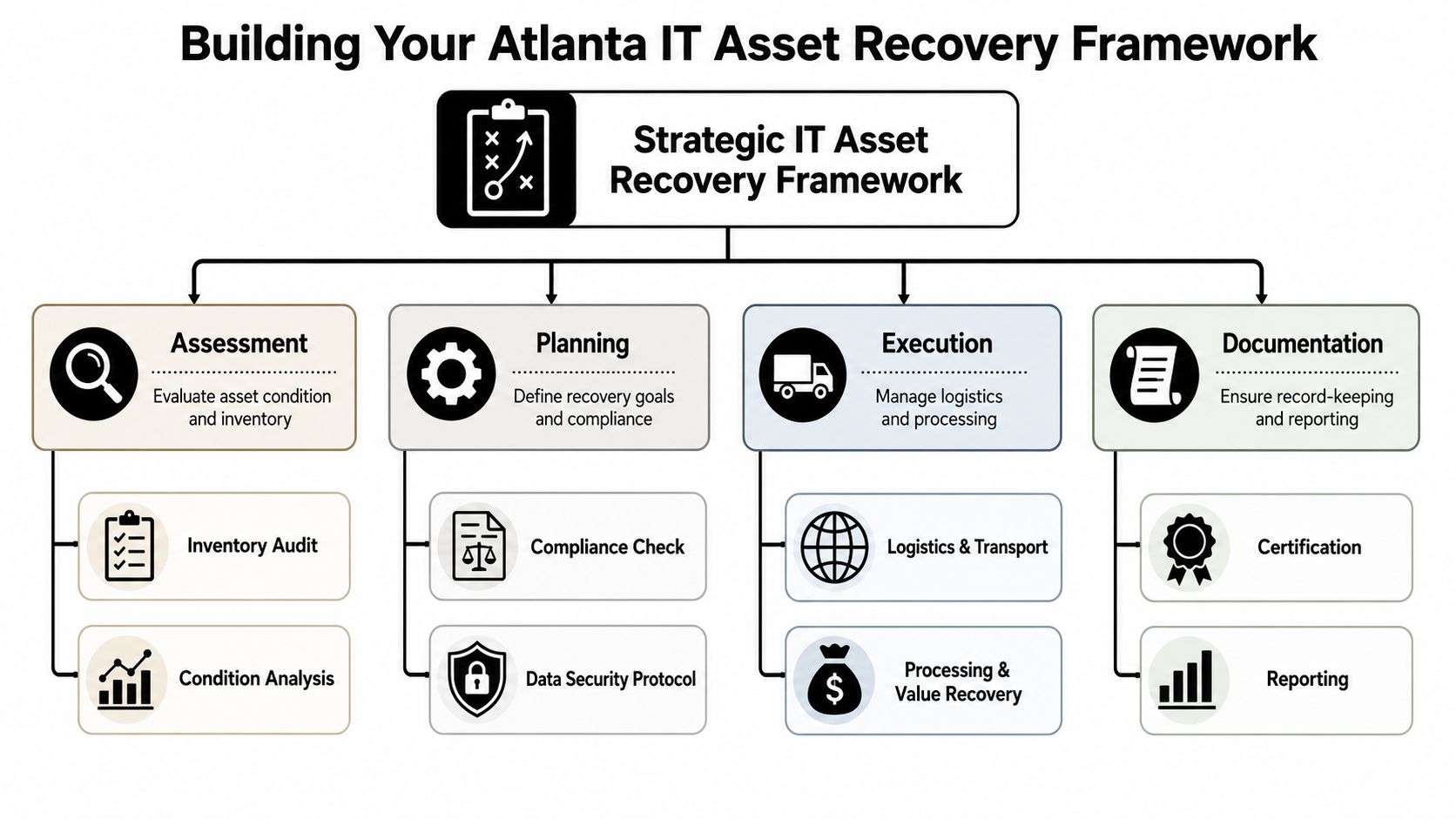
Building Your Atlanta IT Asset Recovery Framework
An IT asset recovery plan should begin before the first device is unplugged. If you're building this from scratch, think in terms of lifecycle control, not disposal. The central question isn't "How do we get rid of this equipment?" It's "How do we retire assets in a way that protects data, captures remaining value, and leaves a clean audit trail?"
A strong baseline helps. IBISWorld lists a 2026 benchmark price of $9.26 per asset for IT asset recovery services, with pricing rising at a 6.53% CAGR from 2023 to 2026 in the broader U.S. market, which is a useful signal that recovery has become an operational line item rather than a simple haul-away cost (IBISWorld IT asset recovery services benchmark pricing). For Atlanta IT managers, that means asset condition, model, and handling discipline directly affect outcomes.
Start with inventory triage
A high-performing recovery workflow starts with triage. In practice, that means separating assets into reuse, resale, and shred-only lanes based on age, condition, and market demand. Enterprise ITAD workflows typically run through assessment, formal buyback quote, secure transport, certified data destruction, refurbishment and testing, then resale or credit issuance, as described in this Atlanta-focused IT asset recovery workflow overview.
That triage has to happen early. If you mix everything together, three problems appear fast:
- Good assets get downgraded: Working laptops and late-model desktops lose value when they sit untracked in a pile with dead equipment.
- Sensitive media gets mishandled: Failed drives, backup media, and specialty storage often need a stricter destruction path.
- Teams waste labor: Facilities, IT, procurement, and compliance start making conflicting decisions because no one owns the classification rules.
Practical rule: Classify by value and risk at the same time. A device can have high resale potential and high compliance exposure.
Build the framework into normal IT operations
The easiest way to lose control is to wait until a project is urgent. Office closures, hardware refreshes, and executive deadlines tend to compress timelines. That's why your framework should live inside your broader asset governance process. If you need a refresher on that upstream discipline, these IT asset management best practices are useful because they reinforce the controls that make downstream recovery cleaner.
A practical framework usually includes:
Asset identification at the record level
Match serial numbers, assigned users, locations, and data-bearing status before decommissioning starts.Disposition rules by category
Set clear criteria for reuse, resale, redeployment, recycling, and destruction.Approval ownership
IT shouldn't make compliance decisions alone, and compliance shouldn't decide resale viability without IT input.Vendor handoff requirements
Require pickup controls, transport procedures, destruction records, and final reporting before scheduling work.
If you're evaluating vendors, compare them against a structured IT asset disposition company selection process instead of choosing solely on convenience.
Define failure paths before they happen
Most programs look fine under normal conditions. They break when the office move accelerates, a storage room floods, or hardware comes back damaged after an outage. The framework should include alternate handling rules for inaccessible, damaged, or partially inventoried assets. That's where a strategic recovery program starts to look less like disposal and more like business continuity support.
Navigating Compliance and Security Demands
Compliance drives the hard decisions in IT asset recovery. If your organization handles patient records, student data, financial information, legal files, internal HR records, or government-related workloads, then retired equipment remains a security issue until you can prove otherwise. That proof doesn't come from verbal assurances. It comes from documented chain of custody, verified data destruction, and complete asset records.

Chain of custody is a control, not paperwork
Atlanta organizations often focus on the destruction event itself. That's too narrow. The higher-risk period often begins earlier, when devices are removed from desks, disconnected from racks, stacked in staging rooms, loaded into freight elevators, or transferred between teams. Every handoff introduces uncertainty unless someone records it.
A workable chain-of-custody process should answer basic audit questions:
- Who handled the equipment first
- Where each asset was staged
- When it left the site
- How it was transported
- What destruction or sanitization method was used
- Which serialized assets were processed and how
If a vendor can't map those steps clearly, you're taking on unnecessary risk.
Your strongest defense in an audit is a record that follows the asset from active use through final disposition.
Post-disaster disposition needs different sequencing
Routine retirement and post-incident retirement aren't the same thing. For Atlanta businesses dealing with a flood, fire, power event, break-in, or abrupt shutdown, the order of operations matters. Local disaster recovery guidance stresses that businesses should first assess physical damage, restore critical data from backups, verify security, and only then decide what equipment can be reused or retired, which puts hardware disposition inside the business continuity plan rather than after it (Atlanta disaster recovery planning guidance for small businesses).
That matters in the field. Damaged equipment may still contain recoverable data. Water-exposed systems may also need malware and tampering review before anyone treats them as scrap. Salvageable assets shouldn't be mixed immediately with total-loss material.
HIPAA and similar obligations raise the bar
Healthcare providers, clinics, billing groups, labs, and adjacent service organizations have a narrower margin for error. They need a retirement process that prioritizes data-bearing assets, controlled transfer, and documented destruction. The same logic applies to firms with contractual security requirements, school systems, and public entities.
If your environment has protected health information or similar regulated data, review what HIPAA-compliant data destruction should include before scheduling removal. This HIPAA-compliant data destruction overview is useful because it frames destruction as a documented compliance control, not a recycling add-on.
One practical point often gets missed. Compliance isn't only about the final drive. Printers, copiers, network appliances, retired servers, backup devices, and specialty clinical or industrial systems may all hold data in places that facilities teams don't always identify during cleanouts.
Secure Data Destruction Methods Demystified
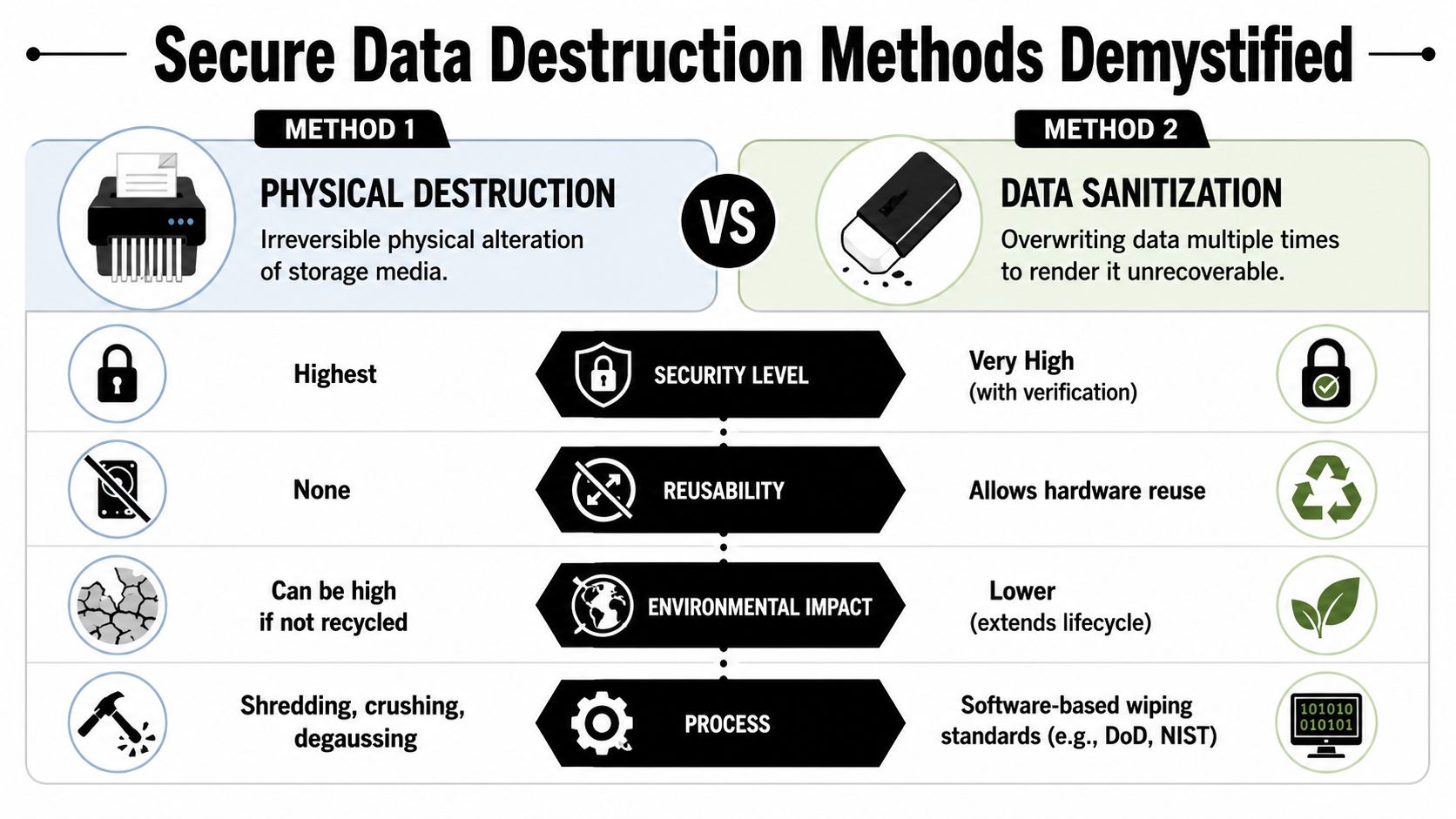
Deleting files doesn't retire data. Reformatting doesn't retire data either. In an asset recovery program, the decision is whether a device should go through verified data sanitization so the hardware can remain useful, or physical destruction so the media can never be reused.
When sanitization makes sense
Software-based wiping fits assets that still have market or redeployment value. If the device is functional, the storage media is healthy, and your policy allows resale or internal reuse, sanitization usually gives you the best balance between security and value recovery.
This approach works best when you require:
- Verification records: You need proof that the wipe completed successfully.
- Asset-level matching: The wipe record should tie back to a serial number or other trackable identifier.
- Functional evaluation: If the drive is unstable, sanitization may fail or produce weak documentation.
For Atlanta businesses that want a reference point for wipe-based workflows, this DoD hard drive wipe standard overview explains the kind of process many IT teams look for when reuse is still on the table.
When physical destruction is the right call
Shredding, crushing, or other irreversible destruction methods belong in a different lane. Use them for failed media, obsolete storage, devices with severe damage, or assets governed by stricter security policies. Once you physically destroy the media, resale value is gone, but so is the possibility that the storage device returns to circulation.
That trade-off is straightforward:
| Method | Best fit | Main advantage | Main drawback |
|---|---|---|---|
| Data sanitization | Functional devices with reuse or resale potential | Preserves hardware value | Requires successful verification |
| Physical destruction | Failed, obsolete, or highly sensitive media | Strongest destruction assurance | Eliminates reuse and resale |
Field advice: Don't shred by default. Shred when the media condition or risk profile justifies losing the residual value.
Match the method to the asset lane
The mistake I see most often is applying one destruction rule to every device. That's easy to administer and expensive in practice. A mixed fleet needs mixed handling. Late-model laptops may deserve sanitization and remarketing. Dead drives from legacy servers may need direct destruction. Tape media and specialty storage may require their own handling path.
The right question isn't which method is better. It's which method fits the asset's condition, the data sensitivity, and the business objective.
Managing On-Site Logistics and Decommissioning
Most recovery projects succeed or fail before the truck leaves the building. On-site execution determines whether assets stay traceable, whether operations stay uninterrupted, and whether your internal teams spend a day helping or a week cleaning up confusion.
A mid-size office refresh in Atlanta usually starts with a staging decision. IT wants devices pulled in batches. Facilities wants hallways clear. Leadership doesn't want conference rooms filled with retired monitors during business hours. The clean approach is scheduled pickup windows, pre-labeled staging zones, and an agreed rule for what gets disconnected by your staff versus by the vendor team.
Scenario one with an office refresh
A typical office refresh has a lot of small friction points. Elevator timing in downtown buildings matters. Shared loading docks matter. Building management may restrict pickup windows. If assets move through multiple floors, tagging and count verification should happen before carts start rolling.
In that environment, good logistics look like this:
- Staged removal by department: Retire one group at a time so IT can reconcile user assignments and missing equipment.
- Protected packing for transit: Loose stacking creates damage claims and serial-number headaches.
- Minimal workspace disruption: Pickup teams should know where they can work without blocking employees or visitors.
This isn't unique to IT. The discipline is similar to physical move management. Even outside Georgia, operational guides on decluttering for Ontario moves make the same core point: sorting before removal saves time, protects value, and reduces chaos on moving day.
Scenario two with a small data center shutdown
A small data center or server room decommissioning is different. Here, the risk isn't hallway congestion. It's controlled shutdown, de-installation order, rack removal, cabling confusion, and media separation. Servers, switches, storage arrays, UPS equipment, rails, and loose drives often require different disposition paths.
That kind of project needs a written runbook covering:
- What powers down first
- Which systems remain in service during transition
- Who removes drives or other media
- How rack assets get labeled at extraction
- Where serialized reconciliation happens before loading
If you're planning a larger retirement event, review what a structured data center decommissioning service should include so transport, de-installation, and final processing are aligned from the start.
The cleanest pickups happen when the asset list, the floor plan, and the removal schedule all match before anyone starts unplugging equipment.
One vendor that fits this type of business-to-business workflow is Atlanta Computer Recycling, which handles on-site de-installation, packing, pickup, and logistics for commercial IT equipment in the Atlanta metro area. That's useful when your internal team doesn't have spare labor to manage the physical side of a retirement project.
Maximizing Value Through Remarketing vs Recycling
An Atlanta IT manager clearing out 300 laptops after a lease refresh usually sees two competing pressures at once. Finance wants recovery value. Security wants the equipment out of the building and processed under clear controls. The right answer is rarely "remarket everything" or "recycle everything." The stronger program sets rules in advance so each asset moves down the right path without delays, storage sprawl, or last-minute debates.
That decision should be made as part of asset lifecycle management, not as an afterthought once equipment is already stacked in a closet. In practice, the biggest losses happen before resale even starts. Devices get mixed across locations, chargers disappear, batteries swell in storage, and teams remove components that secondary buyers expect to see with the unit.
Remarketing makes sense when a device still has buyer demand and the cost to test, sanitize, grade, and resell it does not eat up the expected return. Atlanta businesses retiring late-model end-user equipment often have the best recovery results with consistent batches, complete units, and clear chain-of-custody records from pickup through processing.
The strongest inputs are usually:
- Model relevance: Some devices keep market demand longer than others.
- Physical condition: Cosmetic damage affects resale price even when the device still works.
- Completeness: Missing drives, power adapters, docks, or rails can change the economics quickly.
- Batch consistency: Similar units are faster to test, list, and sell.
- Processing effort: Labor-heavy triage can erase margin on lower-value assets.
Timing matters.
If the remarketing decision comes too late, value drops fast. I see this often with office consolidations around Midtown, Buckhead, and the Perimeter. Equipment sits for weeks, labels fall off, accessories get separated, and the resale window narrows while internal teams are focused on the move itself.
Recycling or destruction is the better choice when the gear is obsolete, failed, incomplete, too costly to process, or tied to a higher security profile. The trade-off is straightforward. Maximum resale revenue, fastest site clearance, and lowest compliance exposure rarely point to the exact same choice. You have to rank them.
Use a simple decision matrix.
| Asset Category | Primary Action | Key Consideration | Potential Value Recovery |
|---|---|---|---|
| Late-model laptops and desktops in good condition | Remarket after verified sanitization | Demand, battery health, cosmetic condition, complete units | Higher relative recovery potential |
| Working network gear and servers with market demand | Evaluate for remarketing | Testing effort, configuration removal, buyer interest | Moderate if models remain desirable |
| Older mixed peripherals and low-demand equipment | Recycle | Handling effort may exceed resale benefit | Limited |
| Failed drives, damaged media, and highly sensitive storage | Destroy and recycle materials | Security outweighs resale | None after destruction |
For a local read on secondary-market demand, pricing pressure, and what buyers in the region want, review these IT asset remarketing trends in Atlanta.
The financial benefit comes from disciplined sorting, not optimistic assumptions. A few dollars more per laptop matters at scale. So does avoiding wasted labor on gear that should have gone straight to material recovery. The Atlanta businesses that get the best outcomes usually treat remarketing and recycling as two coordinated parts of one recovery program, with compliance, logistics, financial return, and sustainability all decided together.
Essential Documentation and Measuring Sustainability
A truck leaves your Atlanta office with retired laptops, switches, and a stack of failed drives. The project is not closed at pickup. It is closed when your team can show, asset by asset, what left the building, who handled it, how data was sanitized or destroyed, and what final disposition occurred.
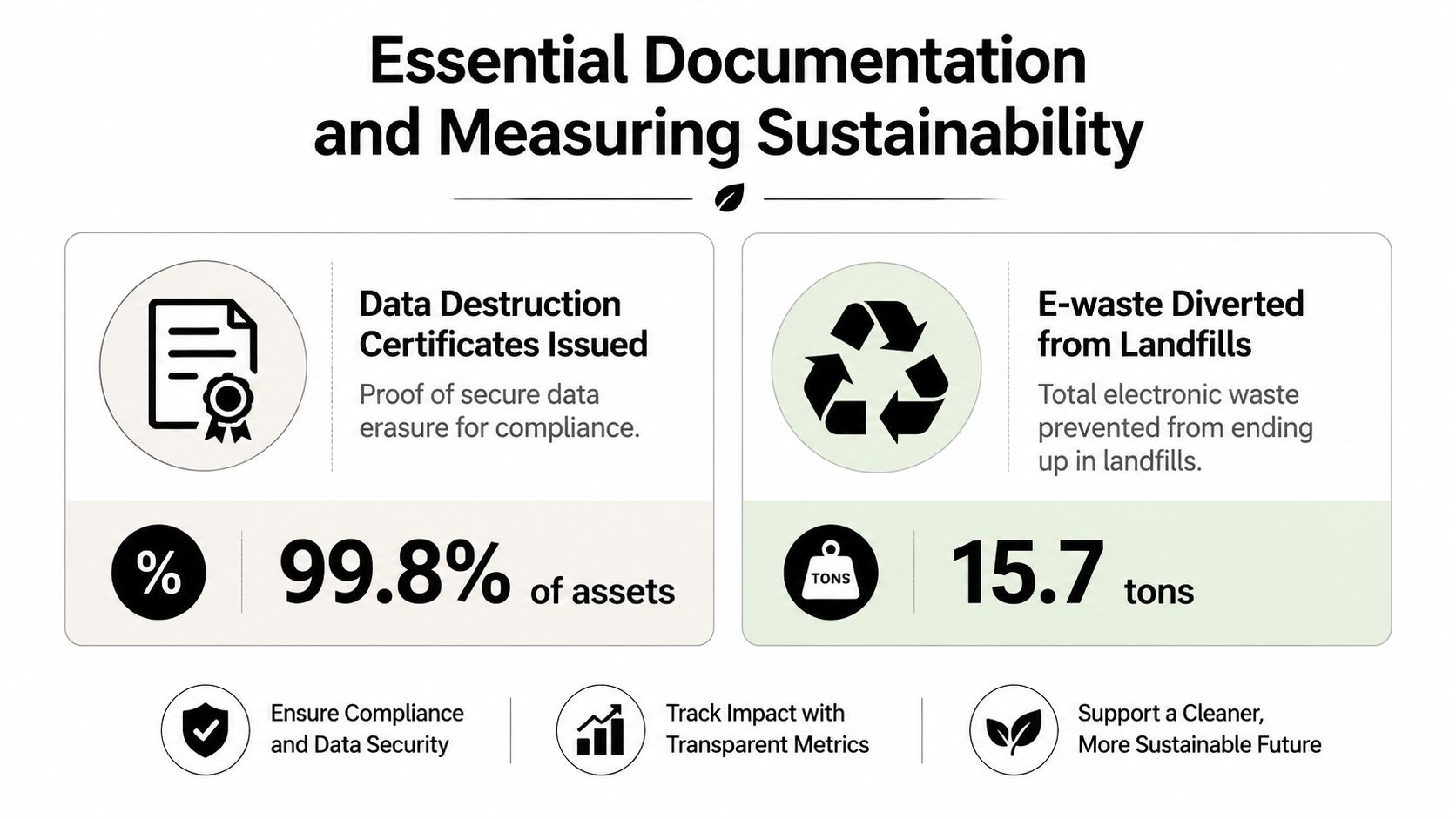
Documentation is what turns IT asset recovery from a one-time cleanout into a managed business process. It gives IT, procurement, compliance, finance, and sustainability teams one shared record. That matters during audits, cyber insurance reviews, contract disputes, and board-level reporting.
The records that matter most
Two records usually carry the most weight.
- Certificates of data destruction document the sanitization or destruction method used for data-bearing assets.
- Serialized asset disposition reports show which specific devices were received and what happened to each one.
Keep both in a system your team can retrieve years later. If the only copies sit in email attachments or a former employee's folder, the control is weak and the audit trail breaks down fast.
For Atlanta businesses with multiple offices, staged pickups, or data centers in different parts of the metro area, chain-of-custody records also matter. A good file should show transfer dates, counts, site contacts, and any exceptions such as missing drives, damaged tags, or unscannable serial numbers. Those details are not paperwork for its own sake. They help resolve discrepancies before they turn into compliance problems or write-off disputes.
Sustainability reporting needs operational proof
Sustainability claims carry more weight when they come from disposition data instead of broad recycling statements. Reuse, parts harvesting, material recovery, and destruction should be visible in the final reporting. That gives your ESG or facilities team something they can defend internally.
The trade-off is straightforward. More detailed reporting usually requires better intake, serialization, and exception handling during the project. That can add effort at the front end, but it gives the business cleaner records for landfill diversion reporting, vendor reviews, and annual sustainability summaries. As noted earlier, the ITAD market has matured. Buyer expectations now include stronger documentation, not just equipment removal.
What a complete closeout package should include
A closeout package should usually include:
- Pickup and transfer records tied to the original scope
- Serialized reporting for tracked assets and any exceptions
- Data destruction evidence for media-bearing equipment
- Disposition summaries showing reuse, recycling, and destruction paths
- Internal retention procedures so records stay accessible for audits, legal review, and finance reconciliation
The best programs use these records for more than compliance. They use them to improve the next cycle. If one Atlanta location consistently produces low-value scrap because assets sit too long, that is a lifecycle management issue. If another site has repeated serial number gaps, that points to a handoff or inventory control problem. Good documentation helps fix both.
When those records are in place, IT asset recovery supports legal defensibility, financial recovery tracking, and sustainability measurement from the same operating program.
If your team needs a structured way to retire equipment without losing control of compliance, logistics, or recovery value, Atlanta Computer Recycling provides business ITAD, secure data destruction, decommissioning support, and electronics recycling for organizations across the Atlanta metro area.