IT Asset Disposition Companies: Your Complete Guide


Your help desk closed the refresh project weeks ago, but the old gear is still there. Laptops are stacked in a storage room. A few decommissioned servers are waiting on a cart. Someone says facilities can haul the monitors away, and someone else says IT already “wiped” the drives.
That's the point where retired equipment stops being a cleanup task and becomes a governance problem. If you're a new IT Director, you're responsible for what happens next, even if the devices are already out of production.
Your Retired IT Assets Are a Liability Not a Nuisance
A room full of retired hardware creates three problems at once. First, data risk. Second, compliance exposure. Third, missed recovery value if usable equipment sits too long and ages out of the secondary market.
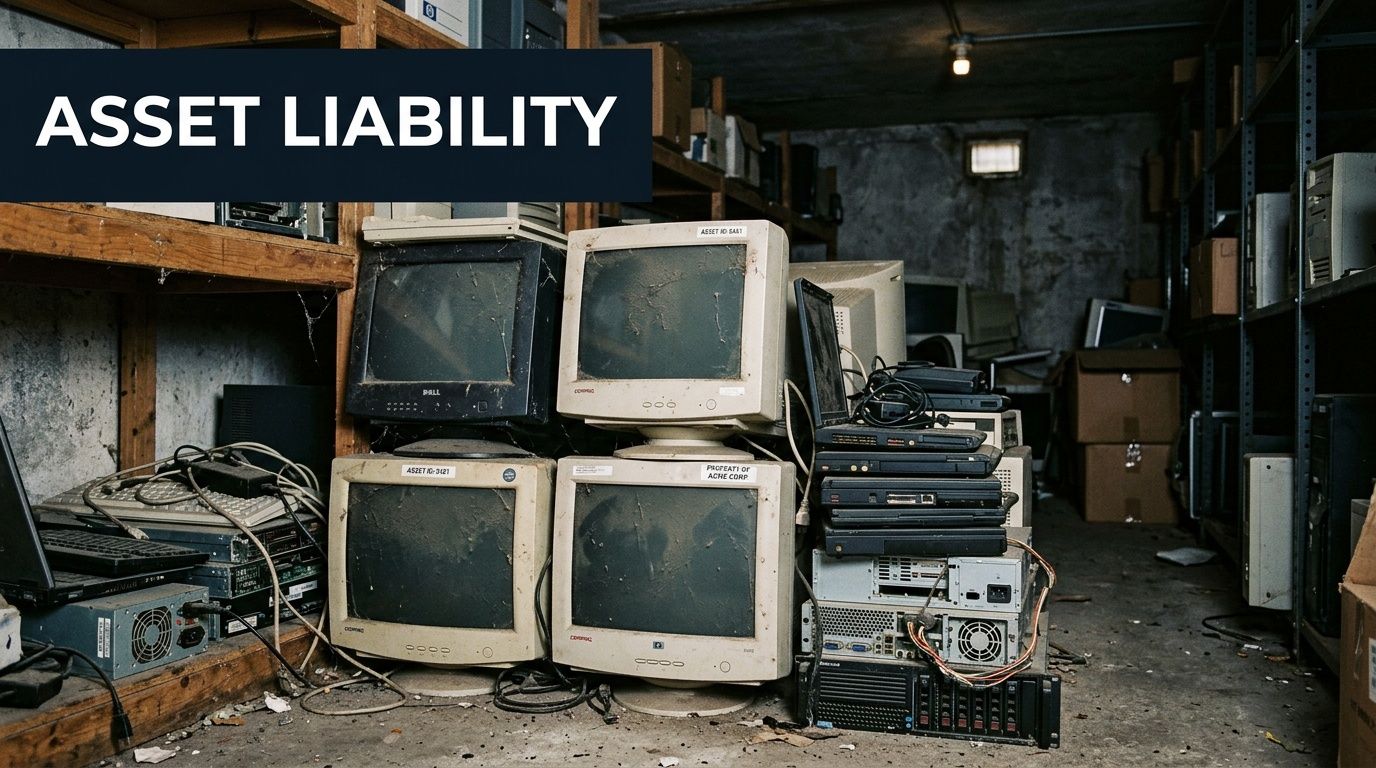
Many teams still treat end-of-life devices like ordinary recycling. That's a mistake. A retired laptop, server, firewall, or storage array may still contain regulated data, saved credentials, network configurations, or internal documents. If you can't prove how that asset was controlled, sanitized, and processed, you're left defending assumptions.
Why ITAD has become a core business function
IT asset disposition, usually shortened to ITAD, is the operational process for retiring technology securely and documenting what happened to each asset. That includes pickup, inventory, data destruction, refurbishment, remarketing, recycling, and final reporting.
This isn't a niche service anymore. The global IT Asset Disposition market was valued at approximately USD 21.77 billion in 2026 and is projected to reach USD 48.48 billion by 2034 at a 10.53% CAGR, with North America holding the dominant market share due to e-waste laws and cybersecurity awareness, according to GM Insights market analysis.
That growth tells you something practical. Serious organizations have moved away from ad hoc disposal. They now treat retirement the same way they treat procurement, patching, and access control.
What goes wrong when disposal is informal
A few patterns show up repeatedly in poorly managed retirements:
- The “temporary” storage trap. Devices sit for months with no owner, no disposition date, and no audit trail.
- Incomplete wiping. Internal staff run basic reset steps but don't create defensible proof.
- Mixed loads. Data-bearing devices get tossed in with general scrap, making chain of custody harder to defend.
- No financial review. Equipment with residual resale value gets destroyed or abandoned instead of remarketed.
Practical rule: If a device ever stored business data, don't let it leave your control under a generic recycling process.
This matters outside the server room too. Buyers, patients, employees, students, and partners increasingly care about data privacy concerns. Disposal mistakes can become trust problems fast, even before they become legal problems.
For hardware that has no reuse path, separate that stream clearly from data-bearing assets and commodity scrap. A documented process for electronics scrap recycling keeps low-value material from contaminating a secure ITAD project.
What IT Asset Disposition Actually Involves
Think of ITAD as a reverse supply chain. New equipment flows into your environment through receiving, deployment, and asset tagging. Retired equipment should flow out with the same discipline.
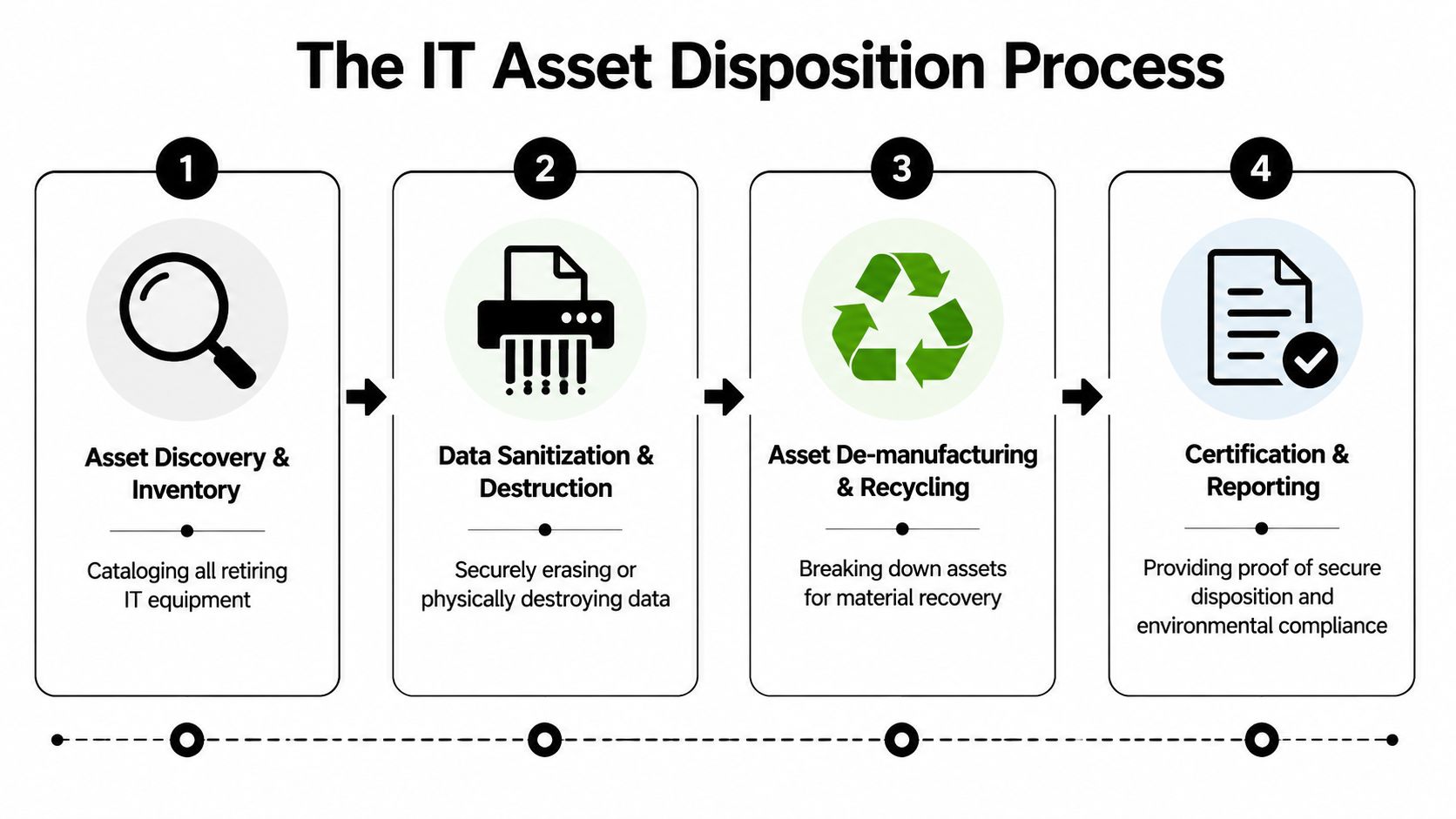
If an ITAD provider can't explain that chain clearly, they probably can't control it well.
The operational flow
A professional process usually starts before pickup day. IT identifies what's being retired, where it sits, whether it contains data, and whether any business unit still owns it. Good projects fail less often because those questions are answered early.
Then the provider moves through the work in sequence:
Discovery and inventory
Devices are counted, described, and tied back to an internal list. For server and network projects, this may include rack position, hostname, serial number, and whether the asset is staying intact for resale or being destroyed.De-installation and staging
In an office, that might mean collecting laptops from multiple floors. In a hospital, it may involve removing workstations from clinical areas without interrupting care. In a data center, it means deracking equipment, labeling cables, and staging gear without mixing customer-owned assets.Secure transport
Weak programs often break at this stage. The chain of custody has to continue after the equipment leaves your building, not end at the loading dock.Triage at the processing facility
Assets are separated by disposition path. Data-bearing devices go to sanitization or destruction. Functional equipment moves to testing and possible remarketing. Non-functional equipment goes to de-manufacturing and recycling.
What each disposition path should accomplish
Not every retired device should meet the same fate. That's one reason experienced it asset disposition companies are worth involving early.
| Asset condition | Typical path | Main objective |
|---|---|---|
| Working and marketable | Refurbish and remarket | Recover value |
| Data-bearing but reusable | Certified sanitization, then resale or redeployment | Remove risk, preserve value |
| Obsolete or failed media | Physical destruction | Eliminate recoverability |
| Non-repairable peripherals and scrap | Responsible recycling | Handle material responsibly |
A mature provider doesn't force everything into recycling. They classify first, then process.
Reporting is part of the service
The project is not finished when the truck leaves or when the drives are shredded. It's finished when your team receives records it can use during an audit, internal review, or security incident response.
Those records often include:
- Asset-level inventory reports with serial numbers or other identifiers
- Disposition summaries that show what was reused, recycled, or destroyed
- Data destruction records for applicable media
- Certificates that support legal and policy requirements
If the documentation arrives as a vague summary with no asset detail, you don't have a defensible ITAD process. You have a pickup receipt.
That distinction matters more than most new IT leaders expect.
Navigating Security and Compliance Mandates
Security is the reason ITAD exists as a specialized service instead of a line item under janitorial cleanup. The hard part isn't moving old equipment. The hard part is proving that sensitive information did not leave your control in recoverable form.
What secure data destruction actually means
You'll hear a lot of loose language in this space. “Wiped.” “Destroyed.” “Erased.” Those words aren't useful unless the method is defined and documented.
For many organizations, the practical standard starts with NIST 800-88. It gives a framework for media sanitization based on risk and media type. In plain terms, you choose a method that fits the device and the data it held, then you document the result.
A provider may use software erasure for devices that remain suitable for reuse, or physical destruction for failed, obsolete, or high-risk media. Atlanta Computer Recycling, for example, offers data destruction certification tied to documented sanitization and destruction workflows. That's the level of evidence you want to compare across vendors.
Why chain of custody matters as much as the wipe
Data destruction can be technically sound and still fail from a compliance standpoint if custody breaks. If you can't show who handled the assets, when they moved, and how they were identified, you've left a gap in the record.
A defensible chain of custody usually includes:
- Serialized tracking from pickup through final disposition
- Controlled handoffs between your staff, transport team, and processing staff
- Documented destruction events tied to specific media
- Certificates of Destruction that map back to the inventory list
For healthcare, this is especially important. HIPAA compliance isn't satisfied by good intentions. You need evidence that devices containing ePHI were controlled and sanitized according to policy.
The standards are technical. The consequences are business-level
Top-tier ITAD processes can achieve 100% data destruction efficacy per NIST 800-88 R1 standards, and on-site shredding trucks can process 5,000 HDDs per day into sub-millimeter particles. That level of certified destruction helps organizations avoid penalties, including $50,000+ fines possible under the HITECH Act for HIPAA breaches, as described in this ITAD provider overview.
That's why I tell IT leaders to stop asking only, “Do you recycle computers?” Start asking:
- What sanitization methods do you use for SSDs, HDDs, and failed media?
- When do you recommend software erasure versus shredding?
- Can I tie the destruction record to a serial number?
- What does your certificate show?
Audit test: If counsel, compliance, or an insurer asks for proof six months later, can you produce asset-level records without rebuilding the project from email?
It also helps to understand the broader privacy footprint inside your environment before retirement work starts. Even simple tools can collect surprisingly broad telemetry, and a quick review of information on data collected is a useful reminder that endpoint devices often hold more data than business teams realize.
Understanding Different ITAD Service Models
Not all it asset disposition companies deliver service the same way. The right model depends on asset type, volume, sensitivity, timing, and how much operational disruption your team can tolerate.
On-site destruction
On-site service keeps the most sensitive step at your location. That usually means drive shredding, media destruction, or supervised collection happens before assets leave the premises.
This model works well when:
- You need witnessable destruction for internal policy, healthcare handling, or executive assurance.
- The media is high risk because devices failed, can't be wiped, or held sensitive regulated data.
- You need tight control over who touches the assets and when.
The trade-off is efficiency. On-site work can be slower or more expensive for large mixed loads if many assets are reusable.
Off-site processing
Off-site service moves the assets to a secure facility for sorting, sanitization, testing, and downstream processing. This is often the better fit for office refreshes, school laptop turnover, and mixed enterprise equipment where some assets may still have resale value.
The upside is operational scale. Facility-based processing is usually better for:
- Mixed hardware lots that need triage
- Refurbishment and remarketing
- Projects spread across departments where centralized reporting matters more than witnessable destruction
The risk is simple. If the provider's transport controls and intake discipline are weak, you won't know it until documentation problems show up later.
Project-based decommissioning
This is different from ordinary pickup. Data center shutdowns, office closures, and colocation exits require coordinated labor, scheduling, de-racking, packing, and asset accountability under deadline.
A simple comparison helps:
| Service model | Best fit | Main benefit | Main caution |
|---|---|---|---|
| On-site | High-security media handling | Immediate control | Can limit reuse options |
| Off-site | Standard refresh projects | Scale and efficiency | Depends on transport discipline |
| Project-based | Data center and facility closures | Coordination across many moving parts | Requires stronger planning |
If your retirement work includes mixed office hardware today but may expand to server or facility projects later, evaluate providers that can support both standard pickup and more complex computer recycling services for business equipment.
How to Choose the Right ITAD Partner
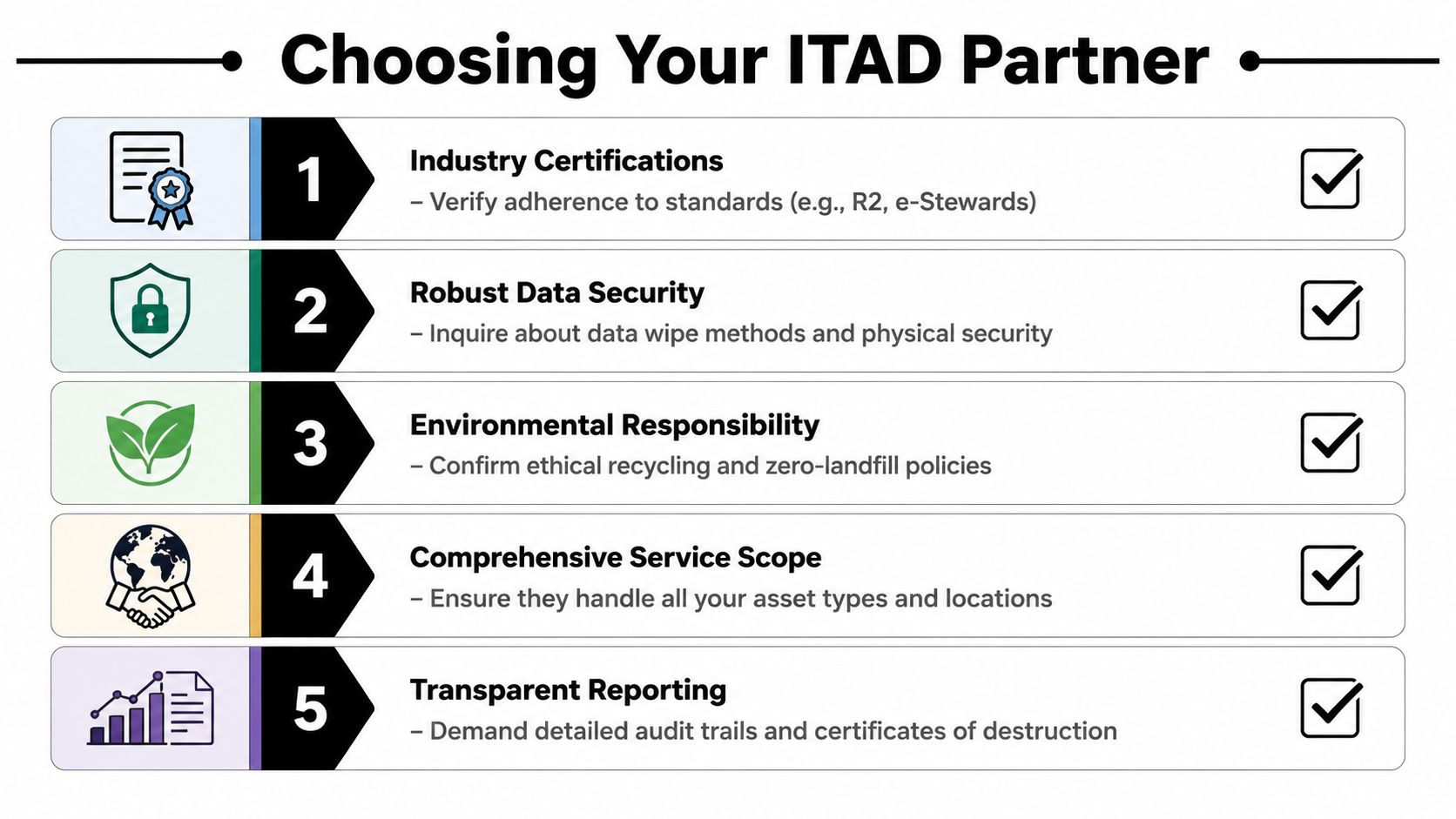
Most vendor evaluations start in the wrong place. They start with pickup cost. Price matters, but low-cost disposal creates expensive problems when the provider can't document chain of custody, can't explain sanitization methods, or can't handle your mix of devices without subcontracting pieces of the job.
Start with controls, not marketing
Ask every provider for a plain-language walkthrough of their process. You want to hear how assets are received, labeled, moved, sanitized, audited, and reported. If the answer leans on buzzwords but skips operating details, keep digging.
Check these areas first:
Certifications and standards
Ask which certifications apply to their facility and processes. Then ask what those standards specifically govern in day-to-day handling.Data handling methods
A good provider can explain when they use software wiping, when they use physical destruction, and how they handle failed drives and solid-state media.Documentation quality
Request a sample certificate and sample report package. Look for asset identifiers, clear disposition outcomes, and readable records.Logistics model
Ask whether they use in-house pickup, subcontracted transport, or a mix. The more parties involved, the more carefully you need to review custody controls.
Regional partner versus national provider
Large national firms can make sense for multi-state rollouts or organizations that want a single contract across many locations. But size doesn't automatically produce better execution at the metro level.
Market analysis notes that fragmented logistics and high collection costs in non-metro areas are significant barriers to ITAD access for SMEs, while regional providers help close that gap with customized, cost-effective pickup and de-installation for medium businesses, hospitals, and schools according to Mordor Intelligence's North America ITAD analysis.
That dynamic matters inside major metro areas too. A specialized regional partner often has practical advantages:
- Faster scheduling because the trucks, crews, and facility are local
- Better project flexibility for partial pickups, department-by-department refreshes, and school calendars
- Less dependence on patchwork reverse logistics
- More direct communication between your team and the people doing the work
Regional service usually wins when your project needs responsiveness, local de-installation support, and fewer handoffs. National scale wins when your footprint is broadly distributed.
Questions worth asking in the first call
Use the first vendor call to test competence, not chemistry.
- How do you maintain chain of custody from pickup through final disposition?
- What records will I receive for data-bearing devices?
- Which assets are candidates for value recovery versus destruction?
- Do you perform de-installation, packing, and site clearance?
- How do you handle hospitals, schools, and other regulated environments?
If the provider can answer those cleanly, then look at pricing and service geography. If they can't, move on.
For organizations that need a local option for secure pickup, de-installation, and environmentally responsible downstream processing, it also makes sense to review a provider's broader electronic waste recycling capabilities, not just its destruction language.
ITAD in Action Real World Scenarios
The mechanics become clearer when you look at the jobs IT teams face.
A hospital tablet retirement
A healthcare group retires a large set of mobile devices used in registration and bedside workflows. The tablets are spread across clinics, and many were used by rotating staff. The main issue isn't the hardware. It's proving that every device containing ePHI was collected, identified, and sanitized under a defensible process.
The right ITAD response starts with controlled collection and asset matching. Devices get segregated as data-bearing assets, transported under chain of custody, and tied to destruction or sanitization records. The compliance team gets a package it can retain, not a generic receipt.
A server rack exit from a colocation facility
A mid-sized technology company shuts down one rack after migrating workloads. The equipment includes servers, storage, rails, network hardware, and a mix of drives with different reuse potential.
This project requires more than recycling. The provider has to coordinate access windows, de-rack equipment cleanly, identify what can be remarketed, and destroy failed or obsolete media. A documented data center decommissioning process is what keeps that work from turning into an after-hours scramble with missing parts and poor records.
A district-wide school refresh
A school system replaces student and staff devices over the summer. The challenge is volume, not just sensitivity. Equipment sits across multiple campuses, budgets are tight, and the district needs practical scheduling with minimal administrative burden.
A good ITAD plan stages pickups around school operations, separates reusable devices from scrap, and gives the district one consolidated reporting package. That matters because public-sector teams often need simple records they can hand to procurement, finance, and administrators without translation.
The best ITAD engagements don't feel dramatic. They feel controlled. Assets move out, records come back, and nobody has to guess what happened.
Engage an ITAD Partner Your Next Steps
If retired hardware is piling up, waiting won't improve the situation. Devices won't become less sensitive in storage, and they usually won't become more valuable with age.
Start with a simple internal review. Identify what you have, which assets are data-bearing, which groups own them, and whether you need on-site destruction, facility processing, or a decommissioning project. Then ask prospective providers to map their process to your risk profile.
For businesses, healthcare organizations, schools, and public-sector teams in the Atlanta metro area, a local consultation is often the fastest way to turn a backlog into a controlled retirement plan. The right partner should help you sort assets by disposition path, define documentation requirements up front, and remove equipment with minimal disruption to staff and operations.
Retired equipment is part of your security program whether you planned it that way or not. It's better to manage it deliberately than explain it later.
If your organization needs a documented path for retiring laptops, servers, storage, network gear, or full roomfuls of old equipment, Atlanta Computer Recycling handles business ITAD projects across the Atlanta metro area with pickup, de-installation, secure data destruction, and responsible downstream processing. A direct review of your asset mix and compliance needs is the easiest place to start.