HIPAA Compliant Data Destruction: An Atlanta Guide (2026)

A lot of Atlanta IT managers are dealing with the same scene right now. A back room or cage has filled up with retired laptops, failed SSDs, old SAN drives, backup media, and decommissioned servers that nobody wants to touch until the next refresh cycle forces the issue.
That pile isn't just clutter. In a healthcare environment, it's stored risk. If those assets ever held ePHI, your exposure doesn't end when the device stops being useful. It ends when you can prove the data was rendered unreadable, indecipherable, and irreconstructible through a documented process.
The High Stakes of Retiring IT Assets
Old hardware tends to linger because disposal feels operational, not strategic. It gets pushed behind active projects, urgent tickets, and user support. But with healthcare data, end-of-life handling belongs in the same risk conversation as access control, encryption, and incident response.
The reason is simple. A retired device can still trigger a breach event if it's mishandled. From 2009 to 2024, healthcare data breaches exposed the PHI of over 846 million individuals, and improper disposal of ePHI remains a reportable breach issue. Penalties can reach $1.5 million per violation category annually, and the average breach cost was $10.93 million in 2025, according to healthcare breach statistics compiled by Sprinto.
That's why hipaa compliant data destruction shouldn't sit under “miscellaneous IT cleanup.” It belongs under risk mitigation, audit readiness, and vendor governance.
What usually goes wrong
In practice, organizations run into trouble in familiar ways:
- Assets get stored without controls and nobody maintains a clean serial-number inventory.
- Teams assume deletion is enough even though deleting files doesn't sanitize the media.
- Failed drives get overlooked because they can't be wiped through normal software workflows.
- Pickup and transport are treated casually with weak chain-of-custody records.
- Documentation arrives late or incomplete when compliance asks for proof.
Practical rule: If you can't show where a device was, who handled it, how it was sanitized, and when it was destroyed or cleared, you don't have a defensible program.
For Atlanta healthcare organizations, that usually means building a repeatable decommissioning process around asset inventory, secure staging, method selection, and final reporting. It also means using a provider that can handle secure local logistics instead of treating disposal like basic junk removal. If you need a starting point for local service options, review secure data destruction in Atlanta with the same scrutiny you'd apply to any other compliance-sensitive vendor.
Understanding Your HIPAA and NIST Obligations
HIPAA doesn't give IT teams much room for interpretation on disposal. If media contains ePHI, your organization has to manage its final disposition in a way that makes the data unreadable and irretrievable. That's the standard that matters.
Many teams encounter difficulty here. They know they need “secure destruction,” but they haven't translated that phrase into operational steps, approved methods, and documentation requirements. The legal requirement is broad. The implementation has to be precise.
What HIPAA expects in practice
For an Atlanta IT manager, the simplest way to think about HIPAA disposal obligations is this:
Know what assets may contain ePHI.
That includes obvious items like laptops, desktops, and servers, but also failed drives, backup media, network appliances, and storage pulled during maintenance.Choose a method that fits the media and its next use.
Reusable media can often be sanitized. End-of-life media may need destruction.Control access before final disposition.
A device sitting untracked in a storage room is a process failure, not a harmless delay.Keep evidence.
Your auditor, privacy officer, or legal team won't accept “we sent it out” as proof.
If your team needs a broader legal framing for how regulated organizations should think about policy, documentation, and accountability, this overview of understanding business compliance is a useful companion read.
Why NIST SP 800-88 matters
HIPAA tells you the outcome. NIST SP 800-88 gives you the operational framework commonly used to get there. It breaks media sanitization into Clear, Purge, and Destroy.
Here's the plain-English version:
| NIST level | What it means | Typical use |
|---|---|---|
| Clear | Logical techniques remove data from readable access | Reusable drives in controlled workflows |
| Purge | More aggressive sanitization methods make recovery much harder | Higher-risk media or stricter internal standards |
| Destroy | Physical destruction renders the media unusable | Failed, obsolete, or non-reusable devices |
That distinction matters because not every asset should be treated the same way. If your team destroys everything, you may be spending more than necessary and losing reuse value. If your team wipes everything, you may be relying on a method that isn't appropriate for the media type.
Good compliance work doesn't start with the shredder. It starts with classification, method selection, and proof.
A strong internal policy should map media types to approved sanitization methods, define who signs off on disposition, and specify what records must be retained after the work is complete. If you're aligning internal procedure with healthcare-specific controls, HIPAA compliance IT requirements is a useful operational reference.
Choosing the Right Destruction Method Wipe vs Shred
This is the decision point that determines whether your disposal program is both compliant and practical. Most assets fall into one of two paths. They're either suitable for software wiping because the device can be reused, or they require physical destruction because reuse isn't safe or realistic.
Teams get in trouble when they apply the same answer to every device.
When wiping makes sense
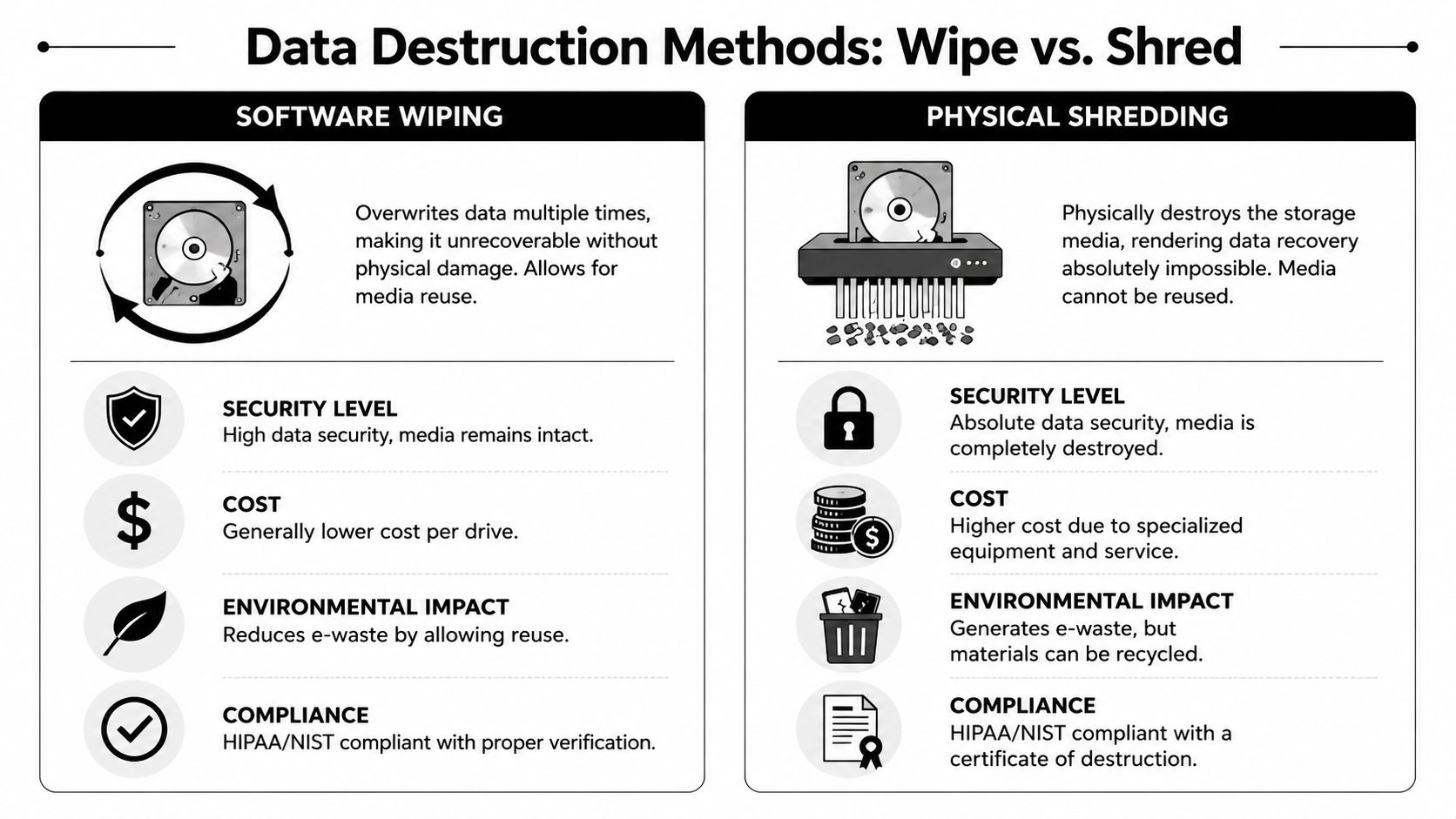
For reusable media, wiping is often the right first choice. Under NIST SP 800-88, that falls under Clear or Purge depending on the technique and risk level. The verified guidance here is straightforward. For reusable media, software wiping such as DoD 5220.22-M can be effective when executed and verified properly, based on HIPAA hard drive destruction requirements from AccountableHQ.
Wiping works best when:
- The drive is functional and can complete the sanitization process.
- The asset has reuse value for redeployment, resale, or donation under policy.
- Your process includes verification rather than assuming the software finished cleanly.
- The media type supports reliable overwriting under your chosen standard.
A well-run wipe process preserves asset value and reduces unnecessary e-waste. In commercial ITAD, that matters. A hospital replacing a fleet of still-functional systems doesn't always need to turn every drive into scrap if the sanitization workflow is defensible.
When shredding is the safer choice
Physical destruction is the better answer when the media is dead, damaged, obsolete, or difficult to sanitize confidently. The same verified guidance notes that for end-of-life media or SSDs, physical destruction through shredding to less than 2mm particles is required because overwriting can be unreliable on flash memory, with a 25% data recovery risk for SSD scenarios described in that source.
That's the trade-off many organizations miss. A failed hard drive can't be wiped if it won't spin up. An SSD may appear to support overwriting, but flash memory behavior makes assumptions risky.
Use shredding or other approved physical destruction when:
- The drive has failed
- The device is an SSD or flash-based media and your policy requires maximum certainty
- The asset has no reuse path
- The device came from a high-sensitivity environment
- Your legal or compliance team wants irrecoverable destruction rather than logical sanitization
If the device can't be verified after wiping, treat it as a destruction candidate.
A practical decision framework
Most Atlanta healthcare IT teams benefit from a simple matrix rather than a one-size-fits-all rule.
| Asset condition | Media type | Likely path |
|---|---|---|
| Working and reusable | HDD | Wipe, verify, document |
| Failed or unreadable | HDD | Physically destroy |
| Working but end-of-life | SSD | Usually destroy unless your policy approves another validated method |
| Damaged, obsolete, or unknown | Any media | Destroy |
| High-sensitivity device with low reuse value | Any media | Destroy |
That approach gives you something defensible in an audit. It also helps operations move faster because technicians don't have to improvise each time a cart of devices comes off the floor.
What works and what doesn't
What works
- Pairing inventory with asset-level sanitization decisions
- Using software wiping only on viable media
- Treating SSDs with more caution than legacy HDDs
- Verifying wipe success before release
- Issuing asset-specific records after completion
What doesn't
- Assuming file deletion equals sanitization
- Mixing reusable and destruction-bound devices with no segregation
- Sending failed drives into a wipe queue
- Accepting vague vendor language like “securely handled”
- Destroying media without being able to tie the action back to serial numbers
If your team needs a closer look at method selection for media destruction, this guide on how to destroy old hard drives is a useful operational reference.
Building a Bulletproof Chain of Custody Process
Method choice is only half the job. The other half is proving the device stayed under control from retirement through final disposition. A weak chain of custody can undermine an otherwise sound wipe or shred process.
Local execution is paramount. The farther a device travels without visibility, the more opportunities you create for handling mistakes, labeling errors, or simple uncertainty about what happened to which asset.
Start at the moment the device is retired
The chain of custody begins when the asset leaves production, not when the truck arrives.
At minimum, your internal process should cover:
- Asset identification with serial number, device type, and source department
- Status tagging that distinguishes wipe candidates from destruction candidates
- Secure staging in a restricted-access area
- Transfer logging whenever custody changes hands
- Final reconciliation against the completion report
Many breakdowns happen before the vendor sees the equipment. A desktop moved into a common storage room, a server drive left in a technician's drawer, or a box of media with handwritten labels creates avoidable compliance risk.
On-site versus off-site handling
For Atlanta organizations, local logistics aren't just about convenience. They affect exposure. Verified guidance specific to Atlanta states that on-site shredding can reduce breach risk by 92% compared to off-site services, and that 68% of breaches involve improperly disposed devices, with increasing HHS audit attention in the Southeast, according to Atlanta-focused HIPAA data destruction guidance.
That doesn't mean off-site processing is automatically wrong. It means you should know exactly why you're choosing it and what controls compensate for the added transport step.
A practical comparison looks like this:
| Process model | Strength | Main concern |
|---|---|---|
| On-site destruction | Strong visibility and reduced transport exposure | Requires mobile capability and scheduling |
| Off-site destruction | Can fit large consolidated projects | Adds custody transitions and transport risk |
The more sensitive the media, the stronger the argument for witnessing destruction on-site or using tightly controlled local transport.
Documentation that holds up under scrutiny
A clean process ends with records that make sense to someone outside IT. Your privacy officer, internal auditor, or outside counsel should be able to follow the file without calling your technicians for interpretation.
Your Certificate of Destruction should clearly identify:
- Which assets were processed
- The serial numbers involved
- The method used
- The date of service
- The facility or service context
- Any witness or operator details your policy requires
Chain-of-custody logs should connect to that certificate, not sit in a separate spreadsheet no one can reconcile later. If you're evaluating what solid end-state documentation looks like, this example of a certificate of destruction form shows the level of specificity organizations should expect.
A Checklist for Selecting Your Atlanta ITAD Partner
Most vendors can say the words “secure disposal.” Fewer can answer detailed questions without getting vague. That difference matters when the assets came from clinics, hospitals, health plans, university medical environments, or any operation holding ePHI.
A local ITAD partner should make your process easier to defend, not harder to explain.
Questions worth asking before you sign
Use this list in procurement calls and vendor reviews.
Will you sign a BAA when the engagement requires it
If a provider hesitates here, stop and clarify roles before any pickup happens.Can you perform on-site service in metro Atlanta
Local response matters when you want fewer custody transitions and less disruption to clinical or office operations.Do you provide serialized reporting
A summary line saying “processed 200 drives” isn't enough for most regulated environments.How do you separate wipe candidates from shred candidates
The vendor should have a clear operational answer, not a sales answer.What does your Certificate of Destruction include
Ask to see a sample before the first job.How are assets secured during pickup and transport
You're looking for a clear custody process, not general statements about professionalism.Can your team support de-installation and packing
This matters during office closures, data center refreshes, and multi-floor healthcare projects.
What a strong local fit looks like
The best Atlanta fit is usually a provider that combines secure pickup logistics, documented sanitization methods, and practical familiarity with hospitals, campuses, government offices, and enterprise IT rooms. Local presence reduces scheduling friction. It also makes witnessed service and tighter chain-of-custody controls more realistic.
One option in that category is Atlanta Computer Recycling's ITAD services, which include DoD 5220.22-M wiping for viable media, physical shredding for obsolete or non-functional storage, and documentation for business clients across the Atlanta metro. That kind of service model is useful when you need one vendor to handle pickup, sanitization decisions, and final reporting without turning the project into a long multi-vendor handoff.
Red flags to treat seriously
A vendor may not be a fit if you hear any of these:
- “We destroy everything the same way” when your organization needs reuse pathways for some assets
- “We'll send paperwork later” without showing sample reporting upfront
- “Our process is proprietary” when you ask basic method questions
- “Just delete the files first” as if user deletion satisfies HIPAA disposal requirements
Vendor selection is where strategy becomes reality. If the provider can't explain their controls clearly, your internal team will end up absorbing that risk.
Beyond Destruction Integrating Compliance into Your IT Lifecycle
The strongest organizations don't treat disposal as a last-mile task. They build it into procurement, deployment, refresh planning, storage policy, and decommissioning workflows from day one. That's how hipaa compliant data destruction becomes routine instead of reactive.
This broader view matters even more in Georgia now. Effective January 2026, Georgia's HB 1033 creates dual obligations for healthcare and public sector entities, mandating 90% e-waste diversion from landfills alongside HIPAA compliance, according to guidance on HIPAA-compliant data destruction and Georgia's upcoming requirements. That means the right partner isn't only proving data destruction. They're also supporting responsible downstream handling.
What that looks like operationally
A mature lifecycle program usually includes:
- Disposition planning during procurement so teams know which assets are likely candidates for reuse versus destruction later
- Standard retirement workflows that trigger inventory capture and secure staging
- Approved vendor pathways for wiping, shredding, recycling, and reporting
- Environmental review so compliance and sustainability aren't managed in separate silos
Security leaders also benefit from thinking about retired assets as one part of a wider defense posture. If your team is reviewing endpoint controls, user risk, and infrastructure exposure alongside disposal procedures, this overview of modern threat protection strategies is a useful complement to lifecycle planning.
The end goal is simple. No loose devices. No undocumented pickups. No guessing about whether a failed SSD was destroyed or just removed from inventory. If your organization wants that process tied to refreshes, moves, and decommissions, IT lifecycle management in Atlanta is the operational model to aim for.
If you're managing retired healthcare IT assets in the Atlanta area, Atlanta Computer Recycling can help you put a documented, practical disposition process in place. That includes secure pickup, DoD 5220.22-M wiping for viable media, physical shredding for non-functional or end-of-life storage, and the reporting needed to support internal review and audit readiness.