The DoD Hard Drive Wipe Standard Explained for Businesses


A lot of businesses are sitting on a hidden liability right now. It's not the firewall, the backup appliance, or the production servers. It's the retired laptops in the storage room, the decommissioned drives from the last office move, and the old servers waiting for “eventual” disposal.
That hardware still holds data. Customer records, employee files, financial documents, credentials, cached email, medical information, and internal IP can all survive long after a device leaves active service. If your organization handles regulated data, the disposal decision isn't just operational. It's a compliance and risk-management decision.
Many buyers, IT managers, and operations teams have heard the term dod hard drive wipe standard and assume it's still the safest choice by default. That assumption causes problems. The phrase still carries authority, but in practice, it can lead businesses into the wrong process for the wrong media, or into a policy that sounds strict while missing current realities.
The End-of-Life Data Security Challenge
Most organizations don't fail at data destruction because they ignore security. They fail because disposal gets pushed to the edge of the project. The hardware refresh is complete, the users are migrated, and the old equipment gets stacked in a back room while someone decides what to do with it.
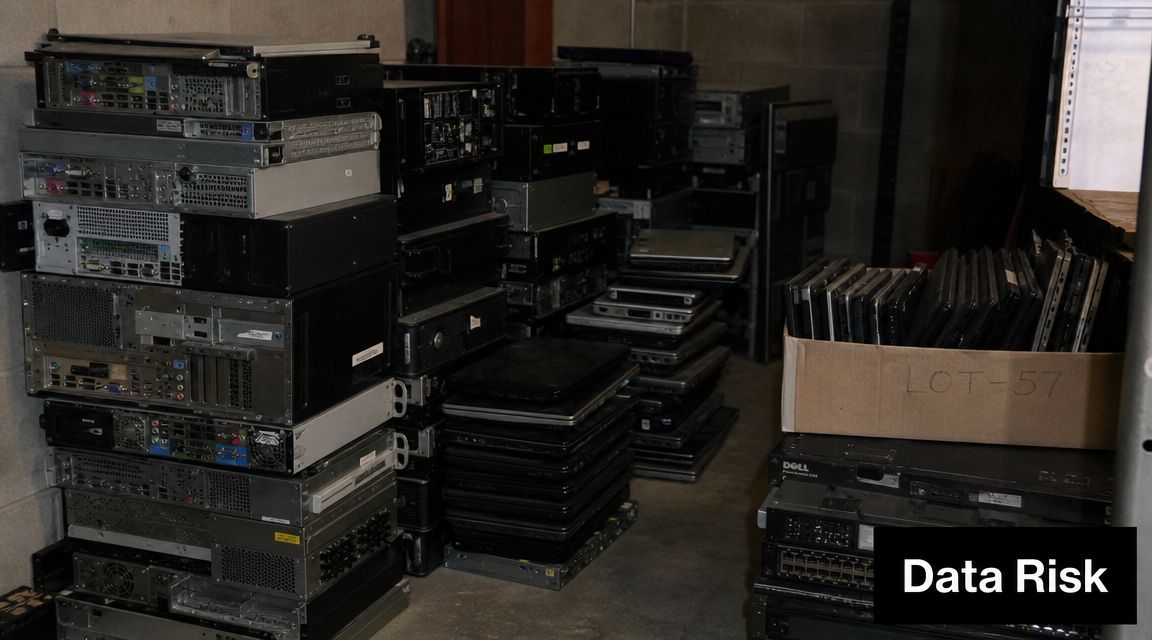
That delay creates exposure. The devices are still in your custody, still capable of leaking data, and often poorly tracked. For healthcare groups, schools, law firms, manufacturers, and financial organizations, that's where routine asset retirement turns into a governance problem.
What usually goes wrong
The most common errors are operational, not exotic:
- Storage without controls. Retired assets sit in unsecured rooms, loading areas, or shared closets.
- Deletion mistaken for sanitization. Staff delete files or reimage devices and assume the data is gone.
- One policy for every drive type. HDDs and SSDs get treated the same, even though they behave very differently.
- No documentation trail. The business can't prove what happened to which asset, by whom, and when.
A good disposition process starts before pickup day. It starts with asset identification, media classification, and a written decision on whether devices will be reused, remarketed, or destroyed. That's why many IT teams build disposal planning into broader IT asset disposal best practices instead of treating it as a last-step cleanup task.
Practical rule: If you can't identify the media type, the data sensitivity, and the required proof before removal, the process isn't ready.
Why the DoD label still creates confusion
The DoD label sounds definitive. To a non-specialist, it sounds like the highest level of wiping available. In real client environments, that label often functions more like shorthand for “secure erase” than a precise technical requirement.
That's where businesses get trapped. They ask for a DoD wipe because they want certainty, but what they really need is a method that matches the device, the compliance environment, and the end use of the asset.
What Is the DoD 5220.22-M Wipe Standard
When people say dod hard drive wipe standard, they usually mean the legacy DoD 5220.22-M sanitization method. In practical terms, it's an overwrite process built around older magnetic hard drives.
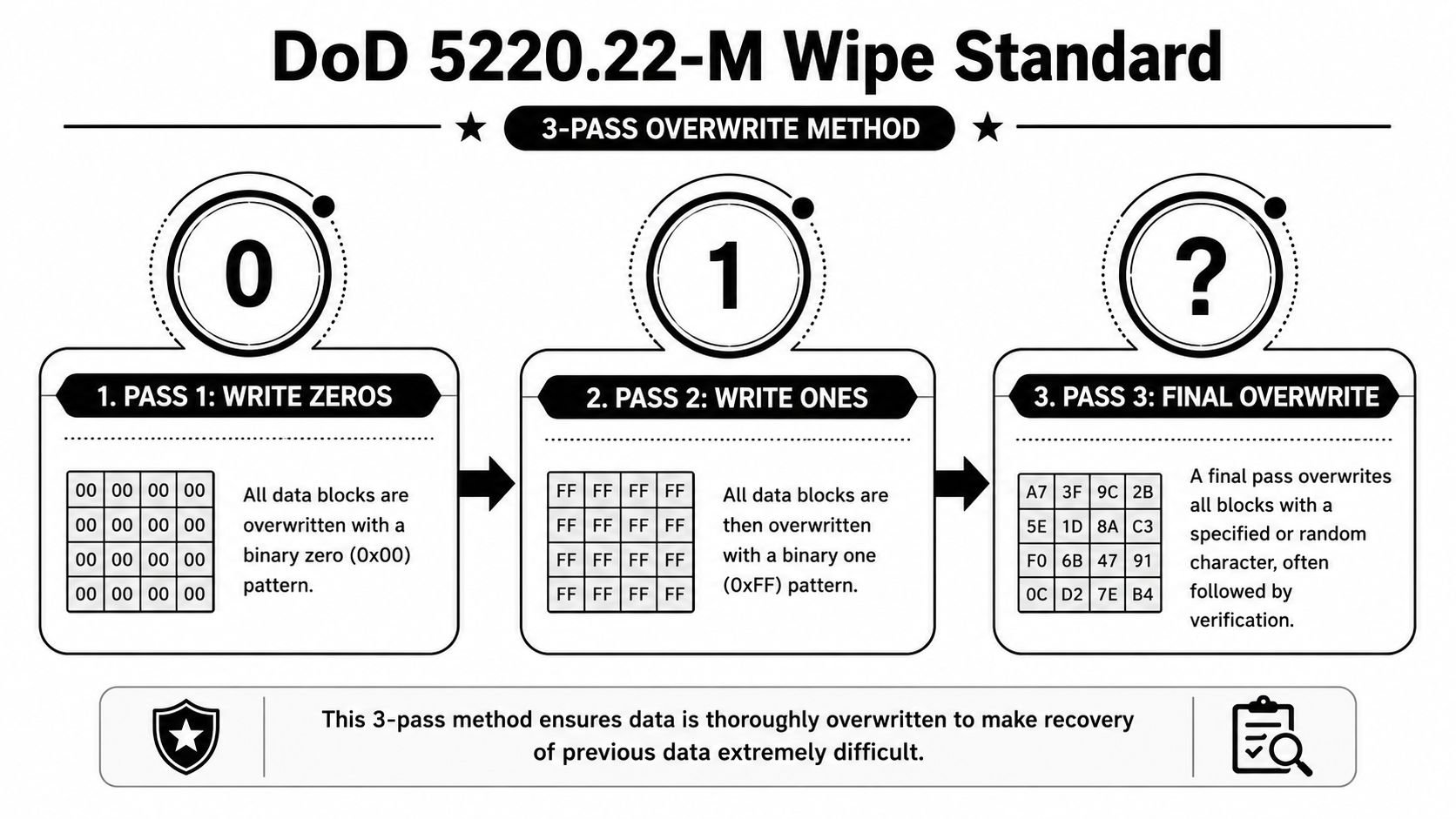
Industry references commonly describe it as a 3-pass overwrite sequence: pass 1 writes zeros, pass 2 writes ones, and pass 3 writes a random pattern, followed by verification of the final pass, as outlined in BitRaser's explanation of the legacy DoD 5220.22-M method.
How the overwrite sequence works
This process resembles painting over a surface multiple times with different layers, effectively obscuring any original markings. The wipe software writes new values across the drive's addressable sectors, replacing what was there before.
The classic flow looks like this:
- First overwrite. The software writes zeros across the drive.
- Second overwrite. It writes ones across the same addressable locations.
- Final overwrite. It writes a random pattern and then verifies the final pass.
The point of the sequence was to reduce the chance that prior magnetic patterns on a traditional hard drive could be reconstructed through recovery attempts. That's why the method became popular in enterprise erasure tools for years.
Why it became widely known
DoD 5220.22-M was associated historically with the U.S. Department of Defense's National Industrial Security Program Operating Manual, which gave it an outsized reputation in commercial IT. Once software vendors started offering the method as a selectable erase standard, the name stuck.
For businesses, that familiarity still matters. Some internal policies, old procurement templates, and audit checklists still reference DoD language. Some service providers also continue to offer certified data destruction services that include the legacy 3-pass method because clients request it or because certain magnetic drives are still headed for reuse.
On older magnetic HDDs, the DoD method was a serious sanitization practice. The mistake is assuming that historical reputation automatically makes it the right answer now.
What this section does not mean
A DoD wipe was never magic. It was a defined overwrite pattern for a certain storage era. If you're dealing with older spinning disks and a reuse scenario, it can still make sense as a legacy workflow. But that doesn't make it the current benchmark for every business or every device.
Is the DoD Wipe Still Relevant in 2026
For most businesses making disposal decisions today, the answer is simple. The DoD 5220.22-M wipe is not the current gold standard. It's a legacy method that still appears in policies and software menus, but modern sanitization practice moved on years ago.
One of the clearest summaries comes from Blancco's review of DoD 5220.22-M and NIST guidance, which notes that the DoD 5220.22-M-style wipe is considered outdated, while NIST SP 800-88 Rev. 1 became the current reference standard after its 2014 adoption. The same source also notes that for ATA disk drives manufactured after 2001 and larger than 15 GB, a single overwrite was already considered adequate to protect against both keyboard and laboratory attacks.
What changed in practice
The business implication is more important than the history. Security standards evolved because storage technology evolved, and because organizations learned that piling on overwrite passes didn't automatically produce better outcomes.
For modern compliance, the question isn't “How many passes can we run?” It's “What sanitization method is appropriate for this media, and can we prove it happened?”
That shift matters because many companies still request a 3-pass DoD wipe out of habit. In real operations, that can slow disposition, delay redeployment, and create a false sense that older language equals stronger protection.
DoD and NIST compared
| Attribute | DoD 5220.22-M | NIST SP 800-88 Rev. 1 |
|---|---|---|
| Status | Legacy, outdated approach | Current reference standard |
| Typical HDD method | Commonly associated with a 3-pass overwrite | Supports modern sanitization decisions based on media and use case |
| Historical context | Built around older magnetic hard drives | Designed as broader media sanitization guidance |
| SSD fit | Poor fit for modern flash media | Addresses modern media categories and methods |
| Business impact | Can create unnecessary processing time if used by default | Better aligned with risk-based decision-making and compliance documentation |
When the DoD label becomes a compliance trap
The trap happens when organizations write policy language that sounds strict but is technically misaligned. Examples include requiring DoD overwriting for all storage media, mandating multi-pass wipes where reuse speed matters, or using old policy text without defining acceptable alternatives for SSDs and encrypted devices.
A stronger approach is to update internal disposal policy around business outcomes:
- Reuse or resale of older magnetic HDDs may allow validated software sanitization.
- Modern SSDs usually require a different path.
- Damaged media often goes straight to destruction because software sanitization can't be validated.
- Regulated data raises the burden of proof, not just the burden of process.
What works better for most businesses
NIST-style thinking works better because it's decision-based, not slogan-based. It asks what media you have, whether sanitization can be verified, whether the asset needs to retain value, and what level of assurance your organization must demonstrate.
If your team still calls DoD the gold standard, the policy likely needs updating more than the drives need extra overwrite passes.
That doesn't mean a DoD wipe is useless. It means you should stop treating it as the universal answer.
Why Overwriting Fails on Solid-State Drives
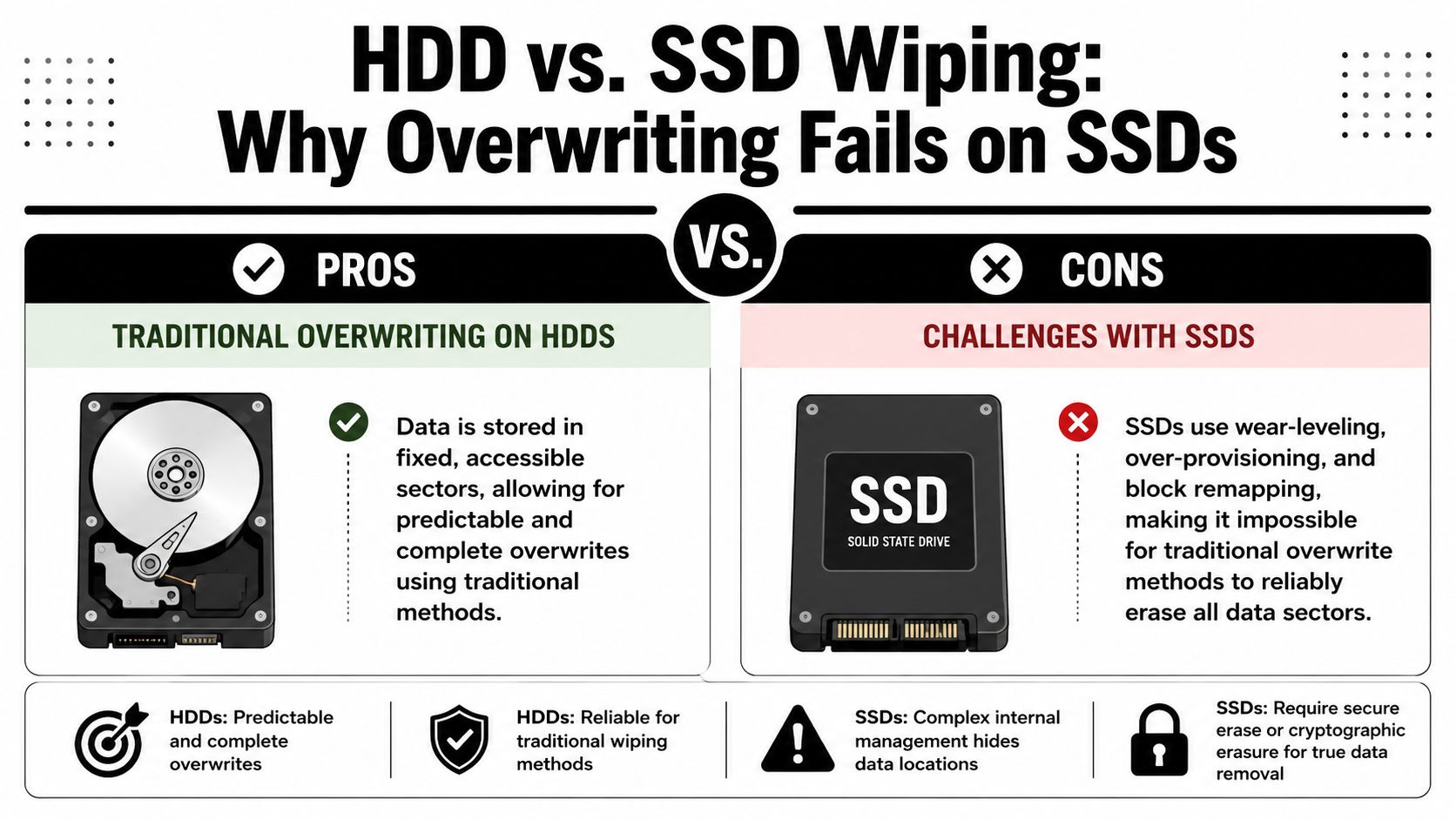
The biggest operational mistake I see in IT disposition planning is applying hard-drive logic to flash storage. A classic overwrite method can be predictable on a traditional HDD because data sits in fixed, addressable sectors. An SSD doesn't behave that way.
Why HDD overwrites are straightforward
On a magnetic hard drive, overwrite software can target known logical locations with a reasonable expectation that the underlying media will be rewritten in a consistent way. That's why older overwrite standards developed around HDDs in the first place.
If the drive is healthy and the software can address the storage normally, overwriting is conceptually simple. Write new data over old data, confirm completion, document the result.
Why SSDs break that assumption
SSDs use controller logic that changes where data lands. Three technical behaviors matter most:
- Wear-leveling. The controller spreads writes across flash cells to extend device life.
- Over-provisioning. Some storage area isn't exposed in the same way as normal user-addressable space.
- Block remapping. The controller may redirect writes away from the physical location that previously held the data.
That means an overwrite command may update what the operating system can see while leaving remnants in areas the software doesn't directly control. This is the reason old overwrite standards create risk on flash media. The process can complete successfully from the software's point of view without delivering full assurance at the chip level.
A successful overwrite report on an SSD can still leave you with the wrong kind of confidence.
What businesses should do instead
For SSDs, the right choice usually depends on whether the device supports a validated purge method such as cryptographic erase. If it does, that can be appropriate in a controlled process. If it doesn't, or if the drive is damaged, inaccessible, or operationally suspect, physical destruction is the safer path.
Some teams also ask whether degaussing solves the SSD problem. It doesn't. Degaussing is relevant to magnetic media, not flash storage. If your policy still treats degaussing as a universal destruction answer, it's worth reviewing what a degausser actually does before applying it to mixed media inventories.
The real business takeaway
This isn't a minor technical footnote. It changes vendor selection, policy language, audit preparation, and how you classify retired assets. If your disposal stream includes laptops from the last several refresh cycles, you almost certainly have enough SSDs in circulation that a blanket DoD overwrite policy is no longer defensible as your primary standard.
Choosing Between Wiping and Physical Destruction
The right disposal method depends on one business question first. Do you need to preserve asset value, or do you need to eliminate residual risk at the highest practical level?
Those goals point in different directions. Wiping protects reuse value. Physical destruction removes the media from future service entirely.
When wiping makes business sense
Software sanitization is usually the better option when the hardware still has downstream value and the media type supports a reliable, validated erase method. Typical cases include refresh projects where working devices will be redeployed internally, sold through remarketing channels, or donated under a controlled program.
Use wiping when:
- The device is functional and the sanitization method can be verified.
- The media type supports the chosen method in a defensible way.
- You want resale or reuse value instead of turning the entire asset into scrap.
- Your policy allows logical sanitization with documentation.
Businesses often keep a legacy DoD workflow for specific magnetic HDD scenarios while using more current methods elsewhere. That can be acceptable if the policy is written clearly and the exceptions are intentional.
When destruction is the better call
Physical destruction is the right decision when certainty matters more than recovery value. That's common for failed drives, unsupported SSDs, media with unknown condition, and high-sensitivity environments where leadership wants the smallest possible residual risk.
Choose shredding or similar destruction when:
- The drive is damaged or unreadable. If software can't complete, you can't rely on a wipe.
- The media is solid-state and purge can't be validated.
- Policy demands maximum assurance for highly sensitive data.
- The hardware has little or no remarketing value.
For many regulated organizations, that's the cleanest route. If the drive won't be reused, destruction simplifies the risk discussion. In Atlanta, that often means arranging documented hard drive shredding for business media rather than trying to force software sanitization onto every device in the stack.
A workable policy model
Many businesses do best with a split policy:
- Wipe qualified HDDs slated for reuse.
- Use approved purge methods for supported SSD workflows.
- Destroy failed, unsupported, or high-risk media.
- Document the decision path for each asset category.
That structure is practical because it aligns security with finance. You preserve value where it's defensible and destroy media where ambiguity would create audit or breach risk later.
Auditable Proof and Chain of Custody
A wipe or shred only protects your business if you can prove it happened. In regulated environments, undocumented sanitization is operationally close to no sanitization at all.
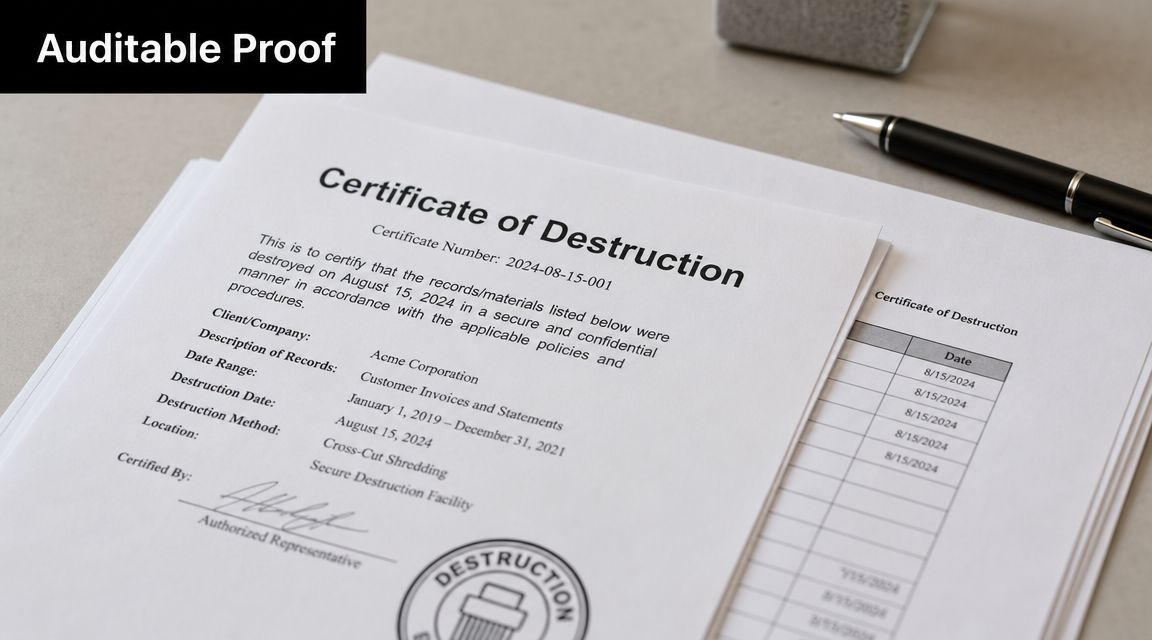
Many disposal programs fall short when the technical method gets all the attention, but the legal and audit exposure often turns on records, asset matching, and chain of custody.
What proof should look like
At minimum, the business should receive documentation that ties the disposition event to specific assets and a specific outcome. A strong record set typically includes:
- Serialized asset identification so the device can be matched to inventory records
- Method of sanitization or destruction for each media item
- Date and handling trail showing when custody changed
- Responsible parties involved in transport and processing
- Certificate records that can be retained for audits, customer due diligence, or internal review
A formal certificate of data destruction is not paperwork for paperwork's sake. It's evidence. If a customer asks how retired systems were handled, or legal counsel reviews a disposal event after an incident, that evidence matters.
Why chain of custody is part of the security control
A drive can be sanitized correctly and still expose the business if custody was sloppy before processing. Unsecured staging, undocumented handoff, mixed loads, and unclear responsibility all create preventable failure points.
That's why mature ITAD programs document the path from your facility to final disposition. Who packed it. Who transported it. Where it was processed. What happened to each item.
The destruction method is only one control. Chain of custody is the control around the control.
Why this matters after a breach
If an organization faces a data exposure claim, investigators and counsel won't focus only on whether the team intended to destroy the media. They'll look at process quality, records, oversight, and whether the company can show a defensible disposal program. For leadership teams thinking through that downstream exposure, this overview of understanding legal risks after data breaches gives useful context on how quickly technical mistakes can become legal problems.
That's why I advise clients to treat proof as part of the service, not an add-on. If a vendor can't produce clear records, the business is absorbing more risk than it probably realizes.
Your Partner for Compliant Data Destruction in Atlanta
For businesses in Atlanta, the practical answer isn't choosing between old terminology and new terminology. It's building a disposal process that matches the media, the compliance requirement, and the final disposition goal.
That means using legacy overwrite methods only where they still make sense, not because the name sounds familiar. It means treating SSDs differently from HDDs. It means deciding early which assets should be remarketed and which should be destroyed. And it means requiring documentation that stands up to internal audit, customer scrutiny, and legal review.
What a capable provider should handle
A business-focused ITAD partner should be able to support several paths without forcing every device into one workflow:
- Software sanitization for qualified reuse assets
- Physical destruction for obsolete, damaged, or high-risk media
- Pickup, de-installation, packing, and logistics
- Serialized reporting and chain-of-custody records
- Certificates that support compliance documentation
In that context, Atlanta Computer Recycling is one local option for commercial clients that need both data wiping and physical media destruction as part of broader IT asset disposition. Its published service profile includes business electronics recycling, ITAD logistics, DoD 5220.22-M 3-pass wiping for qualifying drives, and shredding for obsolete or non-functional media.
What this means for regulated organizations
Hospitals, clinics, school systems, enterprise offices, and public sector departments usually need more than a pickup vendor. They need process discipline. HIPAA-focused environments, in particular, benefit from clear media classification and documented end-of-life handling because retired devices often contain exactly the kind of data that creates long-tail liability.
The same applies to office closures, refresh projects, and data center decommissions. Once you're moving equipment in volume, informal handling breaks down fast. The safer model is standardized intake, tracked custody, defined sanitization paths, and a final record package.
Good ITAD policy doesn't start with “What wipe standard do we want?” It starts with “What evidence will we need if someone asks us to prove this was handled correctly?”
In 2026, the smart business decision is rarely “use the DoD standard everywhere.” The better decision is to use the right sanitization or destruction method for each media type, under a documented process that your compliance team can defend.
If your organization is retiring laptops, servers, desktops, or storage in the Atlanta area, talk with Atlanta Computer Recycling about a disposal workflow that fits your media mix, reuse goals, and documentation requirements. A clear plan before pickup is what turns end-of-life hardware from a breach risk into a controlled, auditable process.