Atlanta IT Asset Lifecycle Trends for Growing Businesses

Your IT environment usually tells you when lifecycle management has slipped. Retired laptops sit in a locked room because nobody wants to guess what data is still on them. Remote staff are using company devices that were deployed quickly and never properly documented. A server was replaced months ago, but the old unit is still powered off in a rack because no one has owned the final step.
That kind of drift is common in growing Atlanta companies. It starts as speed. Then it becomes operational debt. What looked like a minor inventory issue turns into audit friction, cybersecurity exposure, duplicate purchases, warranty blind spots, and disposal risk.
A lot of businesses still treat lifecycle work as a background admin task. The market says otherwise. The global IT Asset Management market is projected to grow from USD 2.09 billion in 2025 to USD 2.85 billion by 2030, at a 6.32% CAGR, according to Research and Markets' ITAM market forecast. That matters because it reflects a broader operational shift. Companies are formalizing how assets are planned, tracked, refreshed, and retired instead of handling equipment ad hoc.
The Growing Pains of Managing Business Technology in Atlanta
A 75-person Atlanta company can go from manageable to messy in a year. One office opens in Alpharetta, a few teams go hybrid, a department head orders laptops outside the standard process, and suddenly nobody has a clean answer to basic questions. Which devices are still active? Which ones hold regulated data? Which retired systems are still sitting in a closet, undecommissioned, because no one owns the final step?
That is the point where technology stops being a support function and starts creating operational drag.
For growing businesses in Atlanta, asset sprawl shows up long before anyone calls it lifecycle management. It appears as duplicate purchases, missed warranty claims, inconsistent onboarding, audit delays, and security teams chasing incomplete records. The immediate problem looks administrative. The financial and security exposure is much larger.
Why the local problem is now a strategic one
Formal lifecycle control is becoming standard operating discipline for growth-stage companies, not a process reserved for large enterprises. Analysts at Research and Markets project the global IT Asset Management market will grow from USD 2.09 billion in 2025 to USD 2.85 billion by 2030, at a 6.32% CAGR, according to their ITAM market analysis. That shift reflects how organizations are treating asset planning, tracking, support, and retirement as financial controls as much as IT tasks.
In Atlanta, the pressure is specific. Healthcare practices need a defensible record of where devices have been and how they were retired. Private schools and colleges deal with shared devices, reassignments, and turnover. Logistics, professional services, and multi-site businesses need one process that still works when equipment is split across Buckhead, Decatur, Kennesaw, remote homes, and coworking spaces.
Older systems make the problem worse. If a business is still relying on aging platforms that cannot support current security or reporting requirements, lifecycle strategy and modernization timing start to overlap. This guide on how to update outdated business technology is useful because it frames the broader business problem, not just the hardware problem.
A practical baseline is to document how assets are approved, deployed, reassigned, repaired, and retired before the volume gets beyond your team's control. A good reference point is this guide to IT lifecycle management best practices.
Practical rule: If retired equipment is piling up faster than your team can document and disposition it, the breakdown started earlier in the lifecycle.
What growing companies usually miss
The failure point is rarely lack of effort. It is split ownership.
Procurement buys equipment based on budget and availability. IT deploys it and tries to keep records current. Security writes policy but may not see accurate lifecycle data. Finance tracks depreciation while operations still lacks a dependable view of who has what, what condition it is in, and when it should leave service.
That gap creates real cost. A laptop with no reassignment record becomes a security question when an employee leaves. An undocumented server replacement becomes an audit problem. A batch of retired devices with no approved disposition path becomes legal and reputational risk if data handling cannot be proven later.
Atlanta companies that handle this well usually make one change first. They assign clear accountability for the full asset life, from purchase request through final disposition, instead of treating each handoff as someone else's problem.
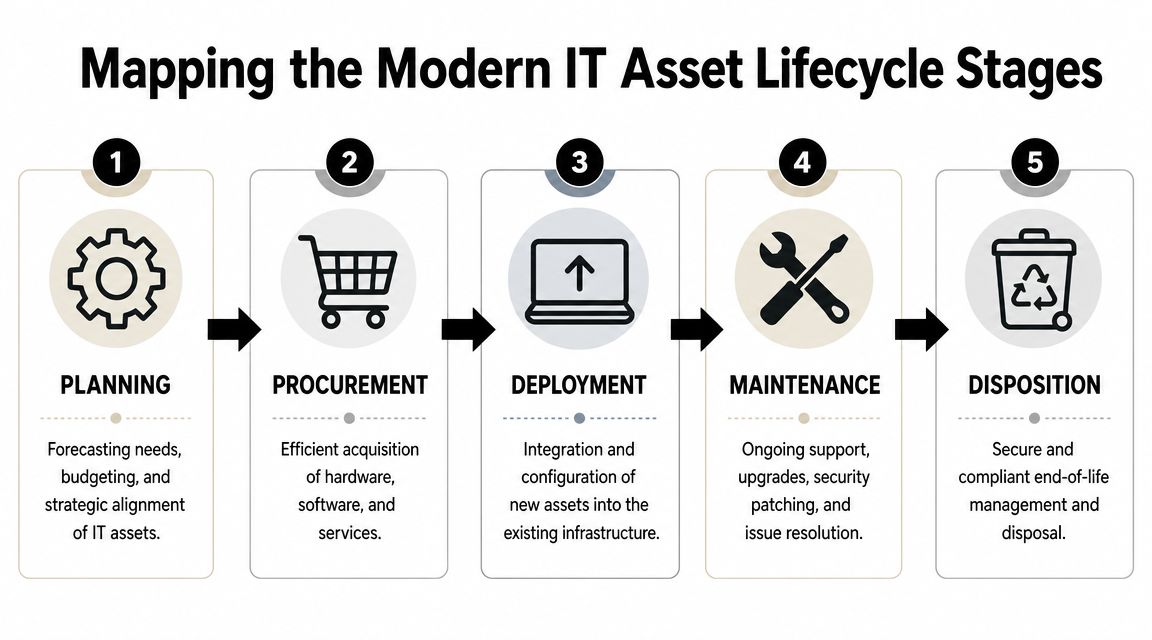
Mapping the Modern IT Asset Lifecycle Stages
The lifecycle itself isn't complicated. What makes it hard is that each stage affects the next one. A rushed purchase creates deployment issues. Weak deployment creates maintenance noise. Poor maintenance creates retirement risk.
The model below is still the right one. The difference is how tightly each stage now has to connect.
A practical reference point for structuring those controls is this guide to IT lifecycle management best practices.
Planning and procurement
Planning is where a lot of avoidable problems should be stopped. This stage should answer basic operational questions before money is spent. What role is the asset supporting? Is it standard issue or exception hardware? How long should it remain in service? What data will it hold? What security controls are required from day one?
If planning is weak, procurement turns into emergency buying.
Procurement isn't only about getting the lowest price. It's about buying assets your team can support, secure, and retire. Standardization matters here. A narrower mix of approved laptop models, mobile devices, storage hardware, and business software makes patching, warranty management, replacement forecasting, and user support far easier.
Deployment and maintenance
Deployment is where a purchased asset becomes part of the environment. For Atlanta companies with hybrid staff, this means more than imaging a laptop and shipping it out. The asset record should be updated at the same time. The assigned user, location, installed software, security status, and expected refresh point should all be captured before the device disappears into daily use.
This is also where many businesses lose control. They treat deployment as a one-time setup event rather than the moment an asset enters a trackable lifecycle.
A device isn't truly deployed until the business can answer who has it, how it's configured, and what process will remove it from service later.
Maintenance covers the long middle of the lifecycle. Patch management, warranty review, repairs, reassignment, software changes, and status updates all belong here. In a hybrid environment, maintenance also means proving that remote assets still meet policy, still belong to the right users, and still deserve to remain in service.
Retirement and disposition
Retirement is the most underestimated stage. Many teams act like an asset is retired when it's unplugged, boxed, or removed from a user's desk. It isn't. Retirement starts a controlled process that should include decommissioning, data sanitization, documentation, chain-of-custody, and a final disposition path.
That last path varies by asset condition and business policy:
| Lifecycle outcome | Typical decision question |
|---|---|
| Reuse | Can this asset be safely reassigned after sanitization and validation? |
| Refurbishment | Is the device worth restoring for continued internal or secondary use? |
| Resale or recovery | Does the asset still have recoverable value worth documenting? |
| Recycling or destruction | Is the safest option certified destruction and responsible recycling? |
When teams map these five stages clearly, they stop treating retirement as a cleanup exercise. They start treating it as the final control point in a business process.
Atlanta's Key Trends Forcing Lifecycle Strategy Changes
Most Atlanta IT teams didn't redesign their asset processes because they wanted to. They did it because the environment changed underneath them. The old method assumed assets lived on site, infrastructure stayed put, and retirement happened infrequently. That isn't the world most growing businesses operate in now.
Three shifts are driving the biggest changes.
Hybrid work broke the old inventory model
When devices rarely left the office, asset tracking was mostly physical. A laptop sat on a desk. A desktop sat in a room. A server lived in a rack. Now devices move constantly between homes, offices, client sites, and shared workspaces.
That changes what “inventory” means. A useful record now has to function as an operational source of truth. In 2026, ITAM platforms are being pushed to automate cleanup, detect anomalies, and update records in real time because estates now span multi-cloud, SaaS, remote or BYOD, and IoT or OT environments, as discussed in these ITAM trend notes from InvGate.
For Atlanta businesses, this means remote offboarding is no longer a help desk checklist item. It has to connect to security, HR, and disposition records.
Cloud migration creates physical retirement work
Cloud adoption removes some on-premise infrastructure. It also creates a physical aftershock. The old storage arrays, backup appliances, firewalls, and rack servers don't vanish because workloads moved. Someone still has to decommission them, document them, sanitize them, and move them out securely.
Businesses that are also thinking about reuse and recovery should understand the broader local push toward more responsible electronics handling. This overview of the circular economy for electronics in Atlanta is useful because it frames retirement as a materials and policy decision, not just a pickup event.
Faster refresh decisions are now tied to risk
A lot of teams still view refresh timing mainly as a budget issue. In practice, the trigger is increasingly risk. Security tooling gets heavier. Vendor support windows close. User performance expectations rise. Audit questions get more specific.
That creates a harder operational question than “Can we keep this device another year?” The better question is whether keeping it creates support drag, patching limitations, user downtime, or a risky retirement backlog later.
What works now is event-driven lifecycle review. Mergers, office moves, hiring waves, cloud migrations, and security standard changes all justify a fresh look at the fleet. What doesn't work is waiting for hardware to fail and calling that a strategy.
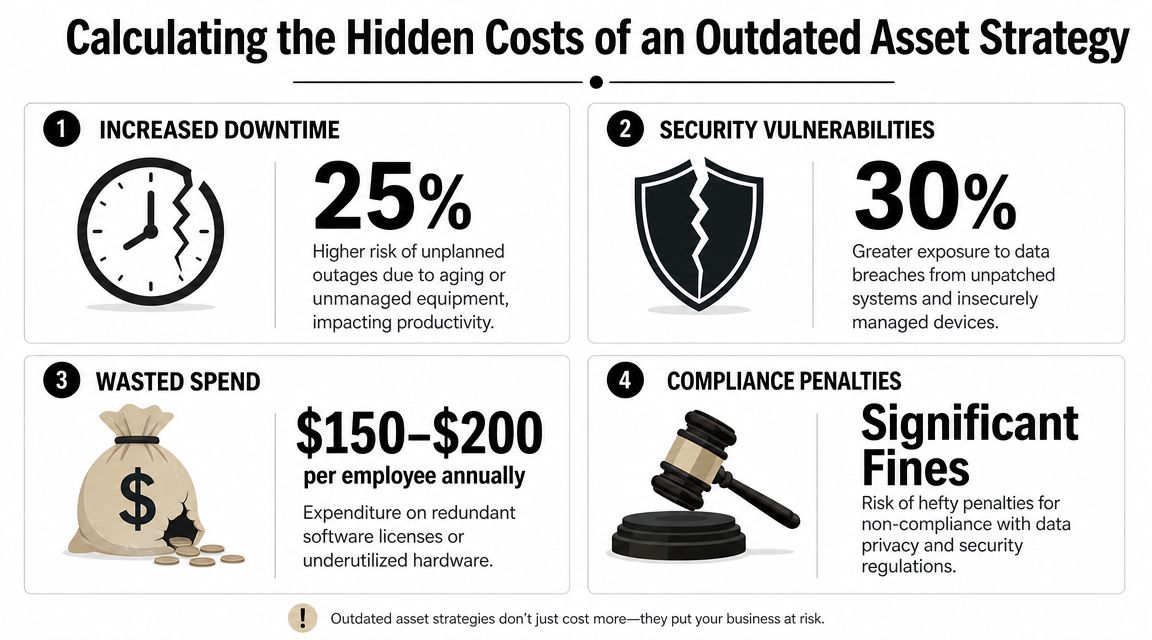
Calculating the Hidden Costs of an Outdated Asset Strategy
The most expensive asset decision is often the one that looks frugal on paper. Keeping equipment longer feels responsible because you delay spending. But deferred replacement can move cost into other categories that are harder to see and harder to budget for.
Those costs usually land in security, support, audit response, and user productivity.
When extended life stops being savings
A useful framing question comes from lifecycle planning itself: “When does extending device life stop saving money and start creating unacceptable risk?” That decision requires regular reviews of warranty status, end-of-life support, and cybersecurity exposure, as explained in this IT asset lifecycle management guidance from MicroAge.
That question matters because aging assets create several layers of cost at once:
- Support drag: Older devices consume more technician time, especially when parts are harder to source or issues become intermittent.
- Security exposure: Unsupported systems and stale asset records make patching and control validation less reliable.
- Vendor risk: Untracked software and hardware histories complicate audit response and license cleanup.
- Deferred retirement backlog: If old assets aren't removed on schedule, they accumulate in storage with unknown data risk.
A better decision lens for Atlanta teams
IT managers usually don't need another reminder that old equipment is inconvenient. They need a way to explain why replacement and retirement timing belong in business planning.
A simple decision table helps:
| Question | If the answer is yes |
|---|---|
| Is warranty support gone or close to it? | Start formal replacement review |
| Has the asset fallen out of normal security support? | Escalate as a risk issue, not a routine hardware issue |
| Is the device causing repeat support effort? | Compare labor drag against replacement timing |
| Would disposal be difficult if delayed further? | Schedule retirement before backlog grows |
One more issue gets ignored until a cleanup project starts. Old equipment often has recoverable value or at least a different disposal path depending on age and condition. If you're sorting through surplus devices, this overview of old electronics for cash options is a useful reminder that retirement planning can include value recovery, not just risk reduction.
Decision test: If nobody can defend why a device is still in service beyond “it still turns on,” the business is already accepting unmanaged risk.
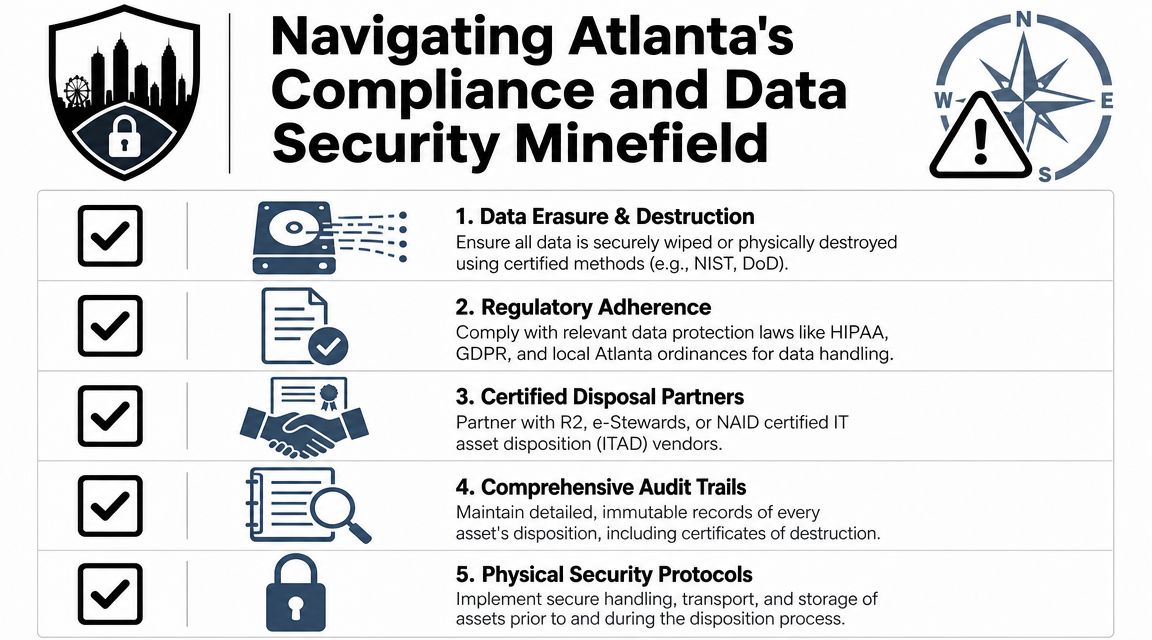
Navigating Atlanta's Compliance and Data Security Minefield
The end of the lifecycle is where technical sloppiness becomes legal and reputational exposure. This matters most in healthcare, education, government, and any business handling regulated or sensitive data. A retired laptop with patient records, a decommissioned server from a finance system, or a batch of student devices awaiting pickup can all create the same problem. The asset may be inactive, but the data risk is still active.
That is why secure disposition has become its own discipline rather than a final housekeeping task.
Why ITAD is now a risk function
The global IT Asset Disposition market is projected to reach $50.65 billion by 2035, with a projected 8.02% CAGR, according to Market Research Future's ITAD outlook. That growth reflects a major shift toward secure data destruction and chain-of-custody as standard expectations tied to breach prevention and compliance.
For Atlanta organizations, the practical implication is straightforward. Retirement has to produce evidence, not assumptions. If a regulator, auditor, client, or internal security leader asks what happened to a specific device, the answer needs to be documented.
That means teams should expect all of the following:
- Chain-of-custody records: Who handled the asset, when, and where
- Verified sanitization or destruction: Especially for data-bearing media
- Disposition reporting: Reuse, resale, recycling, or destruction status
- Environmental accountability: Responsible handling of e-waste streams
What regulated organizations should demand
HIPAA-covered entities and other regulated teams can't treat pickup and disposal as interchangeable services. They need a process that stands up to review. That includes secure staging before removal, documented transport, and proof of data destruction that maps back to actual assets.
For organizations reviewing vendors, critical infrastructure protection insights are a useful companion read because physical security failures often undermine otherwise solid data protection policies. A locked door, controlled access, supervised loading, and documented custody still matter.
A practical local option for organizations with healthcare requirements is HIPAA-compliant data destruction services, especially when retired drives, servers, and user devices need both sanitization and auditable handling.
Retiring an asset without disposition documentation is like terminating an account without an access log. You may have done the work, but you can't prove control.
Security and sustainability are the same decision at retirement
A lot of companies still separate environmental goals from data governance. In practice, the decision is joined. Reuse is only acceptable when sanitization and validation are solid. Destruction is sometimes the safer choice when media is damaged or handling history is unclear. Recycling should be responsible, but never at the expense of documented data control.
That blend of security and sustainability is one of the clearest Atlanta IT asset lifecycle trends for growing businesses. Mature teams don't ask only, “How do we dispose of this?” They ask, “What is the safest documented path for this asset, given its condition, data history, and regulatory context?”
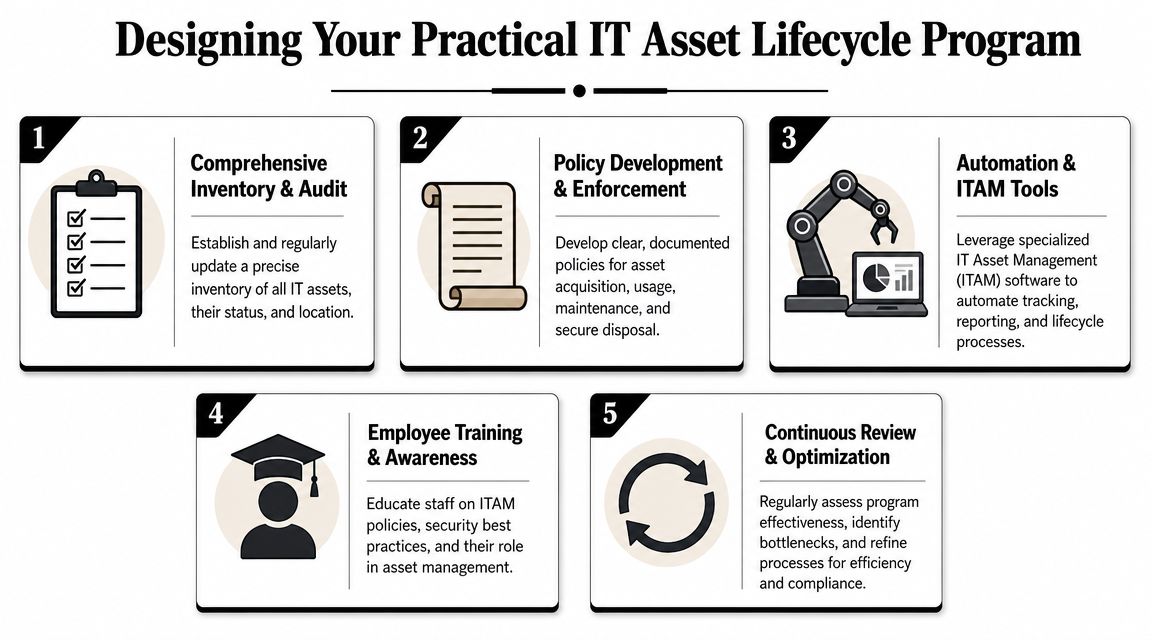
Designing Your Practical IT Asset Lifecycle Program
A growing Atlanta company adds 40 employees in a quarter, opens a second office, and replaces aging laptops in the middle of budget season. If asset records are weak, IT loses time chasing serial numbers, finance loses visibility into replacement timing, and security inherits devices with unclear status. A practical lifecycle program prevents that drift.
Most mid-sized businesses need a repeatable operating model that holds up during hiring spikes, office changes, refresh cycles, and staff turnover. The program should be simple enough to maintain under pressure and strict enough to reduce cyber risk, audit problems, and avoidable spend.
The first job is to establish a baseline your team can trust.
Start with the minimum useful inventory
For a growing business, the inventory has to answer operational and financial questions fast. Track serial number, assigned user, location, purchase date, warranty status, and expected replacement timing. Those fields are usually enough to support support tickets, budgeting, reassignment, and retirement decisions without creating a recordkeeping burden the team will ignore.
If those basics are missing, fix that before adding more policy.
One practical option for businesses that need better visibility is IT asset tracking software guidance. The software matters less than disciplined record ownership and accurate status changes.
Silent asset retention is the failure point to watch. Old laptops, retired switches, and spare monitors sit in closets because nobody closes the record. That turns into hidden cost, weak chain of custody, and confusion during audits or office moves.
Assign ownership by stage, not by emergency
Programs break down when every decision lands on whoever is available that day. Clear stage ownership keeps procurement, operations, security, and finance aligned.
Use a model like this:
| Lifecycle stage | Primary owner | Key control |
|---|---|---|
| Planning | IT leadership with finance input | Standards, forecast, replacement policy |
| Procurement | Purchasing and IT | Approved models, receiving, tagging |
| Deployment | IT operations | User assignment, configuration, record creation |
| Maintenance | IT operations and security | Patching, reassignment, warranty review |
| Retirement | IT, security, and approved disposition partner | Sanitization, documentation, final disposition |
This is also where Atlanta businesses usually feel the trade-off. A loose process may look faster in the moment, but it creates rework during employee exits, lease returns, insurance claims, and compliance reviews. Defined ownership costs less than cleanup.
Build review habits your team will actually keep
Quarterly reviews work well for many growing businesses because they match how staffing, equipment needs, and support demand change through the year. Event-driven reviews matter just as much. New hires, departures, office changes, and infrastructure projects all change the asset picture faster than an annual check ever will.
Focus reviews on a short list of questions:
- Are assigned users and locations still accurate?
- Are any assets out of warranty or near replacement?
- Did terminated employees return all equipment?
- Is replaced infrastructure still active in records, storage, or both?
- Do any assets need retirement action now, before they become a security or space problem?
If you're coordinating lifecycle cleanup with a relocation or consolidation, this office-focused checklist from On The Move Moving Services advice is useful because it forces teams to account for equipment handling before the move starts breaking normal controls.
The inventory fields and review cadence above are both drawn from this Atlanta-focused IT asset management guide.
Standardize retirement so it doesn't become a side project
Retirement needs a written trigger and a written path. Otherwise, teams hold equipment too long, skip documentation, or make inconsistent calls on reuse versus destruction.
A workable retirement procedure usually includes:
- Flag the asset for review based on support status, warranty, security posture, or business need.
- Choose the path such as reuse, refurbishment, resale, recycling, or destruction.
- Sanitize or destroy media according to policy and asset condition.
- Record the outcome in the asset system with date, handler, and final status.
- Store the evidence so audit and security teams can retrieve it later.
This step deserves more attention than it usually gets. In Atlanta, I often see companies manage procurement tightly and treat retirement informally. That is backwards. The retired asset is often the one carrying the highest compliance exposure because it still contains data, still occupies space, and often falls outside day-to-day operational controls.
For businesses in the Atlanta market that need operational help with the final stage, Atlanta Computer Recycling is one example of a provider that handles business electronics recycling, IT asset disposition, pickup logistics, and data-bearing equipment processing for commercial clients.
Field note: The best lifecycle program is the one your operations team can maintain during a busy quarter, with records clear enough for finance, security, and audit to rely on later.
Partnering for Secure and Sustainable IT Asset Disposition
A mature lifecycle program strengthens operations. It lowers surprise costs, gives security teams cleaner data, makes audits easier, and keeps retirement from turning into a storage-room problem. For growing Atlanta businesses, that's not just operational hygiene. It's a competitive advantage. Teams that know what they own and how each asset leaves service make faster decisions with less risk.
Choosing a disposition partner should follow that same logic. Ask practical questions. Can the vendor document chain-of-custody from pickup through final handling? How do they manage data-bearing media that is damaged, obsolete, or nonfunctional? What reporting do they provide back to your team? Can they support office cleanouts, server room work, or data center decommissioning without breaking your internal controls? Do they offer a disposition path that aligns with both security and sustainability requirements?
The right partner should fit into your lifecycle process, not force you to build around theirs. That means clear intake procedures, auditable reporting, secure handling, and enough local logistics capability to support the reality of Atlanta-area operations.
Atlanta Computer Recycling helps Atlanta businesses manage the last and riskiest stage of the asset lifecycle with secure IT asset disposition, electronics recycling, pickup logistics, and data destruction support for offices, healthcare organizations, schools, government teams, and data centers. If your company needs a documented way to retire laptops, servers, network gear, or storage devices without creating compliance or security gaps, review Atlanta Computer Recycling as part of your vendor shortlist.