How Atlanta Firms Improve Endpoint Security

A lot of Atlanta IT teams are dealing with the same reality right now. Users work from Buckhead offices, home setups in Alpharetta, and airport lounges in between. They log in from managed laptops, personal phones, conference room systems, and aging servers that no one wants to touch until something breaks.
That sprawl changes how endpoint security has to work. You can't treat protection as a stack of tools you install once and forget. The firms that improve fastest treat every endpoint as part of a managed lifecycle. They set requirements before deployment, enforce controls during use, monitor for abnormal behavior, keep systems patched, limit lateral movement, and close the loop with secure disposition when hardware leaves service.
The New Perimeter is Everywhere
If you're responsible for IT in Atlanta, the perimeter probably stopped being your firewall a while ago. It's the laptop on a kitchen table. It's the executive's phone on hotel Wi-Fi. It's the engineering workstation that rarely leaves the office but still syncs to cloud services all day.

That shift matters because the endpoint has become the practical starting point for many incidents. A Verizon Business Mobile Security Index study cited in 2026 reporting found that 90% of successful cyberattacks and as many as 70% of successful data breaches originate at endpoint devices in Guardz's summary of endpoint security statistics. That's why firms that want to know how Atlanta firms improve endpoint security start by changing the operating model, not by buying one more point product.
Endpoint security is a lifecycle
The old approach was simple. Issue devices, install antivirus, and hope patching keeps up. That model breaks down in a hybrid environment because risk isn't limited to active use. A retired laptop in a storage closet can be just as dangerous as an unpatched one on the network.
The stronger model treats endpoint security as a chain of custody that runs from purchase to disposal. That includes:
- Procurement controls that define what devices are allowed in the environment
- Enrollment and hardening through MDM and endpoint management platforms
- Monitoring and response for suspicious behavior
- Ongoing maintenance through patching, encryption, and privilege control
- Final retirement with documented, secure disposition
Practical rule: If you can't say who owns a device, what data it holds, what controls are on it, and how it will be retired, it isn't really under control.
Many organizations improve quickly. They stop thinking in isolated tasks and start thinking in stages. Asset inventory supports policy. Policy supports deployment. Deployment supports monitoring. Monitoring supports response. And all of it eventually feeds into IT lifecycle management in Atlanta, where secure retirement is treated as part of security operations, not facilities cleanup.
Local teams need enforceable discipline
Atlanta businesses have a mix of field staff, back-office users, shared workstations, mobile devices, and line-of-business systems that don't all age at the same pace. That creates exceptions, and exceptions are where endpoint risk grows. What works is formal governance with deadlines, ownership, and evidence. What doesn't work is a loosely enforced standard that depends on every team remembering to do the right thing.
A mature endpoint program makes every device pass through the same checkpoints. That's what turns endpoint security from a recurring scramble into a repeatable business process.
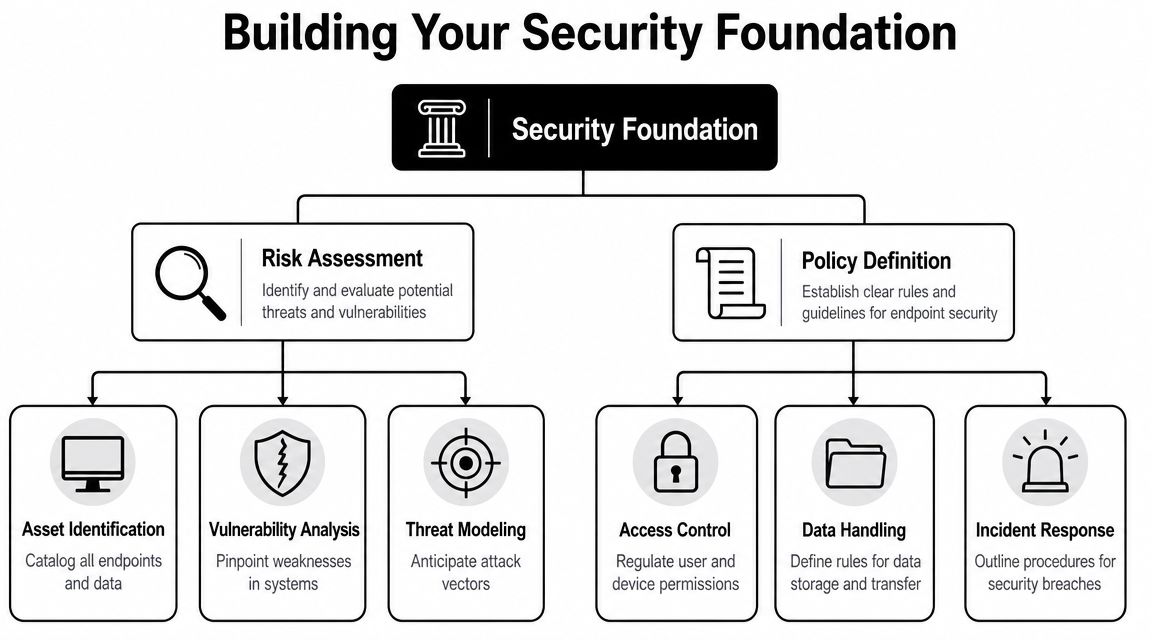
Build Your Security Foundation with Risk and Policy
Most endpoint programs fail before a tool is ever installed. They fail because the business hasn't decided what needs protection, which devices create the most risk, and what “compliant” means.
Start with exposure, not tools
A practical risk review usually reveals the same issue. Teams know their major systems, but they don't always know which endpoints touch regulated data, which users have privileged rights, or which devices fall outside standard management. That gap drives weak policy.
A useful assessment asks plain questions first:
| Question | Why it matters |
|---|---|
| Which devices store or process sensitive data? | These systems need tighter controls and faster remediation. |
| Which endpoints are unmanaged or rarely online? | They often miss patches, policy updates, and telemetry. |
| Who has local admin or privileged access? | Privilege misuse turns small mistakes into large incidents. |
| Which devices are near retirement? | Aging assets often fall outside current standards and need a disposition plan. |
That process should include procurement and vendor decisions too. If endpoints arrive from different channels with inconsistent imaging, firmware, and management enrollment, your security baseline is already fractured. That's one reason firms tighten supply chain risk management strategies alongside endpoint policy.
Policy has to be specific enough to enforce
A policy that says “keep devices secure” isn't a policy. It's a wish. Security teams need concrete requirements they can test for. That means defining approved management platforms, required encryption, acceptable antivirus or endpoint detection tools, password and MFA expectations, restrictions on local admin rights, and retirement procedures for devices leaving service.
A strong local example is Georgia Tech's campuswide Computer Security Standard, announced in 2026, which applies minimum-security requirements to all endpoints used to store, process, or transmit Institute data. Georgia Tech's standard requires endpoint management tools such as Intune, JAMF, or Salt, approved antivirus and endpoint detection tools, encryption for laptops and endpoint systems, controlled administrative privileges, and device categorization with lifecycle tracking. It also established a phased rollout through December 2026 for existing systems, as outlined in Georgia Tech's Computer Security Standard.
A policy becomes operational when it names the controls, the owners, and the compliance deadline.
That's the part many firms skip. They document expectations but never assign deadlines for new systems, rebuilt systems, inherited systems, and exception handling. Georgia Tech's phased timetable is useful because it shows what real governance looks like. New devices and rebuilt systems don't get a grace period forever, and legacy systems need a transition plan instead of permanent exemption.
What a workable baseline usually includes
For most medium and large environments, the baseline isn't exotic. It's disciplined.
- Managed enrollment: Every laptop, server, and mobile device enters an approved management system before production use.
- Full-disk encryption: Portable devices and endpoint systems that handle business data should be encrypted by default.
- Restricted admin rights: Users don't get standing elevation unless there's a justified business case and a review process.
- Lifecycle tagging: Devices need category, owner, location, and retirement status in the asset record.
- Exception tracking: Unsupported systems, lab equipment, and special-purpose devices need documented compensating controls.
What doesn't work is creating a policy the business can't follow. If field teams rely on specialty applications that break under standard hardening, document the exception path and isolate the risk. Policy should force decisions, not drive them underground.
Deploy a Layered Defense for Your Endpoints
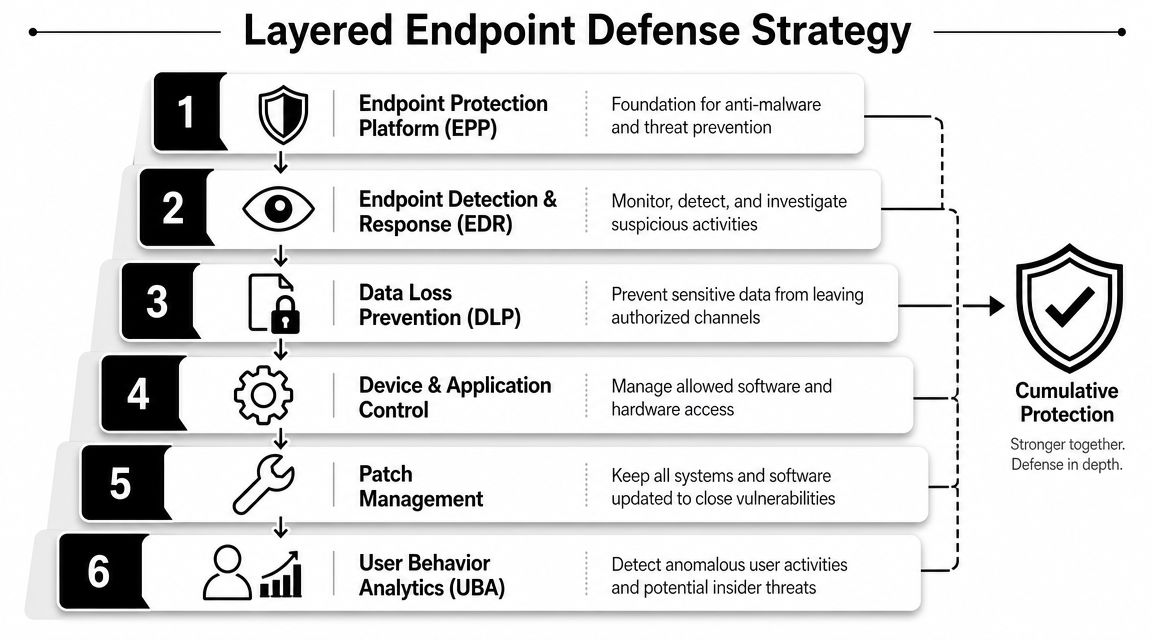
Once the baseline is defined, endpoint protection needs layers that complement each other. A single control rarely fails gracefully. When one misses, another has to catch what's left.
Each layer has a different job
Traditional antivirus still has value for known threats and basic malware blocking. But it's not enough on its own because many incidents don't begin with a file signature. They begin with a stolen session, a script, an abused legitimate tool, or a user-approved action that looks normal at first.
A stronger stack usually combines these functions:
| Layer | Primary role | Common mistake |
|---|---|---|
| NGAV or EPP | Block common malware and known bad activity | Treating prevention as complete protection |
| EDR | Detect suspicious behavior and support containment | Turning it on and never tuning it |
| MDM or UEM | Enforce configuration and mobile controls | Managing inventory without enforcing policy |
| DLP and app control | Restrict data movement and risky software | Applying controls too broadly and causing bypasses |
| Identity controls | Tie device trust to user access | Ignoring the endpoint side of access decisions |
The firms that improve endpoint security in Atlanta use these controls as a system, not a shopping list. Device management tells you what exists. Protection tools tell you what's happening. Identity and access controls determine what a compromised device can reach.
EDR only helps if the team can act on it
For detection-and-response maturity, Atlanta firms should move beyond signature-based antivirus toward behavioral EDR. The practical sequence is clear in trueITpros guidance on endpoint security trends for Atlanta SMBs: deploy sensors, tune alert thresholds, correlate endpoint telemetry with identity and network logs, and automate first-response actions such as host isolation and credential reset. The same guidance warns that the main pitfall is under-tuning or over-tuning alerts, which either floods analysts with noise or misses intrusions.
That trade-off is real. I've seen teams drown in low-value detections because every policy stayed at the vendor default. I've also seen the opposite problem, where suppression rules got so aggressive that the tool became a compliance checkbox instead of a detection platform.
Operator insight: EDR doesn't replace incident response. It shortens the time between suspicious behavior and the first containment action, if someone is prepared to make the call.
What deployment gets wrong most often
The weak pattern is familiar. The security team rolls out a new endpoint platform, celebrates coverage, and assumes the console equals capability. Then an incident hits and no one knows which alerts matter, who isolates the host, or whether resetting credentials will break a critical workflow.
The better pattern looks more operational:
- Tune in phases: Start with broad visibility, then reduce noise based on your environment.
- Map response ownership: Define who approves isolation, who contacts users, and who collects evidence.
- Correlate context: Endpoint alerts become more useful when paired with identity and network signals.
- Measure the right things: Focus on detection speed, containment speed, and endpoint telemetry coverage.
A well-run environment also ties endpoint controls back to asset records. If you don't know where a device sits in inventory, whether it's active, and whether it's approaching refresh or retirement, security operations become guesswork. That's why mature programs align protection tools with IT asset management best practices, not just SOC workflows.
Maintain Control with Proactive Patching and Configuration
Most endpoint environments don't become risky overnight. They drift there. A device starts compliant, misses a few updates, gets one urgent exception, picks up a local admin workaround, and falls outside the baseline.
Patching needs an operating rhythm
The best patching programs don't depend on heroic effort. They use automation for routine updates, staged testing for business-critical systems, and an exception process that has an owner and an expiration date. If a device can't be patched on the normal cycle, someone should document why, what compensating controls are in place, and when the exception ends.
Patching also has to include more than the operating system. Browsers, productivity tools, remote access clients, endpoint agents, and firmware all matter. Attackers don't care which vulnerable component gives them the opening.
Baselines fail when no one enforces them
Configuration management is what keeps hardening from eroding over time. That means standard settings for encryption, screen lock, removable media, logging, approved applications, and local firewall behavior. It also means detecting configuration drift, then correcting it before drift becomes your new normal.
A simple operational model works well:
- Define the baseline in your management platform.
- Measure compliance across all enrolled endpoints.
- Remediate automatically when settings change.
- Review exceptions with the system owner, not just the help desk.
- Retire noncompliant devices if they can't meet current standards.
That last step matters. Some devices aren't worth endless exceptions. If an old laptop can't run the current agent set, won't encrypt properly, or routinely falls behind on updates, replacing it is often the safer business decision.
Least privilege reduces the blast radius
Users don't need permanent admin rights to do routine work. Applications don't need broad access if a narrower permission set will do the job. The principle of least privilege sounds basic, but it's one of the most effective controls for containing damage after compromise.
Remove standing privilege first. Build temporary elevation paths second.
That approach forces cleaner administration. It also pairs well with better inventory discipline. If you're tracking device ownership, role, software profile, and support status in a central system, tools such as IT asset tracking software help security and operations work from the same record instead of competing spreadsheets.
Contain Threats with Network and Access Controls
Even a well-managed endpoint can be compromised. The question is what happens next. If one infected laptop can reach file shares, admin tools, production systems, and backup infrastructure without meaningful barriers, the endpoint problem turns into a business-wide problem.
Segmentation limits what an attacker can touch
Network segmentation is one of the clearest signs of security maturity because it assumes prevention will sometimes fail. User workstations should not have the same network freedom as server administrators. Lab systems, kiosks, and specialty devices should not sit flat on the same trust plane as finance, HR, or production workloads.
Containment works best when you separate based on function and risk. End-user devices live in one zone. Sensitive applications live in another. Management interfaces are restricted further. Remote access paths are narrower still. That structure doesn't eliminate endpoint incidents, but it limits lateral movement and buys the team time to respond.
Zero Trust changes the default assumption
The old model trusted devices once they were “inside.” Zero Trust does the opposite. It assumes no device deserves broad access by default, even on the corporate network. Access should depend on user identity, device posture, location context, and the specific resource requested.
That matters in hybrid environments because not every endpoint arrives in a clean, known state. A laptop can be domain-joined and still be unsafe. A phone can have valid credentials and still be unsuitable for sensitive access if it falls outside policy. Good access design treats trust as conditional and revocable.
A practical way to validate those external dependencies is to monitor what your services expose and how they respond from outside the firewall. Teams that need better visibility into internet-facing checks may find CloudCops' guide on how to configure Prometheus Blackbox Exporter useful when building independent service monitoring around authentication portals, remote access endpoints, and critical applications.
Device controls and network controls have to meet in the middle
A strong endpoint stack without network boundaries leaves too much room for spread. Tight segmentation without device telemetry leaves you blind inside each segment. Security gets stronger when those controls reinforce each other.
Use this as a gut check:
- Compromised user laptop: Can it reach only what that user needs?
- Unknown device posture: Does access degrade or stop until compliance is restored?
- Administrative workflows: Are privileged sessions isolated from general user activity?
- Remote systems: Do they follow the same access logic as on-prem endpoints?
If the answer to those questions is inconsistent across sites, business units, or inherited environments, the architecture needs work. Mature firms don't just protect devices. They limit the consequences when a device goes bad.
Complete the Lifecycle with Secure IT Asset Disposition
The endpoint lifecycle doesn't end when a device is unplugged. It ends when the data is irretrievable, the asset record is closed, and the chain of custody is documented.
Retirement is a security event
Many endpoint programs struggle with asset disposition, leading to failures. Devices are replaced, stacked in a closet, handed to facilities, or moved to a warehouse with incomplete records. The business thinks the asset is gone because it's out of production. From a data security standpoint, that's not enough.
The endpoint threat data discussed earlier supports the need for lifecycle controls, including secure decommissioning, because retired devices can still become breach points if they're mishandled. Security responsibility continues through final disposition.
A secure ITAD workflow is deliberate
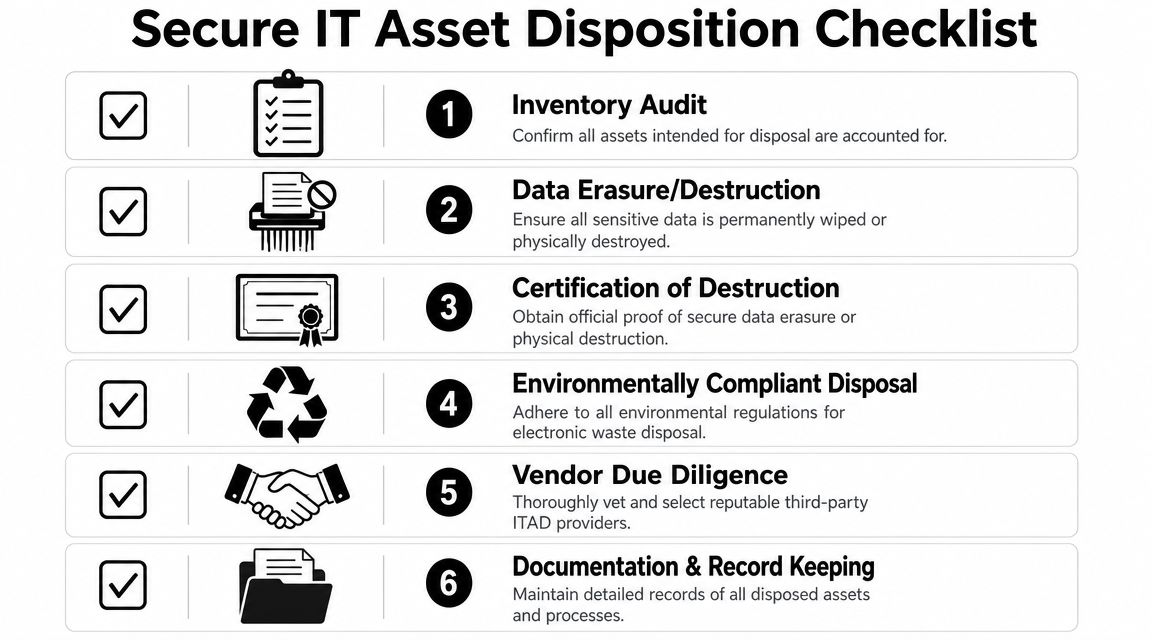
A defensible process usually looks like this:
- Identify assets leaving service. Confirm serial numbers, owners, locations, and whether the device contains internal storage.
- Classify the media. Working drives may be eligible for approved wiping. Failed or highly sensitive media may require destruction.
- Maintain chain of custody. Record who handled the asset, when it moved, and where it went.
- Destroy data appropriately. Use approved wiping for reusable media and physical destruction where wiping isn't possible or appropriate.
- Document the outcome. Certificates, inventory reconciliation, and disposition records should map back to the original asset list.
- Close the asset record. Mark the endpoint retired so it doesn't remain in limbo in procurement, security, or finance systems.
Forgotten endpoints are still endpoints. If a drive leaves your control with recoverable data, the incident happened at the end of the lifecycle, not the beginning.
Wiping and shredding serve different purposes
Not every device should follow the same path. Functional media that will be reused or remarketed often goes through approved data erasure. Non-functional media, highly sensitive drives, and hardware that can't be trusted to wipe clean often goes straight to physical shredding.
The physical side matters too. Building access, loading dock procedures, and storage-room controls affect endpoint security during decommissioning. If you're reviewing how assets move through facilities, this Wilcox Door access control guide is a useful reference for thinking through who should reach storage, staging, and secured disposal areas.
For Atlanta organizations that want a local disposal option, Atlanta Computer Recycling's IT asset disposition services include business ITAD, hard drive wiping using the DoD 5220.22-M 3-pass standard, and physical shredding for obsolete or non-functional media. That's one example of how firms can connect endpoint retirement to documented data destruction instead of informal surplus handling.
What good disposition fixes that tools alone can't
Secure ITAD closes several gaps that endpoint software can't solve once a device leaves active use:
- No more orphaned hardware: Every retired asset is reconciled against inventory.
- No silent data residue: Storage media is wiped or destroyed before release.
- No custody ambiguity: Hand-offs are documented.
- No policy disconnect: Security, asset management, compliance, and facilities follow the same process.
- No landfill shortcut: Disposition supports environmental obligations along with data protection.
That's the complete answer to how Atlanta firms improve endpoint security. They don't stop at deployment. They manage the endpoint from acquisition through retirement, and they treat final disposition as a required control.
Atlanta businesses that need a practical endpoint lifecycle process can work with Atlanta Computer Recycling for business electronics recycling, secure data destruction, pickup logistics, and IT asset disposition support across the metro area.