Atlanta’s Demand for Secure IT Disposal Services Explained

Most Atlanta IT directors know the scene. A locked closet or cage starts as a temporary holding area for retired laptops, failed drives, old switches, dead access points, and a few printers nobody wants to touch until “the next cleanup.” Then an office move, hardware refresh, audit request, or lease return turns that pile into a live risk.
The problem isn't just clutter. It's unknown data exposure hiding inside equipment that has already left production but remains your responsibility. In Atlanta, that risk shows up across hospitals, school systems, logistics operations, financial firms, local government, and multi-site enterprises that cycle through equipment continuously. Secure disposal has become part of normal operations, not a once-a-year purge.
Why Secure IT Disposal Is a Critical Priority in Atlanta
That storage room full of retired equipment usually tells you two things. First, your organization is refreshing technology at a healthy pace. Second, your retirement process probably isn't keeping up with your production environment.

Atlanta's demand for secure IT disposal services is tied directly to the scale of the region's business activity. Atlanta's 2023 GDP was about $473 billion, and the metro remains a major center for healthcare, finance, logistics, education, and government operations, according to Atlanta computer recycling market context. Those sectors retire large volumes of laptops, servers, storage media, and network hardware, and they don't have the option of treating data destruction casually.
Atlanta has volume and compliance pressure
In smaller markets, disposal can still be handled like surplus removal. In Atlanta, that approach breaks down quickly. Every endpoint refresh, office relocation, school lab replacement, or data center cleanup creates a chain of obligations around inventory, data sanitization, transport security, and final disposition.
The same Atlanta computer recycling market context notes that the national IT asset disposition market was valued at $29.20 billion in 2025 and is projected to grow at a 14% CAGR from 2026 to 2034. For Atlanta businesses, that matters because secure disposal now sits inside a large compliance-driven service category, not a side task handed to facilities after hours.
A lot of local IT teams first look for pickup help. The smarter move is to think in terms of a documented retirement program that supports Atlanta business electronics disposal workflows, especially when multiple departments and locations are involved.
Practical rule: If your team can't answer where a retired device is, whether it held data, and what happened to that data, the asset isn't “disposed.” It's unmanaged.
The risk isn't limited to obvious hardware
Many organizations still define IT disposal too narrowly. They focus on laptops, desktops, and servers. Meanwhile, printers with internal storage, old firewall appliances, conference room systems, and badge systems sit in staging areas with little scrutiny.
What works is a governed process. Assets get identified before they pile up. Data-bearing devices are separated from commodity scrap. Failed media follows a different path than reusable equipment. Someone owns the recordkeeping from pickup through final certificate.
What doesn't work is the familiar shortcut: “We removed it from service, so it's handled.” In practice, that's where audit trouble starts.
Key Drivers Fueling Atlanta's IT Disposal Needs
Atlanta organizations usually reach the same conclusion from different starting points. Some are reacting to audit demands. Some are dealing with space constraints after a refresh. Others are trying to prevent the one mistake that turns retired hardware into a reportable incident.
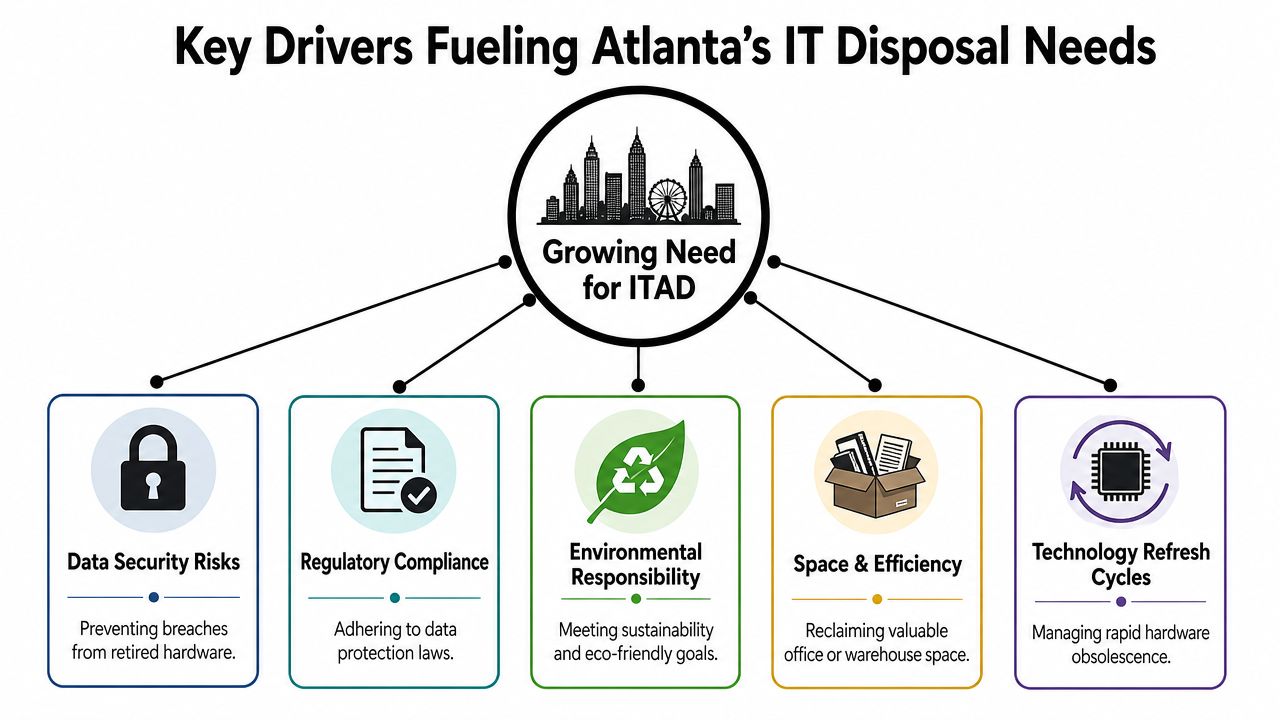
Compliance pushes organizations past ad hoc disposal
Healthcare systems, universities, financial operations, and public agencies all need evidence. Not verbal assurance. Not a truck receipt. Evidence that specific assets were inventoried, handled correctly, and sanitized or destroyed in a defensible way.
That's why disposal vendors who only advertise “recycling” often fall short. A recycler may remove equipment. An ITAD process has to document what was removed, whether it contained data, and what method was used to make that data unrecoverable.
For growing companies, disposal planning increasingly sits alongside broader Atlanta IT asset lifecycle trends for growing businesses. Retirement decisions now affect audit readiness, residual value, and operational risk at the same time.
Risk is broader than a hard drive in a server
The easiest asset to classify is the failed server drive. The harder risk sits in equipment people stop thinking about as storage. Managed switches, multifunction printers, wireless controllers, POS devices, and specialty appliances often retain configuration files, credentials, logs, or user data.
That's one reason secure disposal demand keeps rising. The world generated 62 million metric tons of e-waste in 2022, up from 34 million metric tons in 2010, and only 22.3% was formally collected and recycled, according to data security shredding and e-waste context. The same source says global e-waste is projected to reach 82 million metric tons by 2030 if current trends continue.
For Atlanta businesses, that means the disposal stream is getting larger and messier. More equipment enters service. More equipment exits service. More of it contains data in places that don't look like traditional storage.
Sustainability matters, but only with control
Most enterprise buyers want landfill diversion and responsible downstream handling. That's reasonable. But sustainability claims don't replace data governance.
A sound program balances three goals:
- Protect data first: Devices with recoverable information need sanitization or destruction before anything else happens.
- Recover value where possible: Reusable assets shouldn't be shredded by default if secure wiping can preserve remarketing value.
- Keep non-reusable equipment out of general waste: Responsible recycling is part of the retirement decision, not a separate afterthought.
Secure disposal isn't only about what leaves your building. It's about what proof comes back.
The best programs treat compliance, security, and environmental handling as one workflow. The weak ones split them into separate handoffs, which is where records disappear.
Choosing Between Data Wiping, Shredding, and Decommissioning
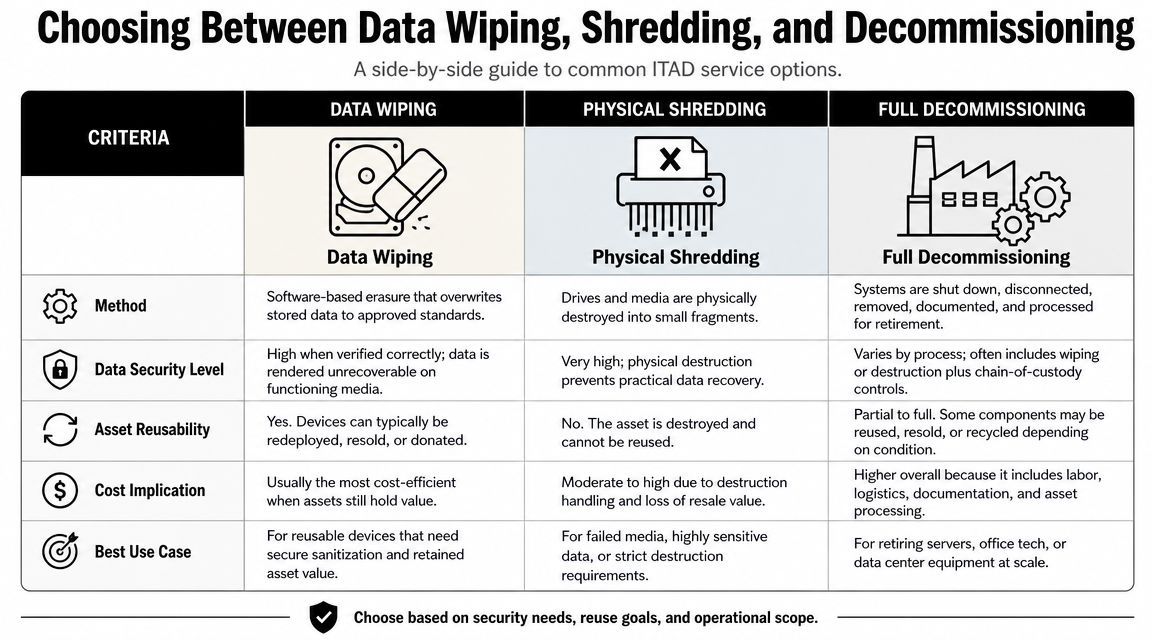
Most disposal mistakes happen because teams treat every asset the same. That's rarely defensible. A reusable laptop with a healthy drive, a failed SSD from a finance server, and a rack of gear from a closed office do not belong in one generic process.
Data wiping works when the asset is reusable
A mature disposal program follows NIST SP 800-88-style sanitization workflows, with different paths for reusable devices and high-risk or failed media, as explained in this overview of electronic waste recycling and sanitization practices. If a drive is functional and the asset still has resale or redeployment value, software-based wiping is usually the right first option.
Wiping makes sense when you want to preserve value. It overwrites data while keeping the hardware intact for reuse, resale, donation, or internal redeployment. That's the practical advantage many finance teams care about, because it prevents the unnecessary destruction of equipment that still has life left in it.
Teams evaluating tooling often start by understanding how hard drive eraser software works in business disposal programs. The key is not the software name by itself. It's whether the process is logged, repeatable, and tied to the exact serialized asset.
Shredding is for failed or high-risk media
Physical destruction is the cleaner answer when a drive has failed, can't be reliably sanitized, or held highly sensitive data that your policy requires you to destroy. That includes drives pulled from damaged systems, obsolete media with uncertain overwrite support, and devices where the cost of preserving residual value isn't worth the exposure.
If a device can't complete a verifiable sanitization process, stop trying to save it. Destroy the media and close the risk.
Shredding also helps when internal stakeholders need certainty. Legal, compliance, and security teams often prefer destruction for a subset of assets because there's no ambiguity about recoverability after the process is completed correctly.
Decommissioning is bigger than disposal
Decommissioning gets misunderstood as “pickup plus destruction.” In practice, it's an operational project. It includes planning, removal from racks or work areas, staging, serial capture, segregation by disposition path, secure transport, and final reporting.
Use decommissioning when the event is complex, such as:
- Office moves: You need old endpoints, printers, and network gear removed without slowing move-out.
- Data center work: Rack equipment, storage, cabling, and failed media need controlled handling.
- Closures and consolidations: Multiple asset classes must be tracked under one project record.
- Post-refresh cleanouts: Large mixed loads need sorting, not bulk pickup.
The right choice depends on risk segmentation
Here's the practical test. Ask two questions for every asset class: can this device be sanitized in a documented way, and does it still have usable value afterward? If yes, wiping is usually the efficient path. If no, destruction is the safer one.
A short comparison helps:
| Service | Best fit | Main upside | Main trade-off |
|---|---|---|---|
| Data wiping | Functional, reusable devices | Preserves asset value | Requires successful, documented sanitization |
| Physical shredding | Failed, damaged, or highly sensitive media | Eliminates recovery risk | Ends reuse and resale potential |
| Full decommissioning | Large or complex retirements | Controls logistics and documentation | Requires more planning and coordination |
What works is matching the method to the media. What fails is using one blanket instruction for everything in the load.
Managing Logistics and Ensuring Chain of Custody
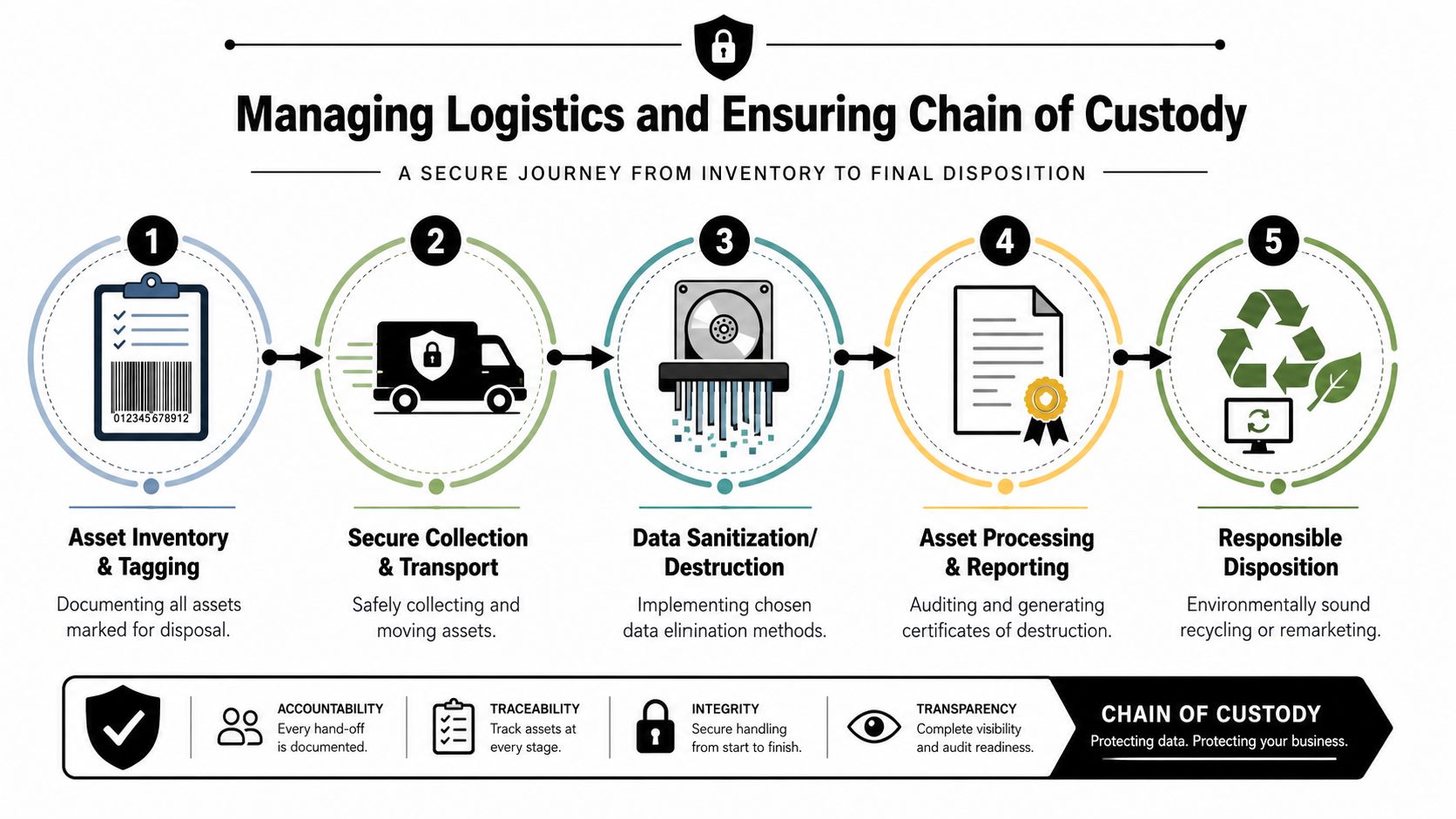
A disposal program is only as strong as its handoffs. The gap between “we tagged it for retirement” and “we received final documentation” is where assets go missing, paperwork gets fuzzy, and audit answers become uncomfortable.
Chain of custody has to survive every handoff
As organizations refresh infrastructure faster, secure disposal has to fit into compressed project windows. According to Georgia ITAD decommissioning guidance, best-practice programs use an unbroken chain of custody from pickup through final processing, with signatures, timestamps, and asset-level documentation. That matters most when regulated workloads are involved, because compliance teams expect auditable evidence.
In plain terms, chain of custody means you can show:
- What was collected
- Who transferred it
- When custody changed
- How it was transported
- What happened at final processing
If one of those steps is undocumented, the whole record weakens.
On-site visibility versus off-site efficiency
Some Atlanta teams prefer on-site services because they want direct visibility into sanitization or destruction. That can be the right choice for selected assets, especially failed media or highly sensitive devices.
Off-site processing often makes sense for broader mixed loads, provided the transport controls and downstream documentation are strong. The point isn't choosing one method on principle. It's understanding the trade-off. On-site handling can increase confidence and reduce transit exposure for certain media. Off-site processing can improve throughput for larger projects if the provider's controls are disciplined.
Transport security often gets less attention than destruction method, which is a mistake. Anyone planning multi-location pickups or larger moves should think the same way they'd think about other valuable freight. Guidance like My Safety Manager on preventing freight theft is useful because retired electronics still have value, and theft risk doesn't disappear just because the equipment is old.
Your disposal chain should be documented well enough that a third party can reconstruct the asset journey without asking for verbal clarification.
What an operationally sound process looks like
Strong logistics usually include these controls:
- Pre-pickup inventory planning: Teams identify asset classes, likely data-bearing devices, and any special handling requirements before the truck arrives.
- Secure collection procedures: Assets are packed, palletized, caged, or otherwise controlled to prevent mix-ups during removal.
- Recorded custody transfers: Signatures, timestamps, and receiving records show where responsibility changed hands.
- Disposition-specific processing: Sanitizable assets go one way. failed or high-risk media goes another.
- Final reporting: Certificates and asset-level records close the file.
For local teams managing office and facility retirements, the operational question is whether the provider can handle business IT equipment pickup in Atlanta without turning pickup day into an unplanned infrastructure project.
Weak logistics usually show up in simple ways
Most failures aren't dramatic. They look like missing serials, mixed gaylords, unlabeled backup tapes, loose drives in bins, or pickup paperwork that only says “miscellaneous electronics.” Those shortcuts create avoidable ambiguity.
The discipline to document logistics is what separates secure disposal from bulk removal.
How to Select the Right Atlanta IT Disposal Partner
Vendor selection gets easier when you stop asking, “Who can pick this up?” and start asking, “Who can defend this process if legal, compliance, or internal audit asks questions six months from now?”
That shift matters because the biggest hidden risk often isn't the server room. It's the mixed-media cleanup where somebody forgot the printers, old badge readers, wireless hardware, and point-of-sale devices.
The hidden test is mixed-media competence
A major gap in many disposal programs is misclassification. In real cleanouts, the hardest assets to handle consistently are often network gear, printers and MFPs with internal storage, backup tapes, badge readers, POS terminals, and IoT devices, as outlined in this Atlanta computer recycling discussion of mixed-media inventory risk. NIST-style sanitization decisions depend on the media type, not on whether the device “looks like IT.”
That's why a vendor's answer to forgotten assets tells you more than their answer about laptops. If they only talk about hard drives and desktops, keep digging. If they can explain how they identify embedded storage and route each device type correctly, you're talking to someone who understands operational risk.
A provider with documented recycling and data handling controls, such as a certified electronics recycler in Atlanta, is usually easier to vet because the conversation moves from promises to process evidence.
Ask for documents, not just assurances
Use a practical checklist during vendor review.
| Evaluation Criteria | What to Ask / Look For |
|---|---|
| Asset inventory process | Ask how they capture serials, quantities, and mixed asset categories before and after pickup. |
| Data sanitization decisioning | Ask how they decide between wiping and physical destruction for different media types. |
| Chain of custody | Request sample transfer records showing signatures, timestamps, and custody changes. |
| Certificates and reporting | Ask to see sample certificates of destruction and asset-level reporting formats. |
| Mixed-media handling | Ask specifically about printers, MFPs, switches, backup tapes, POS hardware, badge systems, and IoT devices. |
| On-site versus off-site options | Ask when each is recommended and how risk changes between them. |
| Decommissioning capability | Confirm whether they can de-install, pack, stage, and remove equipment during office or data center projects. |
| Environmental downstream controls | Ask how reusable equipment is separated from non-reusable material and how final recycling is documented. |
Watch for three red flags
Some warning signs show up early:
- They speak only in generic terms: If every answer sounds like “we recycle everything securely,” you still don't know how they handle your risk.
- They don't ask about non-obvious devices: A serious ITAD partner will ask about printers, storage arrays, tapes, network hardware, and specialty equipment.
- Their paperwork sounds thin: “We can give you a receipt” is not the same as asset-level reporting.
What works in vendor selection is specificity. Ask how they handle failed drives versus reusable laptops. Ask how they classify embedded storage. Ask how they document chain of custody when multiple departments contribute equipment to one pickup.
That level of questioning usually separates true ITAD partners from general junk removal dressed up as electronics recycling.
Your Next Steps for Secure and Compliant IT Disposal
If you're dealing with aging inventory, an upcoming move, or a pending refresh, the next step isn't to schedule a generic haul-away. It's to tighten the retirement process before more equipment accumulates outside production controls.
Three takeaways matter most.
Start with classification, not pickup
Build your disposal scope around what the devices are and what data they may hold. Laptops and servers are obvious. Printers, switches, wireless gear, badge systems, backup media, and IoT devices need equal attention. If your inventory list only captures the obvious assets, your risk assessment is already incomplete.
Match the disposition method to the asset
Some equipment should be wiped and remarketed. Some media should be shredded without debate. Larger events need decommissioning discipline, not just transportation. A defensible process uses different treatments for different device categories and keeps records tied to each asset or load segment.
Treat documentation as part of the service
The pickup isn't the finish line. The record is. If your provider can't produce clear custody documentation, sanitization or destruction records, and final reporting, you haven't closed the loop.
For Atlanta organizations that want one local option aligned with those requirements, Atlanta Computer Recycling provides business-focused electronics recycling and IT asset disposition across the metro area, including hard drive wiping, physical destruction, pickup logistics, and decommissioning support for larger projects. That's relevant when you need one process that covers common office hardware and the less obvious data-bearing equipment that tends to get missed.
The right disposal program should reduce risk, free up space, support audits, and keep useful equipment in circulation when appropriate. It should also make your next refresh easier than your last one.
If your team needs a documented path for retiring laptops, servers, printers, network gear, and other overlooked data-bearing devices, contact Atlanta Computer Recycling to discuss a secure IT disposal plan that fits your environment, timeline, and compliance requirements.