Hard Drive Eraser Software: A Guide for Businesses

A laptop refresh sounds routine until someone asks the question that matters: what happens to the data on the old drives?
That's where many IT teams get exposed. The hardware project is visible, scheduled, and budgeted. The data destruction process is often treated like a final checkbox. In practice, it's a risk decision that touches security, compliance, legal exposure, asset recovery, and chain of custody.
For a business, hard drive eraser software isn't just about deleting files before disposal. It's part of a defensible policy for retiring, redeploying, reselling, or recycling storage media. If your team can't show what method was used, on which asset, by whom, and with what proof, you don't have a strong process. You have a hope-based process.
What Is Hard Drive Eraser Software Really Doing
A refresh project gets risky fast when the hardware is ready to leave the building and nobody can show how the data will be sanitized, verified, and documented. At that point, hard drive eraser software is not just a utility. It is one control inside a larger disposal process that has to stand up to security review, legal scrutiny, and compliance checks.
The software applies a defined sanitization method to selected storage media so data is no longer recoverable through standard access or forensic recovery methods appropriate to the chosen method. In operational terms, it gives your team a repeatable way to process assets, confirm results, and attach evidence to each serial number or asset tag.
What the software controls
Its true value lies in control over scope and proof.
Tools in this category let an IT team choose what gets sanitized, how the wipe is executed, and what record is produced afterward. That usually includes overwrite pattern, pass count, target scope, execution status, and verification output. Those details matter because a successful policy is not just about removing data. It is about showing that the right method was applied to the right device under the right conditions.
A practical wipe process usually falls into one of these scopes:
- File or folder level: Fits systems that remain in service but contain data that must be removed before reassignment.
- Volume or partition level: Useful when part of a disk is being repurposed without retiring the whole asset.
- Whole-drive sanitization: Common before resale, redeployment, return to lease, or recycling.
- Batch processing: Useful in ITAD operations where many assets have to be processed consistently and logged correctly.
For policy design, scope should follow business intent. If the device will leave company control, whole-drive sanitization is usually the baseline. If the system stays internal, a narrower scope may be acceptable, but only if the residual risk is understood and documented.
Where software works and where it fails
Software-based erasure makes sense when the asset is functional and still has reuse or resale value. That is often the cheapest path that still preserves the equipment.
It also has clear limits.
Practical rule: If the drive is failing, locked, unsupported, or inaccessible through a working interface, a software wipe may not complete or may not produce defensible proof.
That is why disposal policy should start with three questions: What media type is this, what condition is it in, and what evidence will we need later? A healthy drive may be a good candidate for software sanitization. A damaged or unstable drive usually belongs in a physical destruction workflow, which can include shredding, crushing, or, for specific magnetic media cases, degaussing as part of a physical media destruction process.
The key decision is operational, not theoretical. Choose the method that gives your team a documented, auditable result for that specific asset, not the method that sounds secure on paper.
Decoding Erasure Methods Overwrite Secure Erase and Crypto-Erase
Method selection decides whether your sanitization process will stand up in an audit or fall apart under basic review. Overwrite, Secure Erase, and crypto-erase can all be valid. The right choice depends on the media, the condition of the asset, the intended disposition, and the evidence your team needs to retain.
Overwrite methods
Overwrite methods replace data on addressable storage by writing new patterns across the drive. They are still practical for traditional hard disk drives that are healthy, fully accessible, and headed for internal reuse or resale.
The operational advantage is control. Administrators can define scope, run the job through a standard workflow, verify completion, and attach the result to the asset record. That makes overwriting useful in environments where consistency matters as much as the technical erase itself.
The limitation is just as important. Overwrite methods only affect storage areas the software can reach. Hidden areas, remapped sectors, damaged media, and some flash-based storage behaviors can leave gaps between what the tool reports and what your policy needs.
Secure Erase and Enhanced Secure Erase
Secure Erase and Enhanced Secure Erase are firmware-level commands supported on some drives. Instead of having the host system write patterns across the media, the drive executes its own erase function.
That usually reduces processing time and technician handling. In volume projects, that difference matters. A method that saves time on each supported drive can materially improve throughput without weakening control, if your team can validate the command ran successfully and capture the result in the chain of custody.
These methods also fit better into a media-specific policy than a one-method-for-everything approach. Teams that are comparing software wiping, firmware commands, and physical destruction should understand where degaussing and other media sanitization methods fit into disposal decisions.
Crypto-erase for self-encrypting drives
Crypto-erase destroys the encryption key on a self-encrypting drive so the encrypted data is no longer readable. For the right hardware standard, it can be one of the fastest ways to sanitize a drive before redeployment or release from company control.
Speed is not the main question. Proof is.
Your policy needs to answer three things before you approve crypto-erase as a standard method. Was encryption active and enforced on that device. Can your team verify key destruction in a repeatable way. Will that evidence satisfy internal audit, customer contract terms, or regulatory review. This is the kind of policy alignment discussed in Server Scheduler's IT security insights.
A method can be technically valid and still fail a compliance review if your records do not prove the method matched the asset.
Choosing the right method
Use the method that fits the asset and the business objective:
- Overwriting fits healthy, accessible HDDs where software control, verification records, and continued asset value matter.
- Secure Erase fits supported drives where firmware-based sanitization is available and your process can document successful execution.
- Crypto-erase fits self-encrypting drives when encryption status, key destruction, and proof requirements are all verifiable.
A common mistake is treating method selection like a software feature checklist. It is a policy decision tied to media type, asset condition, future disposition, and audit expectations.
Meeting Compliance Demands with NIST and DoD Standards
Most businesses don't get audited on whether they used an impressive-sounding tool. They get challenged on whether their sanitization process was reasonable, documented, and aligned with recognized standards.
For most IT managers, that means understanding the difference between DoD 5220.22-M and NIST SP 800-88 Rev. 1.
Comparison of Common Data Sanitization Standards
| Standard | Primary Method(s) | Media Focus | Modern Relevance |
|---|---|---|---|
| DoD 5220.22-M | Overwrite-based methods | Historically associated with magnetic media | Still referenced in procurement and legacy policy, but narrower in modern mixed-media environments |
| NIST SP 800-88 Rev. 1 | Clear, Purge, Destroy | Media-specific guidance across different storage types | Better fit for current enterprise environments, especially where SSDs and flash media are involved |
Why NIST is the stronger policy framework
The old habit is to ask for a “DoD wipe” because people recognize the label. That language still shows up in RFPs, internal policies, and vendor conversations. It's familiar. Familiar isn't the same as current.
NIST SP 800-88 Rev. 1 gives IT managers a more useful framework because it tells you to choose Clear, Purge, or Destroy based on the media type. That matters because modern storage isn't uniform. HDDs, SSDs, NVMe devices, and self-encrypting drives don't all respond the same way to overwrite-based methods.
If you're building your broader control environment, resources like Server Scheduler's IT security insights can help frame sanitization as part of a larger risk assessment process rather than a one-off disposal task.
What auditors and compliance teams care about
A standards-aligned wipe process gives you a defensible answer to basic audit questions:
- What standard guided method selection
- Why one asset was wiped and another was destroyed
- How the result was verified
- What evidence was retained
For regulated organizations, that matters more than brand names. Healthcare, education, finance, and public sector teams need a process that can stand up after the asset leaves the building.
Compliance isn't just the erasure event. It's the record showing your team chose an appropriate method and followed it consistently.
When organizations need proof that the sanitization activity was completed and documented, a formal data destruction certification process becomes part of the control, not an afterthought.
The practical takeaway is simple. If your environment includes flash-based storage, cloud-adjacent infrastructure, mixed endpoints, or decommissioned data center gear, NIST should drive the policy language. DoD terminology may still appear in operations, but it shouldn't be the only standard your team understands.
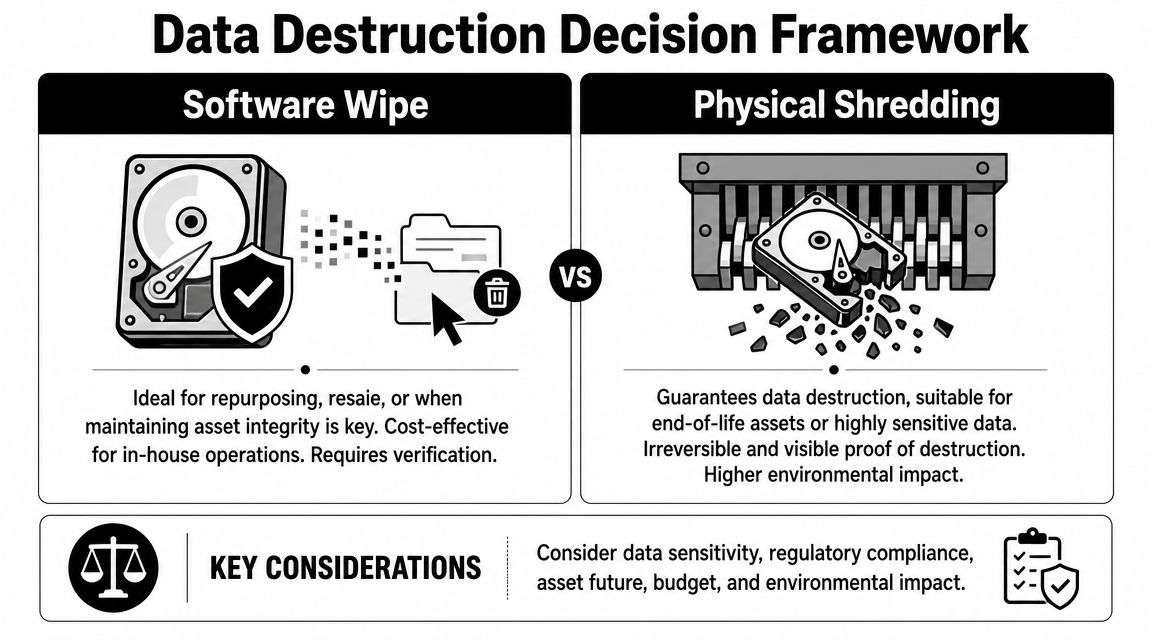
Software Wipe or Physical Shredding A Decision Framework for IT Managers
This decision isn't philosophical. It's operational.
Some assets should be wiped because the hardware still has reuse, resale, or redeployment value. Other assets should be physically destroyed because software can't reach them reliably, or because the risk tolerance is effectively zero.
Start with three variables
Before choosing a method, check three things:
- What type of media is it
- Does it function well enough to sanitize
- What level of proof does the business need
That sounds obvious, but teams skip it all the time. They standardize on one wipe method and push every asset through the same process. That's where mistakes happen.
NIST SP 800-88 Rev. 1 recommends selecting Clear, Purge, or Destroy based on media type, and notes that overwriting is not a reliable universal method for all devices, especially flash-based storage. Blancco's market positioning also reflects the shift toward standards-based erasure verification rather than simple multi-pass overwrite logic, especially for SSDs, NVMe drives, and self-encrypting drives on its drive erasure platform.
When software wiping makes business sense
Software wiping is usually the right call when the drive is healthy, accessible, and still worth preserving.
Use it when:
- The asset will be redeployed internally: You want the data gone, but the laptop, desktop, or server still has service life.
- Resale or remarketing matters: Destroying a usable drive kills recovery value.
- The environment supports verification: Your toolset can log the erase event and tie it to the asset record.
- On-site control is important: In some offices, removing media for off-site handling creates unnecessary disruption or approval delays.
A structured decision model can help teams speed up aligned decisions when infrastructure, security, and compliance stakeholders all need to sign off on the same disposal path.
When physical shredding is the safer choice
Shredding is the right answer when uncertainty is too high.
Choose physical destruction when:
- The drive has failed: If the system can't access it reliably, software can't give you confidence.
- The media is obsolete or inconsistent: Older devices often create verification gaps.
- The storage is flash-based and policy requires a stronger outcome: SSD behavior can leave remnant data outside the logical space software sees.
- The data category is highly sensitive: Legal, clinical, financial, or public-sector records may justify irreversible destruction.
- The asset is already at end of life: There's no business reason to preserve the device.
If a drive can't be read consistently, treat that as a destruction trigger, not a software challenge.
Many organizations land on a mixed model. Functional drives go through a documented wipe workflow. Failed or non-compliant media go to hard drive shredding services. That's usually the most realistic policy because it matches the actual condition of enterprise assets, not the ideal condition on a spreadsheet.
The mistake is forcing every device into the same path for administrative simplicity. Good policy isn't simple because it ignores differences. It's simple because it gives staff a clear rule for handling them.
Creating Your Audit-Proof Data Destruction Workflow
A data destruction policy fails when it lives only in a tool. The software might work perfectly, but if your team can't show chain of custody, method selection, execution, and proof, the process won't hold up well under audit.
What works is a repeatable workflow tied to inventory and documentation.

Build the workflow around evidence
Modern erasure tools create value well beyond the wipe itself. Their strongest operational advantage is compliance-oriented logging and standards support. Enterprise products such as D-Secure and BitRaser add audit artifacts including tamper-proof certificates, standards support tied to NIST 800-88 and DoD 5220.22-M, and certificate generation for compliance workflows, as described in CDW's sanitizer product context.
That matters because logs and certificates reduce chain-of-custody risk. They also give IT managers records they can produce for HIPAA, GDPR, and public-sector audit demands.
A practical operating checklist
Use a workflow your team can repeat under pressure:
- Inventory the asset first: Record serial number, asset tag, owner or department, media type, and current status.
- Classify the disposition path: Redeploy, resell, recycle, legal hold, or destroy.
- Match method to media: Choose overwrite, secure erase, crypto-erase, or physical destruction based on the policy decision tree.
- Control custody during handling: Document who touched the device, where it moved, and when.
- Verify the result: Don't treat job completion as proof. Review logs, completion status, and any exceptions.
- Retain the evidence: Store wipe logs and each certificate of data destruction with the asset record.
Don't leave this to whoever is free that day
One of the weak spots in many IT environments is staffing. Disposal projects often get pushed to generalist admins who are already buried in endpoint work, tickets, migrations, and user support. If your team is evaluating who should own these controls, broader labor market context like cybersecurity hiring trends for tech employers can help explain why governance tasks often end up under-resourced.
The safest workflow is the one a tired technician can still follow correctly at the end of a long project day.
A solid policy removes improvisation. It tells the team what to do with a healthy SATA HDD, a failed SSD, a self-encrypting laptop drive, or a batch of mixed media from a closed office. That consistency is what creates defensible records.
When to Call a Professional ITAD Partner for Disposal
In-house erasure makes sense up to a point. After that, it becomes a distraction, a bottleneck, or a risk transfer you haven't acknowledged yet.
The trigger usually isn't technical difficulty alone. It's the combination of volume, documentation, chain-of-custody requirements, and limited internal staff time.
The clear outsourcing triggers
Enterprise procurement is moving toward evidence-based data destruction. Blancco and Ontrack emphasize digitally signed certificates, centralized reporting, and erasure management consoles, especially for multi-site organizations and data center decommissioning projects where thousands of drives may be processed, as reflected in Ontrack's data erasure management approach.
That shift creates obvious moments to bring in a specialist.
Call a professional ITAD partner when:
- The project is too large for your team to process cleanly: Office closures, campus refreshes, and data center retirements create handling complexity fast.
- You need stricter chain of custody: Especially when devices move across sites, storage rooms, loading docks, or third-party logistics points.
- You have mixed outcomes across the asset pool: Some drives should be wiped for reuse, others shredded because they're non-functional or non-compliant.
- You need consolidated records: Auditors and legal teams don't want scattered screenshots, spreadsheet notes, and technician memory.
- The business wants on-site options: Some environments require visible destruction or supervised handling.
What a good ITAD partner changes
A competent ITAD provider does more than “take away old equipment.” They standardize intake, custody, sanitization method selection, exception handling, reporting, and final disposition.
That matters because internal teams usually don't struggle with the erase command itself. They struggle with everything around it:
- Scheduling pickup without interrupting operations
- Segregating devices under legal hold
- Tracking failed media separately
- Deciding what gets wiped versus shredded
- Collecting proof in one reporting package
In the Atlanta market, one option businesses evaluate is IT asset disposition companies that can handle both software wiping and physical destruction under a documented workflow. That's often the practical answer when the disposal event touches compliance, facilities, security, and finance at the same time.
The business case is focus
The best reason to outsource isn't that your team can't do the work. It's that they shouldn't have to become a temporary disposal operation while production systems still need attention.
A good policy draws a line. Small, routine sanitization can stay in-house. High-volume, high-risk, or heavily documented projects move to a partner built for that workflow.
Data Erasure FAQs for Atlanta Businesses
Is deleting files or formatting enough before recycling a business computer
No. Deleting files removes normal access to the data. Formatting typically resets file system structures. Neither gives a business a strong compliance position for retirement or disposal. For business assets, use a defined sanitization method and retain proof of what happened.
Is a DoD wipe always the right answer
Not always. The phrase is still common in business settings, but it shouldn't be your only decision rule. In mixed environments with HDDs, SSDs, NVMe drives, and self-encrypting drives, the better question is whether the method matches the media and your policy requirements.
What should healthcare organizations focus on under HIPAA
Healthcare teams should focus on defensible disposal controls. That means documented media handling, an appropriate sanitization or destruction method, chain-of-custody records, and retained proof for each asset. The exact operational method matters less than whether the organization can show that protected data was handled in a controlled, documented way.
Can SSDs be safely wiped with the same process used for old hard drives
That's risky as a blanket rule. Flash-based media behaves differently, and overwrite-based logic doesn't apply universally. For SSDs and related media, your policy should account for media-specific sanitization choices and define when physical destruction is the safer path.
If your policy says “wipe all drives the same way,” revise the policy before the next refresh project.
When should a business shred a drive instead of wiping it
Shred when the drive is failed, inaccessible, obsolete, or too sensitive to justify preserving. Also shred when the organization can't verify a reliable software result or when policy requires irreversible destruction.
What records should we retain after data destruction
Keep the asset record, sanitization method used, completion status, exception notes, custody trail, and the certificate or destruction record tied to the device. The goal is simple: months later, someone should be able to identify the asset and see exactly what happened to it.
Can hard drive eraser software help with internal redeployment
Yes, if the drive is functional and the method is appropriate for the media. This is one of the strongest use cases for software-based erasure. It allows an organization to sanitize equipment before reassignment without automatically destroying hardware value.
What usually breaks a business disposal workflow
Three things cause most problems:
- Poor inventory discipline: Devices leave desks, closets, or server rooms without a complete asset record.
- Method mismatch: Staff apply the same wipe routine to every media type.
- Weak evidence retention: Logs, certificates, and exception reports never get centralized.
What should an Atlanta business expect from a disposal provider
At a minimum, expect a documented intake process, a defined wipe-or-destroy decision path, chain-of-custody handling, and asset-level proof of final disposition. If the provider can't explain how records are produced and retained, keep looking.
Is there a practical policy for mixed asset environments
Yes. Use a simple rule set:
- Identify the asset and media type.
- Determine whether the device is functional.
- Decide whether the hardware will be reused, resold, recycled, or destroyed.
- Apply the approved sanitization or destruction method.
- Verify and retain proof.
That framework works better than trying to memorize individual tool features.
If your team is planning a refresh, office closure, server retirement, or data center cleanout, Atlanta Computer Recycling provides business-focused ITAD and electronics recycling services in the Atlanta area, including hard drive wiping for supported media and physical shredding for obsolete or non-functional drives. For organizations that need a documented disposal process, it's worth starting with a conversation about chain of custody, asset reporting, and which devices should be wiped versus destroyed.