Computer Part Disposal an Enterprise IT Playbook

A lot of computer part disposal projects start the same way. Equipment that was supposed to leave months ago is still sitting in a server room corner, a storage closet, or an empty office. The pile usually includes a mix of retired laptops, failed hard drives, old switches, dead monitors, spare RAM, batteries, and half-stripped desktops nobody wants to claim.
That backlog looks like an operations problem. It's a risk stack. Data-bearing devices sit outside active control, facilities teams don't know what can go in scrap, finance wants assets cleared off the books, and compliance needs proof that nothing left the building unsecured. If your process is informal, you're already relying on luck.
Beyond the Storage Closet The Real Risks of Computer Part Disposal
Overflowing retired equipment is a warning sign. It usually means no one has reconciled three separate questions: what the asset is, whether it still holds data, and where it's allowed to go next. That gap is where breaches, audit failures, and disposal mistakes happen.
The scale of the broader problem explains why this is no longer a housekeeping issue. In 2022, the world generated 62 million tonnes of e-waste, and 78% was not formally collected or recycled, according to the Global E-waste Monitor summary cited here. When most discarded electronics stay outside controlled recovery systems, enterprise disposal has to be treated as governance, not cleanup.
What actually goes wrong
The first failure point is usually unsecured media. A desktop may be retired, but its SSD, backup drive, or embedded storage can still expose employee records, financial files, customer data, or system credentials. Failed drives are especially dangerous because teams often assume a dead device is an unreadable device. It isn't safe to make that assumption.
The second failure point is bad handling of mixed equipment. IT teams often accumulate a blend of reusable assets, scrap metal, batteries, monitors, and loose boards in the same area. Once those streams are mixed, tracking gets weaker and downstream options get worse. Reuse value drops. Recycling gets less efficient. Hazardous items become harder to isolate.
Practical rule: If you can't tell who last touched an asset, whether it contains data, and what disposition path it's assigned to, it is not ready to leave your site.
Why enterprises need a defensible program
A defensible computer part disposal program does four jobs at once:
- Protects data: It treats every data-bearing device as sensitive until sanitization is verified.
- Supports compliance: It creates records that stand up in an audit, legal review, or internal investigation.
- Reduces environmental exposure: It keeps electronics out of informal disposal channels.
- Preserves value: It separates reusable equipment from true end-of-life material.
That last point matters more than many teams realize. If disposal starts with a box truck and a generic cleanout mindset, good assets get destroyed too early and risky assets leave without enough documentation. Both outcomes are avoidable.
Most storage closet problems are process problems. The fix isn't a one-time purge. The fix is a repeatable system that starts with inventory, continues through sanitization and logistics, and ends with documented downstream disposition.
Building Your Disposal Inventory and Asset Plan
Before anyone unplugs equipment or schedules a pickup, build a disposal inventory that can survive scrutiny. A device count isn't enough. You need an asset plan that tells operations, security, procurement, and compliance exactly what is leaving, what risk it carries, and what outcome you expect.

A strong inventory for computer part disposal is built around control, not convenience. If your spreadsheet can't tie a serial number to a sanitization record and a final disposition path, it's incomplete.
Start with asset identity and media visibility
At minimum, log these fields for each item:
- Asset identifier: Internal asset tag, serial number, or both.
- Device description: Make, model, form factor, and business unit.
- Current location: Building, room, rack, closet, lab, or user assignment.
- Condition status: Working, failed, damaged, incomplete, or unknown.
- Media presence: HDD, SSD, flash storage, removable media, or no data-bearing component.
- Planned path: Reuse, resale, parts harvesting, recycling, or destruction.
In this aspect, many teams cut corners. They track laptops and servers, but skip peripherals, loose drives, decommissioned network gear, and partial systems. Those “miscellaneous” assets create the biggest chain-of-custody gaps because they move informally.
Classify assets by disposition path
Don't treat all retired equipment the same. Put each item into an operational category before pickup day.
Potential redeploy
Equipment with business use left in it. These assets need testing, cleaning, and controlled reassignment.Potential resale
Functional systems or components with market value. Preserve condition, keep accessories together when relevant, and avoid unnecessary destruction.Parts recovery
Incomplete or aging devices that still contain usable RAM, CPUs, caddies, power supplies, or daughter cards.Recycling only
Assets with no practical reuse path but strong material recovery potential.Destroy on receipt
Failed media or devices with sensitivity, damage, or policy constraints that rule out reuse.
A mature lifecycle process makes this sorting easier. If you're refining your broader controls, these IT lifecycle management best practices are a useful reference for aligning retirement decisions with procurement, deployment, and disposition.
Build approval into the plan
The inventory shouldn't live only with IT operations. Different teams need to sign off on different risks.
| Approval area | What needs confirmation | Why it matters |
|---|---|---|
| Security | Media type and sanitization requirement | Prevents under-scoping data destruction |
| Finance | Asset retirement and resale handling | Supports book disposition and recovery decisions |
| Compliance | Recordkeeping and policy alignment | Reduces audit exposure |
| Facilities | Staging area and loading access | Prevents pickup-day disruption |
A disposal inventory is not a shipping list. It is the control document that proves you knew what you had before it moved.
What works in practice
The cleanest projects use a staged asset log. Teams freeze the inventory, attach any missing tags, separate data-bearing from non-data-bearing material, and stage by disposition category. Then they reconcile what was picked up against what was approved for release.
What doesn't work is the last-minute sweep. That's when loose drives appear in desk drawers, batteries end up in mixed gaylords, and unknown equipment gets added to the load without review. Once that happens, documentation becomes reconstruction instead of evidence.
Executing Compliant Data Destruction
Data destruction is where many disposal programs either become defensible or fall apart. You don't need a complicated policy. You need one that maps media type and data sensitivity to a specific sanitization method, records the result, and keeps the asset under control until that result is verified.
NIST SP 800-88 Rev. 1 gives the right framework. It organizes sanitization into Clear, Purge, and Destroy, and it ties the choice to the media and the sensitivity of the data, as summarized in this computer recycling process overview referencing NIST guidance. The same source also highlights a key benchmark: keep a chain-of-custody log for each serial number before the asset leaves company control.
Clear, Purge, and Destroy in practical terms
Here's the operational difference:
| Method | Best fit | Main trade-off |
|---|---|---|
| Clear | Lower-risk reuse scenarios where policy allows logical sanitization | Preserves asset value, but requires verification discipline |
| Purge | Sensitive data on media that supports stronger sanitization methods | Better for higher-risk data, but not every device supports it cleanly |
| Destroy | Failed media, highly sensitive assets, or devices that can't be reliably sanitized | Highest assurance, but ends reuse value |
The mistake I see most often is using a single method for everything. That sounds simple, but it creates waste and blind spots. Shredding every drive destroys resale value unnecessarily. Wiping every drive assumes all media is functional and all devices can be verified. Neither assumption holds up for long.
Match the method to the asset
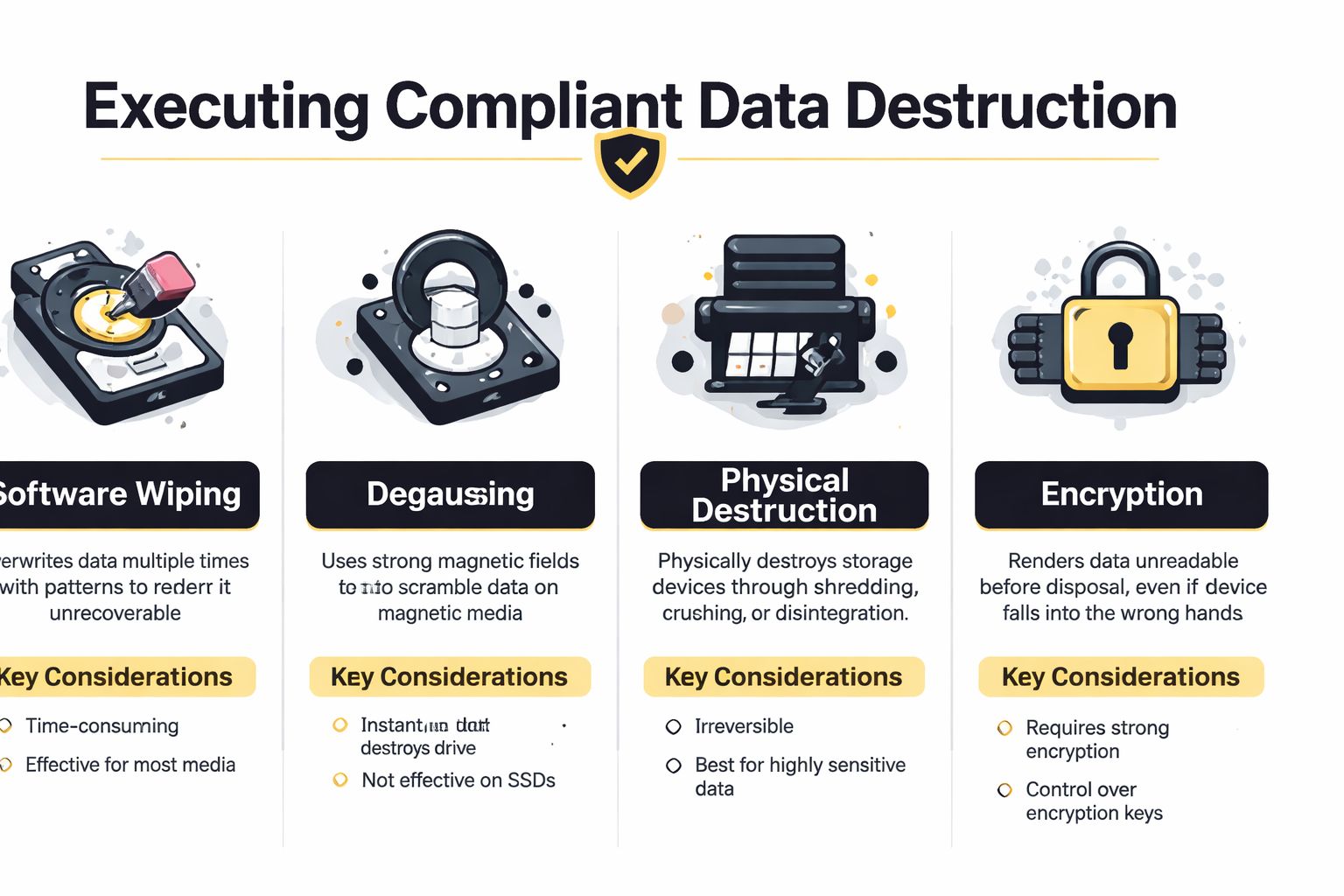
Use software-based sanitization when the device is functional, the media can be verified, and you want to preserve resale or redeployment value. That's common for laptops, desktops, and servers with working drives.
Use degaussing only for magnetic media and only when your policy and workflow support it. It's not a universal answer, and it won't solve SSD disposal.
Use physical destruction for failed drives, media with critical data, or anything that can't be sanitized with confidence. If a device can't complete a compliant erase, move it to destruction and log why.
Don't confuse user reset actions with enterprise sanitization. A user may know how to factory reset Samsung devices for personal troubleshooting, but enterprise disposal requires a policy-based sanitization method, verification record, and chain of custody.
What compliant evidence looks like
A strong program produces evidence at the asset level, not just the project level. That usually includes:
- Serialized records: Each media item tied to a serial number or other unique identifier.
- Method used: Clear, Purge, or Destroy, with enough operational detail to support review.
- Verification status: Confirmation that sanitization succeeded, failed, or was escalated to destruction.
- Certificate record: A formal disposition output you can retain for auditors, legal, and internal governance.
If you need an example of what a documented service workflow should support, review a provider offering certified data destruction with asset-level recordkeeping rather than a generic bulk destruction claim.
Failure modes to avoid
Two habits consistently create exposure:
Assuming failed drives are safe to ignore
Failed media still needs logging and a defined disposition path.Destroying too early
If a compliant erase was possible, premature shredding can erase residual value and raise unnecessary cost.Letting assets leave before record completion
If the paperwork catches up later, your control gap is already real.
Good data destruction programs are not built on one method. They're built on method selection, verification, and evidence.
Managing Secure Logistics and Physical Handling
Once media is controlled, the disposal project becomes a logistics exercise with security consequences. Pickup day is where a solid plan either holds or unravels. Equipment has to be disconnected, sorted, packed, moved, and loaded without mixing streams, interrupting operations, or creating a custody gap.
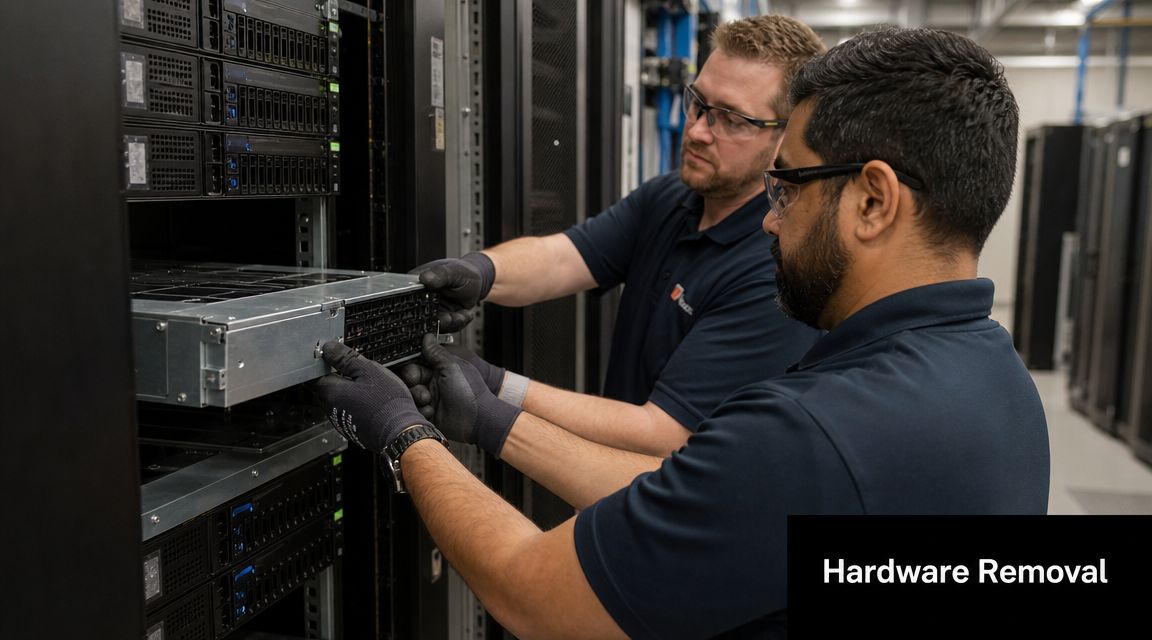
Generic movers are not set up for this. They know how to transport furniture and cartons. They usually don't know how to isolate data-bearing equipment, manage loose drives, or separate hazardous components from scrap streams.
Handle high-risk components first
During physical disposal, the highest-risk items are batteries, circuit boards, and displays, and they should be removed first during dismantling to prevent fire and contamination, based on this e-waste dismantling guidance. The same guidance warns that mixing these into general scrap can lead to rejected loads and safety incidents.
That has direct implications for how you stage material on site. Don't build mixed pallets because it's faster. Build controlled pallets because downstream handling depends on separation.
A practical staging model looks like this:
- Pallet one: Whole units approved for resale or reuse
- Pallet two: Data-bearing devices pending destruction or verified release
- Gaylord or dedicated container: Boards, cables, and component scrap
- Separate containment: Batteries and display assemblies
- Locked tote or sealed container: Loose hard drives and SSDs
De-installation and staging discipline
The best pickup crews work from a site map and a release list. They know which racks are in scope, which rooms require escort, which elevators or loading docks are available, and where staged assets can sit without being disturbed.
Use this sequence on removal day:
Confirm release scope
Match the physical assets to the approved inventory before de-installation starts.Segregate by disposition path
Don't let reuse candidates and destruction-only material mingle on the floor.Protect identifiers
Keep asset tags and serial labels visible whenever possible.Secure loose media immediately
Small devices disappear first. Treat them like cash.Load with reconciliation
Count and verify what went onto the truck, not what was supposed to.
The chain of custody gets weaker every time an asset changes hands without a documented check.
Why specialized pickup matters
Enterprise computer part disposal often involves after-hours access, restricted areas, and equipment that still matters to someone even after it's retired. Servers may need rail removal. Network gear may still be tied to labeling conventions. Monitors and UPS units may require separate handling from CPUs and thin clients.
That's why the pickup process needs more than transportation. It needs custody controls, equipment knowledge, and downstream awareness. If you're comparing local options, look for a provider that supports IT equipment pickup in Atlanta with de-installation and staged removal rather than simple curbside collection.
What works is a short, controlled window with a prepared inventory, pre-cleared access, and segregated staging. What doesn't work is an open-ended office cleanout where equipment sits unattended in hallways while teams decide what to do with it.
Deciding Between Resale, Reuse, and Recycling
Most organizations lose value because they define everything at end of life as waste. That's the wrong lens. Many retired devices are not disposal problems. They are disposition decisions.
The U.S. EPA notes that used electronics can yield valuable materials such as gold, copper, glass, and aluminum, and industry sources commonly estimate that roughly 98% of a computer's mass is potentially recoverable, as summarized on the EPA electronics information page referenced here. That's why landfill should be the outcome you design away from, not the fallback you accept.
A practical decision hierarchy
Start with the highest-value path that still satisfies your security and compliance requirements.
Reuse comes first when the device still meets internal workload needs. This is often the least disruptive option because you already control the asset, the environment, and the support process.
Resale makes sense when the asset has secondary market demand but no longer fits your standards. Working laptops, recent desktops, and some server components often fall into this category if they were sanitized properly and handled carefully.
Recycling is the right answer when the equipment is obsolete, damaged, incomplete, or no longer economical to test and remarket. But even then, recycling should mean material recovery, not disposal by neglect.
Evaluate value against friction
A useful screen is simple:
- Can the asset be sanitized and verified?
- Is the unit functional enough to redeploy or sell?
- Will handling, testing, and remarketing effort outweigh likely recovery?
- Would destruction be required anyway because of policy or sensitivity?
If the answer to the first two questions is yes, don't default to shredding. If the answer to the last two is yes, move it to a controlled recycling path and document why.
For teams that want a quick reality check on what secondary-device demand can look like, browsing marketplaces for UsedMobiles4U iPhones is a useful reminder that retired electronics can retain value when condition, testing, and data handling are managed correctly.
A local service option can also help quantify recovery versus recycling. For example, some businesses use programs for old electronics for cash when they want a clearer separation between reusable assets and true scrap.
If you destroy a reusable asset by default, you didn't reduce risk. You removed options.
Choosing Your ITAD Partner A Vendor Checklist
A weak vendor can undo good internal process fast. Nice branding, a low pickup quote, and broad promises about “green recycling” don't tell you whether your assets will be tracked properly, sanitized correctly, or sent to responsible downstream processors.
That matters because global e-waste is rising faster than formal recycling capacity, and only 22.3% was formally collected and recycled in 2022, according to this discussion of downstream outcomes in United Electronic Recycling's overview. If you don't ask where material goes after pickup, you're outsourcing risk blindly.
What to ask before you sign
Use the checklist below during procurement, not after an incident.
| Evaluation Criteria | What to Ask/Verify | Importance |
|---|---|---|
| Data sanitization process | Which media sanitization methods are used, and how are failed devices handled? | Confirms whether the vendor can support policy-driven destruction choices |
| Chain of custody | Can they provide sample asset-level logs from pickup through final disposition? | Shows whether custody is documented or assumed |
| Certificates and records | Do they issue serialized destruction or recycling records tied to asset identifiers? | Supports audits, legal review, and internal controls |
| Downstream transparency | Will they identify downstream processors and provide recycling certificates or tracking? | Reduces risk of uncontrolled export, dumping, or vague “recycling” claims |
| On-site handling | Can they de-install, pack, and segregate hazardous components correctly? | Prevents damage, contamination, and pickup-day confusion |
| Insurance and liability | What coverage do they maintain for transport, handling, and data-related incidents? | Helps assess commercial risk allocation |
| Service fit | Can they support office closures, healthcare environments, schools, or data center work? | Confirms they understand your operating environment |
Red flags that deserve scrutiny
Watch for vendors that avoid detail. If they can't explain how they handle loose drives, mixed pallets, batteries, or failed media, expect problems later.
Also question any process that starts with indiscriminate shredding. Some destruction is necessary, but a vendor should still be able to explain when reuse, parts recovery, and certified recycling are more appropriate.
If you're benchmarking options, a certified electronics recycler should be able to discuss security controls, downstream accountability, and asset-level documentation without hand-waving. Atlanta Computer Recycling is one example of a business-focused local provider that combines pickup, data destruction, and electronics recycling for commercial clients.
The right vendor gives you evidence, not reassurance.
If your team is sitting on retired laptops, servers, drives, or mixed e-waste and needs a documented path forward, Atlanta Computer Recycling provides business-to-business electronics recycling and ITAD services across the Atlanta area, including pickup, data destruction, and downstream disposition support for enterprise environments.