IT Downtime Risks for Atlanta Companies: A 2026 Guide

A lot of Atlanta firms still treat downtime like a help desk problem. It isn't. It's a balance-sheet problem, a compliance problem, and in many cases a lifecycle management problem.
One benchmark used for Atlanta planning is stark. One hour of downtime can cost about $8,600, and full operational recovery often takes 3–7 days, which means the damage keeps spreading after systems come back online, through backlogs, delayed transactions, and staff time diverted into cleanup and rework, according to this Atlanta downtime cost analysis.
That number gets attention. The more useful takeaway is what sits behind it. Outages rarely start and end with one broken server. They expose weak monitoring, aging equipment, poor change control, fragile backup design, and sloppy retirement of old assets that should have been removed months earlier. For Atlanta companies with hybrid teams, multiple offices, regulated data, and tight service expectations, downtime is usually the result of a chain of preventable decisions.
The Escalating Cost of Going Offline in Atlanta
Atlanta companies operate in a market where delay has consequences fast. If finance can't post, support can't respond, clinicians can't retrieve records, or logistics teams can't see status, the issue stops being “IT is working on it” and turns into customer churn, missed deadlines, and management escalation.
The most useful way to think about downtime is not as a single interruption, but as an operational recovery curve. The first hour hurts. The next few days often hurt more because people switch to manual workarounds, duplicate effort, and spend management time on exception handling instead of normal operations.
Downtime is rarely linear
The Atlanta benchmark above matters because it forces planning around recovery, not just restart. A system may be reachable again, but the business still isn't normal. Tickets pile up, accounting queues stall, warehouse updates lag, and managers start making decisions with partial information.
Practical rule: If your recovery plan ends at “systems restored,” you don't have a business continuity plan. You have a reboot plan.
That's why mature IT managers focus on recovery time objectives, dependency mapping, and asset readiness. They also look beyond the data center and into every endpoint, switch, firewall, storage unit, and retired device still sitting in a closet. The infrastructure you no longer actively manage can still create an outage.
For teams reviewing resilience gaps, a good starting point is a practical business continuity planning checklist for Atlanta organizations. The strongest plans tie technical recovery to business process recovery, vendor coordination, and equipment lifecycle decisions.
What usually goes wrong in practice
The trade-off many companies make is understandable. They delay hardware refreshes, postpone documentation, and keep spare or retired systems around “just in case.” That can reduce short-term spend, but it usually increases long-term exposure.
Three patterns show up repeatedly:
- Deferred replacement: Old infrastructure keeps running until failure risk becomes visible.
- Unclear ownership: No one owns the final decision on when an asset leaves production.
- Recovery optimism: Leadership assumes restoring service is the same as restoring operations.
That mindset creates fragile environments. In Atlanta's competitive business climate, fragile environments don't stay hidden for long.
Unpacking the Real Causes of IT Downtime
Most outages don't come from one dramatic event. They come from a weak chain. A failed update hits an aging server. Monitoring misses the early warning signs. A backup job hasn't been tested. Someone makes a rushed configuration change during the scramble. What started as a technical issue becomes a business outage.
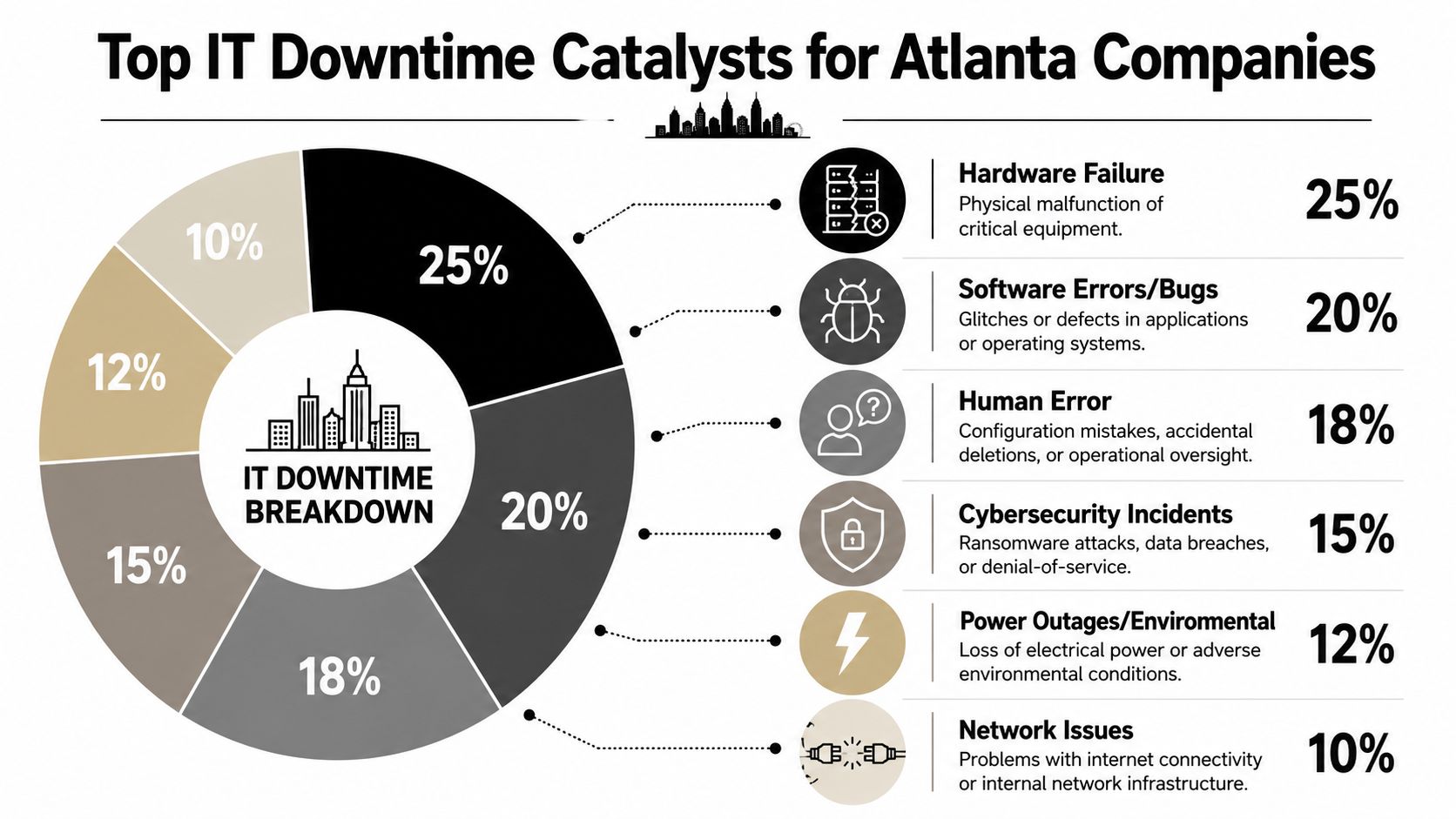
A useful framing from the field is that downtime often results from multiple overlapping failure modes, including server or hardware failures, ransomware, internet or network outages, failed updates, and human error. The same source notes that aging hardware, weak monitoring, poor backup design, and unpatched vulnerabilities raise the likelihood of each problem, as outlined in this review of downtime risk factors for Atlanta small businesses.
Here's a visual breakdown of common catalysts teams should watch.
Failure chains beat single-cause thinking
The mistake is asking, “What caused this outage?” as if there's only one answer. Better questions are:
- What condition made the outage possible
- What control failed to catch it earlier
- What dependency made the blast radius larger
- What retired or legacy asset should've been removed already
That last point gets overlooked. Old backup appliances, decommissioned switches still patched into racks, and dormant workstations with cached credentials can all complicate incident response. They also confuse ownership during a live outage because no one is sure whether the device is active, safe to remove, or still tied to a critical workflow.
The causes managers can actually control
A lot of downtime risk is operationally boring. That's exactly why it matters. Teams reduce exposure when they tighten a few fundamentals instead of chasing one-off heroics.
- Hardware discipline: Replace equipment on a defined lifecycle. “Still powers on” isn't a risk standard.
- Monitoring that reaches the edge: If branch equipment, backup jobs, and storage health aren't visible, you're flying blind.
- Patch and change control: Failed updates don't become outages by themselves. They become outages when testing, rollback planning, and communication are weak.
- Backup design: A backup that exists but can't restore the right workload fast enough is a false comfort.
For a broader local view of the controls Atlanta teams are prioritizing, this summary of IT infrastructure security trends in Atlanta is worth reviewing.
Mature environments don't assume they can prevent every failure. They assume failure will happen and design the environment so one failure doesn't become five.
The True Business Impact of an Outage
The direct cost of an outage is only the visible part. The bigger losses usually show up in payroll inefficiency, delayed billing, third-party recovery work, customer confidence, and compliance exposure. When executives say, “We were only down for a few hours,” they often ignore what operations teams spent the next week cleaning up.
A cyber incident makes that gap even wider. A widely used benchmark from IBM's 2025 Cost of a Data Breach reporting puts the average U.S. data breach at $10.22 million, up 9% from the prior year, and says organizations take an average of 241 days to detect a breach before containment begins, according to this summary of cybersecurity risks for Atlanta businesses.

Outages create secondary losses fast
When a core system goes down, the business starts improvising. That's where hidden cost appears.
| Impact area | What actually happens |
|---|---|
| Productivity | Staff stop normal work and shift into manual tracking, call handling, and duplicate entry |
| Revenue timing | Orders, invoices, claims, or service tickets get delayed even after access returns |
| Management time | Leaders spend hours on updates, vendor escalations, and internal communication |
| Customer trust | Clients don't always distinguish between a technical problem and poor reliability |
| Compliance | Security and privacy teams may need extra review, legal coordination, and documentation |
For healthcare, financial services, education, and public sector environments, downtime can also trigger scrutiny around data access, retention, and disposal. If the event touches regulated systems, the incident response process gets more expensive and more restrictive.
Breach risk and downtime overlap
Many Atlanta companies underestimate exposure. Downtime isn't always separate from security. The same weak controls that allow a ransomware event or unauthorized access often also make recovery slower.
An outage can be operational on day one and regulatory on day two.
If a retired device still contains sensitive data, if a replacement workflow is undocumented, or if a team can't establish chain of custody for removed equipment, the outage stops being just an availability problem. It becomes an integrity and governance problem too.
That's why IT downtime risks for Atlanta companies should be discussed with infrastructure, security, compliance, and procurement in the same room. Each group owns part of the recovery path. If one group is missing, the true cost rises.
Sector-Specific Downtime Scenarios in Atlanta
Downtime looks different depending on the environment. The underlying lesson stays the same. The closer IT is tied to revenue, care delivery, public service, or professional workflow, the less room there is for “we'll deal with that later.”
Industry benchmarks cited for small businesses show outage costs can reach about $5,600 per hour in retail, $8,900 per hour in healthcare, and $7,200 per hour in professional services. The same benchmark identifies common outage causes as ransomware (40%), hardware failures (25%), human error (20%), and ISP outages (15%), according to this breakdown of small business downtime costs by sector.
Estimated hourly cost of downtime by sector
| Sector | Estimated Hourly Cost | Primary Risk Example |
|---|---|---|
| Retail | About $5,600 | POS outage or store network failure disrupts transactions |
| Healthcare | About $8,900 | Clinical server issue delays access to patient information |
| Professional services | About $7,200 | Document systems or line-of-business apps become unavailable |
Healthcare and hospital operations
A hospital or clinic outage rarely stays confined to IT. If patient records, scheduling, imaging access, or secure communications become unreliable, clinicians shift to manual work and administrators start triaging around the system. That creates immediate operational strain and raises privacy concerns if staff resort to unofficial workarounds.
For teams handling regulated data, secure retirement of old devices matters as much as live-system protection. A decommissioned workstation or storage device can still contain patient information long after it leaves a nurse station. Organizations reviewing that exposure should look closely at HIPAA-compliant data destruction practices.
Professional services firms downtown
Law firms, accounting groups, consultancies, and architecture practices often underestimate outage cost because they don't manufacture products. But they sell responsiveness, deadlines, and trust. If document management, voice systems, or cloud access fail during a filing, audit, or client presentation window, the damage is immediate and visible.
In these firms, human error often plays a larger role than leaders expect. A bad permissions change, rushed software update, or poorly handled laptop replacement can block an entire team from work.
Retail and distributed operations
Retail environments have a different problem. They depend on location-level connectivity, endpoint stability, and fast issue isolation. If a branch loses internet, payment processing and inventory visibility can stall at the same time. If the root cause sits in an old firewall, a neglected switch, or an improperly retired spare unit, the outage becomes harder to diagnose.
The companies that recover fastest usually know exactly which assets are in production, which are in reserve, and which should've been disposed of already.
That asset clarity matters across every Atlanta sector. Without it, downtime response turns into guesswork.
Practical Mitigation and Risk Reduction Strategies
Good downtime reduction plans are built in layers. Redundancy without monitoring doesn't help much. Backups without restore testing don't help much either. Security awareness training won't save a team that has no asset inventory and no incident playbook.
The strongest programs mix infrastructure controls with operating discipline.
Build resilience where failure hurts most
Start with the systems that create the biggest operational bottlenecks when they fail. That usually includes identity systems, core network infrastructure, primary line-of-business applications, backup platforms, and the hardware they depend on.
A practical resilience stack usually includes:
- Redundant connectivity: Multiple ISP paths or other fallback options reduce dependence on one carrier.
- Tested backups: Recovery has to be proven against real workloads, not assumed from a green dashboard.
- 24/7 monitoring: Alerting should cover servers, storage, networking, failed jobs, and endpoint health.
- Patch discipline: Schedule updates, test them, and define rollback procedures before maintenance windows begin.
Strengthen process, not just technology
Some outages come from weak decisions under pressure. That's why process matters as much as hardware.
- Document ownership clearly. Every critical system needs an owner, a backup owner, and an escalation path.
- Run change control with teeth. Even a small configuration adjustment can create a large outage if dependencies aren't understood.
- Train users on failure behavior. Staff should know what to report, what not to click, and which manual workarounds are approved.
- Review old assets quarterly. If equipment is no longer needed, remove it from the environment and dispose of it securely.
For facility teams managing server rooms, cages, or enterprise environments, physical controls also matter. This resource on data center security for facilities directors is useful because downtime often starts with access, environmental, or infrastructure weaknesses long before anyone opens a ticket.
The trade-offs that actually matter
Not every organization needs the same level of redundancy. A branch office doesn't need the same architecture as a clinical system or a regional operations hub. What matters is matching controls to business consequence.
What doesn't work is broad optimism. “We have backups somewhere.” “That server is old, but stable.” “We'll retire that hardware next quarter.” Those are the sentences teams repeat before preventable outages.
Buy less complexity if your team can't support it. Buy more discipline no matter what.
The Overlooked Risk of IT Asset Disposition
A lot of downtime guidance ignores what happens at the end of the asset lifecycle. That's a mistake. Improper decommissioning creates both outage risk and breach risk.
The first problem is hoarding. Companies keep aging laptops, old switches, retired servers, and backup appliances in service because replacement feels disruptive. But gear at the end of life fails more unpredictably, performs less consistently, and often can't support current patching or monitoring standards. That makes outage prevention harder before the device breaks.
Old gear doesn't become harmless when it leaves production
The second problem shows up after removal. Decommissioned devices often sit in storage rooms, server closets, or staging areas with little tracking and no clear destruction timeline. That creates confusion during migrations and incidents. Teams can't always tell whether the device is safe to wipe, still needed for rollback, or holding sensitive data.
That uncertainty slows response. It also creates legal and security exposure if the asset contains regulated or confidential information.
Secure disposition is a continuity control
This is why IT asset disposition should sit inside the same conversation as business continuity and incident response. A disciplined ITAD process does four important things:
- Removes unstable equipment from production before failure
- Prevents retired assets from re-entering the environment informally
- Protects sensitive data on drives, servers, and endpoint devices
- Creates a documented handoff between active use and final destruction or recycling
For Atlanta teams evaluating providers, this overview of IT asset disposition companies and services is a useful reference point.
In practice, a qualified provider can help with de-installation, pickup, data destruction, chain of custody, and final reporting. Atlanta Computer Recycling is one local option that handles business ITAD, including equipment removal and data destruction for retired systems. The key isn't the brand name. The key is whether the process reduces operational uncertainty instead of adding more of it.
If a company treats retired hardware like a storage problem, it usually creates a future outage problem.
Your Vendor Coordination Checklist for Secure ITAD
An ITAD vendor shouldn't create fresh risk while helping you remove old equipment. The right checklist is simple. Security first, documentation second, logistics third, sustainability always.
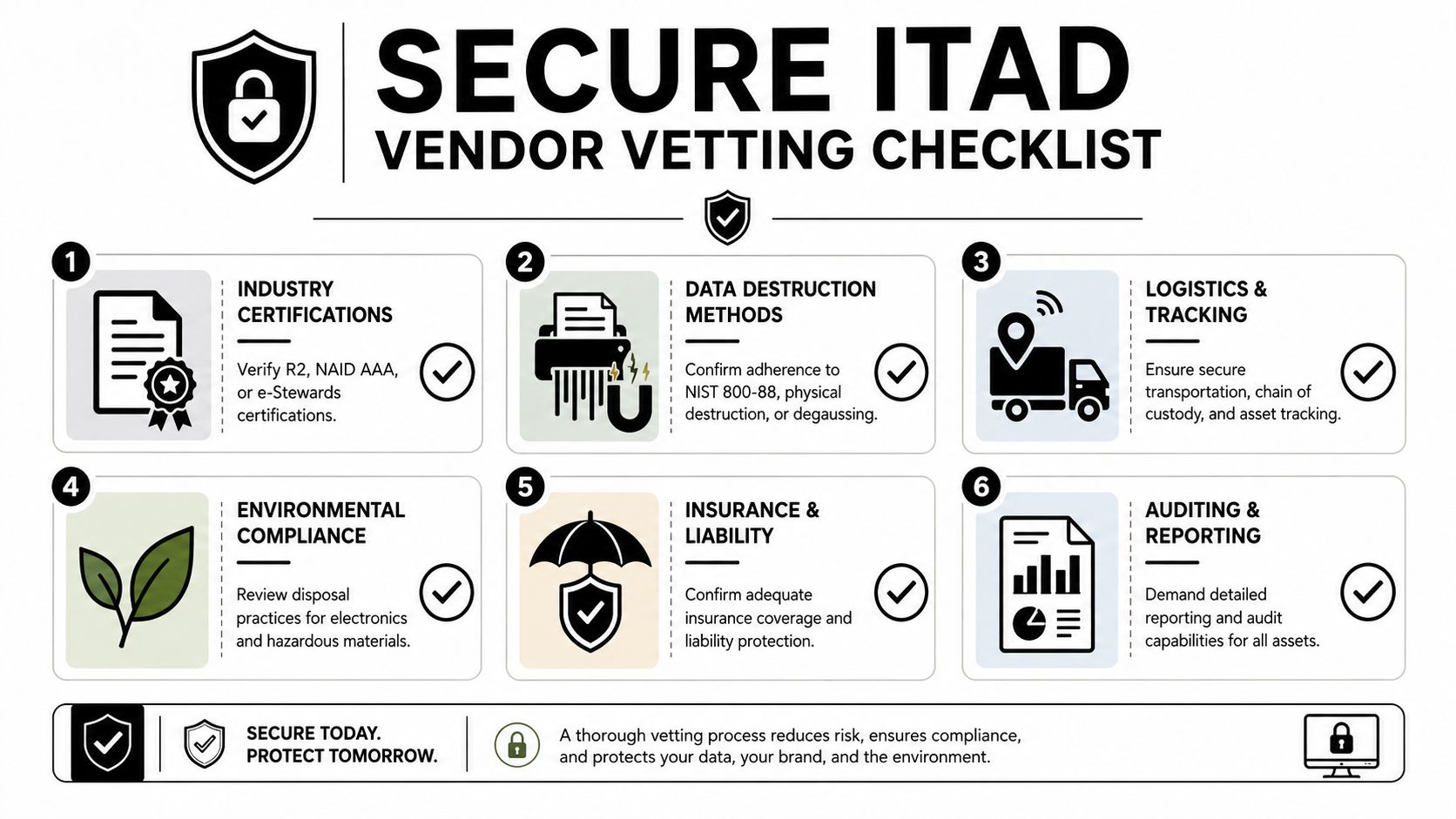
What to verify before you schedule pickup
- Data destruction methods: Ask exactly how drives, SSDs, and failed media are handled. You want a method the vendor can explain and document clearly.
- Chain of custody: The handoff process should be visible from removal through transport and final disposition.
- Operational fit: Good vendors plan around business hours, restricted areas, and minimal disruption to active staff.
- Reporting: You should receive asset-level records and destruction documentation appropriate to your environment.
- Environmental handling: Recycling claims should be backed by process, not marketing language.
- Insurance and accountability: If something goes wrong during transport or processing, responsibilities should already be clear.
Vendor risk doesn't stop at the loading dock. It connects to procurement, compliance, and broader continuity planning. This guide to supply chain risk management strategies is a useful extension of the same conversation.
If a vendor can't explain custody, destruction, and reporting in plain language, don't let them touch retired infrastructure.
If your team is reviewing aging equipment, planning a refresh, or preparing for a site move or decommissioning project, Atlanta Computer Recycling provides B2B electronics recycling and IT asset disposition services across the Atlanta metro area, including secure data destruction, equipment pickup, and logistics support designed to reduce operational disruption during retirement and disposal.