Computers for Change: Secure IT Asset Donation Guide

The storage room usually tells the full story before the asset spreadsheet does. Stacked laptops from a Windows rollout. A few retired nursing station PCs. Network switches from a building refresh. Maybe a pallet of decommissioned lab workstations waiting for someone to “figure out donation.”
If you manage IT for an Atlanta hospital, university, or public institution, that pile represents three competing pressures at once. Finance wants the space back and wants retired equipment handled responsibly. Leadership wants a visible sustainability outcome. Security wants documented control over every device that ever touched sensitive data.
That’s where most “computers for change” conversations go wrong. Consumer donation programs are built for good intentions. Institutional donation programs have to survive audits, chain-of-custody review, and scrutiny from legal, security, and operations teams. If you skip that distinction, the same initiative that looks like a community win can become a data handling problem.
From E-Waste Burden to ESG Opportunity
A computers for change program only works in a regulated organization when you stop treating donation as the first step. Disposition discipline comes first. Community benefit comes after you know what you have, what data risk it carries, and what can be reused without exposing the organization.

Most public discussion around computers for change centers on devices going to individuals. It rarely addresses the B2B side of secure ITAD for hospitals, schools, and similar institutions, which leaves a real gap for Atlanta IT managers dealing with compliance-heavy retirements, as noted by PCs for People’s program overview.
What the storage room is really holding
A retired device isn’t just old hardware. It may contain student records, research data, protected health information, procurement files, saved credentials, cached email, browser tokens, or firmware-level risks that don’t disappear because someone checked “reset this PC.”
That’s why mature programs separate assets into three paths:
- Reuse candidates with documented sanitization and verified condition
- Harvest or recycle candidates that have parts value but no safe redeployment path
- Destroy candidates where media risk or device condition makes donation a bad idea
The organizations that handle this well don't frame it as “recycling versus giving back.” They build a controlled disposition workflow that supports both.
What works and what doesn't
What works is a policy-backed ITAD process tied to sustainability reporting. What doesn't work is a side initiative run outside IT governance because someone wants to clear space quickly.
Practical rule: If your legal or security team can't reconstruct where a device went, who handled it, and how its data was removed, it wasn't donated responsibly.
For Atlanta institutions, the strongest ESG story is usually not “we gave away old computers.” It’s “we created a documented reuse and recycling program that reduced disposal risk, supported community outcomes, and kept electronics in a circular economy approach for electronics in Atlanta.”
That wording matters because it reflects how leadership teams evaluate these programs. Goodwill helps. Verifiability carries the decision.
Building Your Disposition Inventory
The first deliverable in any serious computers for change effort is not a donor announcement. It’s a disposition inventory detailed enough to support security decisions, operational planning, and downstream reporting.
Too many teams start with a simple count. Twenty-eight laptops. Twelve desktops. Four racks of gear. That’s not enough. You need a manifest that tells you what can move to reuse, what needs destruction, and what should never leave the building without special handling.
Build the list before you move a single device
A defensible inventory usually starts with a room-by-room sweep. In a hospital or university, retired assets are rarely in one place. Some sit in central storage. Others remain in clinics, labs, faculty offices, closets, or data center cages because no one has owned the final step.
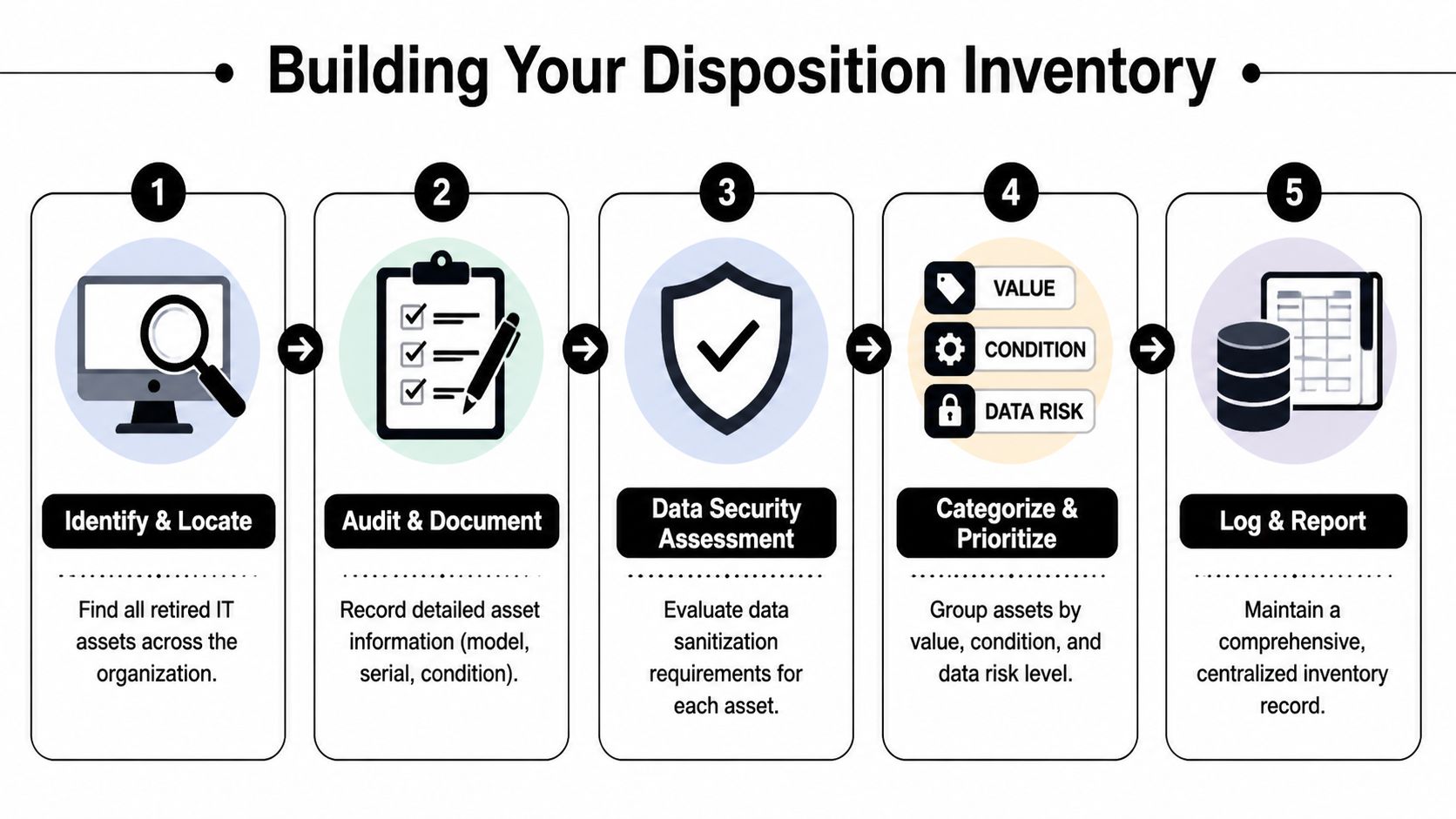
For each asset, capture:
- Asset identifier. Internal asset tag if it exists. If it doesn’t, assign a temporary tracking ID before movement.
- Manufacturer and model. This helps determine reuse potential and handling requirements.
- Serial number. This is the backbone of your audit trail.
- Device class. Laptop, desktop, thin client, server, switch, storage array, monitor, printer, or peripheral.
- Condition status. Working, damaged, incomplete, locked, non-booting, or for-parts-only.
- Data-bearing status. Internal drive present, drive removed, encrypted media present, unknown media state.
- Disposition recommendation. Redeploy, donate after sanitization, recycle, or destroy media first.
A centralized record matters more than the format. Some teams use an ITAM platform. Others begin with exportable spreadsheets and then map final outcomes later. The key is that the record stays consistent from first touch through final disposition.
Grade assets like an operator, not a donor
When teams think donation first, they often overestimate what is reusable in practice. A better method is to grade devices by operational reality.
- Functional and supportable. Good candidate for refurbishment and donation after approved sanitization.
- Functional but obsolete. May still have reuse value, but only if the recipient accepts limited support life.
- Non-functional with recoverable parts. Better for component recovery or certified recycling.
- High-risk media condition. Requires destruction path before any chassis reuse is considered.
A laptop with a cracked case and intact SSD is not a “quick donation.” It’s a media-risk asset until proven otherwise.
A practical example: an Atlanta healthcare system might find that office laptops from an admin refresh are viable reuse candidates, while older nursing station devices with uncertain media history move directly to destruction and recycling. The point isn’t to maximize donation volume. It’s to maximize safe outcomes.
Treat inventory as a control point
Your inventory should also support decision handoffs between IT, security, facilities, and procurement. That’s why teams benefit from using systems designed for IT asset tracking software and disposition visibility, even if they start simple.
A usable manifest answers hard questions quickly:
- Which devices still contain drives?
- Which serial numbers were collected from the radiology department?
- Which assets are old enough that repair no longer makes sense?
- Which units can be packaged together for pickup without mixing risk levels?
When this step is done well, the rest of the program gets easier. When it’s skipped, every later stage becomes an exercise in reconstructing decisions after the fact.
Mastering Data Sanitization and Destruction
A factory reset is an operating system action. Data destruction is a risk control. Those are not the same thing.
For computers for change programs, the biggest mistake I see is trying to preserve donation value by being too lenient on media handling. If a drive’s history is uncertain, if encryption status can’t be confirmed, or if the device came from a high-risk environment, your starting assumption should be caution.
There’s also a business reason to move decisively. Retaining computers older than four years can cost a business more than NZD$4,000 per device annually, approximately US$2,736, in repairs, downtime, and lost productivity according to a Microsoft study on the cost of not replacing older computers. Hoarding old assets “until someone can donate them” often costs more than organizations realize.
When wiping is the right answer
Software-based sanitization is appropriate when the media is functional, the device is a realistic reuse candidate, and your compliance posture allows logical destruction with documentation.
In many business programs, that means a DoD 5220.22-M 3-pass wipe for standard drives that can still be addressed reliably. This preserves the device for reuse while giving the organization a documented sanitization event.
Wiping is usually the right fit when:
- The device still has resale or donation value
- The drive is healthy and accessible
- You need the asset to remain intact for reuse
- Your organization requires formal wipe records tied to serial numbers
When shredding is the better decision
Physical destruction is the better call when media is damaged, inaccessible, unsupported, or too sensitive to justify logical sanitization. This often applies to failed drives, unknown SSD conditions, tapes, and situations where policy mandates irreversible destruction.
Shredding is also the right answer when the device itself has no meaningful second-life path. There’s no reason to preserve a storage medium solely to support a donation narrative.
Data Destruction Methods Compared
| Criteria | DoD 3-Pass Wiping | Physical Shredding |
|---|---|---|
| Best use case | Reuse-ready assets with functional media | Failed, inaccessible, obsolete, or high-risk media |
| Device preservation | Preserves system for donation or resale | Destroys media permanently |
| Auditability | Requires wipe logs tied to asset records | Requires destruction records and media tracking |
| Operational trade-off | Supports reuse but depends on drive health | Highest finality, but ends media reuse |
| Common fit | Laptops, desktops, some servers with working drives | Failed HDDs, SSDs with uncertain state, tapes, damaged media |
| Compliance posture | Strong when documented and policy-approved | Strong when irreversible destruction is required |
The decision should be policy-based
A mature organization doesn’t let technicians improvise this at the loading dock. It defines sanitization rules in advance.
Use a simple internal decision model:
- Known device, good media, viable reuse. Wipe and document.
- Unknown device history. Escalate before release.
- Damaged media or failed drive. Destroy physically.
- Protected or highly sensitive environment. Follow stricter destruction path if policy requires it.
“Donation value never outweighs data risk.”
That’s the standard security teams trust.
The document that closes the loop
No matter which method you choose, the process isn’t complete without a record your compliance team can file and retrieve. That means sanitized assets need traceable logs, and destroyed media needs formal proof.
If your team has ever struggled to answer “show me what happened to these drives,” you already know why the certificate and documentation process for data destruction matters. The certificate isn't admin paperwork. It’s the evidence that your organization fulfilled its duty of care.
Navigating Legal and Compliance Minefields
Legal exposure in a computers for change program rarely comes from the idea of donation itself. It comes from poor control between retirement and final disposition.
In healthcare and higher education, that gap can be wide. A workstation leaves a department. Someone stages it in a closet. A contractor moves it. A volunteer group asks whether the machines can be picked up. Weeks later, nobody is certain which serial numbers still had drives or who signed them out. That’s how manageable retirement projects become audit problems.
Chain of custody is the real compliance test
HIPAA conversations often focus on destruction standards, but auditors and counsel also care about who controlled the asset at each step. If your organization can't show an unbroken chain of custody from pickup through sanitization, you may have a process problem even if the drive was eventually destroyed.
That chain should include:
- Pickup or transfer records from the originating department
- Itemized manifests with asset tags and serials
- Secure transport handling
- Processing records tied to sanitization or destruction outcome
- Final disposition records for reuse, recycling, or destruction
This matters because compliance is not just technical. It is documentary.
Old hardware creates a different class of risk
Basic wiping processes also don't fully address every concern tied to aging hardware. Emerging firmware-level threats in older hardware are often missed by simple wipe routines, which raises the risk profile for donated devices and strengthens the case for using professional ITAD workflows, as discussed in this background discussion on data security risks in refurbished hardware.
That doesn’t mean every old machine is dangerous. It means organizations should be selective about what earns a second life.
A common failure pattern
A hospital clears several exam-room PCs during a refresh. The drives are “reset,” but not processed under formal chain-of-custody controls. A later inquiry asks for evidence that each device containing PHI was secured, sanitized, and released according to policy. The team can produce a pickup email and a broad statement that the systems were donated. It cannot produce device-level records.
That’s a weak position.
If your documentation starts with “we believe those units were included,” your process wasn't defensible enough.
The practical answer is to design your donation workflow as a compliance workflow first. Every handoff should be documented. Every exception should be visible. Every asset should resolve to one final state. Reuse is an outcome. Control is the requirement.
Choosing the Right Program Partner
A charity that accepts computers is not automatically an ITAD partner. That distinction is where many computers for change programs either stabilize or fall apart.
The wrong partner creates friction fast. They may be sincere and community-minded, but if they can’t support documented intake, secure logistics, media handling decisions, or auditable reporting, your team ends up carrying all the control burden internally. At that point, the program becomes difficult to sustain.
Treat partner selection as a change initiative
A new disposition program affects IT operations, security, legal review, and stakeholder communication. That’s why it helps to treat partner selection as an organizational change decision rather than a one-off vendor quote.
McKinsey found that organizational transformations reach a 79% success rate when organizations fully execute a structured, multi-action framework, compared with a 26% baseline average, according to McKinsey’s research on successful transformations. In practice, that means your ITAD program is more likely to stick when leadership ownership, frontline buy-in, communication, and review mechanisms are all in place.
The short list of things that matter
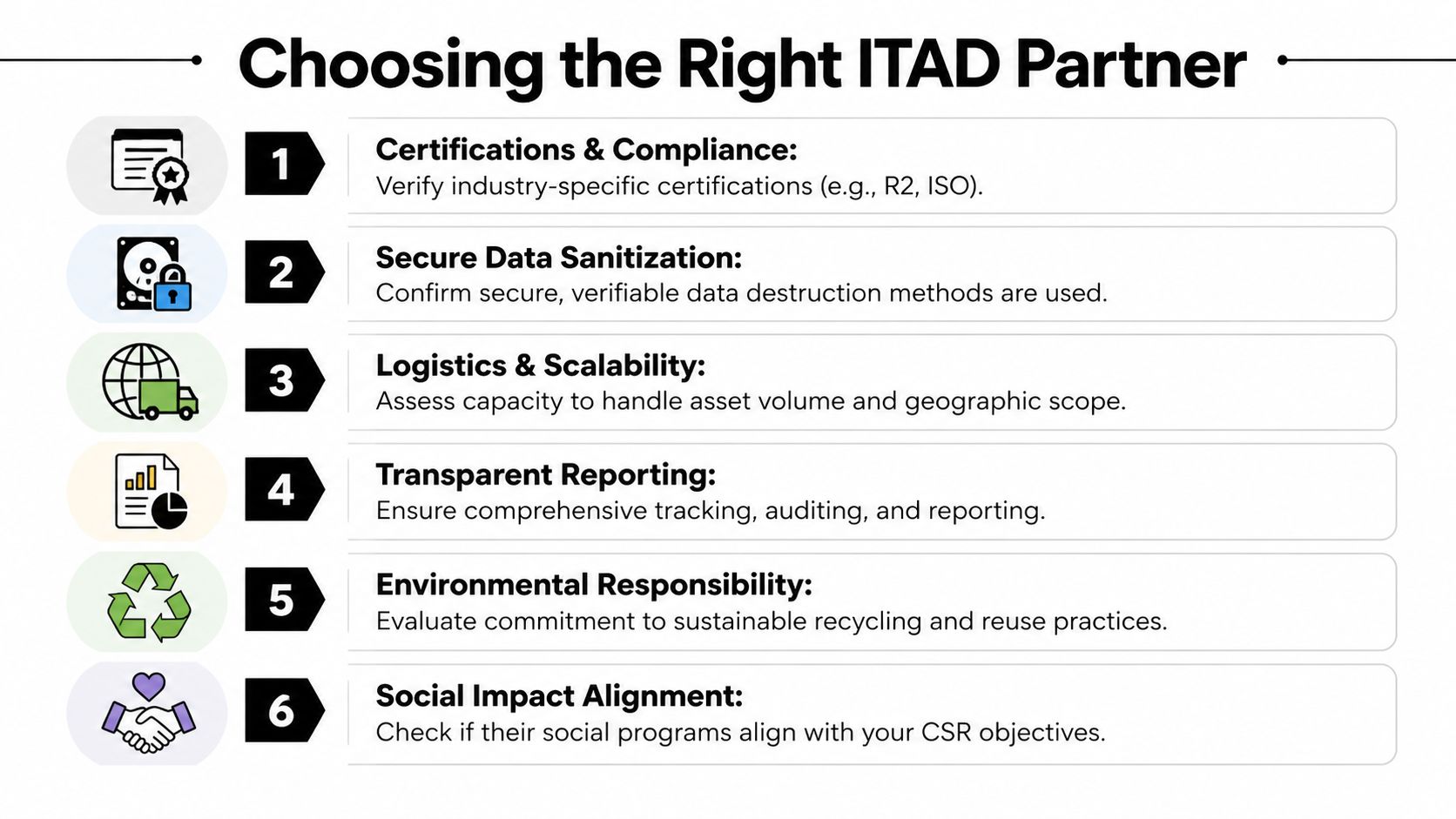
Use a partner checklist built around control, not marketing language:
- Certifications and standards. Ask what recognized certifications, memberships, or documented controls they maintain.
- Data handling method. Get specific on wiping, shredding, exception handling, and certificates.
- On-site capabilities. Confirm whether they can handle de-installation, palletizing, and secure pickup from active facilities.
- Asset-level reporting. You need serial-based outcomes, not summary promises.
- Environmental path. Ask how they prioritize reuse versus downstream recycling.
- Program fit. Make sure they understand hospitals, universities, and public-sector environments.
One useful benchmark when evaluating execution discipline comes from technology change metrics used to assess organizational efficiency. Even without forcing a numeric model onto every project, the lesson is clear: fewer unnecessary handoffs and more direct contributors usually produce cleaner results.
Questions worth asking in the first call
Some of the best vetting questions are simple:
- Can you provide itemized chain-of-custody records?
- How do you separate reuse candidates from destruction candidates?
- What happens when a device arrives with missing asset information?
- Can you support pickup from multiple sites across metro Atlanta?
- What proof do we receive after media destruction and final disposition?
Choose the partner that makes your controls stronger, not the one that makes the donation story sound nicer.
That’s usually the difference between a pilot that fades out and a standing program leadership keeps funding.
Managing Logistics and Reporting Your Impact
Execution is where a computers for change program either becomes routine or becomes a recurring fire drill. Good logistics keep the project from disrupting patient care, class schedules, research activity, or office operations.
The best rollouts start with pickup planning that matches how the facility operates. A hospital may need after-hours removal from clinical areas. A university may need building-by-building scheduling around term breaks. A data center may need staged de-installation so active racks aren’t affected.
Run the pickup like an operations project
Keep the field process simple and controlled.
- Stage by disposition class. Don’t mix likely donation assets with destruction-only media in the same unmarked pile.
- Label before movement. Devices should carry asset tags or temporary IDs before they leave their source area.
- Prepare access details early. Dock access, elevators, badging, and loading windows cause more delays than the actual lifting.
- Escalate exceptions fast. Locked rooms, missing drives, and unlisted devices should go into an exception log immediately.
For larger retirements, de-installation matters as much as transport. Servers, storage units, and network gear should come out in a way that preserves inventory accuracy and avoids accidental cross-mixing with active equipment.
Report what leadership can actually use
The reporting package should support two audiences. Security and compliance need proof of what happened to each asset. Leadership wants evidence that the program delivered environmental and social value without introducing risk.
A strong closeout usually includes:
- Asset-level disposition records
- Certificates for destroyed media
- Summary of assets prepared for reuse
- Summary of assets sent to certified recycling
- Narrative notes on exceptions and how they were resolved
The exact ESG format will vary by organization, but the strongest reports connect community impact to operational discipline. Not “we donated computers.” Better: “we retired assets through a documented process that prioritized reuse where appropriate, certified destruction where necessary, and responsible recycling for the balance.”
That’s the version boards, auditors, and sustainability teams can all support.
If you also need copies of final destruction paperwork for internal records, build that retrieval step into your process from day one using a standardized certificate of destruction request workflow. Teams rarely regret having too much documentation. They often regret having too little.
If you're building a secure computers for change program in Atlanta, Atlanta Computer Recycling can help you handle the hard part correctly. Their team supports business ITAD with on-site pickup, de-installation, DoD 5220.22-M wiping, physical media destruction, and documented disposition workflows designed for hospitals, schools, government agencies, and enterprise environments.