Electronics Recycling Best Buy: Business ITAD Comparison


A familiar scene shows up in IT closets, storage rooms, and empty offices all over Atlanta. Retired laptops are stacked on a cart. A few old servers are still sitting in a rack because nobody wants to touch them without a plan. Monitors, docks, phones, network switches, loose drives, and mystery cables keep accumulating because disposal feels easy right up until someone asks the hard question: what’s still on these devices, and who’s responsible once they leave the building?
That’s where the decision around electronics recycling best buy usually starts for a business. Someone on the team knows Best Buy takes electronics. It sounds convenient. It may even sound responsible. For a household cleanup, that’s often true. For a business environment, the decision is different. You’re not just trying to get rid of old equipment. You’re managing data exposure, compliance obligations, staff time, transport risk, documentation, and chain of custody.
An IT director doesn’t get judged on whether old hardware disappeared. They get judged on whether it disappeared safely, whether the asset records were closed out correctly, and whether the organization can prove what happened if legal, finance, compliance, or leadership asks later.
The E-Waste Crossroads for Atlanta Businesses
A mid-sized office move is where this problem gets real fast. One floor closes, users get newer laptops, the network core gets refreshed, and suddenly there’s a backlog of retired equipment with no clean exit path. Some of it is clearly scrap. Some of it still has value. Some of it definitely contains data. Most of it needs to leave the site without creating extra work for the IT team.

For Atlanta organizations, the crossroads usually looks like this. One path is a retail drop-off model built for consumers. The other is a commercial ITAD process built for business assets. On paper, both may end with recycling. In practice, they solve very different problems.
The retail option appeals because it’s visible and familiar. Stores are easy to find, and for small household quantities, that matters. The commercial path looks heavier at first because it involves pickup coordination, inventory handling, and destruction records. But that extra structure exists for a reason. Business equipment creates risk long after employees stop using it.
A box of old keyboards and power strips is one thing. A batch of laptops from HR, finance, a clinic, or a school district is another. The hidden cost isn’t just what happens to the hardware. It’s what happens if a drive wasn’t wiped properly, if assets go missing in transit, or if your team can’t produce clear destruction and disposition records later.
A retired device is still a live risk until custody, sanitization, and final disposition are documented.
That’s the lens worth using for this decision. Not convenience first. Risk management first.
Many Atlanta IT teams start by looking for the fastest local option, especially when space is tight and internal pressure is rising. If you’re sorting through that exact problem, it helps to frame disposal the same way you’d frame backup integrity or endpoint access control. It’s an operational control, not an errand. For local commercial context, Atlanta business electronics recycling options show how different the business workflow is from a consumer drop-off program.
What usually gets missed
The weak point isn’t always the recycling itself. It’s the handoff before recycling starts.
- Untracked movement: Devices get loaded into personal vehicles, moved without asset reconciliation, or handed off by staff who don’t own the process.
- Mixed asset streams: Low-risk peripherals get mixed with storage-bearing devices, which leads teams to treat everything the same when they shouldn’t.
- No proof later: Finance asks what happened to retired equipment, compliance asks for destruction evidence, and the IT team has nothing beyond a receipt or an email thread.
That’s why the Best Buy question for businesses shouldn’t be “Do they recycle electronics?” They do. The better question is whether that model fits the controls your organization needs.
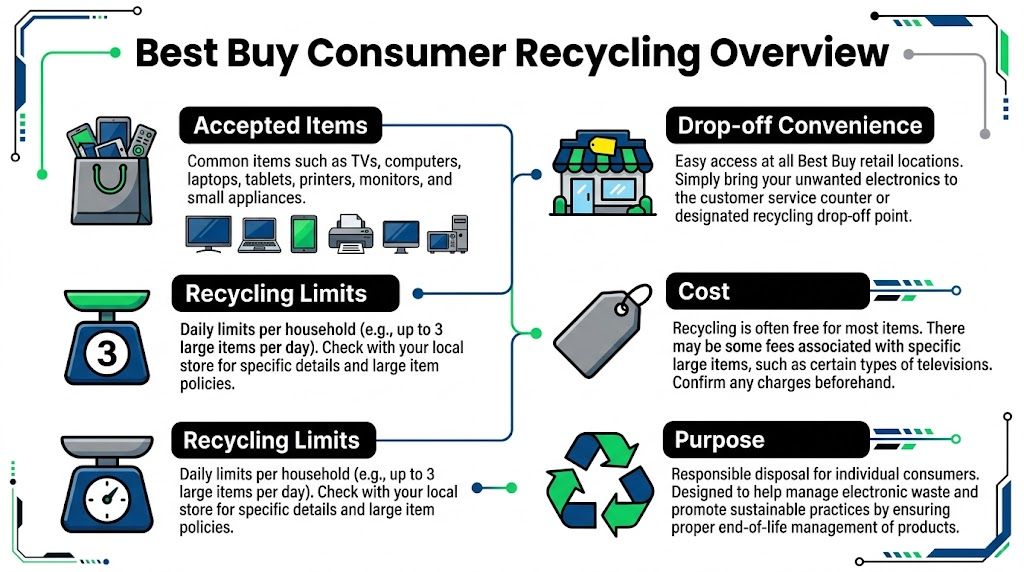
Understanding Best Buy Electronics Recycling for Consumers
A common failure point starts with a well-meaning office manager loading retired electronics into a car and driving them to a retail store. The trip feels efficient. For a business, it can create custody gaps, inconsistent intake records, and confusion about what happened to each asset after drop-off.
Best Buy’s recycling program solves a real consumer need. It gives households a visible, legitimate outlet for old electronics and keeps a lot of material out of the trash. The program has also operated at national scale for years, with Waste Dive’s reporting on Best Buy’s recycling milestones showing how large that collection effort has become.
Why the consumer model works
For home users, the model is simple. Check whether an item is accepted, bring it to a store, and hand it off through a retail collection program. That is a practical answer for a broken keyboard, an old router, or a TV that no longer belongs in the house.
The strength of the program is access. Stores are familiar, the process is easy to understand, and the public already associates the brand with electronics. That matters for consumers who need a local recycling option without setting up a pickup, sorting by resale potential, or managing paperwork.
What a business should understand before using it
The same design choices that make retail recycling convenient for consumers can create friction for commercial use. Best Buy built this program around household drop-off, store counter intake, and standardized limits. Business asset retirement usually requires controlled pickup, asset-level documentation, and decisions about data destruction before anything changes hands.
That difference shows up fast in day-to-day operations.
- Intake is retail-based: Your team packs the equipment, transports it, unloads it, and hands it over at a store.
- Policies are built for household volume: That can be workable for a few low-risk items and inefficient for office cleanouts, relocations, or refresh cycles.
- Documentation is limited compared with ITAD workflows: Retail recycling does not start with serialized reconciliation, audit-ready reporting, or a disposition plan tied to your asset register.
- Mixed devices create avoidable risk: A box of cables and dead keyboards is one thing. A batch that includes laptops, phones, printers, copiers, or anything with embedded storage is a different control problem.
That is the hidden cost many IT teams miss. The store drop-off itself may be inexpensive, but labor, transport time, chain-of-custody exposure, and post-handoff documentation gaps can make the total business cost higher than it looks.
I usually frame it this way for IT directors. Retail recycling is acceptable for a small number of non-sensitive peripherals when the business does not need pickup, serialized reporting, or media handling controls. It is a weak fit for storage-bearing devices, regulated environments, multi-site collections, or any project where finance, legal, or compliance may ask for proof later. If you want a side-by-side view of those differences, this guide to Best Buy recycling for business electronics is a useful reference.
Best Buy remains a valid consumer recycling outlet. The mistake is treating a consumer collection program as if it were a business disposition process. Those are different services with different risk profiles.
Defining Commercial IT Asset Disposition
IT Asset Disposition, usually shortened to ITAD, is the managed end-of-life process for business technology. Recycling is one piece of it. It’s not the whole job.
A commercial ITAD provider handles what business teams struggle with: secure collection, custody control, data destruction, equipment triage, documentation, and downstream disposition that can stand up to internal review. When companies think they need “electronics recycling,” they often really need a documented asset retirement process.
The four pillars that matter
A professional ITAD program usually rests on four operational pillars.
Data sanitization
This is the first one that matters because every later control depends on it. Drives, SSDs, phones, tablets, copiers, and embedded storage all need an explicit decision: wipe for reuse, or destroy.
In a business setting, “we removed the files” doesn’t count. The process has to be repeatable, defensible, and tied to the actual device.
Chain of custody
Custody begins before anything leaves the building. Who touched the equipment, when it was packed, what was removed from service, how it was labeled, and where it went next all matter. This is why mature providers don’t treat pickup as simple hauling. They treat it as a controlled transfer.
Compliance support
Healthcare, finance, education, legal, and public sector organizations all face different levels of scrutiny, but the operational need is similar. They need a process that helps demonstrate that sensitive information didn’t leak during decommissioning and disposal.
Compliance isn’t only about destruction. It’s also about evidence.
Logistics and downstream management
Business e-waste rarely shows up as three neat items by a front door. It appears as carts of laptops, closet cleanouts, palletized gear, branch office collections, old PBX systems, rack equipment, bad batteries, and mixed-value assets. Someone has to separate what can be remarketed, what needs dismantling, and what requires secure destruction.
What ITAD includes that recycling alone does not
A proper ITAD engagement may include some or all of the following:
- On-site pickup: Staff don’t have to break workflow to load cars and make multiple retail trips.
- Asset reconciliation: Devices can be counted, categorized, and tied to internal records.
- Media handling choices: Reusable drives may be sanitized. Failed or obsolete media may be shredded.
- Disposition reporting: The organization receives records that explain what happened to the equipment.
- Project support: Office closures, warehouse cleanouts, and data center work can be planned instead of improvised.
Operational test: If the process depends on your sysadmin spending half a day loading old equipment into a personal SUV, you’re not looking at enterprise-grade disposition.
For IT directors, the value of ITAD is that it converts a messy physical cleanup into a controlled risk event. The equipment still has to move. The difference is that the movement, sanitization, and final outcome are treated as part of governance, not as an afterthought.
If you want a plain-language overview of the service category itself, this explanation of what IT asset disposition means for businesses is a useful reference point.
Critical Comparison Data Security and Compliance
This is the point where the consumer and commercial models separate sharply.
Best Buy states that its recyclers wipe remaining data to render it unrecoverable, and the company also advises users to wipe their devices before drop-off. But the company doesn’t specify protocols such as NIST 800-88 in that guidance. By contrast, professional ITAD services may provide verifiable DoD 5220.22-M 3-pass overwrites, physical shredding, and auditable chain-of-custody reporting aligned with requirements such as HIPAA and NAID AAA, as described in Best Buy’s corporate guidance on recycling old tech.
That single distinction changes the risk profile for a business.
Service model comparison
| Feature | Best Buy Recycling | Commercial ITAD (e.g., Atlanta Computer Recycling) |
|---|---|---|
| Primary user | Consumers and households | Businesses, institutions, public sector |
| Data handling | Recyclers wipe remaining data after drop-off; user is advised to wipe devices beforehand | Verifiable sanitization workflows and physical destruction options |
| Protocol visibility | Consumer guidance does not specify enterprise sanitization standards | Business services may document overwrite or shredding methods |
| Chain of custody | Limited consumer-oriented process | Auditable custody from pickup through final disposition |
| Compliance fit | Not designed around HIPAA-style documentation needs | Built to support regulated business environments |
| Documentation | Basic customer-facing process | Certificates, serialized reporting, disposition records |
| Asset scope | Small-scale consumer drop-off | Bulk IT, storage devices, servers, network gear, site closures |
Wiped is not the same as certified destroyed
A lot of internal misunderstandings start here. Staff hear that a recycler “wipes” drives and assume that satisfies the organization’s duty. It may not.
A business usually needs answers to harder questions:
- Which device was sanitized?
- What method was used?
- Was the media functional enough to wipe?
- If not, was it physically destroyed?
- Who had custody before, during, and after the event?
- Can the organization produce a record tied to that asset?
“Data removed” is a process claim. “Certified destroyed” is a documented control.
That difference becomes critical when the assets came from executives, HR, accounting, legal, clinical environments, student systems, or any user group handling sensitive information. If a drive later turns up in the wrong place, “we assumed the recycler handled it” is a weak position.
Where businesses create unnecessary risk
The most common mistake is treating all retired hardware as low-risk scrap. It isn’t. Storage hides in more places than teams expect. Laptops and desktops are obvious, but so are all-in-one devices, old firewalls, printers, copiers, NAS units, phones, tablets, and some specialized equipment with internal memory.
The next mistake is assuming staff can compensate manually. They often can’t, at least not consistently. Busy teams skip serial capture. They remove a few drives but not all of them. They don’t document failed media separately. They transport devices without sealed containers or sign-off.
That’s how “recycling” turns into an uncontrolled data handling event.
Compliance is really a documentation problem
Most IT directors already understand that sensitive data shouldn’t leave the building casually. The harder part is proving the organization handled disposal correctly. Auditors, legal teams, and executives rarely ask whether you meant well. They ask for records.
A commercial ITAD workflow is built to produce those records. It can create a stronger separation between internal assumption and verifiable evidence.
That matters when you need:
- Asset-level traceability
- A certificate of destruction
- A signed custody trail
- A clear distinction between reused and destroyed equipment
- A defensible answer after an incident or inquiry
For teams formalizing that documentation layer, a sample certificate of destruction process for electronics disposal helps show what business-grade evidence should look like.
The recovery exception matters too
There’s another practical wrinkle. Some devices aren’t ready for destruction because legal hold, migration issues, or accidental retirement can surface after collection starts. In those cases, the business needs clarity on whether media should be isolated, returned, recovered, or destroyed.
That’s where a specialized outside resource can matter. If an organization discovers after decommissioning that certain data may still be needed, vetted professional data recovery services can be useful before irreversible destruction decisions are made.
Practical rule: Don’t send storage media into any disposal stream until your retention, recovery, and destruction decisions are explicit.
What works and what doesn’t
What works is a process that starts with classification. Non-sensitive peripherals can move through a lighter workflow. Data-bearing assets need a stricter path. High-risk media should have a destruction or certified sanitization decision before pickup day.
What doesn’t work is trying to retrofit enterprise controls onto a consumer drop-off model. Once staff are driving mixed devices to a store with no formal intake tied to your asset records, your governance is already weak.
For a business, the disposal question isn’t “Will this eventually be recycled responsibly?” It’s “Can we prove we handled sensitive assets correctly from the moment they left service?” If the answer is fuzzy, the process is too loose.
Comparing Logistics Volume and Cost Models
A common failure point starts in the parking lot. The IT team has a closet full of retired equipment, a store drop-off option that looks inexpensive, and no real plan for moving business assets at scale. By the time staff have sorted devices, loaded personal vehicles, made multiple trips, and tried to reconcile what left the building, the low visible price has already turned into labor cost and control risk.
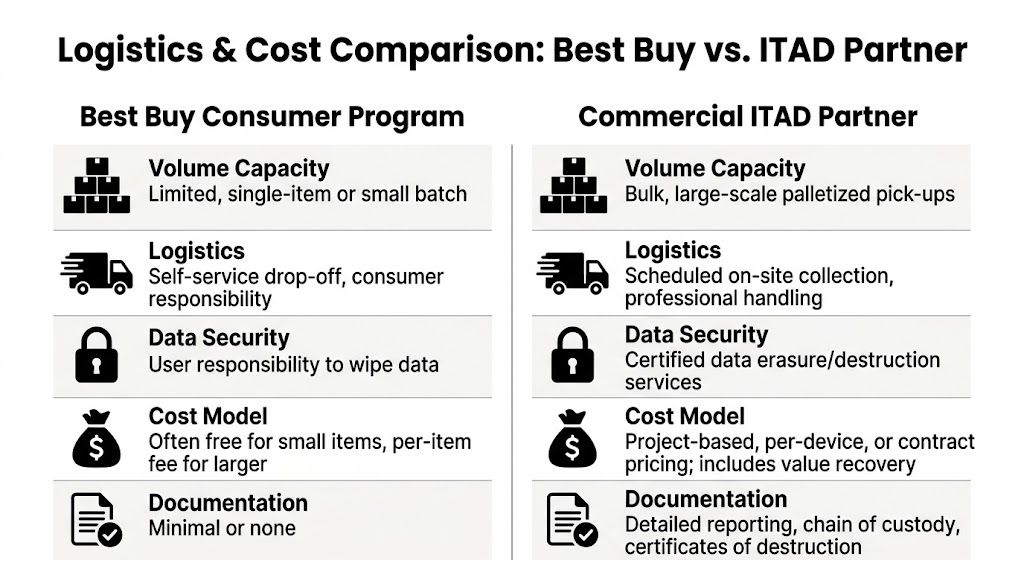
That is the core difference between a consumer recycling program and a business disposition project. One is built for a few items at a time. The other has to handle volume, scheduling, custody, and documentation without pulling engineers into warehouse work.
Retail limits create operational drag
As noted earlier, Best Buy’s program is designed around household use, category restrictions, and item-level handling. That model can work for a keyboard, a cable box, or a one-off monitor. It starts to break when an office refresh produces carts of laptops, stacks of displays, network gear, docking stations, and loose accessories that have accumulated across departments.
The problem is not legitimacy. The problem is fit.
A business retirement event needs a process that absorbs volume in one motion. If the method requires employees to meter equipment through a retail channel over several trips, the disposal stream has become an internal project your team now has to manage by hand.
The invoice is only part of the cost
Finance teams often see free or low-fee drop-off and assume that settles the cost question. For business assets, the larger cost usually sits inside your own operation.
Here is where that cost shows up:
- Manual sorting: Staff have to separate acceptable consumer items from equipment that needs a different path.
- Internal staging: Someone has to pull assets from desks, storage rooms, IDF closets, and conference spaces.
- Employee transport: Skilled staff lose time driving equipment instead of handling IT work.
- Repeat trips: Small-volume intake rules can turn one retirement event into several runs over several days.
- Record cleanup: Asset lists, retirement status, and exception handling still have to be updated internally.
Those hours rarely appear on the recycler’s receipt. They still hit your budget.
A professional electronic waste recycling company for business IT assets changes that cost structure. Pickup is scheduled around the project. Loads are consolidated. Labor shifts from your internal team to a vendor workflow designed for bulk removal.
Logistics design affects control
Logistics is not just a convenience issue. It changes your risk profile.
Ad hoc transport creates more touchpoints, more waiting time, and more room for mix-ups between low-value scrap and assets that still matter. I see this most often during office moves and refresh cycles. Devices end up staged in unsecured areas, loaded in mixed batches, or moved without a clean handoff between the person retiring the asset and the person dropping it off.
Planned collection reduces those gaps. The equipment moves through a defined route, with defined ownership, at a defined time. Teams that want a broader operations view can review the principles behind route optimization in logistics. The same discipline matters in IT asset disposition because every extra stop, delay, and handoff increases both cost and error rates.
Poor disposal logistics waste staff hours and weaken accountability for the assets at the same time.
Consumer pricing and ITAD pricing solve different problems
Consumer recycling is usually transaction-based. A person shows up with a small number of items, and the retailer processes what fits that public program.
Commercial ITAD pricing reflects a different scope of work. The charges may include bulk pickup, packing or palletization, de-installation, serialized processing, on-site services, and value recovery on reusable equipment. On paper, that can look more expensive than a retail drop-off option. In practice, it is often the cheaper business decision once you count internal labor, project delays, fragmented transport, and the lack of business-grade reporting.
What the two models look like in operation
An IT director should compare operating model against operating model, not receipt against receipt.
| Operational factor | Consumer drop-off model | Commercial ITAD model |
|---|---|---|
| Pickup approach | Employee-driven transport | Scheduled site collection |
| Volume handling | Small quantity | Bulk-ready |
| Project ownership | Internal staff improvises | Vendor-led workflow |
| Documentation depth | Light | Business-grade reporting |
| Fit for office closures | Weak | Strong |
| Fit for server and network gear | Limited | Purpose-built |
For small, low-risk items, a retail option may be adequate. For business volume, the key question is whether your process removes burden from the IT team or pushes it back onto them. If your engineers are acting as movers, drivers, and intake staff, the disposal model is already inefficient.
When to Use Best Buy vs When to Hire an ITAD Partner
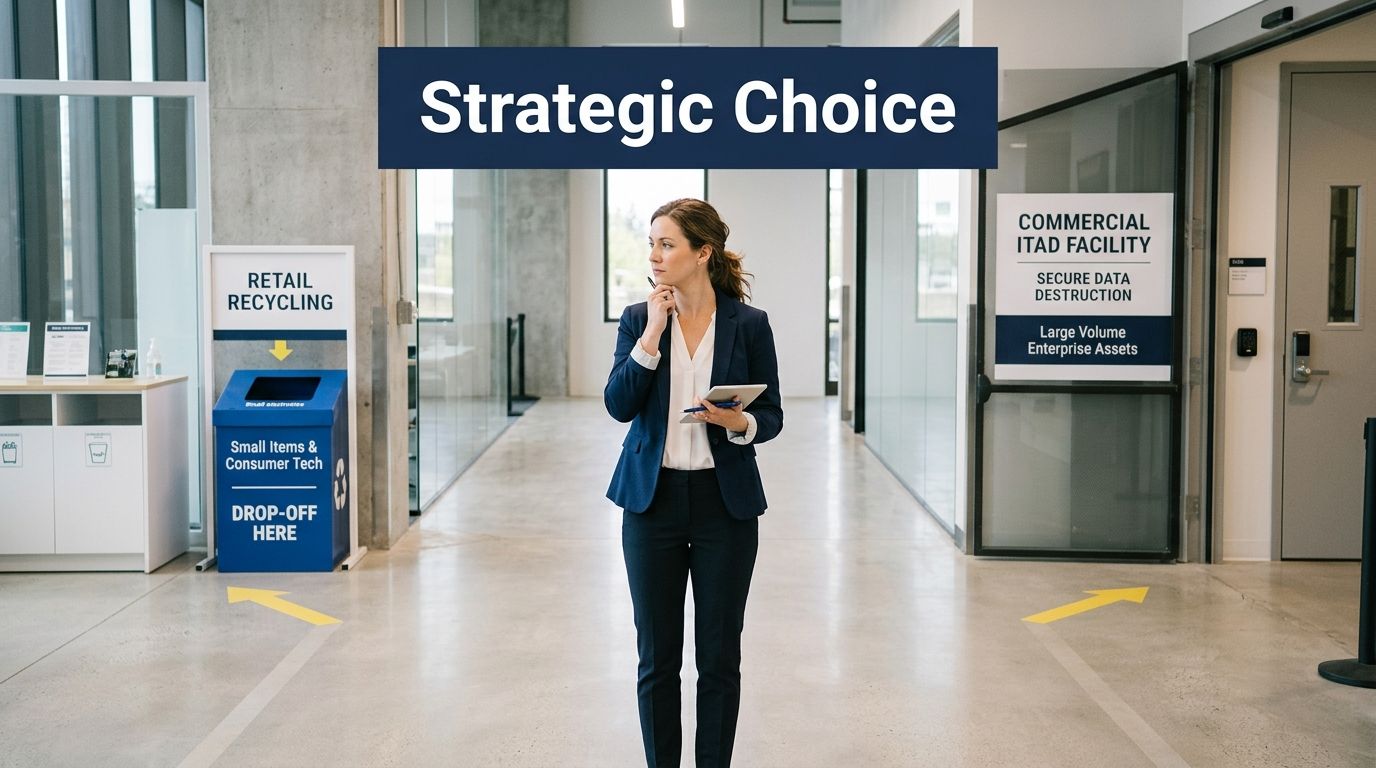
There is a narrow lane where Best Buy can make sense for a business. There’s also a wide lane where it doesn’t.
A 2022 survey found that 61% of consumers who don’t recycle say they don’t know where to go, according to Trellis coverage of Best Buy’s recycling model. Best Buy’s retail footprint solves that consumer access problem well. It doesn’t solve the business problems that matter most to IT directors.
When Best Buy may be acceptable
Use the consumer route only if the assets are low-risk and the scope is small.
- Non-sensitive peripherals: Think cables, mice, keyboards, or other devices with no storage and little compliance exposure.
- One-off employee cleanup: A tiny amount of miscellaneous electronics may be manageable if no formal chain-of-custody record is needed.
- No business-critical timeline: Retail drop-off works better when urgency and volume aren’t driving the project.
Even then, the internal rule should be strict. No storage-bearing device goes through that path unless your organization has explicitly decided the risk is acceptable and completed internal sanitization first.
When an ITAD partner is the right call
Most business scenarios belong here.
- Healthcare and clinical environments: If devices may involve protected information, use a documented destruction workflow.
- Finance, legal, and HR equipment: These departments create too much exposure for casual handoff.
- Schools, colleges, and districts: Bulk rollouts and refreshes create operational volume that retail programs aren’t built to absorb.
- Government and public sector: These teams need process control, documented custody, and clean disposition records.
- Server rooms and data centers: Heavy equipment, embedded storage, and decommissioning complexity require project-based handling.
- Office relocations or closures: When speed, chain of custody, and labor coordination matter, consumer drop-off is the wrong tool.
If the project touches regulated data, bulk assets, or executive visibility, treat disposal as a managed ITAD event.
Vendor checklist for IT directors
When evaluating a commercial provider, ask for direct answers to these questions:
How do you handle data-bearing assets?
Ask whether the provider uses overwrite methods, physical shredding, or both.What documentation do you provide?
You want clear records, not vague assurances.How does custody work from pickup onward?
The handoff process matters as much as final recycling.Can you support bulk pickups and site logistics?
If your team still has to do most of the lifting, the service may not fit.How do you separate reuse from destruction?
That decision should be controlled and documented.What types of organizations do you serve?
Experience with hospitals, schools, enterprises, and government settings usually signals stronger operational discipline.
A qualified commercial electronic waste recycling company for business assets should be able to answer those questions plainly and without hand-waving.
Your Next Steps for Secure E-Waste Management
Best Buy’s recycling program fills an important public role. It gives consumers a visible and responsible outlet for old electronics. That’s useful, and for the right small-scale situation, it can help keep equipment out of the waste stream.
But business asset retirement is a different category of work. The standard isn’t convenience. The standard is whether your organization can control data risk, maintain custody, manage volume, and produce documentation when someone asks for it later.
Therefore, the primary comparison around electronics recycling best buy isn't retail versus recycling. It's consumer convenience versus business-grade risk control.
If your equipment includes storage media, regulated information, office-scale volume, or any situation where leadership would expect a clear paper trail, use a professional ITAD process. Build the disposal plan before the cleanup starts. Separate low-risk peripherals from data-bearing assets. Decide what gets wiped, what gets shredded, and what records your organization needs to retain.
For Atlanta IT directors, that shift matters. It keeps retired hardware from becoming an unmanaged liability sitting in a back room, in an employee vehicle, or in a weak handoff process that nobody can fully explain later.
If your organization needs a secure, documented path for retired business electronics, Atlanta Computer Recycling can help you build a practical ITAD plan for pickups, data destruction, and compliant end-of-life processing across the Atlanta metro area.