Best Buy/Recycling for Businesses: An Atlanta ITAD Guide

Your storage room probably looks familiar. Retired laptops from the last refresh. A few dead monitors. Docking stations nobody wants. Maybe an old firewall, a stack of access points, and several desktops waiting for “the next cleanup day.”
At that point, best buy/recycling feels like the obvious answer. It’s visible, local, and simple. Load up a few carts, drive over, drop the equipment off, and move on.
That logic works for household clutter. It gets dangerous fast when the devices came from a business. The moment those assets hold employee records, patient information, customer data, contracts, emails, credentials, or proprietary files, the decision stops being about convenience. It becomes a question of liability, chain of custody, and proof.
E-Waste Disposal for Your Business Is Best Buy the Answer
An IT manager at a growing Atlanta company usually reaches this decision under pressure. Finance wants the storage room cleared. Operations wants space back. Security wants old devices gone. The easiest answer is often the one everyone already recognizes.

Best Buy has earned that visibility. Its recycling program launched in 2009, and by the end of fiscal year 2023 it had collected more than 2.7 billion pounds of electronics and appliances, including over 183 million pounds in FY23 alone, according to Best Buy’s FY23 corporate responsibility reporting. For consumers, that scale matters. It signals that the program is real, established, and easy to find.
For businesses, scale alone doesn’t answer the harder questions.
What looks simple can create exposure
The problem isn’t that consumer recycling is bad. The problem is that consumer recycling and commercial IT disposition solve different problems. One is designed to help households get rid of a few items responsibly. The other is designed to help organizations retire assets without creating a security incident or a compliance problem.
A business has to think about things a retail counter doesn’t solve on its own:
- Who handled the device before final destruction or processing
- Whether data destruction can be documented
- Whether the asset list matches what left the office
- Whether the process works for bulk volumes
- Whether regulated data remained protected the entire time
A business can’t treat retired devices like general junk removal. Old hardware is still a risk surface.
That’s where many organizations get tripped up. Someone assumes “recycled” means “securely retired,” and those are not the same thing.
If you’re evaluating the retail option against a business-grade approach, this Best Buy recycling guide for Atlanta organizations is a useful starting point because it frames the core issue correctly. The choice isn’t free versus paid. It’s convenience versus documented risk control.
The real decision
If you’re clearing out a handful of personal accessories, Best Buy may be a perfectly responsible option. If you’re managing office laptops, medical workstations, school devices, network equipment, or anything from a server room, you need to look past the storefront and ask what your organization will be able to prove later.
That’s the standard that matters when audit questions start.
Understanding the Two Models Consumer vs Commercial E-Waste Recycling
Most confusion around best buy/recycling comes from assuming all recycling programs work the same way. They don’t. The business mistake is comparing them as if they’re two versions of the same service.
They’re not.
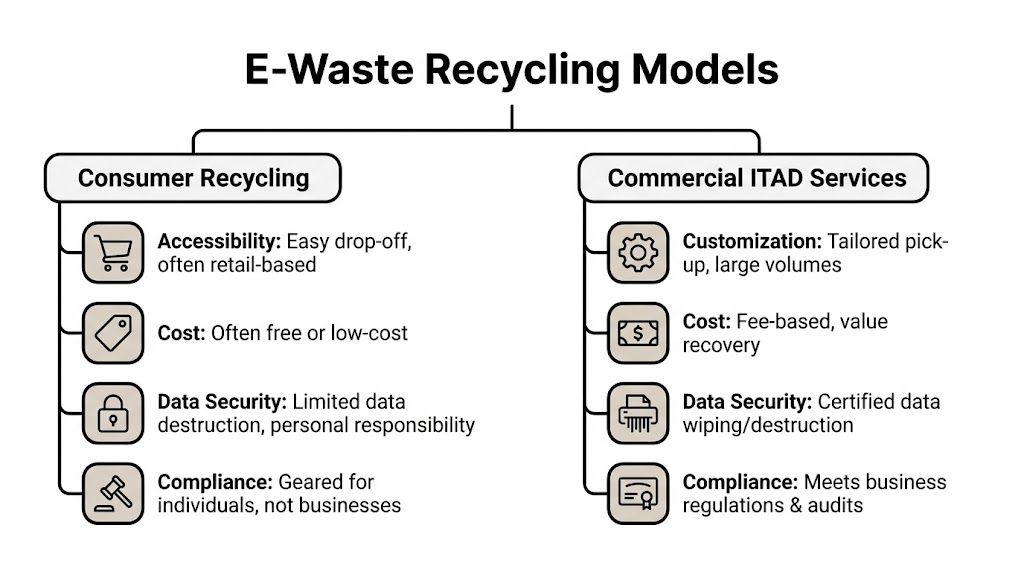
Consumer recycling is built for convenience
Consumer programs are designed around one goal. Make it easy for an individual to bring in a small number of items and keep them out of the trash. That model is intentionally lightweight. It favors accessibility, broad public participation, and simple intake rules.
That approach works. Best Buy shoppers show stronger recycling behavior than the general population. 22% of Best Buy shoppers recycle all or most of their electronics, compared with 18% of the general U.S. population, as reported by Trellis in its review of the program. That’s a strong sign that the consumer model does what it’s supposed to do.
What it’s supposed to do is the key phrase.
Consumer recycling is optimized for:
- Small quantities
- Standardized intake
- Household users
- Minimal process complexity
- Fast drop-off over formal documentation
It is not built around audit readiness, internal asset reconciliation, or regulated data retirement.
Commercial ITAD is built for risk management
A business-grade ITAD process starts from a different premise. Retired equipment still has value, still has identity, and often still has data. The process therefore has to protect the organization while the assets move from active use to final disposition.
Commercial ITAD usually centers on a few operational requirements:
- Asset accountability: each device should be identified, handled, and reconciled.
- Data destruction controls: wiping or shredding should follow a defined process.
- Chain of custody: the organization needs to know where the equipment was and who controlled it.
- Logistics planning: pickup, packing, de-installation, and transportation matter.
- Compliance support: records need to exist after the equipment is gone.
That’s why business disposal often feels “heavier” than a drop-off program. It is heavier. It has to be.
Why the difference matters in practice
A household customer asks, “Can I recycle this old laptop?”
A hospital, school district, law office, or enterprise asks very different questions:
- Can we document data destruction?
- Can we move a large volume without disrupting operations?
- Can we retire devices from multiple departments under one controlled process?
- Can we show what happened to every asset if legal, audit, or security asks later?
Those aren’t edge cases. They’re normal business requirements.
Practical rule: If the main concern is “where can I drop this off,” you’re in consumer-recycling territory. If the main concern is “how do we retire this without exposure,” you’re in ITAD territory.
For Atlanta organizations dealing with offices, clinics, schools, and technical environments, the distinction is often clearer once the disposal project is treated as part of operations instead of janitorial cleanup. A local example of that broader sustainability and disposition mindset appears in this Atlanta recycling resource, which helps show why not every waste stream should be handled the same way.
Security Compliance and Logistics A Head-to-Head Comparison
The useful comparison isn’t “Which option recycles electronics?” Both do. The useful comparison is which option protects a business while doing it.
Here’s the quick view first.
| Feature | Best Buy Recycling | Atlanta Computer Recycling (Commercial ITAD) |
|---|---|---|
| Intended user | Consumer households | Businesses, institutions, and organizations |
| Volume handling | Small drop-off quantities | Bulk commercial loads and project-based pickups |
| Accepted business equipment | Limited for enterprise-type gear | Designed for computers, laptops, servers, network gear, and data center equipment |
| Data destruction proof | No auditable Certificate of Destruction for individual assets | Certificate-based documentation for business records |
| Chain of custody | Retail intake model | Managed business process with traceability |
| Pickup and de-installation | Store drop-off model | On-site pickup, packing, and de-installation |
| Compliance support | Not built for HIPAA-style business documentation | Built around business disposal requirements |
| Use case fit | Personal electronics and small household loads | Office refreshes, closures, decommissions, and regulated environments |

Data security is the first dividing line
Best Buy states that its recycling partners must process hard drives and data storage devices in a way that renders data unrecoverable. That matters, and it shows the program takes responsible handling seriously. But Best Buy does not offer direct NAID AAA certification and does not provide auditable Certificates of Destruction for individual assets, which businesses often need for HIPAA-related proof and internal compliance records, as outlined in Best Buy’s recycling guidelines.
That gap is where business risk starts.
For a household device, a general assurance may be enough. For a clinic, legal office, school system, manufacturer, or financial services firm, it usually isn’t. Those organizations don’t just need good intentions. They need evidence.
A business-grade process should answer:
- Which asset was destroyed or wiped
- When that happened
- Which method was used
- Who maintained control of the device before final processing
If you can’t answer those questions later, security may still believe the project went fine, but compliance can’t prove it.
If a drive once held regulated or sensitive data, “they said they handle it responsibly” is not a record. It’s a hope.
Compliance requires documentation, not assumptions
A receipt for dropped-off equipment isn’t the same thing as a compliance artifact. Businesses often learn that too late.
Healthcare groups need records that stand up to HIPAA review. Schools and universities need disposal controls that align with internal policy and student data responsibilities. Government departments and contractors need asset accountability that survives audit. Corporate legal teams want proof that retired devices didn’t leave the premises and disappear into a generic recycling stream.
That’s why a formal Certificate of Destruction process matters in business ITAD. It changes the event from “we dropped some things off” into “we have records showing what happened.”
Scalability changes the entire workflow
Best Buy’s model is constrained by design. It works when a person brings a manageable number of items to a store. It doesn’t work well when a business is trying to move inventory from multiple floors, remote closets, storage cages, or a server room.
At the business level, disposal usually involves more than the devices themselves:
- Asset staging
- Packing and palletizing
- Serial tracking
- Internal approvals
- After-hours access
- Loading dock coordination
- Transport scheduling
That transport piece is easy to underestimate. Once equipment leaves one facility and moves to another, logistics become part of the risk picture. Teams planning larger moves often benefit from understanding how professional transport carrier services work, especially when chain of possession and timing matter as much as the final recycling step.
A consumer drop-off service doesn’t solve those operational details. Your staff does.
Logistics are where “free” gets expensive
A retail drop-off model often looks inexpensive because the line item on paper is low or nonexistent. The internal labor usually doesn’t get counted.
For a commercial disposal project, someone inside the organization still has to:
- pull the assets,
- verify what’s leaving,
- remove drives or accessories if policy requires it,
- load vehicles,
- send staff off-site,
- and hope nothing gets separated or mishandled in transit.
That’s real cost. It’s just hidden inside payroll, downtime, and process risk.
A professional B2B service shifts that work into a controlled workflow. Pickup gets scheduled. Equipment gets handled on-site. Staff doesn’t spend half a day improvising disposal logistics. Sensitive areas can be managed with less disruption. That matters most during office closures, summer refreshes, mergers, and data center work, where the disposal process competes directly with production priorities.
Accepted items and project fit
Many organizations realize they were trying to force a consumer solution into a commercial problem.
Consumer drop-off programs are best for common household electronics. Business ITAD has to deal with equipment that doesn’t fit neatly into that flow, including rack gear, switches, storage hardware, retired workstations, damaged units, and bulk laptop lots from refresh cycles.
The difference isn’t just “what’s accepted.” It’s whether the provider is set up to handle the project as an operation instead of a drop-off.
What works and what doesn’t
Best Buy works when:
- an individual has a few household devices,
- the main goal is responsible recycling,
- no business documentation is required,
- and no one needs asset-level records later.
Commercial ITAD works when:
- assets came from an organization,
- devices may contain sensitive or regulated data,
- volume is too large for ad hoc trips,
- equipment includes enterprise hardware,
- or the company needs proof, tracking, and controlled handling.
The mistake isn’t using a consumer program for consumer devices. The mistake is assuming it provides the same legal and operational protection a business retirement process requires.
Beyond the Drop-Off Unseen Risks and Liabilities for Your Business
A controller asks for disposal records six months after an office refresh. Legal wants to know who handled the laptops. Cyber insurance asks whether data destruction was documented. If the answer is a store receipt and an employee’s recollection, the business has a documentation problem, not a recycling solution.

Liability stays with the organization
Businesses often treat disposal as the point where risk leaves the building. Liability does not work that way. If regulated data is later exposed, or if an auditor asks for proof of handling, the organization still has to answer for the process it chose.
That is the hidden problem with a simple electronics disposal drop-off option for commercial assets. Convenience is real. So is the gap in custody records, asset-level reporting, and documented sanitization when the job involves business devices instead of a few household items.
Best Buy’s public consumer FAQs do not present a formal path for the kind of HIPAA, audit, or legal documentation many organizations expect from a commercial retirement process, as reflected in Best Buy’s recycling FAQ context. The risk point is straightforward. Improper or undocumented disposal creates exposure long after the equipment is gone.
Cost shows up in places finance did not budget for
The first concern is usually fines or breach response. In practice, the bigger cost is often the internal work that follows a weak disposal trail.
A disposal failure can trigger:
- Internal audit review
- Legal hold and document collection
- Incident response and security review
- Cyber insurance notifications
- Customer, patient, or partner communications
- Executive reporting
- A second disposal project to reconstruct records
Those hours add up fast. I have seen organizations spend more time explaining a bad retirement process than they would have spent running a controlled one in the first place.
Cheap recycling becomes expensive when the business cannot prove what happened to its assets.
Old drives still carry real exposure
Retired equipment is often treated as low-risk because it was reset, reimaged, or left unused in storage. That assumption fails regularly. Data can remain recoverable if wiping was inconsistent, undocumented, or never verified.
That is why experienced IT and security teams treat storage media conservatively. If anyone doubts how much information can still be pulled from a device, review the cases handled by professional data recovery services. The lesson is not that every drive will be recovered. The lesson is that businesses should not base disposal decisions on hope.
Proof is the real dividing line
Regulators, customers, outside counsel, and auditors rarely ask whether equipment was "probably recycled correctly." They ask for records.
A defensible process should show:
- Which assets left the environment
- Who had custody at each handoff
- How data was destroyed or sanitized
- What final disposition occurred
- When the process was completed
Without that record set, the company is left arguing from memory.
Convenience can shift liability onto employees
Consumer recycling often looks harmless because it is easy to assign. An office manager loads devices into a car. A technician makes a few trips after hours. A branch employee handles local disposal because it is faster than coordinating a project.
Now the business has turned staff into transporters, custodians, and witnesses in a process with little formal control. If something goes wrong, the company still owns the risk, and the employee is stuck in the middle of questions they were never trained or authorized to answer. That is the trade-off business leaders need to see clearly. Consumer convenience can become commercial liability.
When to Use Which Service Scenarios for Atlanta Organizations
The easiest way to judge best buy/recycling for business use is to stop thinking about categories and start thinking about actual disposal events.

Best Buy’s consumer model limits drop-offs to three household items per day and does not support bulk commercial volumes or equipment types like servers and network gear, according to Best Buy’s recycling service information. That one operational fact answers a lot of business scenarios before the security discussion even starts.
A healthcare clinic replacing front-desk and exam-room PCs
This is not a retail drop-off job.
Those devices may contain patient information, scanned IDs, scheduling records, and cached documents. Even if the clinic’s IT team has done internal prep work, the organization still needs a controlled offboarding process and documentation that supports HIPAA obligations.
The right fit is a business ITAD workflow with documented data destruction and chain of custody. A consumer counter introduces too much ambiguity.
A school district doing a summer laptop refresh
This project usually involves volume, timing pressure, and multiple buildings. The issue isn’t just where the old devices go. The issue is whether the district can move them in bulk, reconcile inventory, and avoid tying up staff during the narrow summer turnover window.
A retail model breaks down immediately here. The household limit alone makes it impractical. Schools generally need a scheduled commercial pickup process tied to inventory management and responsible downstream handling.
A mid-sized company shutting down a floor after a hybrid-work shift
This is a common Atlanta office scenario. There may be docking stations, monitors, desktops, phones, printers, and a few neglected closets of old hardware. It’s tempting to split the difference and let staff do piecemeal drop-offs.
That usually creates a recordkeeping mess. Some assets leave. Some don’t. Peripheral equipment gets mixed up. Nobody has a full list. If any endpoint still contains business data, the company has created unnecessary uncertainty.
A server rack or network closet decommission
Consumer recycling is the wrong tool here.
Servers, switches, firewalls, and rack hardware require planning, handling, and often de-installation. They also tend to hold more concentrated business risk than standard office endpoints. For these assets, a business-grade e-waste and IT disposition process matters most, especially for organizations planning closures, migrations, or infrastructure upgrades. Teams dealing with those projects usually need a service model closer to commercial e-recycling support than a storefront drop-off lane.
If the disposal project includes racks, patch panels, storage, switches, or any device your infrastructure team had to document during installation, treat retirement as an operations project, not an errand.
A freelancer or sole proprietor with a couple of personal devices
In such instances, Best Buy can make good sense.
If the items are personal, the quantity is small, and there’s no regulated business data or formal recordkeeping requirement, a consumer recycling program can be a responsible and efficient choice. That’s exactly the kind of use case it was built for.
The practical dividing line
Use the consumer option when the disposal event looks like household cleanup.
Use commercial ITAD when the disposal event looks like:
- an office refresh,
- a compliance-sensitive retirement,
- a location closure,
- a network or server decommission,
- a school or healthcare turnover,
- or any project where records and controlled handling matter.
That’s the line most organizations should adopt internally.
Your Final ITAD Decision Checklist for Commercial E-Waste
Before you choose a disposal path, run through these questions with your IT lead, security contact, and whoever owns compliance or facilities.
Answer yes to any of these and you need a business ITAD process
- Do the devices contain customer, patient, employee, student, legal, financial, or proprietary business data?
- Do you need a Certificate of Destruction or similar record for compliance files?
- Are you disposing of more equipment than staff can realistically track by hand?
- Does the project include servers, storage, switches, firewalls, or other enterprise gear?
- Do you need pickup, packing, or de-installation rather than casual drop-off?
- Would an auditor ask for proof of chain of custody?
- Would your security team want asset-level documentation if a question arose later?
- Is the equipment coming from a clinic, school, government office, law office, finance team, or any regulated environment?
If every answer is no
A consumer recycling option may be reasonable if you’re dealing with a very small quantity of low-risk equipment and you don’t need formal business records.
If you’re hesitating on even one answer
Treat that hesitation as a warning, not a minor detail. Most disposal mistakes happen because teams downgrade an IT risk into a facilities task. Once the assets leave your control, fixing that decision gets much harder.
The safest rule is simple. If the equipment belonged to an organization and the organization may need to prove what happened to it, choose a process designed for business accountability.
Frequently Asked Questions on Business E-Waste Recycling
Can our small business use Best Buy if we wipe the drives ourselves
Sometimes, but it’s still risky if the devices are company assets and you need records later. Internal wiping may reduce exposure, but it doesn’t solve chain of custody, bulk handling, or proof of final disposition. If the devices held sensitive information, self-managing the process can still leave a documentation gap.
What is a Certificate of Destruction and why is it more than a receipt
A receipt shows that someone dropped something off. A Certificate of Destruction is part of a business record trail showing that data-bearing assets were destroyed or sanitized through a defined process. For regulated or security-conscious organizations, that difference matters because audits and investigations usually focus on proof, not intent.
Is one option more environmentally responsible than the other
Not automatically. A consumer program can be a solid environmental choice for household electronics. A commercial ITAD process can also be environmentally responsible while adding business controls like secure handling, reuse triage, and documentation. The better option depends on the asset type, the data risk, and whether the organization needs formal accountability.
We only have a few laptops. Doesn’t that make retail fine
Quantity isn’t the only factor. Three laptops from a medical office can create more risk than a whole pile of low-risk personal accessories. The deciding issue is what the devices contain and what your organization may need to prove afterward.
What about old monitors, cables, keyboards, and accessories
Low-risk peripherals are the closest gray area. If they contain no data and you’re handling only a small amount, a consumer drop-off route may be workable. But once the project includes computers, storage media, network hardware, or mixed lots from a business environment, it’s smarter to keep the entire disposal event under one documented process.
If your organization needs secure, documented, business-grade electronics disposition in metro Atlanta, Atlanta Computer Recycling provides commercial ITAD, data destruction, pickup, and decommissioning support for offices, schools, healthcare groups, government entities, and data center projects.