Secure IT Disposal for Gwinnett County Georgia Managers

You’re probably dealing with one of two situations right now.
Either a refresh project is already underway and retired laptops, switches, thin clients, and rack gear are piling up faster than your team can process them. Or the refresh hasn’t started yet, but you already know what’s coming: tickets about replacement hardware, department heads asking for pickup timelines, compliance questions from legal, and a growing list of assets that still contain data.
In gwinnett county georgia, that problem has more weight than it does in a slower market. Local organizations are expanding, healthcare and public sector environments are getting more complex, and data center activity in the broader metro area is raising the bar for how equipment retirement gets handled. Bad IT disposal doesn’t just create clutter. It creates exposure.
The Growing Challenge of IT Assets in Gwinnett County
A common Gwinnett scenario looks like this: an IT manager signs off on a device refresh for a growing office, clinic, school, or county-adjacent contractor. New systems arrive on schedule. The old equipment doesn’t leave nearly as cleanly.
That’s when the significant disposal problem shows up. Retired assets sit in staging rooms, under desks, or in locked closets because nobody wants to be the person who moves a data-bearing device without a documented chain of custody.

Gwinnett’s scale makes this more than a housekeeping issue. Gwinnett County's population surged from 72,349 in 1970 to an estimated 1,037,017 in 2026, a 1,223% increase that has fueled massive commercial, healthcare, and educational expansion, directly correlating with an increased volume of organizational technology that requires periodic, secure retirement (Gwinnett County population data).
What that growth looks like in practice
The pressure isn’t abstract. It shows up in daily operations:
- More endpoints to track: Growing teams mean more laptops, monitors, docks, phones, and peripherals entering the asset pool.
- Shorter replacement windows: Legacy systems stay in service until a modernization push finally forces action, then everything gets retired at once.
- Mixed-risk inventories: A single pickup can include ordinary office hardware, executive devices, old SAN components, badge readers, and medical-adjacent equipment.
- No room for informal disposal: Once assets contain customer records, employee information, patient data, or internal financial files, “just recycle it” stops being a valid plan.
That’s why disposal has to be planned as part of modernization, not treated as an afterthought. Teams that are working through platform upgrades or old application retirements often benefit from thinking about disposition at the same time they think about migration. A useful reference on that side of the project is Legacy System Modernization Strategies, especially if you’re trying to retire hardware and dependent systems in a controlled sequence.
Practical rule: If your refresh plan names what’s coming in but doesn’t name who owns the retired equipment, where it will be staged, and how data will be destroyed, the project is only half planned.
What works and what fails
What works is simple. Build disposal into the project scope, inventory before pickup, separate reusable gear from end-of-life material, and require destruction records for data-bearing media.
What doesn’t work is also predictable. Waiting until storage fills up. Letting departments self-sort equipment. Mixing wiped and unwiped devices in the same pallet. Assuming a recycler’s pickup receipt is enough for audit purposes.
Gwinnett's Economic Engine and Its IT Footprint
Gwinnett isn’t a one-industry market. That matters for IT asset disposition because different sectors generate different disposal patterns, risk levels, and logistics problems.
With a median household income of $87,890 and 404,763 total jobs, Gwinnett's strong economy supports significant technology investment. Service sectors account for 59.4% of employment, indicating a high concentration of office-based businesses with consistent IT refresh cycles (Gwinnett economic profile and reviews).
The service economy drives constant refresh activity
Office-heavy environments usually produce the most predictable ITAD workload. Think laptops, desktops, docking stations, VoIP phones, printers, conferencing gear, access points, and small server room hardware.
That sounds manageable until growth and decentralization creep in. A company with several Gwinnett locations may have consistent purchasing standards but very inconsistent retirement habits. One branch stores old devices neatly. Another keeps them in an unsecure back room. A third already sent a few units out through facilities without involving IT.
For local businesses trying to benchmark what the market looks like, the regional service overview at https://atlantacomputerrecycling.com/gwinnett-county-in-ga/ reflects the kinds of commercial disposal needs that show up repeatedly across the county.
The county’s sectors create different disposal profiles
| Sector | Typical retired assets | Main disposal concern |
|---|---|---|
| Professional and office-based services | Laptops, desktops, monitors, network closets | Data on user devices, uneven branch-level controls |
| Education | Student devices, lab systems, classroom AV, networking gear | Volume, serialization, pickup coordination across buildings |
| Government and public entities | End-user devices, infrastructure gear, storage systems | Documentation, chain of custody, formal retirement processes |
| Healthcare and medical-adjacent operations | Workstations, mobile carts, storage media, specialty equipment | Protected data, internal policy controls, proof of destruction |
| Logistics and trade operations | Rugged devices, scanners, terminals, networking hardware | Operational downtime, distributed sites, mixed hardware condition |
Why Gwinnett organizations need structured programs
A county with this employment mix doesn’t generate occasional e-waste. It generates continuous, operationally significant asset retirement.
Three patterns show up again and again:
- Branch sprawl creates blind spots. Headquarters may have strong policy. Satellite offices often don’t.
- Refresh cycles overlap. User devices, network upgrades, and server replacements rarely happen on the same calendar, which leads to fragmented disposal.
- Finance and compliance want different things. Finance wants value recovery when possible. Compliance wants certainty, documentation, and fast removal of risk.
A mature ITAD program balances those goals by deciding early which assets are candidates for remarketing, which require destruction, and which should go straight to certified recycling.
The mistake is treating every retired asset the same. A monitor doesn’t carry the same risk as a failed SSD. A stack of keyboards doesn’t need the same handling as a decommissioned firewall pair. Good programs sort by data risk first, resale potential second, and recycling path third.
The Local Impact of Atlanta's Data Center Boom
Gwinnett’s role in Metro Atlanta’s infrastructure market changes the disposal conversation. Once you’re dealing with server halls, cages, storage arrays, top-of-rack switches, power gear, and structured cabling, “electronics recycling” is no longer an adequate description of the work.
Gwinnett County is a key part of Metro Atlanta's data center expansion, which includes a planned $16B, 1.2 GW campus. Existing Gwinnett facilities in Peachtree Corners, Norcross, and Suwanee generate a constant stream of retired assets, with a single decommissioning project often involving 1-5 MW of rack removals (Gwinnett County data center market overview).

Data center retirement is a logistics job first
Many IT teams focus first on data sanitization, which is correct, but large decommissions usually fail on logistics before they fail on wiping standards.
A real decommission plan has to answer operational questions such as:
- Who is de-racking equipment?
- How will rails, PDUs, loose drives, and labeled components be separated?
- What happens to cabling left overhead or underfloor?
- Can removal happen without disrupting adjacent production equipment?
- Who signs off on final asset counts when staged inventory changes on the floor?
For projects in this category, https://atlantacomputerrecycling.com/data-center-decommissioning-atlanta-ga/ is a relevant example of the service model organizations usually need: de-installation, packing, removal, and final disposition tied together rather than treated as separate vendors.
What makes Gwinnett projects distinct
Gwinnett sits close enough to major enterprise and colocation activity that local operators often inherit big-city complexity without big-city margin for error. That means tight maintenance windows, landlord or facility rules, loading dock constraints, and security policies that don’t leave much room for improvisation.
A clean project usually follows this pattern:
- Pre-approved scope: Exact rooms, racks, and asset classes are identified before anyone touches the floor.
- Media handling plan: Drives and storage devices are separated from general hardware according to the organization’s destruction policy.
- Sequenced removal: Assets come out in a defined order so teams don’t strand gear behind still-mounted components.
- Documentation at handoff: Every pallet, tote, or serialized media batch is reconciled before transport.
What doesn’t work in decommissioning
The bad projects are easy to recognize.
One vendor shows up for transport but not de-installation. Internal staff start pulling hardware to keep the schedule moving. Loose drives end up in generic containers. Asset lists are updated after pickup instead of before it. By the time someone requests a final destruction record, nobody agrees on what left the room.
In data center work, the safest path is boring. Pre-stage, label, reconcile, remove, document.
That approach won’t feel flashy, but it’s the one that holds up when legal, security, facilities, and finance all ask the same question later: where did each asset go?
Understanding Georgia E-Waste Regulations and Local Programs
Most compliance failures in IT disposal don’t start with bad intent. They start with assumptions.
An IT manager assumes facilities understands what can’t go in general waste. Facilities assumes the recycler will handle everything correctly. Procurement assumes the disposal vendor’s standard paperwork covers all internal requirements. None of those assumptions are enough.
Use local government practice as the benchmark
A good model already exists in gwinnett county georgia. Gwinnett County's own Information Technology Services division manages the full asset lifecycle, from procurement to retirement, for its enterprise data centers and end-user devices, establishing a local benchmark for structured, compliant IT disposition that businesses can model (Gwinnett County Information Technology Services Infrastructure and Operations).
That matters because a mature lifecycle approach changes disposal from a last-mile problem into a managed business process. Procurement knows what entered service. Asset management knows where it went. Operations knows when it’s retired. Disposition produces evidence that retirement was completed correctly.
What a compliant process looks like
You don’t need to copy county government line for line, but you should mirror the discipline.
Start with internal classification
Separate assets into at least three categories:
- Data-bearing devices: laptops, desktops, servers, storage arrays, loose hard drives, SSDs, backup appliances, phones, tablets.
- Non-data peripherals: monitors, keyboards, mice, cables, docks, speakers, commodity accessories.
- Special handling equipment: networking gear with stored configs, security appliances, multifunction devices, and anything tied to regulated workflows.
This step matters because not every item needs the same path.
Map disposal responsibilities before pickup
A disposal event often breaks when ownership is fuzzy. Decide in advance:
| Task | Internal owner |
|---|---|
| Asset inventory review | IT asset manager or systems lead |
| Department signoff | Department head or site manager |
| Data destruction approval | Security, compliance, or IT leadership |
| Pickup coordination | IT operations or facilities |
| Final records retention | Compliance, procurement, or legal ops |
When those owners aren’t named, pickup day becomes a chain of exceptions.
Match records to the disposition method
Your documentation should reflect what happened to the asset. If a device was wiped for reuse, record that. If the media was physically destroyed, the paperwork should say so. If equipment went to commodity recycling, the material stream should be clear enough for internal review.
For organizations building a more formal process, https://atlantacomputerrecycling.com/universal-waste-system/ is a useful reference point for structuring electronics handling under a documented waste-management framework.
Common compliance mistakes
These are the patterns that create preventable trouble:
- Treating all retired gear as scrap: That ignores data risk and often weakens chain of custody.
- Skipping serialization when volume is high: High volume is exactly when serialization matters most.
- Letting departments dispose independently: Local convenience creates central compliance gaps.
- Keeping weak records: If your file only shows a pickup date and a truck left the site, you don’t have much to defend later.
A recycler removes equipment. Your process proves your organization handled retirement responsibly.
That distinction is important. Vendor capability matters, but internal controls still carry the burden of governance.
Ensuring Data Security and HIPAA Compliance
When IT teams talk about disposal, they often focus on the visible hardware. The core issue is the invisible data still sitting on it.
That includes obvious things such as file shares, user profiles, patient records, and backups. It also includes less obvious material: saved credentials, cached exports, browser data, scan histories, and appliance configurations that reveal network structure or access methods.
In Gwinnett, healthcare raises the stakes
With Gwinnett County's healthcare sector employing over 47,000 people and undergoing massive expansion, including Northside Hospital's $400M investment, the need for HIPAA-compliant ITAD for medical records on retired devices is a critical, high-stakes local issue (Gwinnett Coalition health equity overview).
That risk isn’t limited to hospitals. It reaches specialty practices, outpatient facilities, billing groups, labs, imaging providers, managed service environments supporting healthcare clients, and any administrative office that stores protected health information.
For teams that want a non-legal refresher on the broader thinking behind protection controls, Data Security Concepts offers a useful framework for considering how data risk persists beyond active production systems. For HIPAA-specific disposal concerns in commercial environments, https://atlantacomputerrecycling.com/hipaa-compliance-it-requirements/ is directly relevant.
What a defensible destruction standard includes
A strong ITAD policy usually supports two approved outcomes for storage media:
- Certified logical wiping for assets that remain suitable for reuse.
- Physical destruction for media that is obsolete, failed, high-risk, or prohibited from remarketing by policy.
The publisher’s service profile notes the use of DoD 5220.22-M 3-pass wiping and physical shredding. Those are practical examples of the level of specificity organizations should expect from a provider. “We erase drives” isn’t enough. The method needs to be defined.
Wiping is not always the right answer
Teams sometimes overapply wiping because it seems cleaner or more sustainable. But wiping only works when the media is functional, the chain of custody is intact, and policy allows reuse.
Physical destruction is the better choice when:
- Drives have failed or can’t be reliably accessed
- Equipment came from regulated clinical or finance workflows
- The organization’s policy requires non-recoverability
- You can’t tolerate ambiguity about media condition
Documentation is part of the security control
Data destruction isn’t complete when the drive is wiped or shredded. It’s complete when the organization can prove what happened.
That means you should expect records that tie together:
- Asset identity
- Disposition method
- Date of processing
- Responsible vendor
- Certificate or equivalent destruction confirmation
If a regulator, customer, insurer, or internal auditor asks how retired media was handled, memory won’t help you. Records will.
Where organizations go wrong
The worst failures usually come from convenience.
A branch office keeps old laptops in a cabinet for months. A copier hard drive gets overlooked during replacement. A server is removed from a closet and sent to general recycling because nobody realized the storage was still inside. A healthcare team assumes a leasing partner handled everything, but the paperwork only shows equipment return, not data destruction.
Those are process failures, not technical mysteries.
The fix is straightforward. Treat every data-bearing device as sensitive until documented otherwise. Require approved destruction methods. Keep the records where compliance and legal teams can retrieve them.
How to Plan a Bulk IT Disposal or Decommission Project
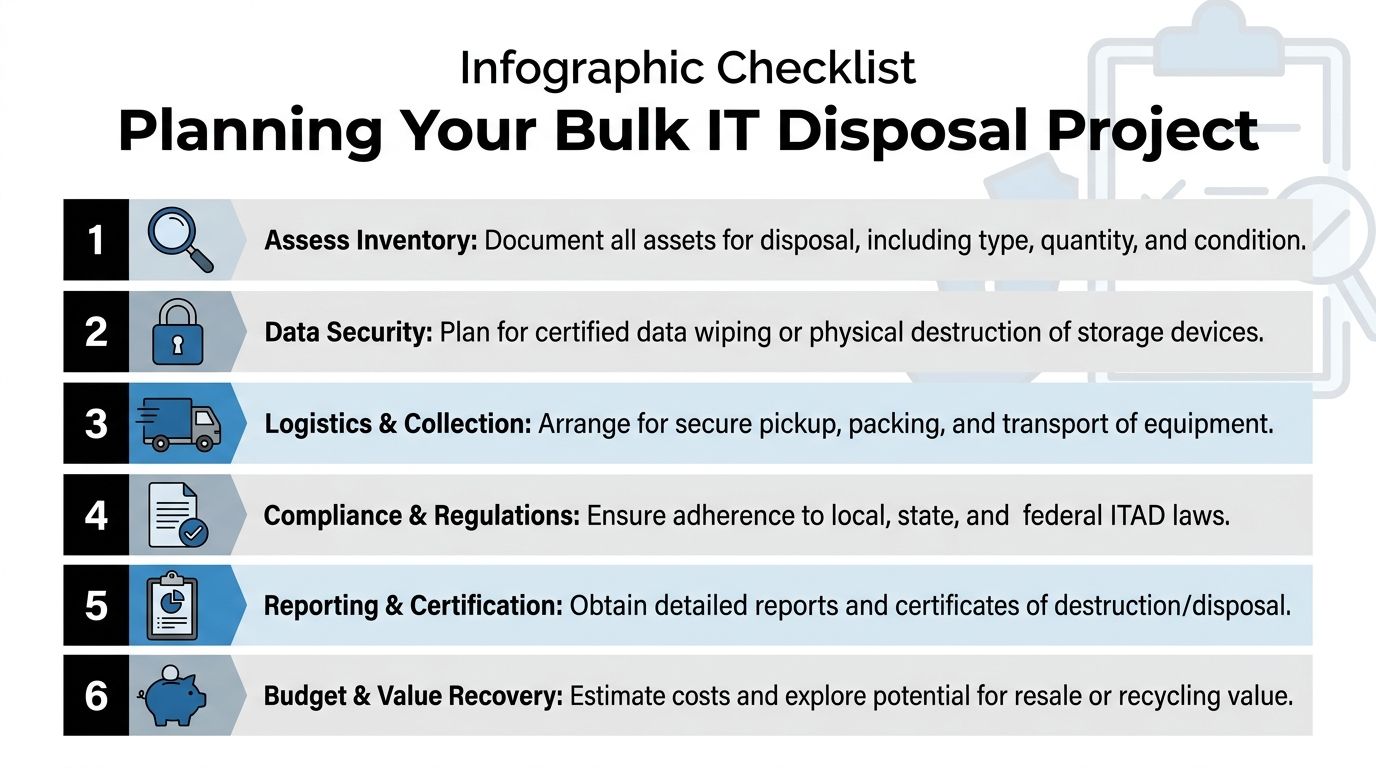
Large disposal projects go sideways when teams treat them like a pickup request. They’re not. They’re short operational programs with security, facilities, finance, and compliance implications.
If you want the project to run cleanly, break it into stages and assign ownership early.
Phase one, define the asset scope
Don’t start with pickup dates. Start with what is leaving service.
Create a working inventory that identifies:
- Asset type: laptop, desktop, server, switch, firewall, storage, monitor, mobile device, printer, accessory
- Location: building, floor, closet, lab, branch office, cage, rack
- Condition: working, failed, incomplete, damaged, unknown
- Data status: data-bearing or non-data
- Disposition target: wipe for reuse, shred media, recycle, hold for review
If you’re dealing with broad commercial cleanouts or refresh cycles, https://atlantacomputerrecycling.com/bulk-electronics-recycling-atlanta-ga/ reflects the kind of bulk program structure that’s usually needed.
What to watch for
The inventory is where hidden scope appears. Missing power supplies. Loose drives in desk drawers. Network appliances removed from service but never struck from records. Department-owned devices that never entered the main asset system.
Find those before the truck arrives.
Phase two, decide the data path
Here, the project moves from disposal to ITAD.
For each data-bearing class, choose the approved method:
| Asset category | Preferred disposition question |
|---|---|
| User laptops and desktops | Are they functional enough for certified wipe and reuse, or should media be destroyed? |
| Servers and storage arrays | Will drives be removed and processed separately, or handled inside the full unit workflow? |
| Loose media | Can each item be reconciled to an inventory list before destruction? |
| Mobile devices | Does the organization require account removal, reset verification, or physical destruction for damaged units? |
| Network and security appliances | Do configs, credentials, or logs require sanitization before release? |
Don’t mix methods casually. If one batch is going to be wiped and another destroyed, mark and stage them separately.
Phase three, plan site logistics
Most delays happen on the day of removal because nobody prepared the site.
A workable plan answers these questions:
- Where will equipment be staged before pickup?
- Who has access to the staging area?
- Will the vendor need loading dock access, elevator reservations, or after-hours entry?
- Do some assets require on-site de-installation before they can move?
- Who signs the handoff when equipment leaves the building?
For office environments, staged carts and labeled pallets usually solve the problem. For labs, clinics, and server rooms, you often need tighter sequencing so active operations aren’t disrupted.
Field note: The handoff point matters. Once assets leave the room, you want a named transfer, not a vague understanding that someone took care of it.
Phase four, control chain of custody
A secure chain of custody doesn’t have to be complicated. It has to be explicit.
That means:
- Count and label assets before removal
- Separate serialized media from bulk commodity items
- Use an approved staging zone
- Record the transfer at pickup
- Reconcile the outbound list against final processing records
At this stage, many organizations overtrust convenience. They assume that because the vendor is reputable, detailed handoff controls are optional. They aren’t.
Phase five, define reporting before the work starts
Ask for final reporting requirements before the first asset moves.
At minimum, your organization usually needs some combination of:
- Itemized inventory results
- Confirmation of data destruction method
- Certificates of destruction
- Recycling confirmation for non-reusable material
- Value recovery summary when applicable
If finance expects recovery credits and compliance expects destruction evidence, those outputs should be specified in advance. Otherwise the provider may deliver one and not the other.
Phase six, close the project like an audit item
The project isn’t done because the room is empty.
Close it by checking:
- Were all expected assets processed?
- Did any equipment remain on-site or get deferred?
- Did all data-bearing devices receive the approved treatment?
- Are final records stored in the right internal system?
- Did the project expose policy gaps that need fixing before the next refresh?
The strongest IT teams do a short post-project review. Not a formal ceremony. Just a disciplined look at what created friction.
What usually improves after the first well-run project
- Branch locations follow central process more closely.
- Security gets involved earlier.
- Facilities knows the access requirements.
- Procurement starts asking better questions about disposition terms.
- Refresh planning gets more realistic because retirement work is finally visible.
That’s the point. Bulk IT disposal should become repeatable, not heroic.
Your Partner for Secure ITAD in Gwinnett County
By the time most organizations start looking for an ITAD partner, they’re already under pressure. A relocation is happening. A data room has to be cleared. A healthcare site is replacing devices. A merger left duplicate hardware in multiple facilities. Storage areas are full and nobody wants another month of delay.
At that stage, the right partner is the one that can reduce operational risk, not just haul equipment away.
What a commercial ITAD partner should solve
For organizations in gwinnett county georgia, a capable provider should handle four things well.
Secure pickup and de-installation
This matters most when assets aren’t already boxed and waiting at a dock. Offices, schools, hospitals, and server rooms often need on-site labor to disconnect, sort, palletize, and move equipment without disrupting the environment.
Defined data destruction methods
If a vendor can’t tell you exactly how drives are wiped, when shredding is used, and what records are produced, keep looking. Security language should be plain, specific, and documented.
Reporting that supports audit review
Commercial clients don’t need vague sustainability language. They need usable records. Asset lists, destruction confirmations, and clear disposition outcomes matter more than polished marketing.
A practical approach to reuse and recycling
Some retired equipment still has value. Some doesn’t. The best providers don’t force everything into a single path. They separate reusable hardware from true end-of-life material and process each stream accordingly.
Why local execution matters
In this market, geography affects execution. Local familiarity helps with scheduling, travel time, repeat pickups, and handling multi-site projects across the county and greater metro area.
That doesn’t mean “local” automatically means “qualified.” It means local reach is useful when combined with the basics that matter:
- Commercial-only discipline
- Experience with healthcare, education, government, and enterprise environments
- Ability to support both routine pickups and larger decommissioning events
- Clear chain-of-custody practices
- Sustainable downstream handling for e-waste
A good ITAD partner should make your internal process easier to defend. That’s the standard worth using.
Atlanta Computer Recycling fits that profile for business-to-business work across the Atlanta metro. The company’s model aligns with the operational needs covered here: secure collection, on-site de-installation, DoD 5220.22-M 3-pass wiping, physical shredding for media that shouldn’t be reused, and coordinated handling for bulk office and data center projects.
For Gwinnett organizations, that combination matters because the challenge usually isn’t one thing. It’s the mix of data risk, removal logistics, documentation, and responsible recycling, all under a real-world deadline.
Frequently Asked Questions About IT Disposal
How much equipment do we need before scheduling service
That depends on the provider and the project type. A standard office refresh, a branch cleanout, and a data center decommission all require different handling. The right question isn’t “what’s the minimum,” but “what’s the scope.” If you can provide an asset list, location count, and whether the equipment contains data, you’ll get a much more useful answer.
What documentation should we expect after disposal
For commercial ITAD, expect records that show what was picked up and how data-bearing assets were processed. If media was destroyed, you should receive a Certificate of Destruction or equivalent confirmation. If equipment was wiped for reuse, the reporting should reflect that method instead of using vague language.
Should we wipe drives ourselves before pickup
Sometimes yes, often no. If your internal process is mature and your team can document the method, internal wiping can work for certain asset classes. But many organizations create more risk by trying to do this inconsistently across locations. If you don’t have the staffing, tooling, or verification process, it’s safer to use a provider with a defined destruction workflow.
What happens to equipment that still has resale value
A proper ITAD program separates reusable hardware from end-of-life material. Functional devices may go through tested reuse channels after approved data sanitization. Obsolete or damaged equipment should move into certified recycling. You want the provider to explain which path applies and how that decision is made.
Do monitors, printers, and accessories need the same handling as computers
Usually not. Non-data peripherals typically follow a recycling path unless they contain storage, internal logs, or embedded configurations that matter to your organization. Printers and multifunction devices deserve extra attention because some include storage or retained scan data.
Can one project include office gear and server room equipment
Yes, but it should be scoped carefully. Mixed projects often require different workflows for user devices, loose drives, network gear, and de-racked infrastructure. Combining them is fine if the inventory, staging, and documentation keep those categories separate.
How far in advance should we plan
Earlier than many teams anticipate. If the project involves multiple locations, after-hours access, compliance review, or on-site de-installation, planning time helps avoid rushed decisions. The best results come when disposal is built into the refresh or closure plan instead of tacked on at the end.
If you’re managing retired laptops, servers, network gear, or a full site decommission in Gwinnett, Atlanta Computer Recycling can help you handle the project with secure data destruction, compliant pickup, and business-focused ITAD execution across the Atlanta metro.