Secure Electronics Recycling in Duluth GA

A lot of IT managers in duluth ga end up in the same spot. A renovation date is fixed, old laptops are stacked in a closet, a server room still has production gear mixed with retired hardware, and someone from compliance asks the question nobody wants at the last minute: “How are we documenting disposal?”
That moment gets more complicated in hospitals, school districts, and public sector offices. You’re not just getting rid of equipment. You’re protecting patient records, student data, staff credentials, and budget accountability, all while trying not to derail daily operations.
Duluth has changed a lot over time. It was officially chartered in 1876 and grew from 842 residents in 1950 to over 30,000 by 2018, which helps explain why the area now supports more business activity and a stronger need for sustainable IT asset services (Duluth, Georgia history and demographics). As more offices, schools, and healthcare facilities expand or refresh equipment, disposal becomes a logistics project, not a housekeeping task.
That’s why early coordination matters. The teams that handle this well usually line up the recycler, facilities staff, and security stakeholders before movers or contractors touch a single rack. In projects that also involve power shutdowns, branch circuit changes, or room reconfiguration, it can help to coordinate with specialists in commercial electrical services so deinstallation and electrical work don’t conflict.
If you’re managing assets across metro Atlanta, this overview of business-focused recycling services at https://atlantacomputerrecycling.com/atlanta/ gives a useful starting point for understanding the local service model and what a commercial program typically includes.
Introduction to Electronics Recycling in Duluth GA
A hospital wing closes for renovation on Friday. By Monday, the IT room has to be cleared, drives accounted for, and anything reusable separated from equipment that needs destruction. Facilities wants the room empty. Compliance wants paperwork. Finance wants to know whether any value can be recovered.
That’s the practical side of electronics recycling in duluth ga.
For a school district, the scene looks different but the pressure feels the same. Summer break is short. Hundreds of classroom devices, networking closets, and front-office systems need to move out before new equipment comes in. If the old gear is piled together without a plan, the district loses time sorting, loses visibility into which devices held sensitive data, and often loses any chance of reuse value.
Why local organization matters
Commercial recycling works best when it’s treated like a move-out project with security controls. That means someone has to define:
- What’s leaving the building
- What still contains data
- What can be redeployed or resold
- What needs certified destruction
- Who signs off at each handoff
Without that structure, retired electronics can sit in storage for months. That creates risk. It also creates confusion during audits, because the hardest asset to defend is the one nobody tracked.
Practical rule: If your team is already discussing deadlines, loading docks, badges, elevators, or contractor access, you’re not dealing with “trash removal.” You’re dealing with IT asset disposition.
What usually goes wrong
Most problems start small. A few desktop towers are mixed with non-working monitors. Old backup drives are boxed without labels. A network switch from a clinic gets moved with general surplus because nobody realized it had configuration data tied to protected systems.
That’s why experienced IT managers start planning disposal before final shutdown. They don’t wait until the room is empty. They map the project while the equipment is still identifiable.
In duluth ga, that planning matters because the local business footprint keeps growing, while disposal guidance in general community content usually doesn’t go deep on commercial e-waste logistics. Hospitals, schools, and larger offices need something more detailed than a generic recycling checklist.
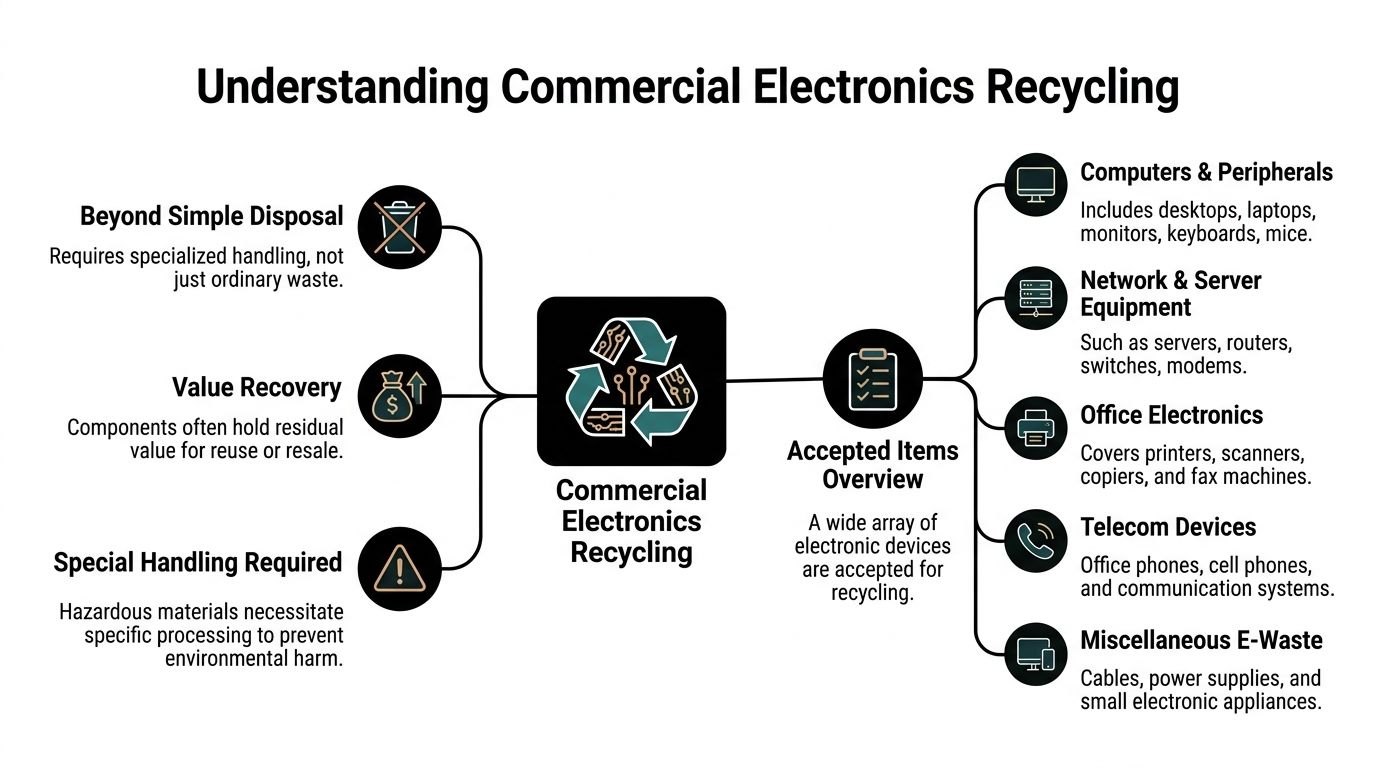
Understanding Commercial Electronics Recycling and Accepted Items
Commercial electronics recycling isn’t the same as tossing old devices into a bin behind the office. A better comparison is selective demolition. In a building teardown, crews don’t smash everything together and sort it later if they can avoid it. They identify what can be salvaged, what contains hazards, and what requires controlled removal.
IT disposal works the same way.
Duluth’s business base has grown, but local guides still rarely explain bulk e-waste infrastructure for hospitals, schools, and businesses, which leaves many organizations without a clear recycling roadmap (local guides often miss bulk e-waste planning).
A business-focused accepted items reference like https://atlantacomputerrecycling.com/accepted-items/ is useful because it helps teams sort assets before pickup day instead of during it.
The three buckets that matter
Most organizations can sort retired electronics into three practical groups.
Assets with reuse potential
Think newer laptops, functioning servers, switches, and some office workstations. If they still work and aren’t too outdated, they may be suitable for refurbishment or secondary markets.Assets that need data handling first
This includes desktops, servers, storage arrays, copiers with hard drives, and laptops from clinical or administrative environments. The device itself may be recyclable or reusable, but the data layer comes first.Assets that are mainly scrap or specialty material
Damaged monitors, broken peripherals, failed UPS units, cables, telecom remnants, and obsolete accessories usually go into material recovery channels rather than resale.
What commercial teams often overlook
The accepted items list is broader than many people expect. It usually includes much more than “computers.”
- Computers and end-user devices often include desktops, laptops, monitors, docking stations, keyboards, and mice.
- Network and server equipment can include rack servers, blade chassis, switches, routers, firewalls, storage devices, and rails.
- Office electronics may include printers, scanners, multifunction devices, and conference-room hardware.
- Telecom gear often covers office phones, handsets, paging equipment, and older communications systems.
- Power-related hardware can include UPS units, batteries, and power distribution components.
- Miscellaneous e-waste may include cabling, adapters, power supplies, and small electronic accessories.
Why sorting upfront saves pain later
A mixed pile slows everything down. It forces crews to open boxes, identify unknown equipment, and ask follow-up questions when the truck is already scheduled.
A pre-sorted staging area helps in practical ways:
- Faster loading: Pallets and carts can be assigned by asset class.
- Clearer data decisions: Drives and data-bearing devices don’t get buried under scrap.
- Better financial visibility: Reuse candidates stay separate from low-value material.
- Cleaner audit trails: Your inventory list matches what left the building.
Treat every retired device like a library book. If you can’t say where it came from, what category it belongs to, and where it went next, you’ll have trouble defending the process later.
A plain-language test for accepted items
If your item plugs in, stores data, connects to a network, conditions power, or supports communications, it probably belongs in a commercial recycling conversation. The key isn’t just whether the recycler accepts it. The key is whether your team classified it correctly before pickup.
That’s where a lot of hidden cost lives. Not in the truck. In the sorting mistakes.
Compliance and Data Destruction Options for ITAD
The hardest part of ITAD for hospitals and schools usually isn’t moving hardware. It’s proving that the data on that hardware can’t come back.
That proof has to hold up after staff turnover, after a compliance review, and after everyone has forgotten the project details. If your records are vague, the disposal process becomes hard to defend even if the actual destruction work was done correctly.
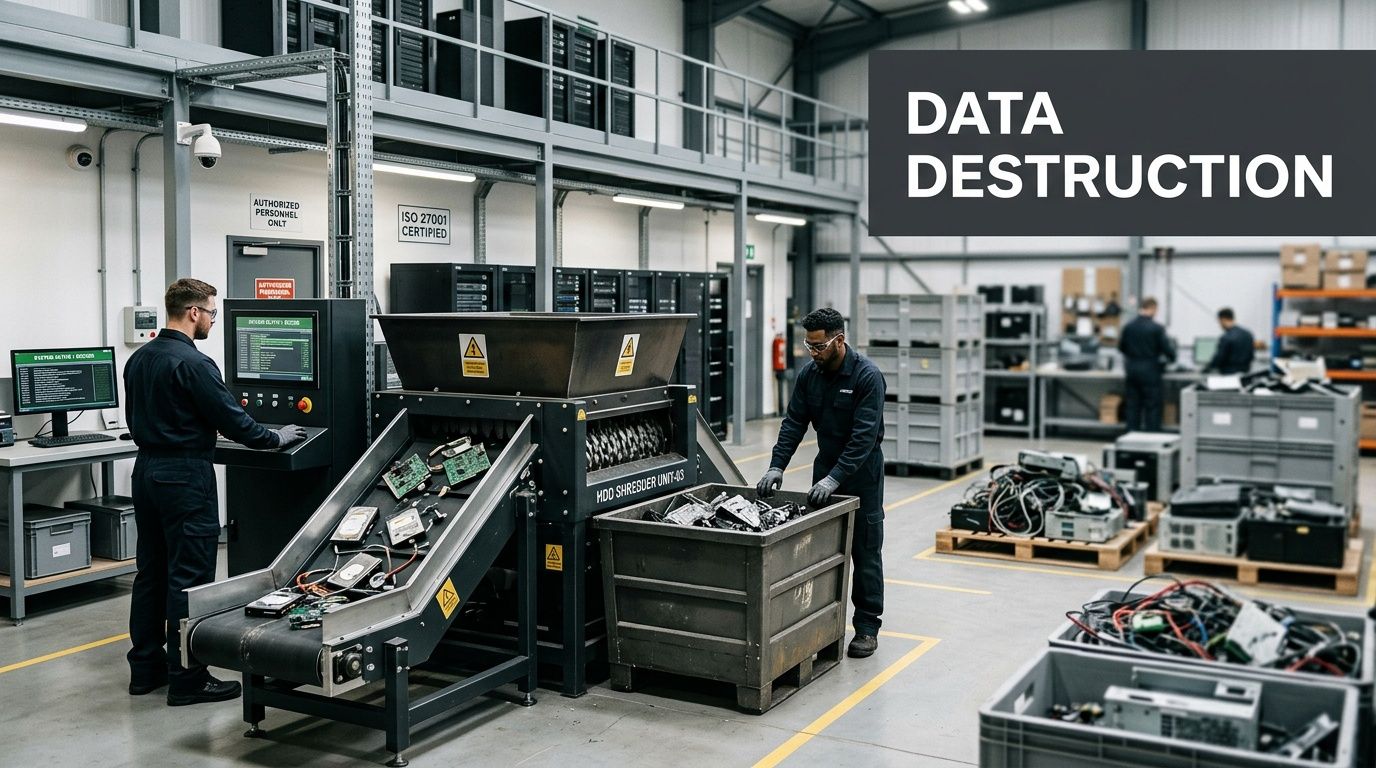
A local reference point matters here. Iron Mountain’s Duluth facility offers DoD 5220.22-M wiping and NAID AAA shredding, with 100% data irretrievability versus 15–20% risk from single-pass wipes (Iron Mountain Duluth ITAD services).
For teams reviewing secure disposal options, a service overview like https://atlantacomputerrecycling.com/secure-data-destruction/ helps frame the difference between wiping, shredding, and documented chain of custody.
When wiping makes sense
DoD 5220.22-M 3-pass wiping overwrites data three times using varying patterns. In plain terms, it’s like erasing a whiteboard, writing over it, erasing it again, and repeating the cycle until the original writing can’t be reconstructed through normal recovery methods.
Wiping is usually a strong fit when:
- The drive still functions
- The asset may have resale or redeployment value
- The organization wants to preserve hardware for reuse
- The chain of custody remains controlled throughout the process
This option is often attractive to finance teams because it can support asset recovery instead of turning every device into scrap.
When shredding is the right call
Physical shredding is different. It destroys the media itself. At the Duluth facility noted above, shredding reduces drives to less than 2 mm particles, which is useful when the media is damaged, obsolete, or too sensitive to allow any reuse path.
Shredding is often the better choice for:
- Failed hard drives that can’t be wiped
- Devices from high-risk departments
- Media tied to patient or student records
- Hardware leaving highly regulated environments
- Situations where policy requires destruction, not sanitization
If wiping is like deep cleaning and repainting a room for a new tenant, shredding is demolition. You don’t preserve anything. You remove the possibility of reuse to eliminate residual data risk.
“Specify the destruction method before pickup, not after loading. Once assets are mixed in transit, exceptions become harder to manage.”
Chain of custody is the quiet compliance tool
A good chain of custody does something simple. It answers who had the asset, when they had it, and what happened next.
That matters because many disposal failures don’t come from bad shredders or weak wiping tools. They come from poor handoffs. A drive sits on a desk overnight. A pallet is left in an unsecured corridor. An inventory sheet says “misc. IT equipment” instead of listing devices that stored sensitive information.
Look for documentation that tracks:
| Documentation element | Why it matters |
|---|---|
| Asset identification | Connects each device to a known inventory or category |
| Pickup acknowledgment | Shows when custody transferred |
| Processing record | Confirms whether wiping, shredding, or recycling occurred |
| Final certificate | Supports internal audits and policy signoff |
How to write better disposal requirements
A lot of RFPs are too vague. They ask for “secure recycling” and leave the important choices unstated.
A stronger scope usually spells out:
- Data-bearing assets: Identify servers, laptops, storage, copiers, and removable media separately.
- Approved methods: State whether each asset type should be wiped, shredded, or evaluated case by case.
- Witness and reporting needs: Decide whether your team needs serialized reporting, destruction certificates, or observed destruction.
- Exception handling: Define what happens if a drive is unreadable, missing, or physically damaged.
If you manage healthcare or education environments in duluth ga, the safest approach is simple. Don’t buy “recycling” first and hope compliance is included. Buy the compliance outcome first, then fit recycling around it.
Managing On-site Deinstallation and Logistics
Removing IT equipment from an active building is mostly a coordination job. The technical piece matters, but the success of the project usually depends on access windows, staging rules, labeling, and who controls the route from server room to truck.
That’s why deinstallation should be planned like a move through a hospital corridor, not like a pickup from a warehouse shelf.
For larger local pickups and deinstall projects, this service page at https://atlantacomputerrecycling.com/it-equipment-pickup-atlanta-ga/ reflects the kind of logistics support commercial clients usually need in metro Atlanta.
Start with a site survey
A site survey answers basic but critical questions:
- Where is the equipment now?
- What can be removed immediately?
- What stays live until cutover?
- Which doors, elevators, docks, and badges are required?
- Are there restricted zones such as clinical areas, testing labs, or student records offices?
Without those answers, crews lose time on the day of removal. Your own staff also gets pulled into avoidable troubleshooting.
Dust changes both safety and value
In data center and server room work, dust isn’t cosmetic. It affects handling, cooling, and resale condition. In Duluth-area data center environments, contamination can drive cooling costs 20–40% higher and cut server lifespan from 5–7 years to under 3, while pre-decommission cleaning can restore efficiency and improve resale value (data center cleaning in Duluth).
For IT managers, the practical takeaway is straightforward. If equipment is heavily contaminated, clean before you pull. Don’t wait until after it’s on a pallet.
A step-by-step removal playbook
Most smooth deinstallations follow a pattern.
Label before disconnecting
Every rack unit, loose device, and drive container needs a clear identifier before cables start coming out. Once hardware is stacked on carts, memory gets unreliable.
Common labels include room, rack, device type, and final handling instruction such as wipe, shred, recycle, or redeploy.
Stage by destination
Keep different outcomes physically separate.
- Redeploy items go to one area
- Wipe candidates to another
- Immediate destruction media to locked containers
- Scrap-only hardware to bulk pallets
This prevents the classic mistake where a reusable server gets treated like low-grade scrap because it landed in the wrong cart.
Control the path through the building
In hospitals and schools, the route matters. Teams should know which elevator to reserve, which doors are badge-controlled, and which hours avoid peak foot traffic.
Dispatch planning is helpful here. Even a simple understanding of route optimization can improve truck sequencing, reduce idle time, and help multi-stop pickups stay on schedule.
Field note: The shortest path across a facility isn’t always the best one. The best route is the one that avoids patient areas, class transitions, and loading dock bottlenecks.
Pack for transport, not for appearance
A tidy stack of loose equipment may look organized, but it won’t travel well. Servers need stable placement, drives need secure containers, and monitors need protection from impact.
Good packaging reduces breakage, protects any remaining resale value, and keeps the custody trail cleaner because fewer items go missing in transit.
Who needs to be in the loop
The removal team should never operate in a silo. A reliable project usually includes input from:
| Stakeholder | Main concern |
|---|---|
| IT | Asset identification and shutdown timing |
| Compliance or privacy | Data-bearing devices and documentation |
| Facilities | Access, elevators, dock use, and room turnover |
| Security | Escorts, badges, restricted zones |
| Finance or procurement | Reuse value and final reporting |
If one of those groups is missing from planning, the issue usually shows up on removal day.
Typical Workflow Timelines and Bulk Disposal Programs
Many IT managers ask for a timeline when they’re really asking for predictability. They want to know when the surprises usually happen and how to prevent them.
The answer is to break the project into phases with decision points. That turns disposal from “we’ll figure it out as we go” into a managed workflow.
A realistic project sequence
Most commercial recycling projects in duluth ga follow the same broad path, even when the volume changes.
| Phase | Duration | Key Activities |
|---|---|---|
| Assessment | Varies by site scope | Review equipment types, identify data-bearing assets, confirm access limits, define pickup windows |
| Planning and approvals | Varies by internal process | Align IT, compliance, facilities, and security; confirm what gets wiped, shredded, reused, or recycled |
| On-site pickup and deinstallation | Depends on building access and volume | Label, disconnect, stage, pack, and move equipment through approved routes |
| Transportation and intake | Depends on project location and handling needs | Transfer custody, reconcile loads, separate by processing path |
| Data destruction and processing | Depends on media condition and reporting needs | Perform wiping or shredding, evaluate reuse candidates, send scrap to certified downstream channels |
| Final documentation | Depends on reporting format | Deliver certificates, asset summaries, and disposition records for internal files |
This table doesn’t use fixed day counts because the main variable is usually your organization, not the truck. A single closet cleanup can move quickly. A hospital decommission can slow down because one team still needs approval from privacy, facilities, and department leadership.
What changes in bulk programs
Bulk programs are less about one big pickup and more about consistency. Some organizations produce retired equipment in waves. Others store assets for months and then run a major purge.
That changes how you build the program.
One-time decommission
This works best for office closures, school refreshes, and server room shutdowns. The project has a defined endpoint, and everyone is trying to clear space fast.
Key questions include:
- Is there a hard move-out date?
- Does any equipment remain in production until the last minute?
- Are there enough staging areas on site?
- Does your team need serialized records or category-based reporting?
Recurring pickup program
This model fits campuses, health systems, and multi-building organizations. Instead of waiting for storage rooms to fill up, the organization creates a regular release process.
Benefits usually include:
- Cleaner inventories: Assets leave while records are still accurate.
- Lower internal clutter: Fewer retired devices sit in back rooms.
- Better policy compliance: Staff follow one disposal path instead of inventing workarounds.
- Easier budgeting: Smaller recurring projects are often easier to approve than emergency cleanouts.
The decision points that delay projects
A surprising number of delays come from unresolved policy questions, not physical labor.
Common hold-ups include:
- Nobody decided wiping versus shredding for failed or unknown drives.
- Ownership is unclear for telecom gear, copiers, or lab equipment.
- Pickup windows conflict with school schedules, clinic operations, or contractor work.
- Storage assumptions break down because the temporary holding room is already full.
The fastest disposal projects aren’t the ones with the biggest crews. They’re the ones where the organization answered the policy questions before the truck arrived.
How to avoid scope creep
Scope creep in ITAD doesn’t look like software creep. It looks like “while you’re here, can you also take these 40 boxes from another floor?”
That can be fine if the material is already identified. It becomes a problem when the added equipment changes the data profile, labor needs, or access plan.
A simple control method is to approve scope in two layers:
- Confirmed assets listed for current pickup
- Contingent assets that may be added if reviewed on site
That keeps the project flexible without turning it into guesswork.
Duluth GA Case Examples from Atlanta Computer Recycling
Hospital and school IT teams often understand the theory of recycling and data destruction. What they need is a practical model for how a project feels when it’s done well.
The examples below are written as realistic service scenarios for duluth ga organizations based on the kinds of needs local healthcare and education teams commonly face. They show process design, not audited performance claims.
For organizations working in Gwinnett County, this location page can help frame the local commercial service footprint: https://atlantacomputerrecycling.com/georgia-gwinnett-county/
A hospital renovation with a short compliance window
A regional care facility needed to clear a server room before a renovation contractor took over the space. The pressure point wasn’t just removal. It was proving that drives from clinical systems, admin workstations, and storage devices were handled under a defensible chain of custody.
The internal team split the project into zones:
- Active systems that stayed online until cutover
- Retired servers awaiting sanitization decision
- Media that required direct destruction
- Non-data equipment such as rails, racks, and power accessories
That separation mattered. It allowed facilities to reclaim space in phases while compliance staff kept close control over the devices with the highest privacy sensitivity.
Hospitals do best when they define “data-bearing” broadly. Not just servers and laptops, but also devices like copiers, specialty systems, and older appliances with embedded storage.
The biggest lesson from that kind of project is that room turnover and data handling should be planned together. If they’re treated as separate jobs, the hospital ends up waiting on whichever team got looped in second.
A school district summer refresh
A district technology department had a narrower calendar. Once students and teachers left for break, the team had to remove aging desktops, lab devices, and telecom equipment from multiple buildings before new deployments began.
Schools usually face a different kind of complexity. The devices are spread out. The asset records may be tied to classrooms, front offices, libraries, and testing centers rather than one server room. That means the project succeeds or fails on labeling discipline.
The district team simplified the process with a campus-by-campus intake method:
| School area | Likely handling need |
|---|---|
| Classroom carts and desktops | Sort for reuse or recycling |
| Front office devices | Verify data handling requirements |
| Network closets | Separate switches, firewalls, and telecom gear |
| Storage rooms | Triage unknown surplus before pickup |
This type of summer project usually teaches two lessons.
First, don’t let each building improvise its own packing standard. One school will box neatly, another will stack loose towers, and a third will send unlabeled devices with no power adapters. Standardized prep instructions save enormous time.
Second, finance should understand early which assets may have reuse value and which are responsible recycling candidates. That keeps expectations grounded and helps avoid budget assumptions based on equipment that’s already obsolete or damaged.
What both examples have in common
The hospital case and school case differ in pace and risk profile, but they share the same operational truth. Disposal gets easier when the organization decides three things early:
- what it has,
- what data rules apply,
- and how the equipment will move through the building.
That’s the core of a good commercial electronics recycling plan in duluth ga. Not speed alone. Order.
FAQs for Commercial Electronics Recycling in Duluth GA
Hospitals and schools in Gwinnett often deal with a double challenge. They serve communities with real resource pressures, yet local material about health needs rarely explains how those institutions should retire IT equipment in a HIPAA-conscious way. HRSA designates Gwinnett County as medically underserved, but local resources still tend to overlook HIPAA-compliant IT disposal protocols for hospitals and schools (Duluth-area community health needs assessment).
How do I verify HIPAA-conscious disposal for shredded media
Ask for documentation that connects the media handed off to the destruction method used. In practice, that means your team should review chain-of-custody records, inventory references where available, and a final certificate of destruction.
Don’t rely on a verbal assurance that “everything was shredded.” For regulated environments, paperwork is part of the security outcome.
What items usually need extra attention under Georgia-focused commercial recycling programs
The trouble items are usually the ones people forget are electronic. Copiers with storage, telecom gear, removable media, UPS systems, and batteries all deserve separate handling decisions.
If an item stores data, powers critical systems, or contains specialty material, flag it before pickup rather than assuming it belongs in a general scrap stream.
Can we bundle small telecom devices with server room equipment
You can bundle them into the same overall project, but you shouldn’t mix them blindly in the same containers. Small phones, headsets, adapters, and handsets tend to disappear into server pallets if they aren’t boxed and labeled separately.
A simple rule works well:
- Rack gear together
- End-user devices together
- Loose telecom devices in labeled cartons
- Media in locked or specially designated containers
That separation helps both inventory control and loading efficiency.
How should we handle batteries
Battery handling shouldn’t be an afterthought. UPS batteries especially need a defined path, because they’re heavy, awkward, and not something staff should casually pile into a corner after deinstallation.
For internal policy, assign battery ownership clearly. Someone should be responsible for identification, staging, and approved release so those units don’t get mixed with general hardware.
If your team says, “We’ll deal with the batteries later,” that usually means the hardest items will be the last ones left on site.
What’s the best first step if our inventory list is incomplete
Start with a walk-through, not a spreadsheet cleanup marathon. A short on-site review often reveals more than old inventory records do.
Look for three things first:
- Data-bearing devices
- Bulky infrastructure such as racks, UPS units, and storage hardware
- Unknown surplus in closets, labs, and back rooms
Once those are identified, the rest of the project becomes easier to scope.
Conclusion and Next Steps
Commercial electronics recycling in duluth ga isn’t just about moving old hardware out the door. For hospitals, schools, government offices, and larger businesses, it’s a controlled process that combines logistics, data protection, documentation, and responsible downstream handling.
The organizations that handle it best usually do four things early. They identify data-bearing assets, sort equipment by disposition path, coordinate building access before removal day, and require documentation strong enough for future audits. That approach reduces confusion for staff and lowers the odds of a last-minute scramble.
It also makes budget conversations easier. When your team knows what may be reusable, what must be destroyed, and what will move as scrap, finance and compliance can review the same plan instead of reacting to separate versions of the project.
If you’re planning a clinic renovation, a school refresh, an office closure, or a data center cleanout in duluth ga, treat disposal as part of the project schedule, not the cleanup after it. That one shift in thinking usually changes everything. The work gets safer, cleaner, and much easier to defend.
If your organization needs a business-focused partner for secure IT asset disposition, Atlanta Computer Recycling can help with commercial pickups, on-site deinstallation, data destruction, and responsible electronics recycling across the Atlanta metro area. A good next step is to request a site assessment so your team can map equipment categories, building access, and compliance requirements before the project clock starts.