Weather in Lawrenceville GA: Smart IT Disposal Guide


Your pickup window looked fine yesterday afternoon. By evening, the forecast had shifted, the loading dock was wet, and the server room team was asking whether to move retired gear now or wait another day. That’s a familiar problem in Gwinnett County.
For IT managers, the weather in lawrenceville ga isn’t background noise. It affects chain of custody, media handling, driver safety, dock access, and whether equipment arrives dry enough for secure processing. A rushed move during a bad weather window can create avoidable risk. A delayed move without a plan can create a different kind of problem, especially when sensitive assets are staged for removal and users expect the project to stay on schedule.
Most public weather pages stop at temperature, rain, and wind. That helps a commuter. It doesn’t help much when you’re coordinating a server decommission, a school refresh, or a hospital pickup that has compliance requirements attached to it. What matters in practice is how local weather changes the way assets should be packed, moved, scanned, and processed.
Why Your IT Asset Disposal Plan Needs a Weather Forecast
A typical failure point looks like this. Facilities clears a dock slot. IT disconnects racks on schedule. Security is expecting a truck. Then a Georgia storm cell rolls through, and the whole job gets harder at once.
The issue usually isn’t just rain. It’s what rain changes. Floors get slick. Visibility drops. Cardboard softens. Pallets sit longer than planned near open bay doors. Staff start improvising to keep the project moving, and that’s when good process starts to slip.
Lawrenceville sits in the Atlanta metro and has a humid subtropical climate with long-term average highs around 72°F and lows near 46°F, which is useful context when planning decommissions and transport timing (AccuWeather weather data for Lawrenceville). That broad pattern sounds manageable until you apply it to real operations. Warm air, damp conditions, and fast weather swings don’t stay on paper. They show up in the loading area and inside equipment.
What weather changes on the ground
A weather-aware ITAD plan answers practical questions before the truck arrives:
- Where will assets wait: If gear leaves a conditioned room, is there a dry staging area between the server room and the truck?
- Who makes the delay call: Is that decision owned by IT, facilities, security, or the logistics lead?
- How is chain of custody protected: If pickup shifts by a few hours or a day, where do drives and endpoint devices stay, and who controls access?
- What gets processed indoors: Some media should move directly to indoor handling instead of sitting through a questionable weather window.
Practical rule: If the forecast creates doubt about exposure, don’t solve it with tarps and speed. Solve it with staging, communication, and a revised pickup window.
The main trade-off is simple. Pushing forward can preserve your timeline but increase moisture, handling, and safety risk. Delaying can protect the assets and the people moving them, but only if you’ve already decided how to secure equipment while it waits.
The best IT disposal plans treat weather as an operational input, not a last-minute inconvenience.
Lawrenceville's Year-Round Weather and Your IT Assets
Lawrenceville’s weather doesn’t create one kind of risk. It creates different risks depending on the season, the facility, and the type of equipment being moved. A laptop refresh from an office suite doesn’t behave like a rack teardown from a data room. A school district pickup has different timing pressures than a healthcare environment.
For teams that manage the weather in lawrenceville ga as part of planning, the useful mindset is a seasonal threat matrix rather than a generic forecast. If you need a local temperature reference for broader planning, this page on temperature patterns in Lawrenceville is a practical companion.
Seasonal Weather Risks and ITAD Planning Focus
| Season | Typical Weather | Primary Risk to IT Assets | ACR Planning Focus |
|---|---|---|---|
| Spring | Severe storms, fast-changing conditions, heavy rain windows | Pickup delays, wet transfer paths, transport disruption | Build schedule flexibility, confirm indoor staging, protect chain of custody |
| Summer | Heat, humidity, strong afternoon storm patterns | Condensation risk, moisture exposure, hot vehicles and docks | Early pickups, climate-aware packing, faster dock-to-truck transfer |
| Fall | Wide day-to-night swings, mixed wet and dry stretches | Thermal transition issues during transport | Time moves after temperatures settle, avoid leaving gear in transitional spaces |
| Winter | Damp cold, occasional sharp cold snaps, chilly mornings | Static, reverse thermal shock, brittle handling conditions | Warm indoor staging, controlled loading, careful unbagging and processing |
What works season by season
Spring is mostly a logistics problem. Even if equipment itself stays dry, crews can lose time to storm timing, pooled water near loading areas, or road conditions that make a secure route less predictable.
Summer creates a hardware problem. Gear may leave a cool room and hit hot, humid air immediately. That transition matters more than the headline temperature.
Fall catches teams off guard because the air can feel comfortable while equipment still sees a big environmental jump between spaces. Server gear and storage arrays don’t care whether humans think the weather feels mild.
Winter in north Georgia is usually seen as easy. It isn’t. Cold mornings and dry indoor air change how electronics behave during handling, especially when organizations rush year-end cleanouts.
The planning mistake to avoid
Many teams plan around average conditions. Projects fail at the edges, not in the average.
Standard weather reports tell you whether to bring an umbrella. IT managers need to know whether a dock transfer, drive wipe, or de-install should happen at all.
A useful planning habit is to tie each season to one operational control. In spring, focus on schedule flexibility. In summer, focus on moisture and vehicle heat. In fall, focus on timing. In winter, focus on static and controlled acclimation.
Protecting IT Equipment from Georgia's Heat and Humidity
A common summer failure in Lawrenceville looks small at first. Equipment comes out of a cold server room, sits near an open dock door, then waits in a hot truck while staff finish badges, inventory checks, or signoff. By the time the load reaches processing, you may be dealing with moisture on metal surfaces, warm drives, and a chain of custody that got harder to control than it needed to be.
Heat gets attention because everyone feels it. Humidity creates the more expensive mistakes.

Why humidity changes handling decisions
At nearby forecast points, relative humidity can reach 89%, according to the National Weather Service Lawrenceville forecast details. For IT asset disposition, that matters less as a weather headline and more as an operating condition. Warm, damp air meeting cooler equipment can leave moisture where you do not want it, especially around drive bays, ports, boards, and metal chassis surfaces.
The risk usually shows up during transitions, not during long-term storage. A rack comes offline in conditioned air. It moves through a hallway. It pauses at the dock. It gets loaded into a vehicle that has been sitting in Georgia heat. Each step is manageable on its own. The trouble starts when nobody owns the full transfer window.
I have seen teams rush this part because the gear is already retired and no longer viewed as production equipment. That is the wrong assumption. Retired assets still carry data, still need accurate inventory, and still need to arrive in a condition that supports secure processing.
What works in the field
Controlled transition beats fast transition.
- Stage equipment in a secure indoor area before pickup: Get assets close to the exit while keeping them in conditioned space as long as possible.
- Shorten dock exposure: Load once the truck, paperwork, and escort requirements are ready. Do not let pallets wait while administrative details catch up.
- Route sensitive media differently when needed: Drives, backup media, and devices tied to regulated data often warrant indoor destruction or indoor secure processing instead of extended dock time.
- Tie disposal timing to your broader asset plan: Teams that schedule refresh, decommissioning, and pickup as one workflow usually make better weather calls. A disciplined IT lifecycle management approach reduces rushed handoffs and last-minute staging problems.
Vehicles can be the hottest point in the chain
The truck is often the harshest environment in the whole move. Cargo areas heat up fast, especially between stops or while crews are waiting for access. Basic fleet heat-control habits help more than many IT managers expect. Some practical tips to keep cars cool in summer translate well to service vehicles, particularly when reducing cabin and cargo heat buildup is part of protecting loaded equipment.
Plastic wrap also gets misused in summer. It can help with physical stability and dust control, but it is not a cure for moisture risk. If gear is wrapped at the wrong point in the move, humidity can stay trapped around the equipment longer than it should.
The goal is simple. Keep the chain of custody intact while limiting sudden temperature and moisture exposure.
For high-sensitivity pickups, the best choice is often a tighter loading window, more indoor staging, and less equipment sitting in transition, even if that takes more coordination from the client team and the ITAD vendor.
How We Handle Storms for Safe On-Site Pickups
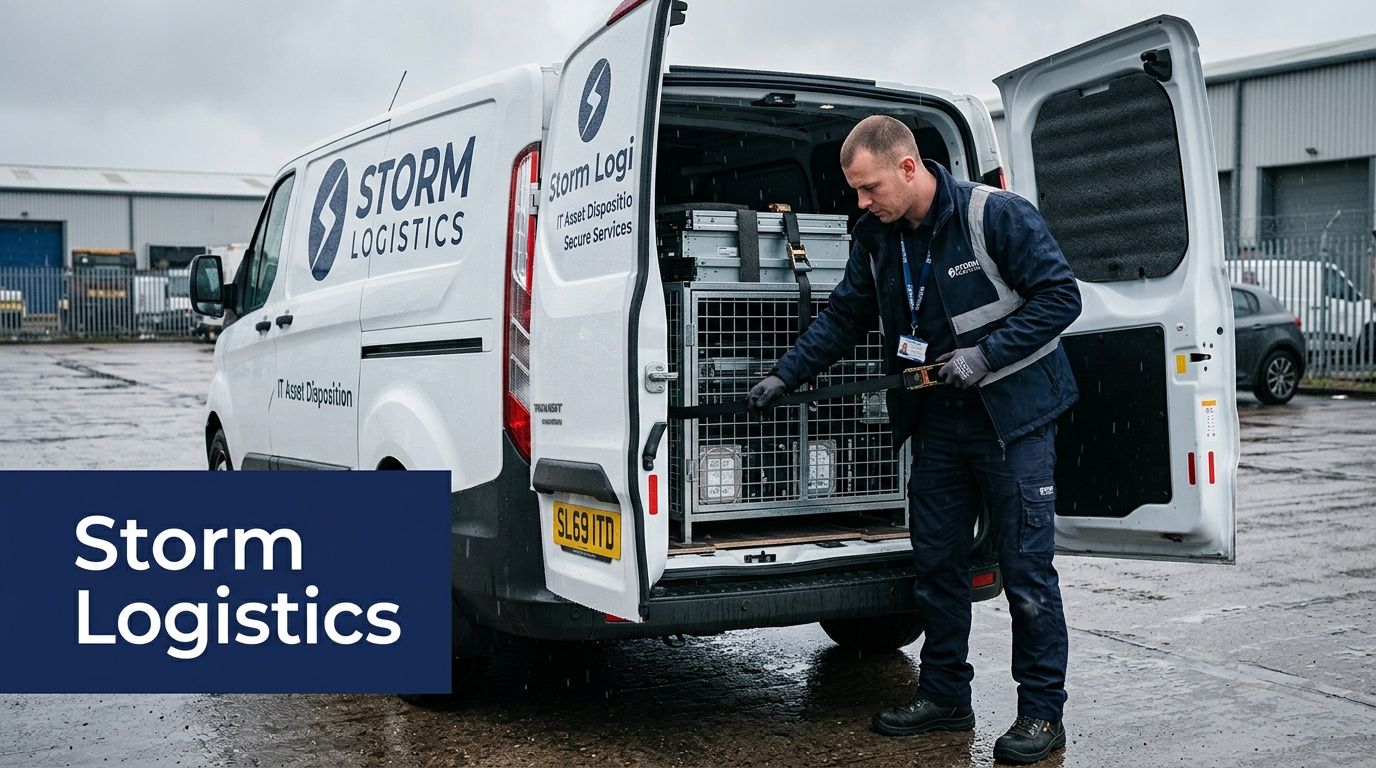
A pickup can look fine at 9:00 a.m. and fall apart by 11:30. The truck is on time, IT has equipment ready, security has the dock open, and then a fast Georgia storm turns the handoff into a wet, rushed transfer. That is exactly the point where weak disposal procedures show up.
Storm planning for IT asset disposition starts before the crew arrives. For us, the weather question is never just, "Can the truck get there?" The real question is whether the site can move retired assets from controlled indoor space to secured transport without adding water exposure, delays, or custody gaps.
The scheduling call
In Lawrenceville, storm risk often matters less than storm timing. A site may be workable early and unsafe later, or the reverse if the dock is still wet and staff are improvising around standing water. We usually prefer a pickup window that gives facilities time to confirm dock conditions, access routes, and indoor staging before the first asset leaves the building.
That is why morning pickups often work better during unstable weather. The decision is not about convenience. It is about control. By then, teams usually know whether overnight rain affected the loading area, whether escort staff are in place, and whether the building has a dry path from storage room to truck.
If your organization wants to simplify that coordination, this page on IT equipment pickup planning in Atlanta is a useful operational reference.
What we check before a truck rolls
We make the go or no-go call based on operational exposure at the client site.
Three conditions matter most:
Transfer points
Every doorway, elevator threshold, dock edge, and parking-lot crossing adds risk. More touchpoints mean more chances for rain contact, slips, and equipment getting parked in the wrong place while people wait for clearance.Wait time
Storms create idle time. Idle time creates custody problems. If pallets sit in a hallway, under an awning, or near an open dock door because one team is not ready, the weather has already changed the risk profile of the pickup.Indoor fallback space
A dry, access-controlled holding area gives the site options. Without it, teams feel pressure to keep loading once they start, even when conditions worsen.
What works in the field
The best storm-day pickups are boring. Everything is labeled before arrival, the route is cleared, the staging area is indoors, and one client contact can approve a delay without a chain of emails.
A few practices consistently reduce problems:
- Pre-stage by release group: Keep high-priority assets, loose media, and smaller endpoint loads separated so crews can load in controlled waves.
- Use one decision-maker on site: Security, facilities, and IT need a single person who can stop the move if dock conditions change.
- Shrink open-dock time: We want assets coming out only when the truck, paperwork, and crew are all ready.
- Plan the abort point: If lightning, wind, or heavy rain hits mid-process, everyone should know whether equipment goes back inside, to a secured holding room, or stays sealed in a covered area already under control.
Some habits create trouble fast:
- Hallway accumulation: Disconnected gear stacks up, staff step around it, and inventory visibility gets worse.
- Improvised weather protection: Absorbent wrap, loose tarps, and cardboard do not replace a dry transfer path.
- Speeding up the final handoff: Faster loading with fewer scans, labels, or sign-offs is where chain-of-custody mistakes happen.
In unstable weather, protecting the process matters more than keeping the original pickup time.
Chain of custody during delays
Storms pressure people to make informal decisions. For ITAD, that is where avoidable mistakes happen.
If a pickup pauses or shifts to another window, the custody standard should stay the same. Assets remain in controlled space. Inventory stays visible. The handoff stays documented. We do not treat bad weather as a reason to relax sign-off, access control, or container checks.
For hospitals, schools, public agencies, and multi-floor office sites, that discipline matters even more. Weather changes the schedule. It should not change how securely the pickup is run.
Managing Cold Snaps for Secure Winter IT Disposal
A Lawrenceville pickup can start in a heated server room, pass through a cold loading area, and end in a truck that has been sitting outside since dawn. That temperature swing creates handling problems many IT managers do not plan for because Georgia winters look mild on paper.
Winter disposal jobs fail in smaller, quieter ways than summer jobs. Condensation can form after gear moves back into warmer air. Dry indoor heat can raise static risk during packing and sorting. Plastic cases, screens, and older components also get less forgiving after a cold wait near a dock or in a vehicle.
Cold weather changes the exposure points in the chain of custody. It does not reduce them.
Where winter handling goes wrong
The usual mistake is timing. Staff clear offices early, stage pallets near an exterior door, and leave equipment there while the truck route, paperwork, or freight access catches up. I have seen that create the coldest part of the asset’s trip before the secure transfer even begins.
For ITAD, the practical concern is not whether the device still powers on. The concern is whether cold exposure creates avoidable risk during inventory, data destruction, testing, or resale evaluation. A laptop brought from a warm office into cold air, then back into a heated processing area, may need time to stabilize before anyone touches diagnostics or drives. If your team already uses a business continuity planning checklist for operational disruptions, winter ITAD belongs on that list with its own hold times, staging rules, and approval path.
Better winter handling habits
A few habits make winter pickups safer and cleaner:
- Stage in conditioned space: Keep assets in secured indoor space until the truck, crew, and paperwork are all ready.
- Shorten the cold window: Move equipment once, in one controlled transfer, instead of letting it sit near docks, vestibules, or parking areas.
- Allow rewarming before processing: If equipment has been exposed to sharp temperature changes, let it reach room conditions before evaluation, wiping, or repair triage.
- Treat dry air as an ESD issue: Antistatic bags, grounded handling, and disciplined touch points matter more during cold snaps.
- Avoid overnight vehicle storage: Trucks move equipment. They should not serve as uncontrolled winter storage.
Planning for school breaks and year-end cleanouts
Winter pickups often line up with office closures, campus break periods, and fiscal-year cleanup projects. That sounds efficient, but it creates pressure to rush the removal before staff leave for the holiday or building access changes.
The better approach is to build a short cold-weather decision tree into your project plan. Decide who can delay loading, how long equipment should acclimate before processing, and where assets stay secured if pickup timing slips. A general disaster recovery planning checklist is useful for that discussion, but IT asset disposition needs one extra layer. You have to protect the equipment and the custody record at the same time.
In winter, speed creates more risk than delay if the shortcut puts equipment into cold staging areas or uncontrolled vehicles.
For schools emptying labs during break and offices clearing storage rooms in December or January, the best runs usually start after indoor prep is finished and the outbound move can happen in one controlled push.
Building Your Weather-Resilient ITAD Contingency Plan
Most organizations have a business continuity plan. Fewer have a weather-specific IT asset disposition plan that anyone can use on pickup day.
That gap matters in Gwinnett County. The county sits in Dixie Alley, and records from 1950-2023 show over 100 tornado events there. A nearby EF-2 tornado on April 27, 2011 caused widespread power outages and disrupted 15% of local businesses, which is exactly the kind of event that exposes weak logistics and weak contingency planning (historical Lawrenceville weather context from Wunderground).
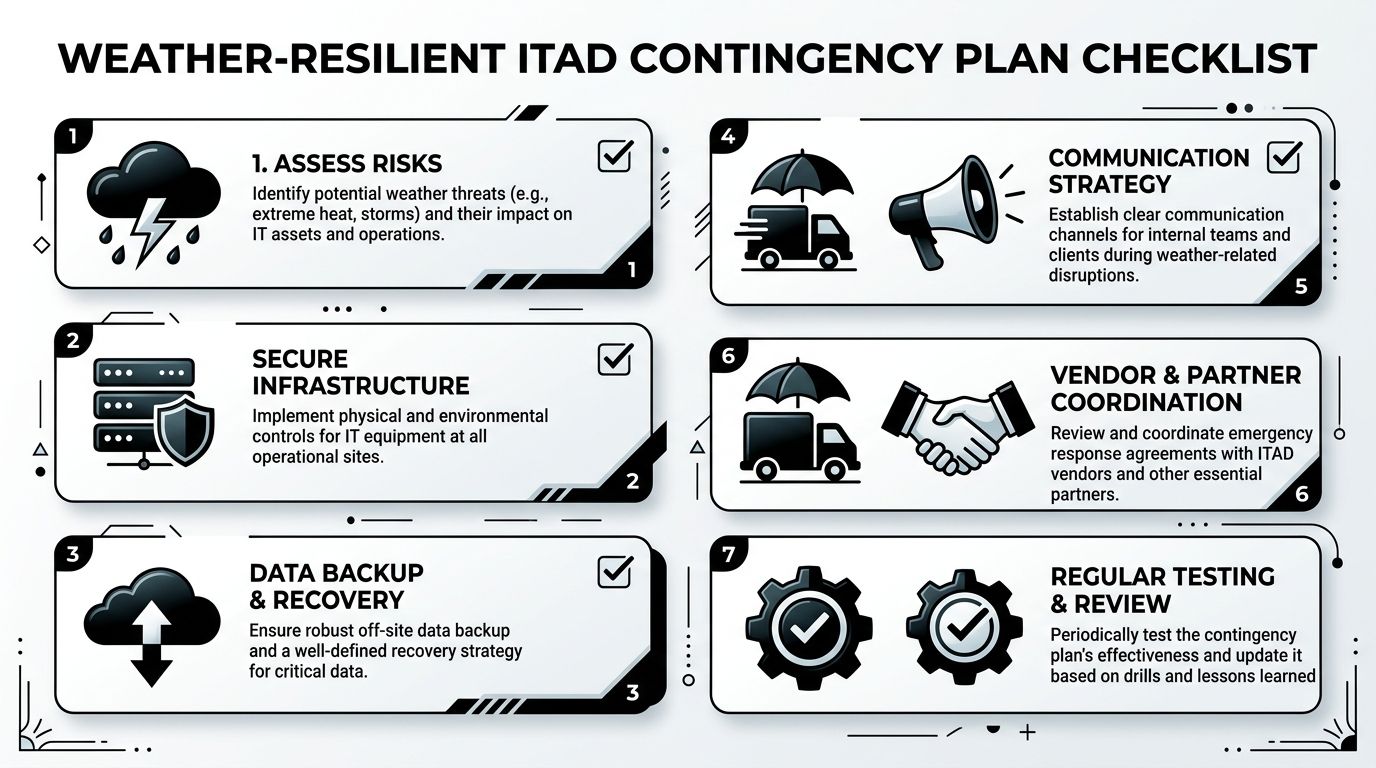
A weather-resilient ITAD plan doesn’t need to be long. It needs to be specific enough that your team can use it without debate.
The seven decisions to make in advance
Name a weather decision owner
Someone has to approve delay, staging, or reroute decisions. If that authority is split across departments, the pickup will stall when timing matters most.Define your stop conditions
Don’t rely on “we’ll know it when we see it.” Decide in advance what conditions trigger a postponement, an indoor-only move, or a partial pickup.Map secure staging areas
List the exact rooms or zones where disconnected assets can wait if weather closes the dock window.Separate asset classes
Drives, endpoint gear, network equipment, and full racks don’t all need the same response. The plan should say what gets prioritized for indoor handling.Build a communication ladder
Facilities, security, IT, and the vendor contact should know who gets called first and who confirms the final schedule change.Pre-stage supplies and labels
If a clean weather window opens, your team shouldn’t lose it while looking for carts, tags, or sign-off sheets.Review the plan after each event
Every weather delay reveals something. Maybe access control was slow. Maybe your staging room was too small. Update the plan while the lesson is fresh.
Useful supporting documents
A practical ITAD contingency plan usually sits beside the broader company recovery playbook. If your internal documentation is thin, this disaster recovery planning checklist is a good framework for thinking through responsibilities, communications, and recovery dependencies.
For IT-specific continuity, this business continuity planning checklist helps connect weather events to operational decisions around retired equipment, project timing, and secure disposition.
What a strong plan looks like
A strong plan is not theoretical. It names rooms, contacts, approval rules, and fallback actions. It assumes the weather in lawrenceville ga will eventually interrupt a pickup, and it removes improvisation from that moment.
A weak plan sounds like this: “We’ll move what we can and see how it goes.”
A strong plan sounds like this:
If storms hit before loading, disconnected assets return to Room B-14, badge access stays limited to IT and security, and the pickup shifts to the next approved morning window.
That level of clarity protects schedules, people, and compliance at the same time.
Partner with ACR for All-Weather Peace of Mind
Weather risk doesn’t sit outside IT asset disposition. It’s part of it. Heat changes how you load. Humidity changes how you handle drives. Storms change scheduling, routing, and dock safety. Cold snaps change acclimation and static exposure.
The teams that manage this well don’t guess. They build staging plans, define delay thresholds, protect chain of custody, and use pickup windows that fit real site conditions. That’s how projects stay secure even when the forecast doesn’t cooperate.
If your organization handles server decommissions, office closures, school refreshes, or healthcare equipment retirement in Gwinnett County, it helps to work with a partner that already plans around weather in lawrenceville ga. Local experience matters because the risk is rarely one dramatic event. It’s usually a series of small weather decisions that either keep the project controlled or push it off course.
For Lawrenceville organizations that need secure, compliant IT asset disposition, Atlanta Computer Recycling in Lawrenceville can help you build a pickup and processing plan that holds up in real Georgia conditions.
If you're planning a pickup, decommission, or bulk equipment removal anywhere in the Atlanta metro, talk with Atlanta Computer Recycling about a weather-aware ITAD strategy that protects your data, your schedule, and your chain of custody.