Expert ITAD & Electronics Recycling Duluth GA United States

Your retired gear usually doesn’t leave all at once. It stacks up in phases. A row of pulled laptops after a refresh. Two storage arrays nobody wants to touch until after quarter close. A handful of failed drives sitting in a locked drawer because legal, compliance, and operations haven’t aligned on what happens next.
That situation is common in duluth ga united states business environments. Teams are balancing uptime, budget control, audit readiness, and sustainability at the same time. The pressure gets worse when the equipment holds regulated data or when the removal window is narrow and the building has limited dock access, shared freight elevators, or active staff on the floor during the project.
Duluth has always been shaped by logistics and growth. The city began as Cherokee territory in the early 19th century, then grew rapidly after the 1871 railroad funding and renaming to Duluth, a change tied to economic ambition and connectivity (historical background on Duluth, Georgia). That history still matters. Local organizations operate in a place where movement, access, and timing affect every infrastructure project, including secure electronics recycling.
Introduction to Electronics Recycling in Duluth GA United States
A typical mid-sized office in Duluth doesn’t need a lecture on e-waste. It needs a workable plan.
The usual trigger is simple. An infrastructure upgrade finishes, old hardware gets removed from production, and then nobody wants to be the person who signs off on final disposition without clear chain of custody. That hesitation is rational. A quick haul-away may clear floor space, but it won’t answer the questions that matter later: Was data destroyed, who handled the assets, and which items were reused versus recycled?
What local teams are dealing with
In Duluth, organizations often need more than a generic pickup vendor. They need a provider that understands the local commercial footprint, the Atlanta-adjacent logistics pattern, and the practical issues that show up during removal work.
Those issues usually include:
- Tight windows: Work often has to happen before staff arrives, after a maintenance window, or between tenant activity in shared buildings.
- Mixed asset types: A single project can include desktops, laptops, servers, switches, bad drives, and peripherals that all need different disposition paths.
- Compliance pressure: Healthcare, education, and public-sector teams can’t rely on verbal assurances.
- Sustainability expectations: Leadership wants landfill avoidance, but not at the expense of data security.
A local service model matters because it reduces handoff risk. When the same team can assess, collect, transport, process, and document assets, fewer things get lost between “we removed it” and “we can prove what happened to it.”
Secure recycling works best when it’s treated as an operational project, not a cleanup task.
For organizations managing assets across Gwinnett County, practical local planning starts with understanding pickup coverage, scheduling realities, and service availability in the area served by Atlanta metro commercial recycling support in Gwinnett County.
What good electronics recycling actually looks like
The strongest recycling programs in Duluth don’t begin at the truck. They begin with inventory discipline.
A sound process identifies what can be remarketed, what must be wiped, what requires physical destruction, and what belongs in certified downstream recycling. That sequence protects data first, then recovers value where possible, then handles residual materials responsibly.
What doesn’t work is informal disposal. Loose drives in boxes, undocumented pickups, and “we reformatted it” as a data destruction method all create avoidable exposure. In business environments, disposal has to stand up to internal review, customer scrutiny, and sometimes regulators.
Understanding IT Asset Disposition and Data Security
IT asset disposition, or ITAD, is the controlled retirement of business technology. It covers the entire path from end-of-use through data destruction, reuse, resale, recycling, and final reporting.
The most common mistake is treating ITAD like junk removal. It isn’t. Once a device held company data, customer records, employee information, network credentials, or regulated files, retirement becomes a security workflow.
A useful starting point is this. If production systems are boats, retired devices are lifeboats. They may be off the main route, but the data can still float.
What happens after equipment leaves service
The lifecycle should be deliberate, not improvised.
Identification
The team determines what the asset is, who owned it, and whether it likely contains data.Segregation
Data-bearing devices get separated from non-data-bearing hardware. This sounds obvious, but mixed pallets are where mistakes start.Disposition decision
The item is routed toward reuse, resale, recycling, or destruction based on age, condition, and data sensitivity.Processing and documentation
Every device should produce a trail that matches what happened physically.
If you’re planning around operating system sunsets or refresh cycles, it helps to frame retirement as part of broader IT asset end-of-life management, not as a last-minute disposal event. That mindset changes purchasing, migration timing, and storage practices before risk accumulates.
Quick format versus real erasure
A quick format doesn’t equal secure deletion. It changes file system references. It doesn’t reliably eliminate recoverable data.
That’s why professional workflows distinguish between convenience actions and defensible sanitization methods. For many organizations, the critical split is between software wiping and physical shredding.
| Method | Best use | Trade-off |
|---|---|---|
| Software wiping | Functional drives that may be reused or remarketed | Preserves asset value, but requires verified processing and reporting |
| Physical shredding | Failed, damaged, obsolete, or highly sensitive media | Strong finality, but ends any reuse or resale potential |
The publisher background states that Atlanta Computer Recycling offers free hard drive wiping using the DoD 5220.22-M 3-pass standard and physical shredding for obsolete or non-functional media. That distinction matters because not every drive deserves the same path. A healthy drive in a refresh project may support reuse. A failed imaging-system drive probably shouldn’t.
Why standards matter
A standard matters because a policy without a method is only a promise.
In practice, teams should ask for:
- Documented serial tracking: Asset-level records reduce disputes later.
- Verified sanitization process: The method used should be specific, not generic.
- Exceptions handling: Failed drives need a defined fallback path.
- Certificates and reports: If the audit comes later, memory won’t help.
Practical rule: If a vendor can’t explain what happens when a drive fails wiping, the process isn’t mature enough for regulated data.
For a plain-language overview of disposition workflows, this explanation of IT asset disposition is a useful reference point for internal stakeholders who need the basics before approving a project.
What works and what fails in the field
What works is boring on purpose. Tagged assets. Segregated pallets. Separate containers for drives. Written approvals before material leaves the room. Reports that match the physical count.
What fails is speed without control. Technicians pulling gear before inventory is final, facilities staff mixing retired hardware with office cleanout, or someone assuming cloud migration means local endpoints no longer matter.
The safest ITAD program is the one that assumes every retired device still matters until proven otherwise.
Key Services Offered by Atlanta Computer Recycling
Most commercial IT recycling projects need a mix of services, not a single transaction. A laptop refresh doesn’t look like a rack decommission. A branch office closure doesn’t look like a clinic equipment turnover. The value is in matching the handling method to the asset type and the business risk.
A practical provider in duluth ga united states should be able to process functional equipment, dead media, mixed electronics, and bulk pickups without forcing everything into one disposal bucket.
Data-bearing device handling
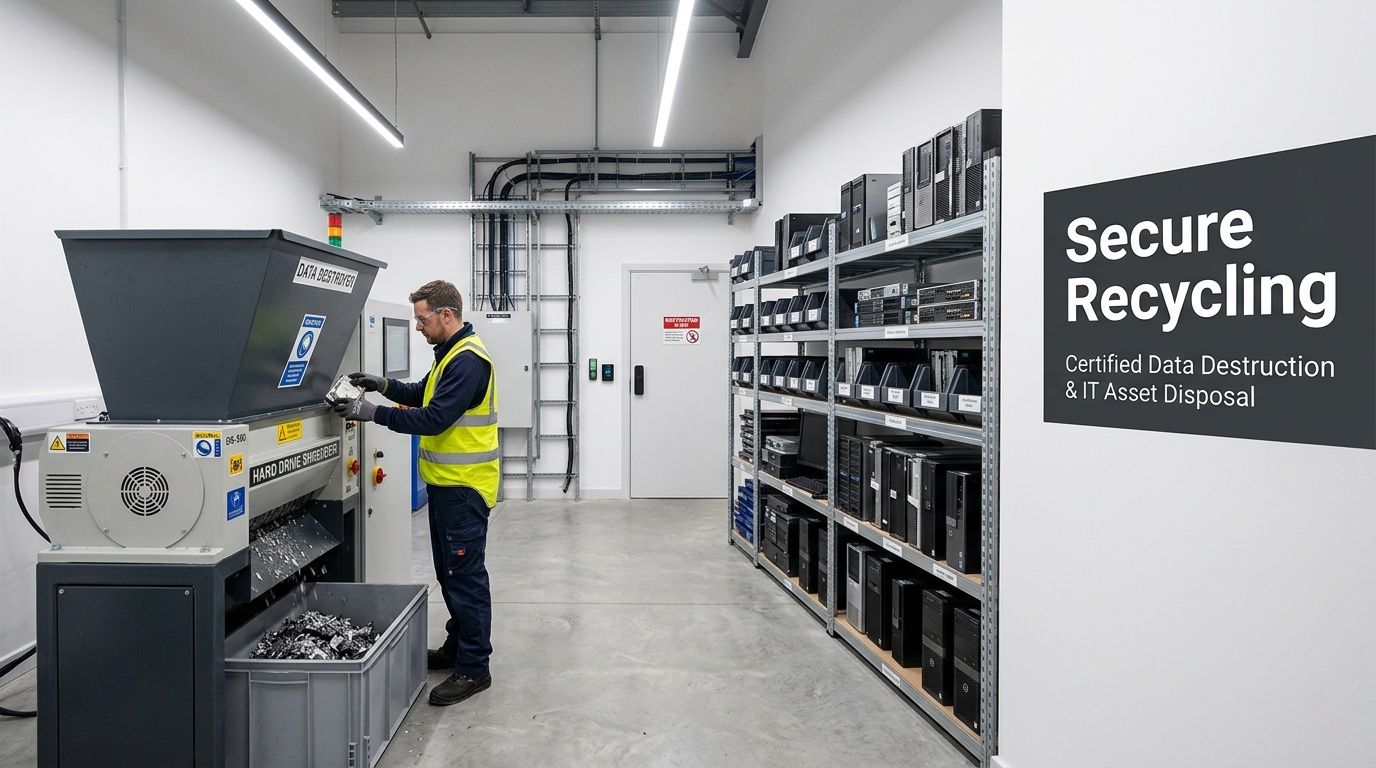
Hard drives, SSDs, and embedded storage devices drive most of the anxiety in retirement projects. That’s where secure wiping and physical destruction need to be clearly separated.
When a device is still functional, wiping may preserve the option for reuse or resale. When it’s non-functional or too sensitive to re-enter circulation, physical shredding is the cleaner answer. In real operations, teams usually benefit from a blended model. Reclaim what still has value. Destroy what introduces doubt.
That sounds simple, but execution matters. Good providers stage media separately, verify counts before processing, and maintain enough control that a customer can reconcile what left the site against what was destroyed or refurbished.
Resale and reuse versus recycling
Not every retired asset is scrap. Some still has productive life left.
The better question isn’t “Can this be recycled?” It’s “Should this be remarketed first?” Reuse sits higher on the value chain than material recovery, but it only works when the device is economically viable and the data has been handled properly.
A useful decision lens looks like this:
- Choose reuse when equipment is functional, current enough for secondary demand, and worth testing.
- Choose resale when you want to offset project cost and the hardware still carries market value.
- Choose recycling when the unit is obsolete, damaged, incomplete, or not worth labor-intensive recovery.
- Choose destruction when the media condition or data sensitivity removes any tolerance for uncertainty.
That final category matters more than many teams admit. A drive that intermittently fails, a damaged backup device, or a storage component from a sensitive environment often belongs in the destruction stream, even if someone thinks they might still extract value from it.
What a mature processing floor looks like
The strongest operations are easy to audit visually. Assets are labeled. Intake areas are distinct from wipe stations. Material streams don’t overlap without documentation. Non-ferrous material, circuit boards, plastics, and media don’t get tossed together in a convenience pile.
Mature ITAD operations reduce risk by creating fewer “gray zone” moments where an item’s status is unclear.
For organizations comparing service scope, Atlanta Computer Recycling’s commercial services outline the practical categories most businesses need, including pickup, data destruction, and responsible electronics processing.
Choosing the right service mix
A single office refresh may need three paths at once. Functional laptops can be wiped and reused. Failed drives can be shredded. Miscellaneous cables, monitors, and broken peripherals can move into certified recycling.
That mix usually beats all-or-nothing handling.
What doesn’t work is sending every asset to destruction when a portion could be remarketed, or trying to preserve every device when the labor cost and risk exceed the return. Strong IT managers make those calls before pickup day, not after the truck is loaded.
Navigating Compliance and Certification Requirements
A compliance problem usually starts long before any pallet leaves the building. In Duluth, I see it happen when an office closes a ticket for “equipment pickup” without deciding which devices carry regulated data, which ones can be remarketed, and which ones need destruction on day one.
That gap creates avoidable risk for hospitals, schools, local agencies, and private employers alike. The data types differ. The standard for control does not.
What compliance looks like during a real disposition project
Policy names are familiar. Day-to-day execution is where teams get exposed.
A healthcare provider has to account for media that may contain protected health information. A school district has similar obligations around student records stored on laptops, servers, and shared devices. A government office may be dealing with personnel files, procurement records, or public safety systems. In every case, the hard part is proving that handling, sanitization, transport, and final disposition followed a documented process.
Environmental handling matters too. Retired electronics cannot be treated like general trash, especially when batteries, displays, and mixed components are involved. For that part of the process, universal waste management guidance for electronics and related materials helps explain why controlled recycling channels are the safer choice.
Certifications help. Process discipline matters more.
R2 and e-Stewards can signal that a recycler has formal controls, downstream standards, and audit requirements. Those are useful indicators. They are not a substitute for asking how the work is performed on your project.
In practice, the weak points are usually simple. A drive gets separated from its asset tag. A mixed pickup combines low-risk peripherals with data-bearing equipment. A provider offers a generic certificate but cannot show device-level reporting. Those issues matter more than marketing language.
Use a short screening list before approving a vendor:
| Question | Why it matters |
|---|---|
| How is each asset tracked from removal through final processing? | Chain of custody problems usually happen during handoffs |
| What is the rule for failed drives and damaged media? | Exception handling shows whether the process holds up under pressure |
| Will final reports show item-level outcomes where needed? | Audit reviews go faster with specific records |
| How are regulated assets kept separate from low-risk recycling loads? | Mixed streams create unnecessary exposure |
Duluth teams need compliance plans that fit local operating conditions
This point gets missed in a lot of vendor conversations. A compliant plan also has to work inside the building, the parking lot, and the schedule you have.
Duluth organizations often operate in multi-tenant offices, busy medical buildings, school campuses, and municipal spaces with limited dock access or narrow pickup windows. In underserved parts of the area, staff time is already stretched, and off-site drop-off models can pull technicians and administrators away from core work. On-site ITAD reduces that disruption, keeps custody tighter at the point of removal, and makes it easier to keep reusable equipment in the circular economy instead of defaulting everything to scrap.
That trade-off matters. A cheaper disposal option can create more labor, more internal coordination, and more room for mistakes.
A practical compliance checklist
Teams do better with a working plan than with another policy memo.
Classify assets before pickup is scheduled
Separate likely data-bearing equipment from commodity electronics and accessories.Set sanitization and destruction rules in advance
Decide which assets can be wiped for reuse and which media must be physically destroyed.Confirm who approves scope changes
Facilities, compliance, IT, and department owners should know who can add or remove items during the project.Require documentation that closes the loop
Certificates, serialized reporting, and clear disposition records should be part of the standard deliverable set.Review downstream handling, not just pickup capability
Collection is only the first control point. Final processing determines whether the project stands up to review.
If your internal policy requires documented data destruction, your vendor process has to show exactly how that requirement was met.
Onsite Deinstallation and Logistics Management
The most successful disposition projects are won before the first asset is unplugged. Logistics decide whether the job feels controlled or chaotic.
That’s especially true in Duluth-area facilities where projects may share loading space with other tenants, operate under building access rules, or require work around active business hours. In those environments, on-site deinstallation isn’t just muscle. It’s coordination.
The project flow that keeps risk down
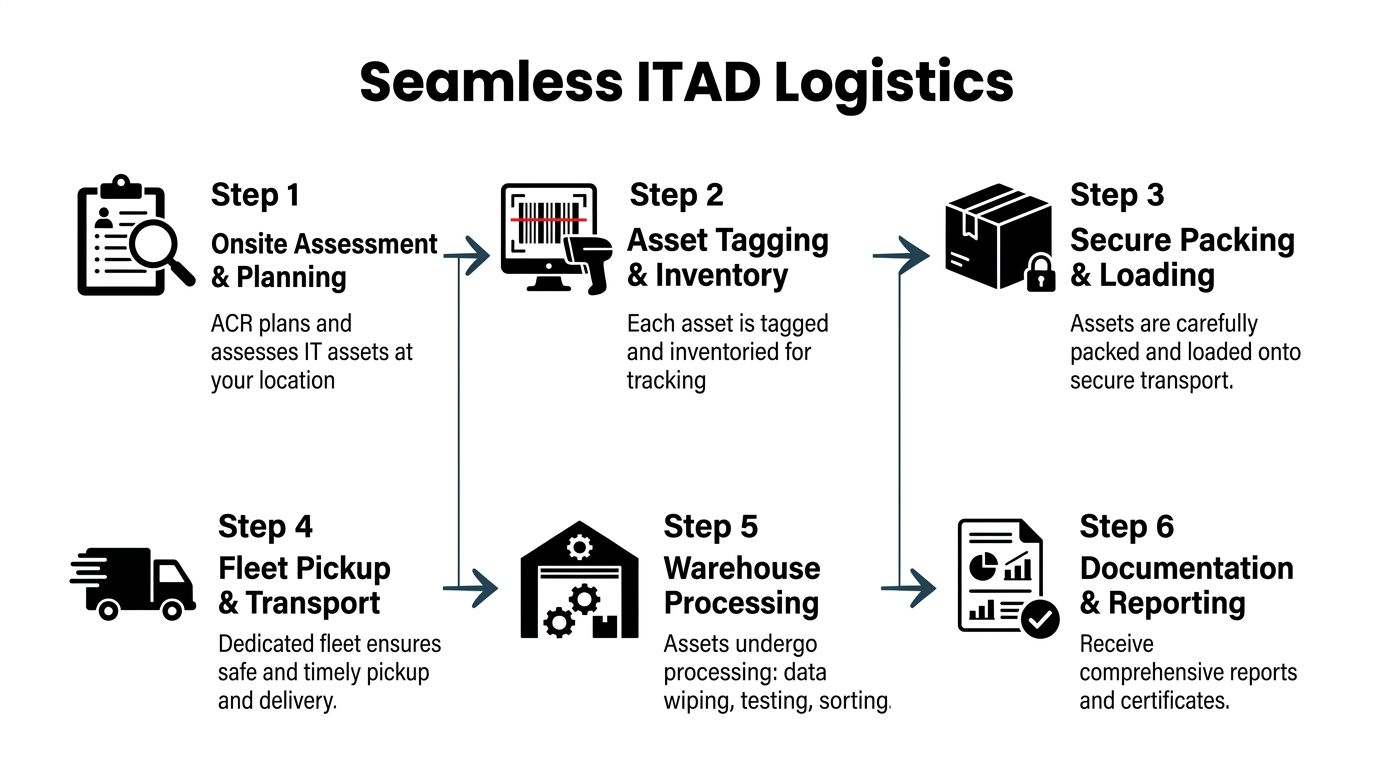
A disciplined workflow usually follows a sequence like this:
Assessment on site
The team confirms asset type, location, access constraints, and removal order.Tagging and inventory control
Each item gets tied to a list before movement begins.Packing and staging
Devices are boxed, palletized, or caged according to sensitivity and condition.Pickup and transport
Assets move through a controlled chain rather than ad hoc loading.Processing off site
Wiping, testing, sorting, destruction, and recycling happen by asset class.Final reporting
The customer receives documentation that closes the loop.
This sounds straightforward because it should be. Problems usually enter when one of those steps is skipped in the name of speed.
Data center nuance in Duluth
Data center environments raise the bar. Rack density, cooling design, and removal sequencing all affect whether you can extract assets without disrupting adjacent production.
A relevant local example comes from QTS Datacenters in Duluth, where facilities use DCIM monitoring targeting sub-1.3 PUE and redundant cooling, supporting on-site asset removal with less than 0.1% annual downtime in that operating model (QTS Duluth data center details). For ITAD planning, the lesson is clear. Removal work has to fit the facility’s operational discipline, not fight it.
What to prepare before the truck arrives
The cleanest projects usually have these items settled in advance:
- Access approvals: Building management, security, and dock scheduling should be confirmed early.
- Removal sequence: Start with non-critical gear, isolated rooms, or already-decommissioned racks.
- Container plan: Drives, loose media, and small devices shouldn’t travel in open bins.
- Internal ownership: Someone from IT and someone from facilities should both be reachable during the job.
A lot of delays come from simple issues. No freight elevator reservation. No clear path through a suite. Assets disconnected but not labeled. One missing cabinet key. These aren’t technical failures, but they can derail a technical project.
Field note: The best logistics plans assume that at least one access detail will go wrong and build slack around it.
For organizations that want a practical view of commercial pickups and deinstallation support, this Atlanta-area IT equipment pickup service page is a useful benchmark for what a coordinated workflow should include.
What works versus what doesn’t
What works is controlled movement in small, verifiable steps. Assets leave rooms in the order the inventory expects. Sensitive media is isolated. Trucks aren’t loaded until the count is reconciled.
What doesn’t work is bulk clearing by general labor with technical review afterward. Once mixed pallets move out of controlled areas, reconstruction gets expensive and confidence drops fast.
In active offices, hospitals, and schools, the ideal logistics plan is the one employees barely notice. Quiet staging. Tight timing. Minimal floor disruption. Full paperwork later.
Case Studies from Local Hospitals Schools and Government Offices
At 6:30 a.m., before staff arrive, a pickup team is waiting at a loading dock behind a clinic near Duluth. Upstairs, nurses still need clear hallways. In another part of town, a school technology lead is counting down the last open week before teachers return. A government office has old switches stacked in a closet, but no one wants them leaving the building without a clean audit trail. That is what local ITAD work looks like here. The job is not just recycling equipment. It is removing risk from active environments without slowing the people who still need the building.
In Duluth, that local context matters. Many organizations sit inside the larger Atlanta technology and disposal network, but the last mile still happens in neighborhoods with tight access, lean internal teams, and uneven resources. On-site collection and sorting reduce hallway clutter, shorten the chain of custody, and keep more reusable equipment in the regional circular economy instead of sending mixed loads straight to scrap.
Hospital example with PHI exposure and limited staff time
A Duluth-area healthcare facility replacing older endpoints and support systems during a broader modernization effort faces a familiar problem. Devices may be scattered across nurse stations, back offices, mobile carts, and storage rooms. Internal IT usually has enough staff to support the upgrade, but not enough time to babysit retirement work all day.
As noted earlier, healthcare providers serving underserved communities often operate under tighter staffing and budget pressure. That changes the disposal decision. A warehouse-first approach may look cheaper on paper, but it creates longer dwell times and more handoffs. For devices that may hold protected health information, on-site triage is usually the better choice.
The cleanest hospital projects split assets into clear handling paths from the start:
- Clinical-adjacent devices with storage stay under the highest control and move first.
- General office systems are inventoried by device class and data risk.
- Failed drives and loose media go directly into destruction custody.
Short dwell time matters more than speed alone. Equipment should move from room to cart, cart to secured staging, and staging to truck without sitting in open corridors or shared spaces. In hospitals, a quiet two-hour pickup with full reconciliation beats an all-day clearing effort that disrupts patient operations and leaves questions later.
School example with bulk turnover and summer deadlines
Schools create a different kind of pressure. The issue is not sensitivity alone. It is volume, mixed ownership, and a calendar that looks open until maintenance crews, classroom resets, and device refreshes all hit at once.
In a K-12 turnover, the practical mistake is treating everything as one pile. Student laptops, staff desktops, lab systems, interactive boards, closet gear, chargers, and broken peripherals do not belong in the same intake stream. If they get mixed early, the district loses reuse value, creates extra labor, and makes final reporting harder than it needs to be.
The districts that handle summer pickups well usually make three decisions before the first truck arrives:
- Set a cutoff date for adding more devices to the disposal pool.
- Assign one contact per campus who can answer inventory questions fast.
- Separate damaged units from reusable ones before central staging begins.
That approach matters in Duluth because schools do not all have the same storage space, dock access, or staffing depth. On-site pickup by campus, even if it takes more route planning, often causes less disruption than forcing every site to push unlabeled equipment into one central room. It also gives working devices a better chance of reuse within the Atlanta market, which supports both budget recovery and local sustainability goals.
Schools get better results when retirement is managed like a deployment project with deadlines, owners, and asset controls.
Government office example with legacy network gear
Government offices usually have fewer endpoint surges and more infrastructure leftovers. A city or administrative department may be retiring switches, routers, firewalls, workstation towers, monitors, and small-room storage gear, some of it old enough to have little resale value. That does not reduce the need for control. If the equipment once sat inside a sensitive network, the record of disposition matters as much as the physical removal.
The recurring issue in public-sector work is documentation discipline. Staff may know what is obsolete, but years of moves, refreshes, and closet cleanouts often leave weak labels and partial inventories. In that situation, on-site verification is not a luxury. It is how teams avoid arguing later about what left the building, what was destroyed, and what entered commodity recycling.
A practical public-sector workflow looks like this:
| Environment | Main risk | Best operational response |
|---|---|---|
| Hospital or clinic | PHI exposure | Controlled collection, immediate segregation, and clear destruction decisions |
| School district | Bulk volume and mixed ownership | Campus-level sorting, cutoff dates, and reuse screening |
| Government office | Weak audit trail | On-site verification, device-class separation, and detailed final reporting |
Across all three environments, the strongest results come from work that starts at the point of removal. That is especially true in Duluth, where local access constraints and staffing realities can turn a routine pickup into a disruption if the team relies too heavily on off-site sorting. On-site ITAD reduces that friction, protects the chain of custody, and keeps more equipment in the Atlanta reuse and recycling stream where it can do the most good.
Benefits of Partnering with Atlanta Computer Recycling
For business clients, the primary benefit of a specialized ITAD partner isn’t convenience alone. It’s operational clarity.
A capable provider can help you protect data, keep disposal work from disrupting staff, and route assets into the right end-of-life stream without forcing your internal team to manage every handoff. That matters in Duluth, where many organizations operate as part of the broader Atlanta business ecosystem but still need local response and practical scheduling.

Why local execution changes outcomes
A local commercial recycler can usually do three things better than a distant, generic processor:
- Coordinate pickups with fewer delays
- Adjust to building and access constraints
- Support on-site work without creating extra project layers
That’s not a branding point. It’s a control point.
When the same organization can handle deinstallation, transport, data-bearing media decisions, and final reporting, your team spends less time chasing status updates from separate vendors who each own only one piece of the workflow.
Sustainability with a practical business case
Sustainability goals matter more when they aren’t abstract. In the Duluth area, organizations participating in certified recycling programs divert up to 70% of IT assets from landfills and support local climate resilience efforts in underserved communities (Georgia Tech community resilience context).
That matters for ESG reporting, internal sustainability goals, and public-sector accountability. It also matters because disposal choices affect the local environment, not just the balance sheet.
The trade-off is straightforward. If you maximize destruction without evaluating reuse, you may reduce recovery potential. If you chase reuse too aggressively, you can create data-risk or labor-cost problems. A strong partner helps you strike the right balance based on asset condition and regulatory exposure.
Better support for underserved community institutions
This point often gets overlooked. Schools, nonprofits, healthcare facilities, and public offices serving underserved communities usually don’t have surplus IT labor for retirement projects.
They benefit from service models that are:
- Transparent about chain of custody
- Practical about mixed loads
- Flexible on pickup logistics
- Focused on reuse before scrap when appropriate
Responsible recycling is easier to defend internally when it solves a security problem and a sustainability problem at the same time.
For commercial clients, that combination is why partnership matters. You’re not only removing old gear. You’re reducing internal workload, improving audit readiness, and participating in a more circular local technology economy.
Conclusion and How to Request a Quote
Most IT disposal problems don’t start as emergencies. They become emergencies because teams wait too long to define the process.
If you’re managing retired servers, endpoint refresh leftovers, failed drives, or a full-site decommission in duluth ga united states, the strongest next step is simple. Get the scope documented before the hardware starts moving. That means identifying asset types, flagging data-bearing devices, deciding what can be reused versus destroyed, and confirming who owns signoff internally.
A good quote process should feel operational, not vague. You should be able to describe the environment, the asset mix, the removal constraints, and the reporting you’ll need at the end. If the project includes healthcare systems, school equipment, government assets, or active office floors, say that early. Those details affect scheduling, handling, and documentation.
What to have ready before you ask
Bring these basics to the first conversation:
- Asset categories: Laptops, desktops, servers, switches, drives, monitors, and miscellaneous electronics
- Approximate project type: Routine refresh, office closure, warehouse cleanup, or data center decommission
- Pickup conditions: Dock access, elevator rules, room locations, and preferred time window
- Security requirements: Which items need wiping, which need destruction, and whether certain assets require special handling
- Reporting expectations: Inventory reconciliation, certificates, and final disposition summaries
What a solid next step looks like
The most efficient path is usually a site survey or a detailed intake discussion. That allows the recycler to identify labor needs, transport requirements, media handling needs, and any building-access issues before pickup day.
If you wait until the last minute, you’ll usually pay for it in delays, internal confusion, or rushed decisions about sensitive hardware. If you plan early, the project becomes routine. That’s the goal.
The right recycling partner should make retirement feel controlled from the first inventory review through the final documentation.
If you need commercial electronics recycling or secure IT asset disposition in Duluth, contact Atlanta Computer Recycling. Their team supports business, healthcare, education, government, and data center projects with pickup, deinstallation, data destruction, and responsible downstream processing across the Atlanta metro area.