Atlanta Businesses Investing in Data Protection: 2026 Guide

If you're an IT manager in Atlanta, you probably have a version of the same problem sitting somewhere right now. A locked storage room with retired laptops. A rack of old servers waiting for approval. Backup drives from a completed migration. Network gear nobody wants to reconnect, but nobody has officially signed off to destroy.
That equipment looks inactive. It isn't harmless.
For many Atlanta businesses investing in data protection, the blind spot isn't the live network. It's everything that has already left production but hasn't completed a secure end-of-life process. That's where compliance, chain of custody, and defensible destruction matter most.
The Hidden Data Risk in Atlanta's Growth
Atlanta's growth has changed the scale of the problem. Metro Atlanta's data-center expansion means more installations, more refresh cycles, and eventually more decommissioning. In the first seven months of 2025, Georgia attracted over $40 billion in data-center investment, according to GovTech's report on the Atlanta area's data-center market.
That changes the practical security question. It isn't only "How do we wipe a laptop?" anymore. It's how to retire a room full of servers, storage arrays, failed drives, appliances, and backup media without creating a compliance gap.
Why retired infrastructure gets missed
Most security programs are built around active threats. Email filtering. MFA. Endpoint tools. Vulnerability management. Those all matter, but they don't solve the problem of dormant hardware still holding regulated or confidential information.
A retired server can still contain:
- Authentication artifacts from prior systems
- Database remnants from line-of-business applications
- Archived records tied to finance, HR, healthcare, or student operations
- Configuration files that reveal internal architecture
- Unencrypted backup content stored for convenience during a migration
When teams move fast, retired assets often get treated like logistics instead of risk. They get stacked, tagged loosely, and scheduled for pickup later. That's where process breaks down.
Practical rule: If a device ever stored production data, treat it like an active compliance obligation until sanitization is verified and documented.
A useful starting point is to identify and assess security risks across the full asset lifecycle, not just the assets still connected to your environment. That includes moves, refreshes, closures, mergers, and storage rooms that become long-term holding areas.
The local blind spot
Atlanta has a lot of enterprise infrastructure concentrated in one market. That means more branch consolidations, more office reconfigurations, and more disposal events that involve mixed equipment types rather than a neat batch of identical laptops.
The operational mistake is assuming one disposal workflow covers all of it. It doesn't. SSDs, failed hard drives, tape media, and network appliances don't all lend themselves to the same sanitization method or the same verification standard. If your organization is clearing out obsolete hardware for resale, recycling, or scrap recovery, the secure handling process has to begin before equipment is moved to a commercial electronics scrap stream.
The hidden risk isn't only data exposure. It's the absence of proof. When legal, compliance, or audit teams ask what happened to retired equipment, "we sent it out for recycling" isn't a defensible answer.
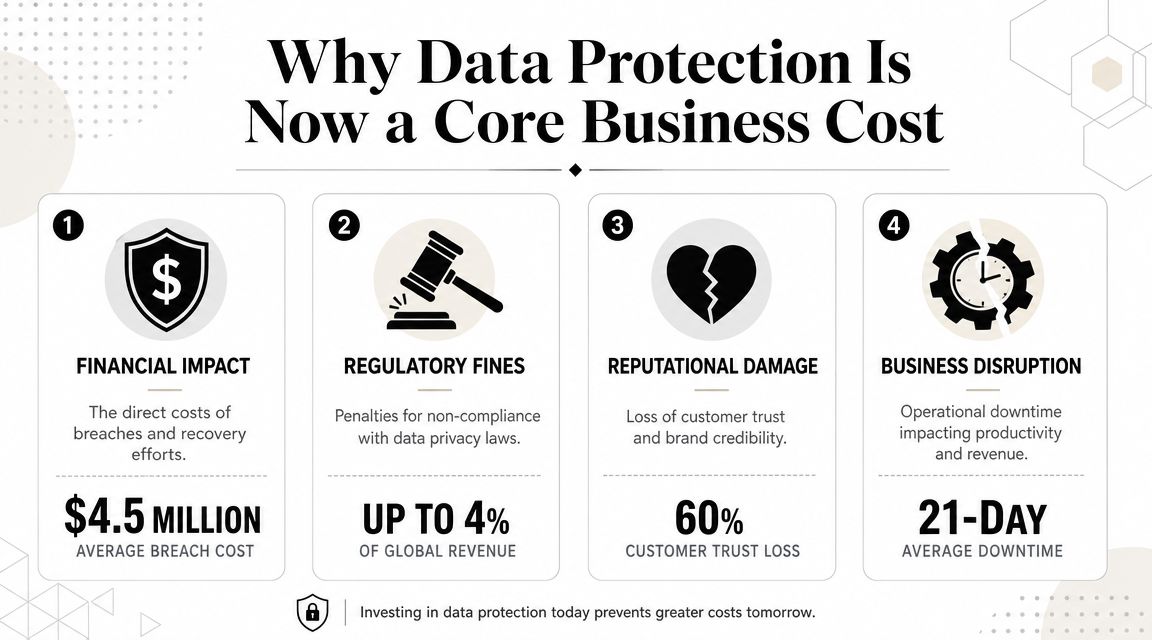
Why Data Protection Is Now a Core Business Cost
Atlanta businesses aren't treating data protection as a niche IT spend anymore, and the local market helps explain why. The Atlanta economy was estimated at more than $324 billion in GDP, ranked 10th largest in the United States and 18th largest globally, with seven Fortune 100 companies headquartered in metro Atlanta and more than 75% of the Fortune 1000 having a presence in the region, according to the overview of Atlanta's economy.
In a market like that, organizations aren't just handling routine office files. They're handling payroll records, financial systems, patient data, student information, contracts, backups, and operational infrastructure. Once you understand the volume and sensitivity of what's moving through Atlanta organizations, secure disposal stops looking optional.
Legal pressure doesn't require a single state privacy law
Georgia doesn't have a single privacy statute that functions as a master rule for all businesses. That doesn't mean the pressure is light.
A 2024 Georgia privacy bill, SB 473, passed the state Senate 37–15 and would have applied to organizations with more than $25 million in annual revenue that processed data from at least 175,000 Georgia residents, or at least 25,000 residents if more than 50% of gross revenue came from data sales. The bill proposed civil penalties up to $7,500 per violation, as described in the Georgia trends and developments analysis from Chambers. It didn't become law, but the signal is clear. Regulators and lawmakers are moving toward tighter expectations, not looser ones.
For an Atlanta IT manager, the takeaway is simple. Waiting for a final statute before building controls is the wrong move. The safer path is to build a process that already stands up to scrutiny.
The real budget argument
The business case isn't just "avoid fines." It's broader.
A weak end-of-life process creates costs that show up in different departments:
- IT operations deal with cluttered storage, unclear ownership, and delayed refresh projects
- Compliance teams can't prove what happened to data-bearing assets
- Legal teams inherit avoidable exposure if a breach or investigation reaches retired equipment
- Procurement and finance lose value when remarketable assets sit too long without disposition
- Leadership carries reputational risk if customers or partners question handling practices
I've seen organizations spend heavily on perimeter controls and still leave retired drives in unsecured staging areas because disposal was treated as a housekeeping task. That's not a technical problem. It's a governance problem.
For teams thinking through broader data privacy concerns, the practical point is that privacy doesn't end when a device is unplugged. In many environments, that's when the hardest proof requirement begins.
A mature data protection program treats retired assets as regulated assets until destruction, sanitization, or documented remarketing is complete.
The Three Pillars of an Airtight Data Protection Strategy
A reliable program has to cover the full lifecycle. Not just prevention, not just response, and not just disposal in isolation. The strongest approach I see in practice is built on three connected pillars.
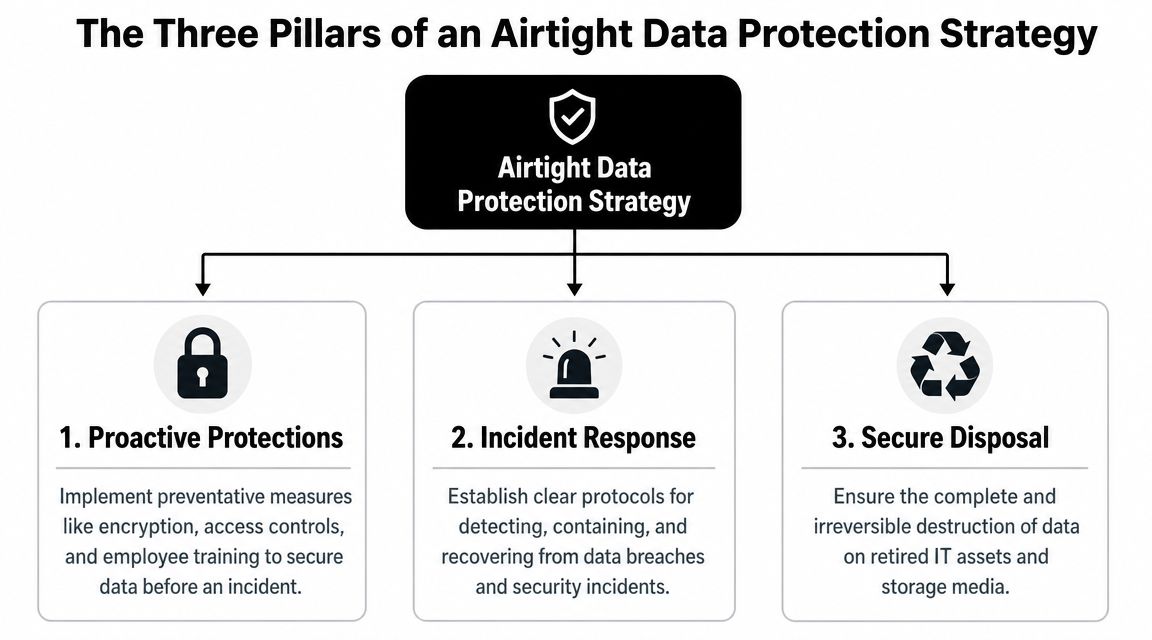
Proactive protections
Start before data becomes hard to control. This includes encryption at rest, encryption in transit, role-based access, and disciplined administrative permissions. It also includes workstation handling rules, removable media controls, and procedures for temporary project storage.
This matters in Atlanta because the business environment is large, dense, and highly interconnected. As noted earlier, the city's economy exceeds $324 billion in GDP and includes more than 75% of the Fortune 1000, which makes secure handling of retired IT assets part of business continuity and risk management in a very practical sense for local organizations.
What works:
- Restricting access by role instead of granting broad convenience access
- Encrypting laptops and servers by default so lost or staged devices don't expose readable data
- Documenting ownership for systems before refresh or migration starts
What doesn't work:
- Broad local admin rights
- Shared credentials for infrastructure teams
- "Temporary" storage locations that become permanent
Internal governance
Technology controls fail when nobody owns the decision points. Governance is where retention schedules, destruction approvals, move procedures, and staff responsibilities become clear.
This pillar should answer questions like:
- Who approves destruction for each asset class?
- How long can a retired device remain on-site before disposition?
- Which data categories require physical destruction rather than logical wiping?
- What documentation has to be retained after pickup or destruction?
"If ownership is vague, retired equipment will sit. When equipment sits, risk expands."
Good governance also reduces internal conflict. IT doesn't have to guess what legal wants. Facilities doesn't have to improvise around e-waste pickups. Security doesn't have to reconstruct a chain of custody after the fact.
Secure disposal
This is the pillar many guides underweight. It shouldn't be.
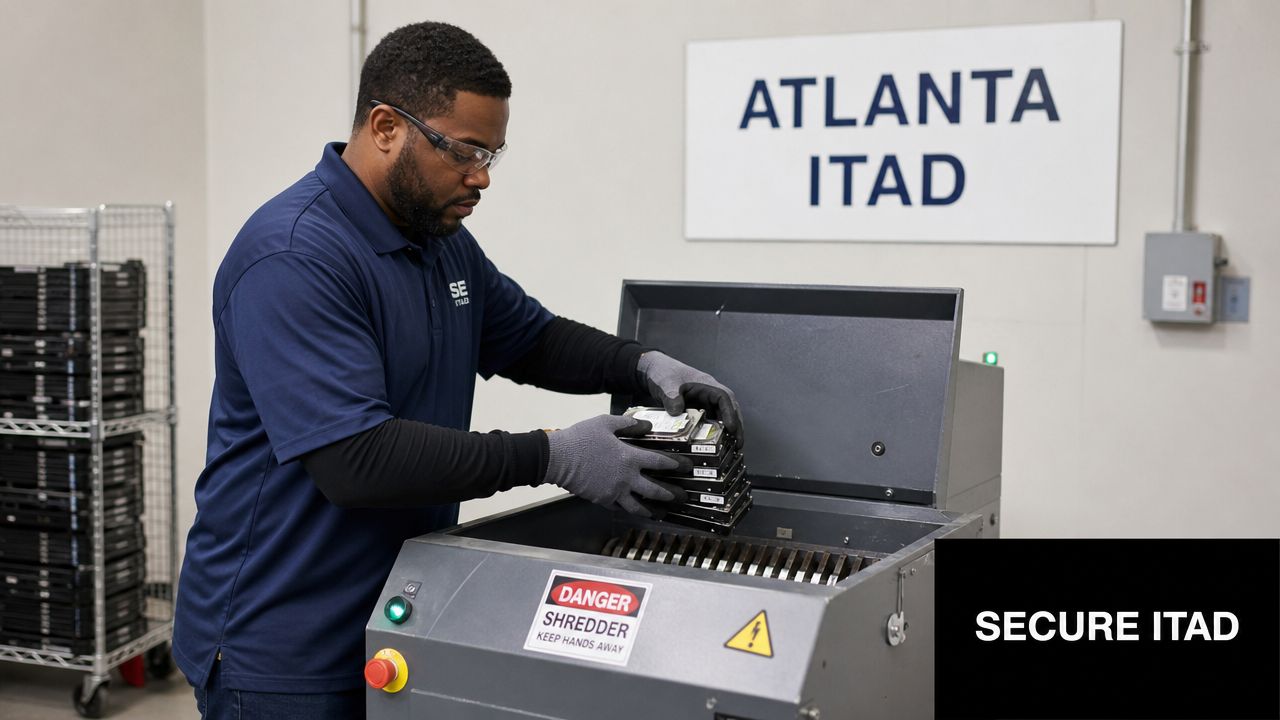
A data protection strategy is incomplete if the final handoff is weak. Secure disposal means inventorying every data-bearing asset, choosing a sanitization or destruction method that fits the media type and business requirement, maintaining chain of custody, and keeping audit-ready records afterward.
For organizations that need outside support, providers with documented destruction practices and auditable handling matter more than generic recyclers. If you're evaluating disposition controls, it's worth reviewing what a NAID AAA certified data destruction process typically involves, especially when legal or compliance teams want evidence that destruction wasn't informal.
The mistake is thinking disposal is just the last step. In reality, it's the proof step. It's where your written policy either becomes defensible or falls apart.
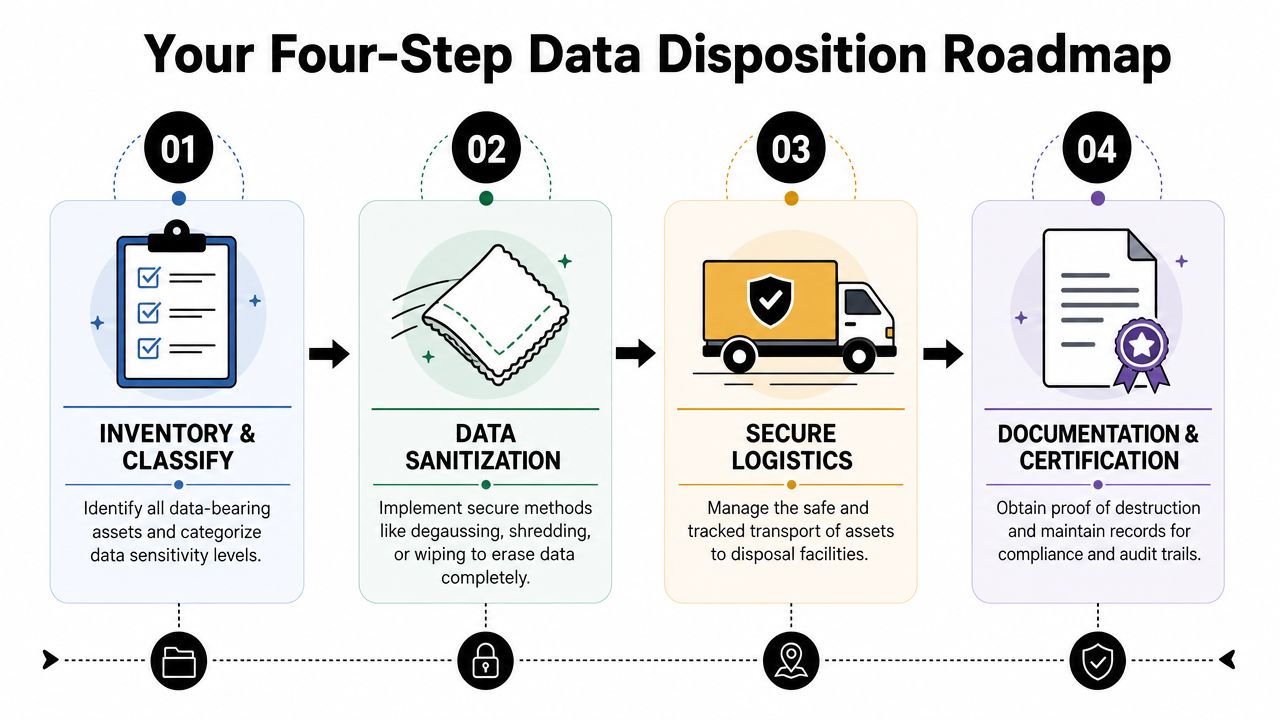
Your Four-Step Data Disposition Roadmap
The best disposition programs are boring in the right way. They don't depend on memory, heroics, or last-minute cleanup. They follow a repeatable path every time equipment leaves service.
Step 1 Inventory and classify
Build your process from the asset outward. Before anything leaves a closet, office, rack, or branch location, identify what it is and what kind of data it may contain.
Include:
- Asset type such as laptop, server, SAN component, firewall, copier drive, or backup media
- Storage type such as HDD, SSD, flash, or embedded memory
- Business owner who can approve final disposition
- Data sensitivity based on actual use, not guesswork
- Condition because working and failed media may require different handling
A simple mistake here causes bigger failures later. Teams often inventory devices but not media. Then loose drives, failed RAID members, and pulled backup units disappear from formal tracking.
Step 2 Set destruction rules before pickup
Don't let your vendor make all the decisions on the dock. Your organization should define what happens to each category of asset.
For example, a reusable business laptop might be eligible for verified wiping if policy allows remarketing. A failed drive from a healthcare application may need physical destruction. Network appliances and multifunction devices should be evaluated for embedded storage before release.
A documented policy should state who can authorize exceptions, how long assets can remain in staging, and what evidence must come back after disposition. If you need a baseline for service scope, many Atlanta teams start by reviewing a dedicated IT asset disposal workflow and then adapting it to their own compliance model.
Step 3 Match the method to the media
Not every device should be handled the same way. The decision should reflect media type, operational value, and proof requirements.
| Method | Best For | Verification | Key Advantage |
|---|---|---|---|
| Wiping | Reusable devices that remain functional and are approved for resale or redeployment | Software-generated erasure records and asset-level reporting | Preserves asset value while removing data when the media supports verified sanitization |
| Shredding | Failed media, highly sensitive assets, or devices not intended for reuse | Physical destruction records, chain-of-custody documentation, and destruction certificates | Irreversible destruction with a straightforward compliance story |
One caution on terminology. Teams often reference specific wipe standards loosely. What matters in practice is using a documented method that fits the device and producing verifiable records afterward. If the drive can't be reliably sanitized, destroy it physically.
Step 4 Verify everything
Verification is where many programs become audit-ready. Or not.
Use a closeout checklist that requires:
- Pickup reconciliation against the original inventory
- Exception handling for missing serials, failed drives, or unlisted media
- Sanitization or destruction evidence tied to individual assets or batches
- Final certificates and retained records stored where audit, security, and legal teams can retrieve them
Field note: The safest process isn't the one that sounds sophisticated. It's the one your team can execute consistently under deadline pressure during refreshes, office closures, and decommissions.
If you're decommissioning a server room, this step matters even more. Racks get emptied quickly. Loose drives and peripheral storage often don't.
Choosing a Secure ITAD Partner in Atlanta
Once your internal rules are clear, vendor selection gets easier. The question isn't whether a provider picks up electronics. Plenty do. The question is whether the provider reduces risk after pickup.
Georgia businesses still have to manage a meaningful compliance stack even without one all-purpose consumer privacy law. Businesses may have obligations under federal rules such as HIPAA and GLBA, and Georgia requires affected residents to be notified after a breach in the most expedient time possible, with no minimum threshold for the number of affected individuals, as outlined in this explanation of Georgia data privacy requirements for Atlanta SMBs. That's why your ITAD provider's process has to be defensible, documented, and easy to explain.
What to verify before you sign
Use a practical checklist. Ask for evidence, not marketing language.
Chain of custody controls
Ask how assets are labeled, loaded, transported, and reconciled. You want a process that tracks what left your site and what reached the processing point.Sanitization and destruction standards
Ask which media are wiped, which are shredded, and how failed devices are handled. A credible provider should explain limitations instead of promising one method fits everything.Audit-ready documentation
Certificates matter, but they aren't the whole story. Ask what reports you receive, whether serial-level reporting is available, and how exceptions are documented.On-site and de-installation capability
This matters for data centers, hospitals, schools, and large offices. Moving equipment incorrectly before sanitization can create a chain-of-custody problem you didn't have to accept.
Questions that separate strong vendors from weak ones
A good ITAD conversation gets specific fast:
- What happens to drives that fail during attempted wiping?
- How do you handle mixed loads with servers, laptops, loose media, and network gear?
- Can you support staged pickups during a multi-site closure?
- What documentation do you retain if we need records later?
- Who has custody of equipment between pickup and final processing?
Providers that answer clearly are usually running a real process. Providers that stay vague are often depending on trust instead of controls.
One local option some organizations evaluate is Atlanta ITAD services for business equipment retirement, especially when they need pickup, de-installation, data destruction, and recycling handled within one documented workflow. That's not the only model in the market, but it's the kind of bundled process many enterprise and public-sector teams prefer because it reduces handoff points.
The right ITAD partner shouldn't force you to explain away uncertainty to compliance or legal. They should remove uncertainty from the process.
Making Data Protection Your Competitive Advantage
The companies that handle retired assets well don't just avoid trouble. They become easier to trust.
Clients, regulators, auditors, procurement teams, and internal leadership all notice the same thing. A business that can account for data from deployment through destruction usually runs tighter operations everywhere else too. That's why Atlanta businesses investing in data protection should think beyond breach avoidance and start thinking about proof, discipline, and commercial credibility.
What strong programs signal to the market
A well-run end-of-life process tells partners and customers that your company doesn't treat sensitive information casually. It shows that refresh cycles are controlled, data-bearing devices aren't left in limbo, and disposition decisions aren't improvised during moves or cleanup projects.
That matters in Atlanta's business environment, where organizations often support multiple offices, regulated workflows, and large volumes of infrastructure. Secure retirement of equipment becomes part of how you demonstrate reliability.
The better way to frame the investment
Don't frame data protection as a cost center that only exists to satisfy policy. Frame it as operational maturity.
A mature program does three things well:
- Protects trust when customers and partners ask how retired assets are handled
- Supports compliance with records your team can produce
- Preserves value when assets can be wiped, resold, or routed into responsible recovery instead of sitting idle
For teams planning refreshes or lifecycle budgeting, it's also smart to understand how secondary market value and disposition timing affect returns. Reviewing current IT asset remarketing trends in Atlanta can help you align data security decisions with recovery value instead of treating those goals as separate.
Retired hardware shouldn't be the weakest point in your security model. It should be one of the most controlled parts of it.
Atlanta Computer Recycling helps Atlanta-area businesses manage secure IT asset disposition, electronics recycling, drive wiping, shredding, pickup logistics, and documentation for retired equipment. If your team is dealing with office cleanouts, infrastructure refreshes, or data center decommissioning, you can review service options through Atlanta Computer Recycling.