Ecycle Atlanta: Secure ITAD Services for Businesses


The problem usually starts with good intentions. Someone swaps out a batch of laptops, retires a few rack servers, or closes a small office suite and moves the old gear into a locked room “for now.” Six months later, that room holds hard drives, access points, monitors, backup appliances, printers, and a stack of mystery boxes no one wants to open.
That isn’t just a space issue. It’s an IT risk issue. If those assets still contain regulated data, employee records, customer files, cached credentials, or old backups, your storage closet is functioning like an unmanaged archive with no retention policy and no audit trail. If the hardware is mixed together without inventory, you also lose the ability to decide what can be wiped and reused, what needs shredding, and what has to move straight into downstream recycling.
Businesses across Atlanta are dealing with this at the same time the e-waste stream keeps expanding. Global e-waste reached 62 million metric tons in 2022, up 82% from 2010, and only 22.3% was formally collected and recycled, according to Sourgum’s e-waste statistics overview. That matters at the facility level because every unmanaged pile of retired equipment becomes part of a larger disposal problem, with both data exposure and environmental consequences attached.
The Hidden Risks in Your IT Storage Closet
A typical scenario looks harmless on the surface. The old SAN from a storage refresh is stacked beside retired desktops. A few loaner laptops from a department rollout sit on a shelf with no charger and no owner tag. There are network switches from a branch move, plus several boxes of loose drives pulled during troubleshooting. Everyone knows the room is full. No one is fully sure what’s in it.
That setup creates three liabilities at once. First, you have unknown data-bearing assets sitting outside a controlled destruction process. Second, you have chain-of-custody gaps because the equipment has already fallen out of active management. Third, you have disposition delays that make the project bigger and messier every quarter.
Space pressure makes the problem worse. Teams often treat offloading old gear like a storage decision when it’s really a governance decision. If you're trying to separate active inventory from retired equipment before pickup, practical guidance from top storage solutions for business success can help frame the operational side, but storage only buys time. It doesn't solve secure disposition.
Many companies also underestimate the scrap side of the equation. Mixed loads of cables, broken peripherals, obsolete towers, and non-working accessories still need a documented path out of the building. For organizations sorting that material stream, electronics scrap recycling options are useful to review early, before those items get mixed in with reusable IT assets.
Old hardware becomes dangerous when no one can answer three basic questions: what it is, who last used it, and how the data will be destroyed.
The business mistake isn’t having retired equipment. Every growing company accumulates it. The mistake is allowing that hardware to sit in a gray area between live operations and controlled disposal.
Your First Step A Strategic IT Asset Audit
A pickup gets scheduled for Friday. By Thursday afternoon, nobody can say which laptops still have encrypted drives, which server rails belong to production gear, or whether the box of loose SSDs came from Finance or a decommissioned lab. That is how an ecycle atlanta project turns into a security problem.
A strategic audit fixes that before anything leaves the building. It gives IT, compliance, and facilities the same record set, so the disposition plan is based on actual assets, actual data risk, and actual recovery value.
Atlanta’s broader recycling history makes the point well. In 2017, the city’s curbside program struggled with a 41% contamination rate, and a multi-year effort later reduced contamination by 31%, according to The Recycling Partnership’s Atlanta curbside case study. Business IT has the same problem in a different form. Mixed streams create mistakes, and mistakes in IT disposition carry compliance and data exposure consequences.

Build the inventory before anyone touches the racks
Start with a physical inventory, room by room, rack by rack, closet by closet. Procurement records help, but they never tell the full story. They miss failed swap-outs, loaner machines, acquired equipment, and hardware that was moved years ago without an update in the CMDB.
The audit should capture five things for every item:
- Asset identity including device type, manufacturer, model, serial number, and internal asset tag
- Exact location such as site, room, rack, cabinet, shelf, or office
- Operational status including live, retired, failed, unknown, or staged
- Data-bearing status covering HDDs, SSDs, flash storage, backup media, and embedded storage
- Ownership and policy context such as business unit, custodian, system owner, or regulated use case
That last field matters more than many teams expect. A retired workstation from marketing and a retired workstation from HR may look identical on a cart, but they do not carry the same risk profile once you start documenting destruction requirements, legal hold concerns, or GDPR compliance obligations.
Separate by risk, not by form factor
A good audit does not stop at counting devices. It groups assets by the control they require.
Use three working categories:
Reuse and remarketing candidates
Newer laptops, desktops, servers, and network gear that may justify testing, wiping, and resale.Mandatory destruction assets
Systems tied to regulated data, security incidents, executive use, legal hold exceptions, or internal policies that require physical destruction of media.Commodity recycling material
Low-value peripherals, broken accessories, obsolete electronics, and mixed non-data equipment.
This classification drives downstream decisions. It tells your ITAD partner which assets can be wiped and remarketed, which need serialized media destruction, and which can move straight into electronics recycling. It also exposes where you may need equipment such as a degausser for magnetic media destruction instead of a one-method-fits-all approach.
If an item’s data history is unclear, classify it at the higher risk level and document the exception.
That rule prevents one of the most common audit failures. Unknown assets get treated as low-risk scrap because nobody wants to slow the project down.
Define success before disposition starts
Every stakeholder hears something different when leadership says, “clear out the old equipment.” Finance hears recovery value. Security hears destruction. Facilities hears floor space. Legal hears documentation.
Put the project goals in writing before pickup is scheduled:
- If compliance is the driver, identify which assets need serialized tracking, Certificates of Destruction, and exception handling
- If data security is the driver, specify whether destruction must occur on-site and what chain-of-custody evidence is required
- If ROI is the driver, flag equipment worth testing for resale or redeployment
- If speed is the driver, define access windows, elevator restrictions, dock instructions, and removal priority
This step saves money because it prevents the wrong work from happening to the wrong equipment. It also reduces audit pain later. When Atlanta Computer Recycling walks into a site with a validated inventory and a clear scope, the project usually moves faster, produces cleaner documentation, and avoids the rework that drives up cost.
A clean audit turns a clutter problem into a controlled disposition project. It gives you a basis for chain of custody, method selection, Certificates of Destruction, and resale decisions before the first asset is unplugged.
Choosing Your Data Destruction Method
The most important question in any ITAD project is simple. How will data be destroyed, and how will you prove it?
A lot of e-recycling content stays vague here. It says assets are handled “safely” or “securely” and leaves out the method, the standard, the documentation, and the exceptions. That’s where IT managers get into trouble. According to Ecycle Atlanta’s discussion of e-waste security gaps, many guides don’t explain the difference between standards like DoD 5220.22-M and NIST 800-88, or the need for verifiable compliance reports and on-site shredding options.
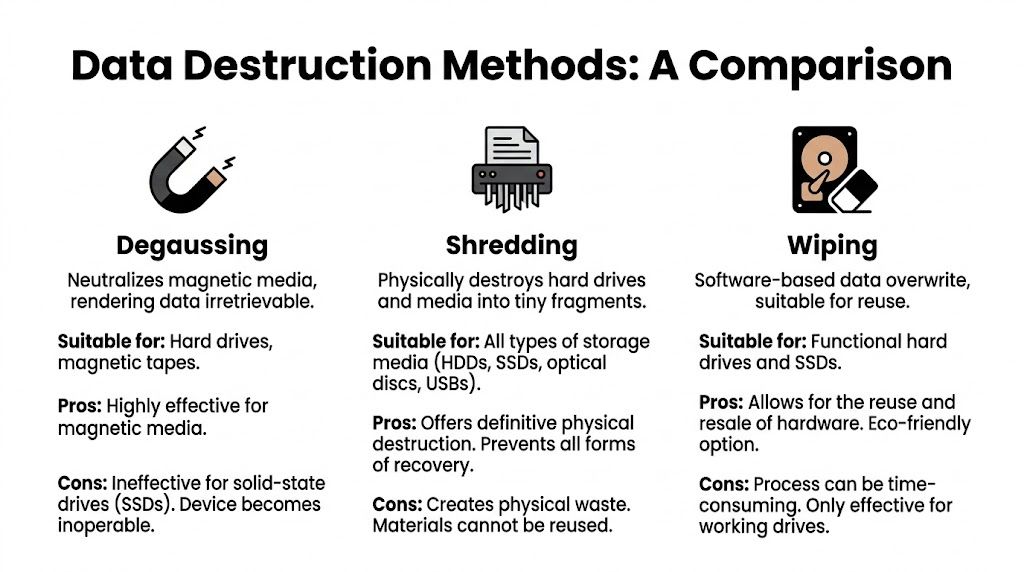
Wiping, shredding, and degaussing are not interchangeable
These methods solve different problems.
Software wiping overwrites data on storage media and preserves the asset for reuse if the device remains functional. This is the path most organizations prefer for newer laptops, desktops, and servers with resale value.
Physical shredding destroys the media itself. That eliminates reuse of the drive, but it also gives the highest level of finality when policy, regulation, or internal risk tolerance requires destruction.
Degaussing applies to magnetic media. It neutralizes data on compatible media types, but it isn’t a universal answer across modern device inventories, especially where mixed storage technologies are involved.
For businesses evaluating whether degaussing belongs in their process, it helps to understand what a degausser does in secure media destruction and where its limits are.
Data Destruction Methods Compared
| Method | Security Level | Best For | Allows Asset Resale? | Compliance Standard |
|---|---|---|---|---|
| Wiping | High when properly validated | Functional laptops, desktops, servers, reusable storage | Yes | Often documented against DoD 5220.22-M or NIST 800-88 |
| Shredding | Very high | Failed drives, high-risk media, regulated environments, unknown-history storage | No | Commonly paired with destruction certificates and chain-of-custody records |
| Degaussing | High for compatible magnetic media | Specific legacy or magnetic media workflows | No practical resale path for the media | Used where magnetic media destruction fits policy requirements |
When wiping is the right choice
Wiping works when you need both security and value preservation. If the drive is healthy, the system can be processed, validated, and moved into remarketing or internal redeployment. That matters for fleets of recent business laptops or servers with resale demand.
The key isn’t just that the wipe happened. The key is that it was logged, tied to the asset serial, and validated. A statement that “all drives were erased” is not documentation. You need device-level records.
One example in the Atlanta market is Atlanta Computer Recycling, which offers DoD 5220.22-M 3-pass wiping and physical shredding for obsolete or non-functional media as part of commercial ITAD work. That type of method-based disclosure is what buyers should look for from any provider, because it lets you align asset handling to policy instead of relying on vague promises.
When shredding is non-negotiable
Some organizations shouldn’t accept reuse risk on certain media, even if the hardware still has value. Healthcare is the clearest example. If the device touched patient information, insurance data, imaging systems, or endpoint workflows connected to clinical operations, risk owners often prefer destruction over reuse.
Government and public sector departments make similar calls when chain-of-custody requirements are strict or when internal policy treats media destruction as the default control.
Healthcare and government clients shouldn't treat “recyclable” and “reusable” as the same compliance answer. They’re different decisions with different evidence requirements.
Shredding is also the practical answer when:
- The drive is failed or unstable, making validated wiping unreliable
- The device history is incomplete, especially after office closures or inherited environments
- Policy requires physical destruction, regardless of residual market value
- You need witnessable or on-site handling, rather than off-site sanitization
DoD vs NIST matters less than proof of execution
IT managers sometimes get stuck on standard names and miss the operational question. The standard matters, but evidence matters more. If a vendor says they wipe to DoD or follow NIST principles, ask what records they provide per asset and how exceptions are handled.
You should expect answers to questions like these:
- What happens when a drive fails the wipe process?
- Is the exception routed automatically to shredding?
- Do you issue serialized Certificates of Destruction?
- Can you distinguish wiped assets from shredded assets on the final report?
- Is on-site shredding available for high-risk projects?
This is especially important for organizations with international data obligations. If your environment intersects with privacy regulation beyond domestic requirements, a broader review of GDPR compliance expectations can help legal and security teams align data disposition decisions with retention and destruction duties.
If a provider can't explain their audit trail in plain language, they probably can't defend it during an audit either.
The best data destruction decision is rarely the cheapest one. It’s the one that fits the actual risk profile of the assets in front of you.
Executing On-Site De-Installation and Pickup
Pickup day is where a good plan either holds together or falls apart.
The businesses that have the smoothest ecycle atlanta projects do one thing well before the truck arrives. They prepare the site like an operational handoff, not like a bulk junk removal appointment. That means access is cleared, stakeholders are assigned, and the inventory is ready for verification.
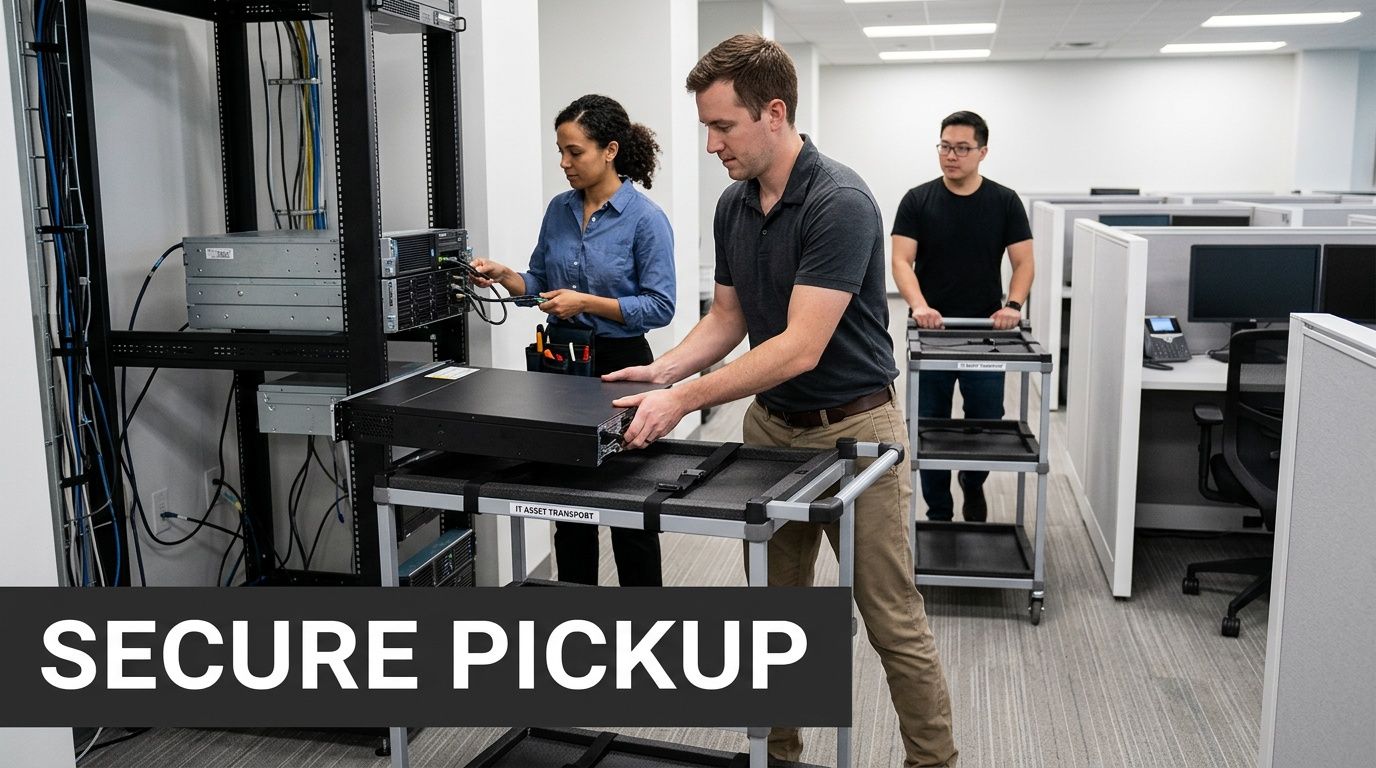
What to have ready before the crew arrives
For offices, schools, hospitals, and data rooms, the same operational issues come up again and again. Loading access is blocked. Freight elevators are booked. Assets are still connected. No one has authority to sign the release paperwork.
A short pre-pickup checklist prevents most of that:
- Confirm physical access including dock availability, elevator access, parking, after-hours entry, and any badging requirements
- Designate a staging area so boxed assets, loose equipment, pallets, and de-racked gear can be separated without disrupting active operations
- Identify live vs retired equipment with tags or floor notes so technicians don't touch anything still in production
- Assign one internal owner who can answer questions, approve removals, and reconcile surprises against the inventory
- Secure loose media separately if drives, tapes, or small devices need a different destruction path than the rest of the load
For organizations planning a coordinated removal, it helps to align the handoff with a provider’s IT equipment pickup process in Atlanta so your internal team knows what the crew will need on arrival.
How professional de-installation should look on site
A proper pickup is methodical. The crew verifies what’s being removed, disconnects retired systems carefully, de-racks servers without damaging adjacent equipment, and packs assets for secure transport. Nothing should be handled as anonymous bulk material unless that was defined in advance.
That matters most in active environments. In a server room, one rushed pull can affect neighboring hardware, cable paths, or power distribution. In a hospital or campus setting, poor coordination can create unnecessary downtime, hallway congestion, or security issues.
On site, I look for discipline in three areas:
Asset verification
The crew should reconcile the staged equipment against the inventory or pickup scope, especially for serialized hardware and media-bearing devices.Controlled physical handling
Equipment should be packed and moved in a way that protects the chain of custody and prevents accidental damage or mix-ups.Documentation at transfer
The handoff point should be recorded. Once the assets leave your possession, the custody trail should already be active.
The chain of custody doesn't start at the recycling facility. It starts when your staff releases the asset.
Keep disruption low, not just risk low
A good vendor protects uptime as well as data. That usually means scheduling removals around business operations, splitting pickups across phases, or de-installing in waves so active staff can keep working.
For office moves and data center work, practical sequencing helps:
- Remove peripherals and non-data equipment first
- Stage loose devices before rack work begins
- De-rack top-to-bottom or by cabinet group
- Separate reusable assets from destruction-only media at the site
- Leave a signed transfer record before the truck departs
The handoff should feel boring. That’s a good sign. In ITAD, uneventful execution usually means the planning was sound and the controls were real.
Final Disposition From Remarketing to Recycling
A lot can still go wrong after pickup.
From an IT manager’s perspective, the highest-risk mistakes often happen inside the facility, after the equipment is off your floor and out of sight. If the vendor cannot show how each asset moved from intake to final disposition, you are relying on trust where you should be relying on records.
A controlled ITAD process tracks assets individually or by approved batch logic, verifies what arrived, confirms data handling status, tests for reuse, and assigns a final path. That path should be clear. Reuse, parts recovery, or recycling.
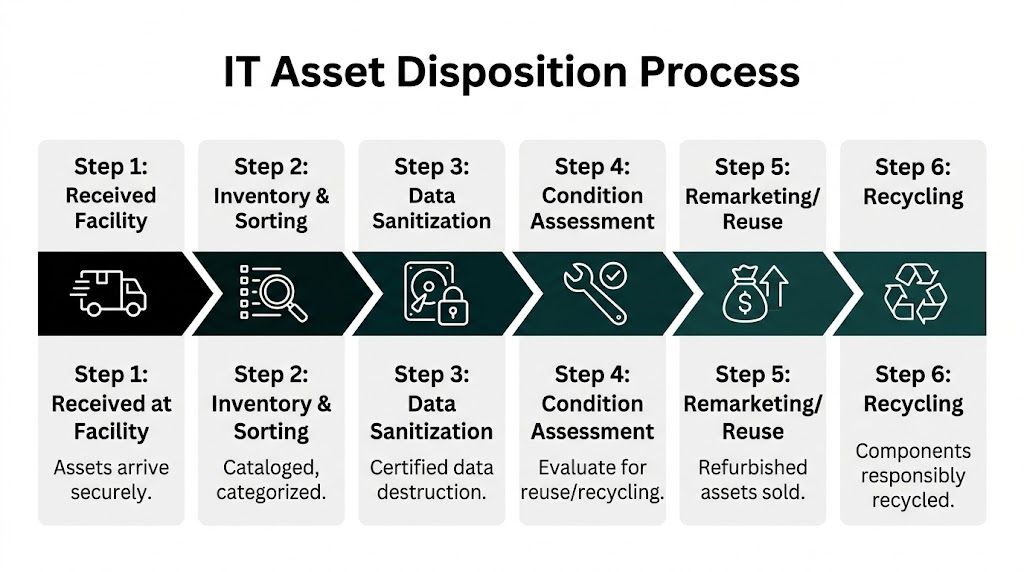
Intake and triage shape both value and risk
The first real decision after intake is not environmental. It is operational. Which assets are fit for remarketing, which need parts harvesting, and which should go straight to de-manufacturing because the condition, age, or data risk makes reuse a bad choice.
Good triage improves recovery value, but it also protects compliance. A late-model laptop with verified sanitization and a clean functional test belongs in a different stream than a damaged drive-bearing device with a failed wipe result. Treating both as generic scrap leaves money on the table in one case and raises risk in the other.
I see organizations miss this in two directions. Some scrap everything and lose resale value. Others push too much into reuse without enough testing or documentation.
What belongs in remarketing
Remarketing makes sense when the hardware still has market demand, passes functional review, and has documented data sanitization tied to the asset record. That usually applies to newer business laptops, desktops, networking gear, mobile devices, and some server components.
The upside is straightforward:
- Value recovery can offset project cost
- Usable equipment stays in service longer
- Your recycling stream is limited to what needs end-of-life processing
For larger refreshes, the recovery value can be material enough to affect the project budget. If you want a practical reference point for which categories still hold value, review old electronics for cash through structured IT asset recovery.
Reuse needs controls. Testing records, condition grading, sanitization confirmation, and a documented release into resale channels. Without those controls, remarketing becomes a blind spot instead of a recovery strategy.
What belongs in recycling
Some assets should not be remarketed. Failed hardware, obsolete systems, broken devices, low-value peripherals, and media routed for destruction belong in a controlled recycling stream.
At that stage, the question is not whether the vendor says they recycle. The question is whether they can explain the downstream path with enough specificity for an audit file. That means de-manufacturing, separation into material categories, and routing through traceable downstream processors rather than vague assurances that the load was "handled."
The strongest providers can tell you what happened to the non-reusable fraction without hesitation. Which items were dismantled. Which materials were recovered. Which media was destroyed. Which exceptions were logged.
That level of detail matters.
Documentation is what closes the project
Final disposition is only complete when the paperwork supports the physical outcome. If legal, internal audit, procurement, or your security team asks for proof six months later, the file has to stand on its own.
The records usually include:
- Serialized disposition reporting showing what was received and how each asset was processed
- Certificates of Destruction for drives, tapes, and other media sent to physical destruction
- Certificates of Recycling or equivalent documentation for non-reusable equipment
- Exception reports for missing serial numbers, failed wipes, damaged assets, or count discrepancies
- Chain-of-custody records connecting transfer, transport, intake, processing, and final disposition
This is also where the earlier data destruction decision shows up in black and white. If your standard was NIST 800-88 purge for reusable devices and physical destruction for failed media, the reporting should reflect that. If a vendor talks generally about secure recycling but cannot produce asset-level proof, your compliance position is weaker than it looks.
A disposition process you can defend
The best outcome is simple to explain under scrutiny. Each asset has a recorded intake, an approved data handling result, a final disposition path, and closing documentation that matches the work performed.
That is the standard to hold. Clear reuse criteria. Controlled recycling channels. Certificates that match the scope. A custody trail that does not break once the truck leaves your site.
Choosing the Right Ecycle Atlanta Partner
Most businesses don’t need a one-time hauler. They need a repeatable process and a vendor that can support it every quarter, every refresh cycle, every office move, and every decommission. That’s the key decision when you evaluate an ecycle atlanta partner.
Price matters, but it should not be the first screen. Cheap pickup without disciplined data handling creates expensive problems later. The better question is whether the provider can operate like an extension of your security and facilities teams.
What to ask before you sign anything
A serious vendor conversation should feel like risk review, not just scheduling. Ask direct questions and pay attention to how specific the answers are.
Use a checklist like this:
Which sanitization standards do you support?
Ask whether they perform DoD 5220.22-M wiping, how they address NIST 800-88 expectations, and when they route media to physical destruction.What proof do you provide per asset?
You want to know whether reporting is serialized, whether Certificates of Destruction are included, and how exceptions are documented.Can you support on-site services?
For some organizations, on-site de-installation, packing, and witnessable destruction matter as much as the downstream recycling path.How do you manage chain of custody?
Ask when custody begins, who signs at transfer, and how the assets are tracked through transport and intake.What happens to reusable equipment?
The provider should be able to explain testing, grading, value recovery, and what categories are candidates for remarketing.What happens to non-reusable equipment?
Push for clarity on downstream recycling and material recovery rather than generic language about “green disposal.”
For businesses comparing vendors locally, reviewing an Atlanta electronic waste recycling company’s service scope can help you separate broad marketing claims from actual B2B ITAD capabilities.
Technology questions reveal operational maturity
One of the most overlooked screening questions is about the provider’s technology stack. According to Ecycle Atlanta’s overview of AI in e-waste processing, forward-looking ITAD operations are using AI and computer vision to improve sorting accuracy to over 98% and raise material recovery efficiency by 30-50%.
That doesn’t mean every client needs an AI-heavy workflow. It does mean you should ask how the provider uses automation, tracking, and audit systems.
Good questions include:
- How are assets logged at intake?
- Is serialized tracking available?
- How do you separate reuse candidates from destruction-only media?
- What systems support reporting and audit readiness?
- How do you reduce handling errors on larger projects?
A vendor that can answer those cleanly usually has a more mature process overall.
The best partner is the one who can explain their controls before there’s a problem, not after.
Build for the next project, not just this one
The strongest client-vendor relationships in ITAD are built on repeatability. Once your team has a working audit template, an approved destruction policy, a standard pickup workflow, and a predictable reporting package, the next project gets easier. Office cleanouts, lifecycle refreshes, branch consolidations, and data center reductions stop feeling like one-off fire drills.
That’s why I recommend choosing for fit, not just availability. A provider should match your environment:
- Healthcare teams need strong destruction documentation and clear handling for regulated data.
- Schools and universities often need flexible pickup scheduling and bulk asset processing.
- Government departments usually prioritize custody controls and defensible reporting.
- Enterprise IT groups need both remarketing discipline and reliable de-installation support.
If a vendor can’t discuss those trade-offs without slipping into sales language, keep looking.
The right partner reduces internal workload because they don’t require your team to babysit the process. They know what information you need, what compliance artifacts legal will ask for, and what facilities constraints can derail a pickup. Over time, that consistency becomes part of your operational hygiene, not just your recycling program.
If your organization needs a secure, documented way to retire computers, laptops, servers, drives, and network equipment, Atlanta Computer Recycling provides commercial ITAD services across the Atlanta metro area, including pickup, de-installation, data destruction, and responsible downstream disposition. The practical next step is to scope your inventory, define which assets require wiping versus shredding, and request the reporting package you’ll need before the first item leaves your building.