Scrap Electronics: A Business Liability or Hidden Asset?

The storage room usually tells the truth before the spreadsheet does.
A stack of retired laptops by the wall. Two racks of old servers no one wants to touch because they still “might have something on them.” A pile of monitors, dead UPS units, loose drives, cables, and phones left over from a refresh that happened months ago. Most businesses call it scrap. In practice, it is a mix of data risk, compliance exposure, recoverable material, and possible resale value sitting in one place without a decision.
That is why electronic scrap deserves a different level of attention than ordinary cleanout work. A server is not just metal. A laptop is not just a disposal item. Every retired asset has to be sorted by what it contains, who used it, what data may still reside on it, and whether the best outcome is reuse, resale, certified recycling, or destruction.
That Pile of Old Equipment Is More Than Just Scrap
Most IT managers do not have a scrap problem. They have a decision problem.
The equipment has already left production. The hard part is deciding what happens next without creating security gaps, audit headaches, or avoidable write-offs. Once devices are retired, they enter a gray zone where ownership is still yours, but visibility often drops fast.
Scrap is part of a large industrial system
“Scrap” sounds like waste. The market says otherwise. The United States processes approximately 85 to 150 million metric tons of scrap metal annually, and the industry generates over $117 billion in economic activity according to Statista’s overview of scrap materials in the U.S.. That matters because your retired electronics do not disappear when they leave your office. They enter a real downstream system with real specifications, handlers, and consequences.
For business equipment, the practical question is not whether scrap has value. It is what kind of value it has.
- Security value: Devices may still hold customer records, employee data, credentials, or internal documents.
- Material value: Equipment contains recoverable metals and components.
- Market value: Some assets belong in resale channels, not the shredder.
- Documentation value: Proper disposition records protect your team during audits and internal reviews.
A common mistake is treating all retired devices the same. If your process for old phones, failed SSDs, network switches, and aging servers is “put it in the back until we have enough,” you are delaying a business decision while risk stays active.
For smaller items such as aging handsets, a consumer-oriented option like sell old phones can help illustrate how secondary markets work. In a business setting, though, the standard has to be much tighter because custody, data handling, and reporting matter just as much as any recovery amount.
What changes when you treat scrap like an asset class
When teams formalize electronic scrap handling, three things usually improve first:
- Data-bearing devices stop sitting untracked.
- Finance gets clearer visibility into recovery versus disposal cost.
- Facilities and IT stop arguing about who owns the pile.
If you want a grounded view of downstream processing, this breakdown of what happens to recycled electronics is useful because it shows why front-end sorting decisions matter so much.
Practical rule: If you cannot say where a retired device is, what data it held, and what disposition path it is assigned to, it is not scrap yet. It is still an active risk item.
Understanding the DNA of Electronic Scrap
A retired desktop and a scrap filing cabinet may both be old assets. They are not the same kind of scrap.
Electronic scrap is defined less by appearance than by composition. Inside one device, you can have marketable metals, proprietary components, batteries, and stored data. That combination is what makes e-scrap operationally different from ordinary surplus.

A retired device is a locked diary, not an empty notebook
The simplest analogy is this. A metal shelf is an empty notebook. Once you remove it from service, its main issue is physical disposal. A laptop is a locked diary. Even when it looks dead, it may still carry years of user activity, saved credentials, browser artifacts, local files, cached email, or synchronized business data.
That is why visual condition tells you almost nothing about actual risk.
A cracked monitor with no storage is one thing. A non-booting laptop with an intact SSD is something else entirely. IT teams get into trouble when they sort by “works or doesn’t work” instead of “data-bearing or non-data-bearing.”
Electronic scrap contains both opportunity and obligation
Retired electronics also deserve attention because of what they are made of. Metals recovered from e-waste can return to manufacturing with major energy advantages. Recycling aluminum saves up to 95% of the energy needed for primary production, and recycling steel saves 72%, according to OKON Recycling’s summary of metal recycling importance.
That gives sustainability teams a useful reporting point, but it also has a practical operations lesson. A good disposition process is not just about getting old assets out of the building. It is about sending them into the right downstream channel so those materials can be recovered.
For business readers who need a formal framework around that process, IT asset disposition is the right lens. ITAD is the discipline that connects data destruction, logistics, resale, recycling, and reporting into one controlled workflow.
What usually goes wrong
Three patterns show up again and again in mishandled scrap programs:
- Mixed storage: Drives, laptops, batteries, and loose peripherals all end up together.
- No intake triage: Nobody separates data-bearing gear from commodity electronics at the start.
- No disposition decision: Equipment sits in limbo because the team has not chosen reuse, resale, recycle, or shred.
That limbo is expensive. It slows cleanouts, increases the chance of informal disposal, and makes later audits harder because chain of custody starts late or not at all.
Key takeaway: Electronic scrap is not one category. It is a controlled stream of devices and components that carry different levels of data sensitivity, recycling value, and handling requirements.
A Spectrum of Scrap Categorizing Your Retired IT Assets
Good scrap handling starts with categorization, not pickup.
If you look at all retired IT equipment as one pile, you miss both risk and value. A better model is to treat your inventory as a spectrum. Some assets should be repaired. Some should be remarketed. Some belong in certified recycling. Some need special hazardous handling before anything else happens.
This first-pass sort does not need to be perfect. It needs to be disciplined.
Start with one question
Before model age, resale value, or cosmetic condition, ask this:
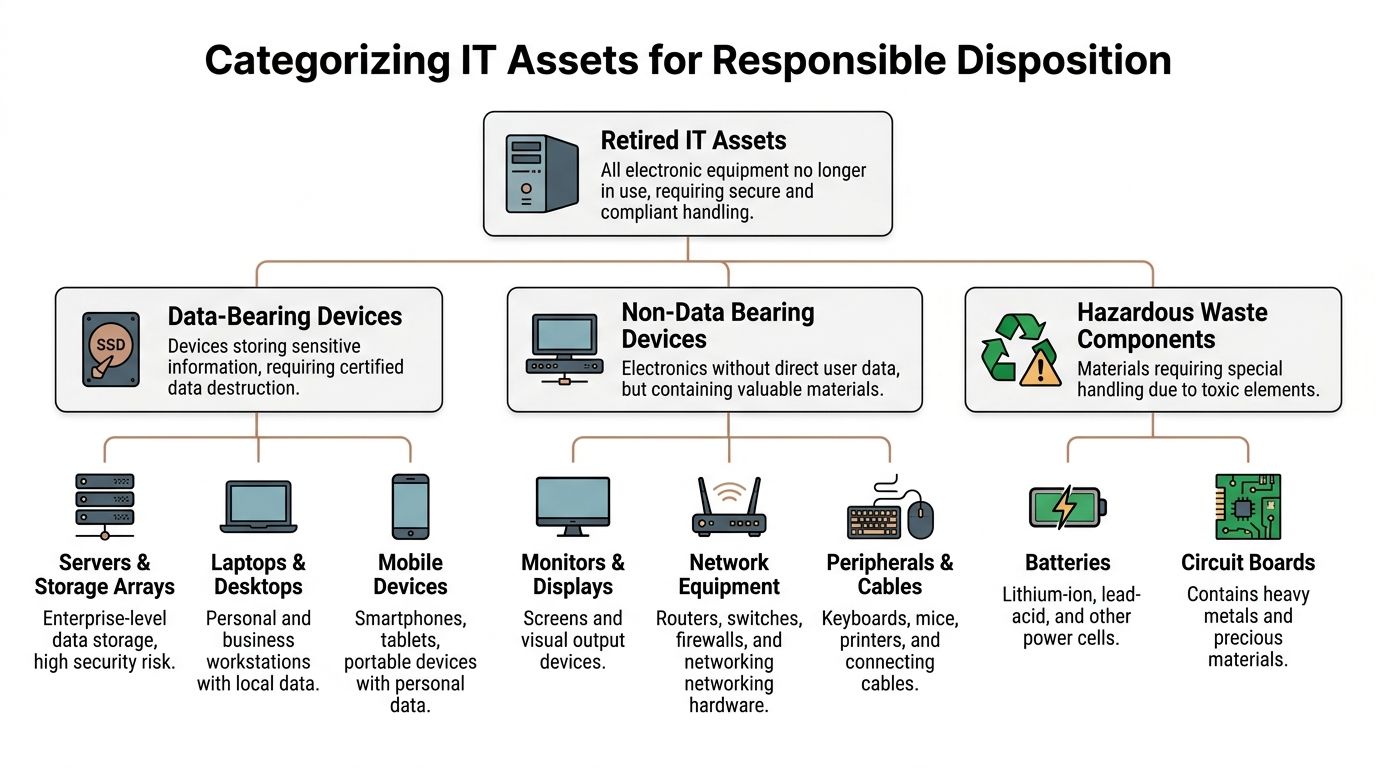
Does the asset store data?
That immediately separates the inventory into a high-control stream and a lower-control stream. Servers, laptops, desktops, storage arrays, mobile devices, and loose media all need tighter handling than monitors, cables, docking stations, or many peripherals.
Four categories that work in practice
Repairable
These are assets with a useful remaining life but a fixable issue.
Examples include a recent laptop with a failed motherboard, a desktop needing memory replacement, or a server with replaceable components where the platform still fits an internal need. Repairable assets matter because many organizations scrap devices too early to clear space fast.
What works:
- Testing before declaring end of life
- Checking whether the asset still fits an internal role
- Removing and securing storage media before any bench work by a third party
What does not:
- Assuming “won’t boot” means “no value”
- Letting departments hand off broken devices without asset records
Reusable or remarketable
This group includes equipment that no longer fits your production standard but still has market demand.
Typical examples are off-lease laptops, late-generation desktops, network hardware with current relevance, and server gear with secondary market buyers. For these assets, pre-audit discipline matters most. If you send potentially marketable equipment straight to destruction, you erase recovery before the project starts.
A useful way to think about this category is function plus timing. Some assets lose value quickly once a refresh cycle moves on. Delays hurt here.
Tip: Pull serials, specs, and storage status early. Once equipment is stacked on pallets without records, resale decisions get slower and less accurate.
End-of-life recyclable
Some scrap has reached its end of life. The hardware is obsolete, damaged beyond practical repair, unsupported, or too low-value to remarket responsibly.
This category often includes old towers, legacy servers, damaged peripherals, scrap metal housings, low-demand network gear, and stripped systems with little remaining component value. These assets still need careful processing because they contain recyclable material and may still include components that require proper downstream handling.
The mistake here is not recycling. The mistake is failing to separate out data-bearing parts and hazardous subcomponents before bulk processing.
Hazardous components
This category cuts across the others. A battery can be attached to a reusable laptop. A circuit board can come from an end-of-life server. Hazardous handling is not a standalone asset type as much as a special condition you have to flag.
Examples include:
- Lithium-ion batteries: Found in laptops, tablets, phones, and UPS-related devices.
- Lead-acid batteries: Common in backup power systems.
- Circuit boards: Present in nearly every device and require proper downstream processing.
- Damaged power units: Often overlooked during office closures and equipment room cleanouts.
A simple audit method for IT managers
You do not need a complex software rollout to improve scrap decisions. Use a short review process:
Identify the asset class
Server, laptop, desktop, phone, network gear, monitor, storage, peripheral.Flag storage media
HDD, SSD, flash, embedded storage, removable media.Assign one disposition path
Repair, redeploy, resale, recycle, or destroy.Isolate exceptions
Swollen batteries, broken screens, damaged drives, unknown devices.
Organizations typically move from cleanup mode into actual ITAD management at this stage. Once the inventory is sorted by path, the project becomes manageable.
The High Stakes of Scrap Legal and Compliance Risks
Electronic scrap becomes dangerous when teams confuse movement with control.
Removing equipment from a floor, closet, data center, or branch office does not reduce risk by itself. If the devices still contain regulated data, if the chain of custody is weak, or if the downstream recycler cannot handle the material correctly, the company that generated the scrap is still exposed.

Data destruction is a control, not a checkbox
For healthcare, education, government, and any organization managing employee or customer information, the most immediate scrap risk is data leakage.
A drive does not need to be in a functioning computer to create a breach scenario. If the media exists and the data remains recoverable, your obligations do not end because the asset was retired. That is why certified data destruction matters. It creates a defined method, a documented event, and evidence that the organization handled media intentionally.
Two approaches usually matter most:
- Software wiping: Appropriate when the media is functional and the device may continue to reuse or resale channels.
- Physical shredding: Appropriate for failed media, obsolete drives, or cases where policy requires destruction over sanitization.
Many IT teams also reference internal or customer-facing destruction standards such as DoD 5220.22-M because they need a recognizable process for media sanitization. What matters operationally is consistency. The method must match the asset condition and the organization’s compliance expectations.
Environmental compliance lives in the details
The environmental side of scrap is where many businesses underestimate their exposure.
Loose batteries in a gaylord box, broken devices mixed with metal scrap, or informal drop-off through a non-specialized channel can create avoidable problems. Electronic waste contains materials that require proper handling, and that responsibility starts before the recycler touches the load.
One issue that business readers often miss is downstream purity. Industrial scrap recycling is not casual sorting. Steel scrap, for example, must meet strict composition requirements. In some grades, total copper content cannot exceed 0.20 to 0.30%, as detailed in Steel Dynamics scrap specifications. That matters because improperly processed e-waste can contaminate a recovery stream and create liability for the originating company.
If your team wants a concise review of battery and electronic handling rules, universal waste is the category to understand. It affects how many common IT components should be stored, moved, and transferred.
Chain of custody is what auditors trust
A lot of organizations focus on the final certificate and ignore the period before it. That is a mistake.
Chain of custody starts when the asset leaves service, not when it reaches a recycling dock. A strong process usually includes:
- Asset identification: Serial numbers, tags, device counts, and media status
- Controlled pickup: Named parties, logged transfer, and secure staging
- Documented processing: Wipe results, destruction records, and disposition outcome
- Final reporting: What was reused, recycled, destroyed, or remarketed
Without that chain, the business is relying on assumptions. Assumptions do not help during a breach review, customer questionnaire, or internal audit.
Practical test: If legal, compliance, or leadership asked for the custody trail of one retired server from removal through final disposition, could your team produce it without reconstructing the story from emails?
What works and what fails
The organizations that manage scrap well do not rely on cleanout days alone. They use repeatable controls.
What works:
- separating data-bearing media immediately
- labeling and staging retired assets by disposition path
- using documented handoff procedures
- requiring destruction and recycling records that match the original inventory
What fails:
- leaving retired devices in unsecured storage
- mixing office junk removal with IT equipment handling
- sending equipment to a general scrap outlet without data controls
- waiting until a move, merger, or closure forces a rushed response
Scrap is not a low-stakes back-office chore. It sits at the intersection of privacy, environmental duty, and financial accountability.
Strategic Disposal Pathways for Business IT Scrap
Once inventory is categorized and risk is clear, the next decision is pathway.
At this stage, many businesses either recover value or lose it. The wrong path destroys resale potential, increases handling cost, or creates security problems. The right path matches the asset’s condition, data profile, and business purpose.
The four pathways that matter
Some retired equipment should stay inside the business. Some should go to a secondary market. Some should be recycled for materials recovery. Some should be destroyed because the media, condition, or policy leaves no reasonable alternative.
The useful question is not “How do we get rid of this scrap?” It is “Which path creates the best balance of security, compliance, and value?”
Internal reuse or redeployment
This works when equipment no longer fits one department but still meets a real business need elsewhere.
A common example is moving office desktops into lower-demand roles, using older laptops for training, or keeping certain network gear for lab or backup use. Internal reuse can stretch value, but only if IT controls configuration, sanitization, and reassignment properly.
Weak redeployment creates its own problems. Devices moved informally tend to fall out of asset tracking, and old local data can follow them if sanitization is inconsistent.
Resale and value recovery
This is the path most often missed because teams rush decommissioning.
Secondary market recovery can be meaningful. Organizations can achieve up to 80% value recovery, and a single rack of decommissioned servers can fetch up to $50,000 on the secondary market, according to Excess Logic’s discussion of data center decommissioning challenges. That does not mean every rack is worth that amount. It means the upside can be large enough that pre-audit discipline is worth the effort.
Resale works best when:
- hardware is from recent generations
- serials and configurations are documented
- drives are sanitized or removed according to policy
- project teams identify marketable assets before bulk removal
Resale works poorly when:
- everything is palletized without triage
- the team confuses speed with efficiency
- no one separates reusable gear from obsolete scrap
A quick comparison for decision-making
| Pathway | Best For | Key Benefit | Primary Consideration |
|---|---|---|---|
| Internal reuse | Equipment with remaining functional life and a known internal use case | Extends asset life without immediate outside disposition | Requires proper sanitization, reimaging, and updated asset tracking |
| Resale and value recovery | Recent, marketable hardware | Can offset project costs and turn decommissioning into a revenue source | Needs early audit, data handling controls, and realistic grading |
| Certified recycling | Obsolete, low-value, or damaged electronics | Compliant materials recovery and environmental handling | Requires separation of data-bearing media and hazardous components |
| Physical destruction and shredding | Failed media, policy-driven destruction, or nonfunctional storage devices | Maximum confidence for sensitive data destruction | Usually eliminates remarketing value for the affected asset or component |
For businesses evaluating service options, IT asset disposal is the broader operational category that ties these pathways together.
Certified recycling
Certified recycling is the right endpoint for equipment that has reached true end of life.
This path is not just hauling devices away. Good recycling means controlled intake, removal of data-bearing media, separation of hazardous parts, and routing materials into qualified downstream channels. It is the correct answer for large volumes of aging monitors, damaged PCs, non-marketable servers, cables, and metal-heavy electronics that no longer justify repair or resale.
This path works best when teams resist one bad habit: mixing everything together for convenience.
Physical destruction and shredding
Destruction has a clear role, especially for failed drives, obsolete media, and devices governed by stricter internal policy.
The mistake is using shredding as the default answer for every retired asset. It is sometimes necessary. It is not always smart. If the drive can be sanitized and the equipment has legitimate market value, automatic destruction may convert a recoverable asset into low-grade scrap.
Rule of thumb: Destroy the media when risk or condition requires it. Do not destroy the whole asset by habit if another secure path preserves value.
The strongest programs do not choose one pathway for everything. They build a routing logic that assigns each asset to the best-fit outcome.
How a Professional Partner Manages Your Scrap Securely
A professional ITAD workflow is less about trucks and pallets than about control points.
When businesses handle scrap well, the visible result is a cleared room or decommissioned space. The essential work happened in the less visible steps: intake discipline, media handling, material segregation, logistics, documentation, and downstream accountability.
What good execution looks like
A capable partner usually starts on site, not at the warehouse. That means de-installation, packing, pickup coordination, and secure staging happen in a way that does not disrupt office operations or create loose custody gaps. This matters even more in hospitals, campuses, government sites, and data centers where retired gear may be spread across departments or rooms.
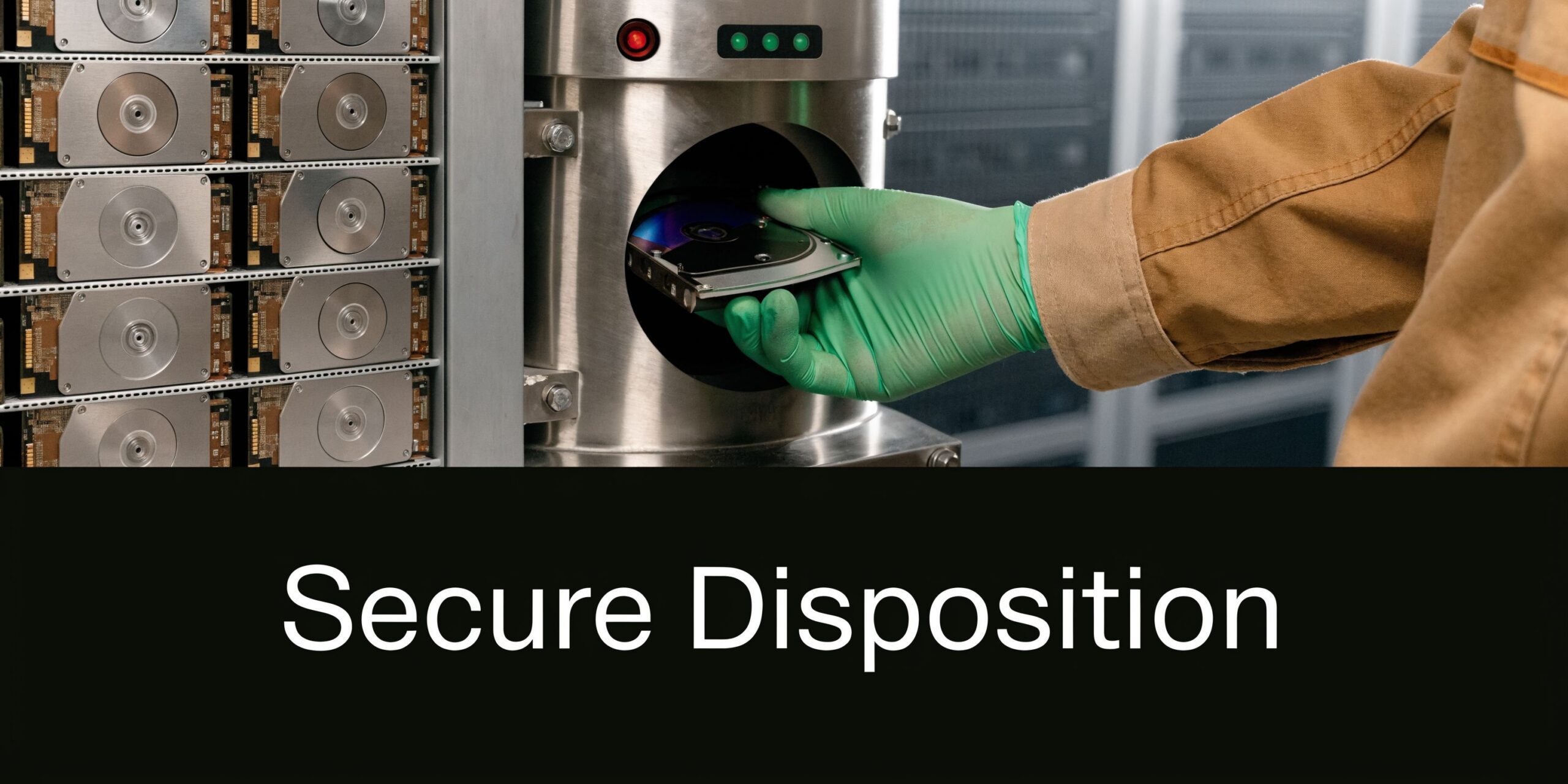
Data-bearing devices then split into two main lanes:
- Sanitize for continued use or resale
- Destroy because the media is failed, obsolete, or policy-restricted
That decision should be documented, not improvised by whoever happens to be loading the truck.
Material recovery only works when front-end handling is disciplined
Many business users think of electronics recycling as an isolated niche. In reality, it plugs into a much larger materials recovery economy. The U.S. recycles approximately 105,800 aluminum cans every minute, according to iScrap App’s scrap recycling facts and figures. The lesson is not about cans themselves. It is that the recovery infrastructure for metals is fast and mature, and businesses benefit when their retired electronics are processed into that system correctly.
For electronic scrap, “correctly” means:
- data-bearing parts are secured first
- batteries and hazardous components are separated
- reusable equipment is not mixed into commodity scrap
- downstream processors receive sorted material, not contaminated loads
Reporting closes the loop
The final piece is paperwork. Without it, a service event is just a memory.
Professional reporting should help an IT manager answer basic but critical questions:
- What exactly left the site?
- Which devices were wiped?
- Which drives were shredded?
- Which assets were recycled?
- Which items had reuse or recovery value?
That record set supports compliance reviews, internal asset reconciliation, and budget conversations with finance or leadership.
What to ask for: Asset-level documentation where practical, destruction records for media, and a clear summary of final disposition outcomes.
Businesses often underestimate how much time they spend trying to reconstruct old cleanouts. Good reporting prevents that. It also gives IT managers something they can hand to compliance staff without adding another internal project.
Turn Your E-Scrap from a Problem into a Plan
Most electronic scrap becomes a headache for one reason. The business waits too long to classify it.
Once retired equipment starts piling up, the organization loses time, visibility, and often value. Some of that inventory should be destroyed. Some should be recycled. Some may still have resale potential. All of it deserves a documented path.
The right approach is straightforward:
- identify data-bearing assets first
- sort equipment by disposition path
- isolate hazardous components
- protect chain of custody
- choose secure processing over convenience
That is how scrap stops being a storage problem and becomes an operational process.
For teams building broader internal sustainability or retirement policies, external reading on e-waste and recycling initiatives can be helpful context. The practical requirement inside a business, though, is tighter. You need secure handling, records, and a repeatable method your auditors, security team, and finance team can all live with.
If your current process is still based on “store it until we deal with it,” start with an inventory review and a disposition policy. If you have equipment with recovery potential, a defined resale and recycling workflow can also support old electronics for cash rather than treating every retired asset like worthless junk.
Scrap is not the end of the asset lifecycle. It is the point where your business either loses control or proves it has one.
If your business has a room, closet, rack, or warehouse area filling up with retired electronics, Atlanta Computer Recycling can help you assess what should be wiped, shredded, resold, or recycled. A no-obligation consultation is a practical first step toward turning unmanaged scrap into a secure, documented disposition plan.