Recycle E Waste Near Me: Certified & Secure

Your old equipment usually becomes urgent all at once.
A workstation refresh gets approved. A storage room fills with retired laptops. A copier dies the same week your network team is pulling old switches from a branch office. Then procurement asks for disposal paperwork, legal asks about chain of custody, and your security team asks the one question that matters most: who is verifying the drives are destroyed or sanitized?
That’s where most searches for recycle e waste near me go off track for a business buyer. Residential results talk about weekend drop-offs, accepted household items, and county convenience centers. That’s fine if you’re clearing one drawer at home. It doesn’t help much when you’re managing racks, encrypted laptops, printers with internal storage, or devices that touched patient, student, employee, or government data.
Atlanta businesses run into this every day. A hospital can’t treat retired workstations like general scrap. A school district can’t afford to lose track of carts of old Chromebooks during summer turnover. A data center team can’t have a recycler show up without the labor, packing materials, dock coordination, and documentation needed to move equipment cleanly.
Introduction and Local E-Waste Challenges
An Atlanta IT manager dealing with a hardware refresh usually has two deadlines at once. One is operational. Get the new equipment in, keep users working, and clear the old hardware fast enough that offices, closets, and server rooms don’t become staging areas. The other is risk-driven. Make sure no drive, SSD, backup appliance, or multifunction printer leaves the site without a defensible disposal process.
That second deadline is where commercial e-waste projects either stay controlled or start slipping.
Why business disposal is different
For a business, e-waste is rarely just waste. It’s a mix of:
- Data-bearing assets such as desktops, laptops, servers, SAN gear, and copiers
- Assets with residual value that may be suitable for reuse or resale
- Regulated equipment streams tied to internal policies or sector-specific requirements
- Bulky low-value items that still require labor, loading, and proper downstream handling
Globally, the problem is getting bigger fast. In 2022 the world generated 62 million tonnes of electronic waste, an 82% jump since 2010, yet only 22.3% was formally recycled, according to the Global E-waste Monitor summary cited here. For commercial clients, that isn’t just an environmental headline. It’s a reminder that informal or poorly documented disposal is still common, and bad vendors still exist.
Practical rule: If a vendor talks about “junk removal” before they talk about data destruction, chain of custody, and downstream accountability, keep looking.
Atlanta adds its own complexity. You may have multiple facilities across the metro, building access restrictions, loading dock windows, or a facilities team that only allows after-hours work. A hospital, law office, school, or public agency also has internal sign-off steps that a residential guide never mentions.
That’s why a local search should lead you to a process, not a drop-off list. If you’re sorting through options, this guide on where to recycle electronics in Atlanta helps separate consumer disposal from business-grade service.
The local vendor question most teams miss
A lot of managers focus on proximity first. That matters, but it isn’t enough. The better question is whether the provider is set up for commercial pickups, secure handling, and audit-friendly reporting.
There’s also a visibility issue on the vendor side. Strong operators aren’t always the ones that show up with the slickest consumer-facing pages. Businesses often benefit from reviewing how service companies approach Local SEO strategies, because local visibility can shape which vendors you find first, not which ones fit an enterprise disposal project.
What works in practice is simple. Choose a partner that can remove the equipment, document each stage, protect data, and separate reuse-worthy gear from true scrap. What doesn’t work is sending a facilities runner to a public drop-off site with a van full of tagged company assets and hoping the paperwork can be reconstructed later.
Selecting the Right Certified Provider
Most vendor mistakes happen before pickup day. They happen during selection, when a company accepts vague assurances instead of checking how the provider runs the job.
Start with the non-negotiables
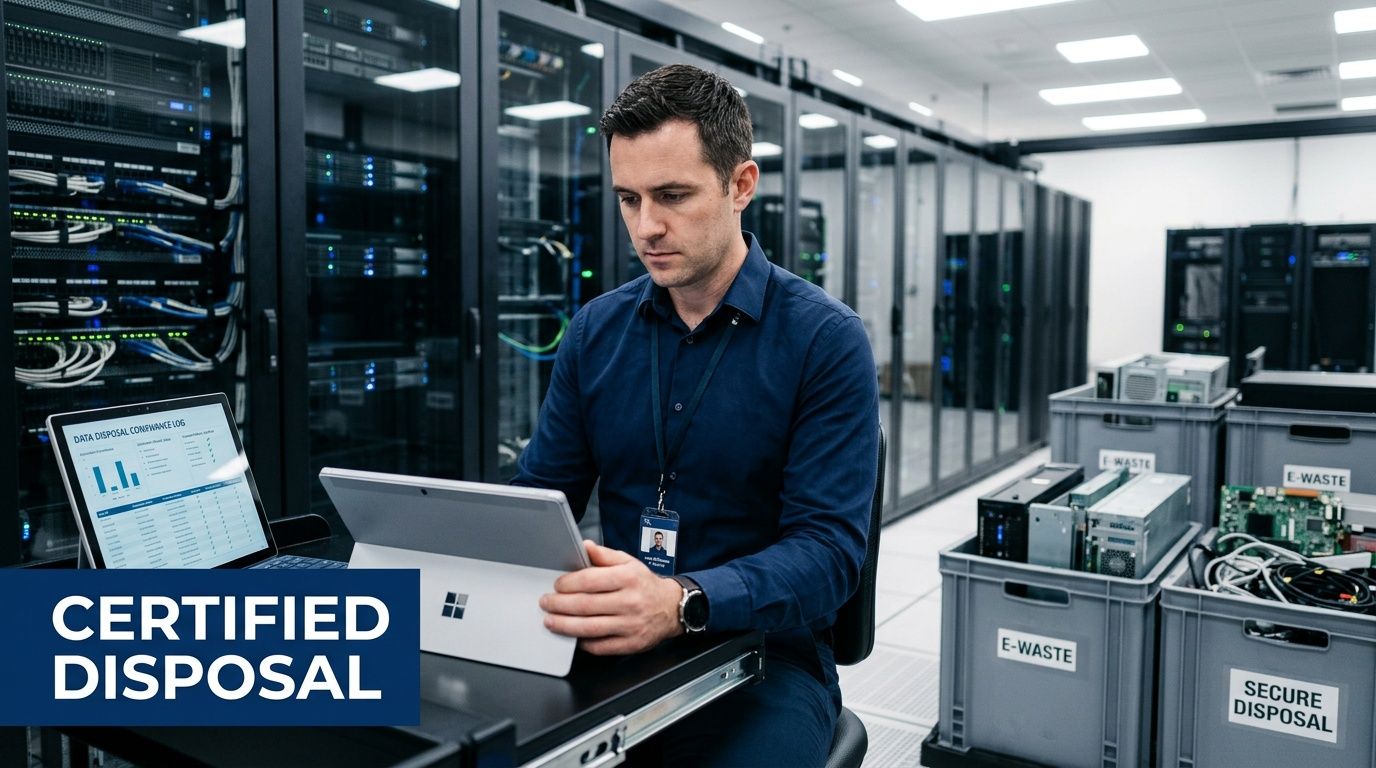
A commercial recycler should be able to explain, plainly, how they handle:
- Certifications such as R2v3 or e-Stewards
- Data destruction standards aligned with NIST 800-88 and, when specified by client policy, DoD 5220.22-M workflows
- Chain of custody from pickup through final disposition
- On-site services including de-installation, packing, and media destruction if needed
- Downstream accountability so material doesn’t disappear into unknown outlets
Existing "recycle e waste near me" content overlooks B2B compliance: 80% of e-waste is improperly managed, with data breaches costing businesses an average of $4.45 million per incident**, as summarized in this commercial e-cycling overview.
If the provider can’t explain their process in operational terms, not marketing terms, that’s a warning sign.
Questions that reveal how a vendor really operates
Ask these early, preferably before requesting a final quote:
How is equipment logged at pickup?
You want serialized tracking or a clear itemization process, not a handwritten “miscellaneous electronics” line.What happens to working assets?
Some providers are set up to evaluate reuse potential. Others default to scrap. That choice affects both recovery and reporting.How are failed drives handled?
A mature vendor distinguishes between drives that can be sanitized and drives that require physical destruction.Who performs the labor?
Subcontracted trucks and borrowed labor can complicate access control and accountability.What documentation arrives after the job?
Certificates, inventory summaries, and disposition reports should be standard, not special requests.
A provider such as Atlanta Computer Recycling’s business electronics recycling service is one example of a local model built around pickup, data destruction, and commercial asset handling. What matters more than the name is whether the workflow fits your environment.
Red flags that cost more later
The cheapest quote often leaves out the expensive parts.
Watch for these issues:
- Loose pickup windows that don’t align with dock access or after-hours requirements
- No mention of certificates unless you specifically ask
- Flat claims about “recycling everything” without a breakdown of reuse, destruction, and downstream processing
- No site walk or intake call for larger jobs
- Confusion about printers, copiers, firewalls, and network gear, which often hold data and need the same controls as computers
If a vendor treats a retired switch stack the same way they treat broken keyboards, they don’t understand commercial disposition.
What works versus what doesn’t
What works is a provider that scopes carefully. They ask about elevators, loading docks, palletizing, rack removal, drive types, and whether your internal team wants audit access.
What doesn’t work is a vendor chosen because they were “near me” and available tomorrow. Fast response is useful. Unstructured response isn’t.
The best commercial projects start with boring details. Access windows. Asset lists. Security approvals. Truck size. Certificates. Those details are exactly what keep disposal from turning into a compliance problem.
Asset Preparation for Secure Data Removal
If pickup day is chaotic, the root cause is usually poor preparation.
A surprising amount of risk comes from mixing asset types, skipping inventory, or staging equipment in a way that breaks chain of custody. Businesses that handle prep well usually reduce confusion for IT, facilities, and the recycler at the same time.
Separate assets before anyone touches a pallet
Start by dividing your equipment into practical groups. Don’t build your staging area around department ownership. Build it around handling method.
Use categories like these:
- Functional computers and servers that may qualify for data sanitization and reuse review
- Non-functional data-bearing media that should move straight to physical destruction
- Network gear and peripherals that need inventory control but not necessarily the same destruction workflow
- Printers and copiers that may contain storage and should be flagged for special review
- Loose drives, backup tapes, and removable media that need tighter custody than general electronics
That simple separation prevents one of the most common mistakes on commercial jobs. Teams often stack live drives in the same gaylord or cart as dead printers, keyboards, and cables. Once that mix happens, audit quality drops immediately.
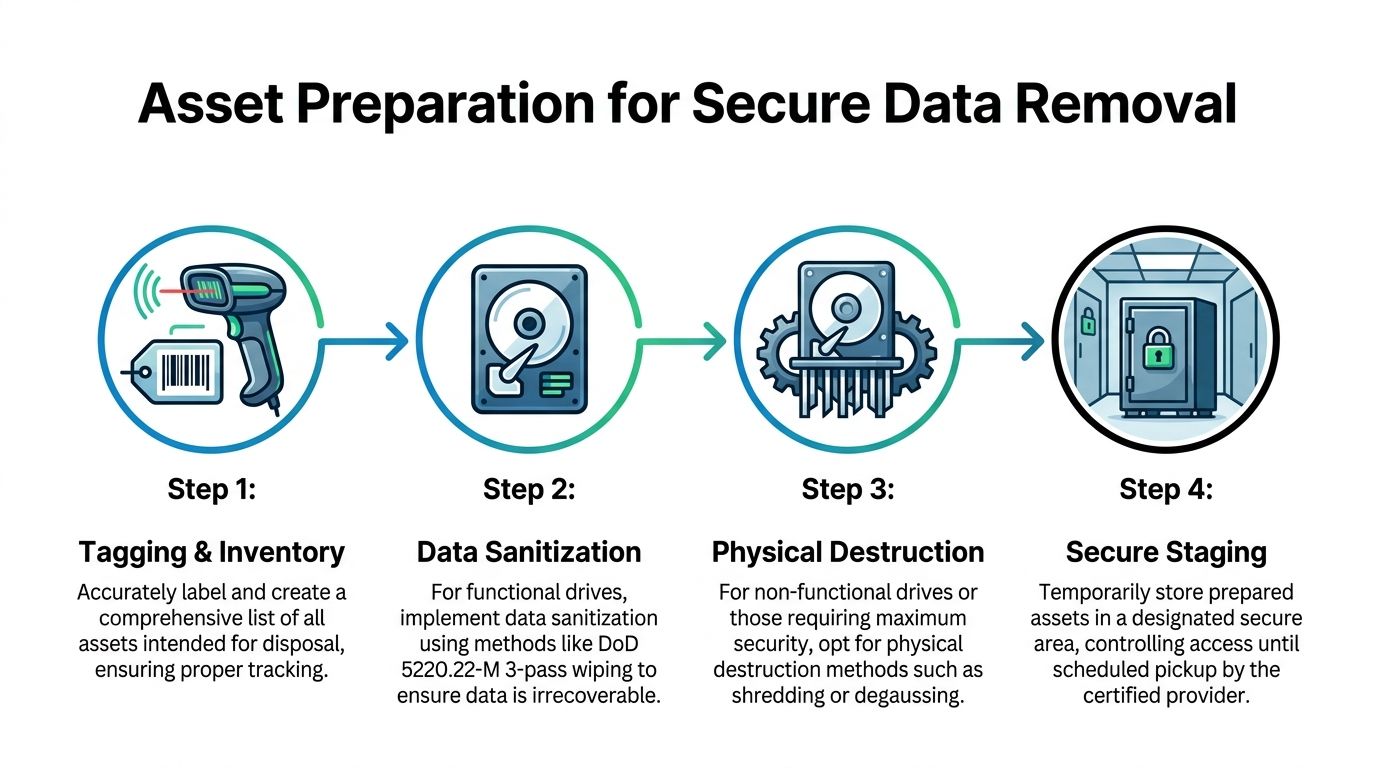
Use tagging and inventory that someone can audit later
The first real control point is inventory. Every asset doesn’t need a novel written about it, but every item should be traceable enough that your team can answer basic questions later.
At minimum, capture:
- Asset identifier from your internal inventory if one exists
- Device type such as laptop, server, firewall, copier, or switch
- Location where it was removed from
- Data-bearing status so media handling is never ambiguous
- Disposition instruction if certain items must be destroyed rather than evaluated for reuse
A lot of teams already know this in theory. The miss happens when they wait until the truck arrives to sort it out.
Field note: The easiest time to lose control of equipment is during the handoff between “retired from service” and “ready for pickup.” Lock down that gap.
Know when wiping is appropriate and when shredding is better
Not every data-bearing device should be handled the same way. Functional drives can often be sanitized to recognized standards. Failed media, damaged drives, and devices with high-security requirements often belong in the destruction stream.
Following industry standards like NIST 800-88 and DoD 5220.22-M for data destruction prevents data recovery in over 99.9% of cases, with industrial shredders processing up to 1,000 lbs/hour to meet NSA specifications, based on the process details summarized in this ITAD methodology reference.
That has two practical implications.
First, your internal team shouldn’t guess whether a drive is a wipe candidate. Confirm power-on condition and policy requirements before pickup.
Second, don’t assume physical destruction is always the only safe route. If a device is functional and your policy allows sanitization, that path can preserve reuse potential. If the device is failed or your policy demands destruction, don’t waste time trying to salvage it.
If your team needs a refresher on the wiping side, this walkthrough on how to wipe a computer hard drive is a useful starting point for internal prep conversations.
Stage equipment like it has to survive transport and scrutiny
Secure staging is where practical project management matters more than theory.
For office equipment, use a controlled room with limited access. For server gear, stabilize rails, remove loose accessories, and keep matching components together. For boxed laptops, avoid mixing power supplies and docks loosely if they’ll be reviewed for reuse.
A clean staging area should tell the recycler three things immediately:
- what needs wiping
- what needs shredding
- what may be remarketed or recycled
What doesn’t work is leaving equipment spread across cubicles, loading docks, or open hallways while different departments “finish checking” their old assets. That’s how laptops vanish, labels fall off, and printers with stored data get treated like harmless metal.
Coordinating De-Installation and Pickup
A disposal project can be technically sound and still go sideways on logistics.
The trouble usually isn’t recycling. It’s access. It’s building rules, freight elevators, loading dock timing, insurance checks, and the fact that facilities, IT, security, and the recycler all use different language for the same task.
A six-phase timeline that keeps projects moving
For commercial pickups, a phased schedule works better than a single calendar invite.
Kickoff and site review
Confirm scope, asset locations, building restrictions, and whether any equipment is still live.Internal approvals
Security, facilities, procurement, and department leads sign off on dates, access, and contacts.De-installation prep
Label what stays, what goes, and what requires special handling. Disconnect in the right order so nothing operational gets removed by mistake.Secure staging
Move retired assets into approved holding areas. Keep data-bearing items controlled and separated.Pickup and loadout
Assign one on-site lead from IT and one from facilities. The recycler’s crew should follow the preapproved path through the building.Post-pickup reconciliation
Match pickup records against your internal list while the project is still fresh.
Who should own what
The cleanest jobs give each group a narrow role.
| Team | Primary responsibility |
|---|---|
| IT | Confirm retirement status, identify data-bearing assets, approve disposition instructions |
| Facilities | Manage dock access, elevators, carts, parking, and building rules |
| Security or compliance | Verify chain-of-custody expectations and access permissions |
| Recycler | Supply labor plan, packing approach, truck timing, and removal documentation |
That division prevents the common confusion where everyone assumes someone else approved the removal of a rack, cabinet, or copier.
Practical loadout advice from real office projects
Weekend and after-hours windows often work best for office closures, branch consolidations, and data room cleanouts. They reduce interference with employees, simplify dock access, and let your team focus on verification rather than foot traffic.
A few habits make a noticeable difference:
- Mark exclusion zones so the crew doesn’t touch devices that are staged nearby but still in service.
- Pre-clear hallways and elevator paths before the truck arrives.
- Bundle similar pickups across nearby facilities when your internal team can support a grouped schedule.
- Photograph rack layouts before removal if there’s any chance of later audit questions.
A smooth pickup is usually a communication win, not a trucking win.
For teams looking at an on-site removal model, this page on IT equipment pickup in Atlanta shows the type of service scope you should expect from a business-focused provider.
What doesn’t work is scheduling pickup first and trying to solve internal coordination later. By then, every delay gets expensive in staff time, building friction, and rescheduling.
Ensuring Compliance and Documentation
Most organizations don’t get in trouble because they meant to mishandle retired equipment. They get in trouble because the paper trail is thin, inconsistent, or impossible to reconstruct under pressure.
For IT asset disposition, documentation is the control. It proves what left the building, how data was handled, and where material ended up.
The records that matter on every project
A commercial e-waste file should usually include:
- Pickup confirmation with date, location, and authorized contacts
- Asset or container listing showing what was transferred
- Chain-of-custody records documenting possession changes
- Data destruction evidence such as wipe reporting or destruction certificates
- Final disposition summary showing reuse, recycling, or destruction pathway
If your team can’t pull those records quickly, the project isn’t really closed.
This is also where certified programs matter. Certified e-waste recycling programs using R2v3 and e-Stewards achieve 85–90% diversion from landfills, with auditors reporting 97% zero-landfill compliance in the U.S., according to this certified recycling process summary. For ESG reporting, procurement review, and legal defensibility, that level of structured downstream handling matters far more than a generic “we recycle electronics” promise.
Compliance standards comparison
Different organizations map the same disposal event to different internal rules. The practical answer is to document for the strictest relevant audience.
| Regulation | Applies To | Documentation | Retention Period |
|---|---|---|---|
| HIPAA | Healthcare providers, insurers, business associates handling protected health information | Chain of custody, destruction evidence, asset records, vendor certificates | Follow your organization’s legal and records policy |
| DoD 5220.22-M or agency-specific secure disposal rules | Government, defense, contractors, and organizations adopting those methods internally | Sanitization or destruction method record, custody logs, authorized handoff records | Follow contract terms and agency policy |
| State and corporate environmental policies | Any business disposing of electronics | Pickup logs, downstream recycling records, certificates, audit reports | Follow corporate environmental and procurement policy |
| Internal security policy | All organizations with data-bearing devices | Device list, sign-off records, wipe or shred confirmation | Follow your internal retention schedule |
Don’t treat the retention column as a clerical afterthought. Legal, procurement, privacy, and security teams often need different copies stored in different systems.
What a strong certificate package looks like
A certificate of destruction shouldn’t be a decorative PDF. It should answer basic audit questions without forcing your team to chase details later.
Look for:
- Date of service
- Client location
- Reference to the asset batch or tracking list
- Method used, such as sanitization or physical destruction
- Provider identity and authorization
If the certificate is disconnected from your inventory, it has limited value. The better practice is to pair the certificate with the intake or pickup manifest so one supports the other.
For teams that need a reference point, this certificate of destruction form example shows the level of specificity worth requesting from any vendor.
Keep one complete disposal file per project. Don’t scatter records across email threads, shared drives, and someone’s desktop folder.
Common documentation failures
The most common misses are predictable:
- the vendor sends a certificate but no asset list
- the internal asset list never matches what was picked up
- facilities arranged the removal but compliance never received the final paperwork
- printers, copiers, and loose drives were removed outside the main inventory process
Those aren’t technical failures. They’re handoff failures.
A clean ITAD process gives your legal and security teams confidence because it leaves little room for interpretation. If a surprise audit lands six months later, you want retrieval to be boring. Open the file. Match the manifest, certificate, and disposition report. Move on.
Accepted Items Cost Variables and Vendor Checklist
Business buyers usually need the most practical guidance here. Not because the work is mysterious, but because pricing and scope can look inconsistent when vendors define the job differently.
One company quotes “free recycling” and excludes labor, de-installation, media destruction, and difficult items. Another quotes a pickup fee but includes staging support, wiping, and reporting. Without a framework, those proposals are hard to compare.
What commercial providers usually accept
Most B2B recyclers will handle common IT and office electronics such as:
- Desktops and laptops
- Servers and storage gear
- Switches, routers, and firewalls
- Monitors and docking stations
- Printers, copiers, and multifunction devices
- Cables, accessories, and power equipment
- Loose hard drives and other data-bearing media
Acceptance gets more nuanced with specialty equipment. Medical devices, lab electronics, building systems, batteries, and non-IT industrial equipment may require separate approval or a different disposal stream. Some vendors also place tighter conditions on damaged units, mixed loads, or items that are expensive to process.
That’s why “accepted items” shouldn’t be a footnote in the quote. It should be explicit.
The cost variables that actually move a quote
The headline price rarely tells the full story. Commercial e-waste jobs are built from labor, handling complexity, transport, and documentation expectations.
Here are the variables worth comparing line by line.
Access and labor complexity
A ground-floor office with boxed laptops is one thing. A high-rise with freight elevator reservations, after-hours access, and rack de-installation is another.
Labor usually rises when the job includes:
- equipment removal from work areas rather than dock-side handoff
- rack breakdown or unbolting
- stair carries or long internal transport routes
- special scheduling windows
- on-site media shredding or witness requirements
A quote that ignores these realities may not stay cheap once the crew arrives.
Mix of reusable versus scrap material
Some equipment can offset project cost if it’s functional and suitable for reuse channels. Some can’t.
That distinction affects pricing because providers recover value differently depending on condition, age, completeness, and whether your policy allows remarketing after secure sanitization. If every device is obsolete, damaged, or missing parts, expect less value recovery and more pure recycling cost.
Data destruction method
Wiping and shredding are not interchangeable from a labor or equipment standpoint.
If your policy requires physical destruction for all media, the vendor needs to account for handling, segregation, and destruction reporting. If some assets qualify for sanitization, they may move through a different workflow.
This is one reason generic electronics haulers struggle with commercial work. They price loading. They don’t price secure disposition.
Pickup geography and project grouping
For Atlanta-area organizations with multiple sites, route planning matters. A grouped pickup schedule can reduce disruption and simplify internal staffing. A one-off emergency loadout at a remote site can do the opposite.
Local service capability matters here. U.S. recycling rates for e-waste hover at 15–20% while Atlanta’s metro area lags below 10%, according to this regional e-waste summary. In practical terms, local business-ready providers matter because they can support reuse and certified recycling without pushing companies toward informal disposal shortcuts.
What works in quote comparison
The best quote comparisons use a shared checklist. Not a price-only spreadsheet.
Use a side-by-side review that asks:
| Category | What to verify |
|---|---|
| Scope | Does the quote cover pickup only, or pickup plus de-installation, packing, and staging support? |
| Data handling | Are wipe and shred options stated clearly for different media conditions? |
| Documentation | Are certificates, chain-of-custody records, and final reports included? |
| Accepted items | Is there a written list of included and excluded equipment categories? |
| Scheduling | Are access windows, dock limits, and after-hours constraints reflected? |
| Downstream process | Does the provider explain reuse, recycling, and destruction pathways? |
That format usually exposes the “free” quote for what it is. Partial service with unresolved risk.
A practical vendor checklist for IT managers
Before awarding the work, review these points with procurement, security, and facilities.
Insurance and site-readiness
Confirm the vendor can meet building access requirements and provide the paperwork your property manager or security office expects.Chain-of-custody method
Ask how assets are logged, labeled, transferred, and reconciled. The answer should be specific.Data destruction options
Make sure the provider distinguishes between sanitization and physical destruction, and can document both.Audit rights and transparency
Serious providers should be comfortable explaining downstream handling and reporting.Service boundaries
Clarify whether the crew disconnects equipment, removes it from desks, breaks down racks, pallets loose gear, or only loads pre-staged material.Problem-item policy
Ask how they handle copiers, failed drives, damaged batteries, specialty electronics, and mixed loads.Turnaround expectations
Get timing in writing for pickup, processing, and documentation return.Internal owner on your side
Assign one business lead who can answer questions on pickup day. Without that, even a good vendor loses time waiting for decisions.
Cheap disposal gets expensive when your team has to fill in the process gaps afterward.
Hidden cost factors that residential guides never mention
Most residential content skips the things commercial clients wrestle with:
- chain-of-custody breaks caused by poor staging
- IT staff time spent disconnecting and escorting crews
- building delays from missing COIs or dock approvals
- mixed loads that force re-sorting on site
- special handling for printers and copiers with stored data
- repeated pickups because departments weren’t aligned on retirement timing
Those costs don’t always show up as line items. They show up as wasted labor, missed project windows, and weak documentation.
The best buying posture
Treat your recycler like a controlled service partner, not a commodity hauler.
That means you should expect a scope review, item clarity, security answers, and post-service documents. It also means your own team should be ready with a clean asset list, a clear disposition policy, and a single point of contact.
If you do that, the search for recycle e waste near me turns into something more useful. Not “who will take this stuff,” but “who can remove it securely, document it properly, and help us avoid unnecessary cost.”
Conclusion with Pro Tips
Commercial e-waste projects run well when the basics are handled with discipline. Pick a certified provider. Sort and tag assets before pickup. Separate wipe candidates from shred candidates. Plan de-installation with facilities and security, not just IT. Keep every certificate and manifest in one retrievable project file.
Five habits make the biggest difference:
- Bundle related pickups when multiple departments or sites are retiring equipment around the same time.
- Use off-hours windows for busy offices, hospitals, and shared buildings.
- Flag printers and copiers early so nobody forgets they may store data.
- Decide your destruction policy in advance instead of debating wipe versus shred at the loading dock.
- Compare quotes by scope and documentation, not by pickup price alone.
The companies that handle this well don’t treat disposal as an afterthought. They treat it like the last controlled stage of the asset lifecycle. That’s the approach that protects data, supports compliance, and keeps old equipment from becoming a recurring problem.
If your organization needs a business-focused partner for secure electronics pickup, data destruction, and IT asset disposition in the metro area, Atlanta Computer Recycling provides commercial service for offices, schools, healthcare environments, government sites, and data center projects. A practical next step is to request an on-site assessment, confirm accepted items and handling requirements, and build your vendor checklist before the next refresh cycle starts.