Alpharetta IT Asset Disposal: A Business Guide

You’re probably dealing with a version of the same problem I see across alpharetta offices, clinics, schools, and satellite facilities. The refresh is done. New gear is live. The old gear didn’t disappear. It moved into a server room corner, a storage cage, or a back office shelf.
That pile looks harmless until someone asks a simple question. What data is still sitting on those devices, who owns the handoff, and how would you prove proper disposition if compliance asks for records next week?
For business equipment, disposal isn’t a recycling errand. It’s a security and documentation project with logistics attached. If you treat it like junk removal, you create avoidable risk. If you handle it with a clear chain of custody, a defined destruction method, and complete records, the project becomes manageable.
The Hidden Risk in Your Alpharetta Office
Monday at 8:15 a.m., an auditor asks for disposition records on the laptops your team replaced last quarter. Your help desk knows some were reissued. Facilities remembers a few boxes in storage. A systems engineer says several failed drives are still in the server room. That is how a routine hardware refresh turns into a compliance problem.
In Alpharetta, that problem shows up often in fast-growing offices with a mix of new systems, inherited gear, and equipment retired during hurried upgrades. The city’s growth into a major business and technology hub has left plenty of organizations with current infrastructure sitting next to older assets that never made it through a documented exit process.
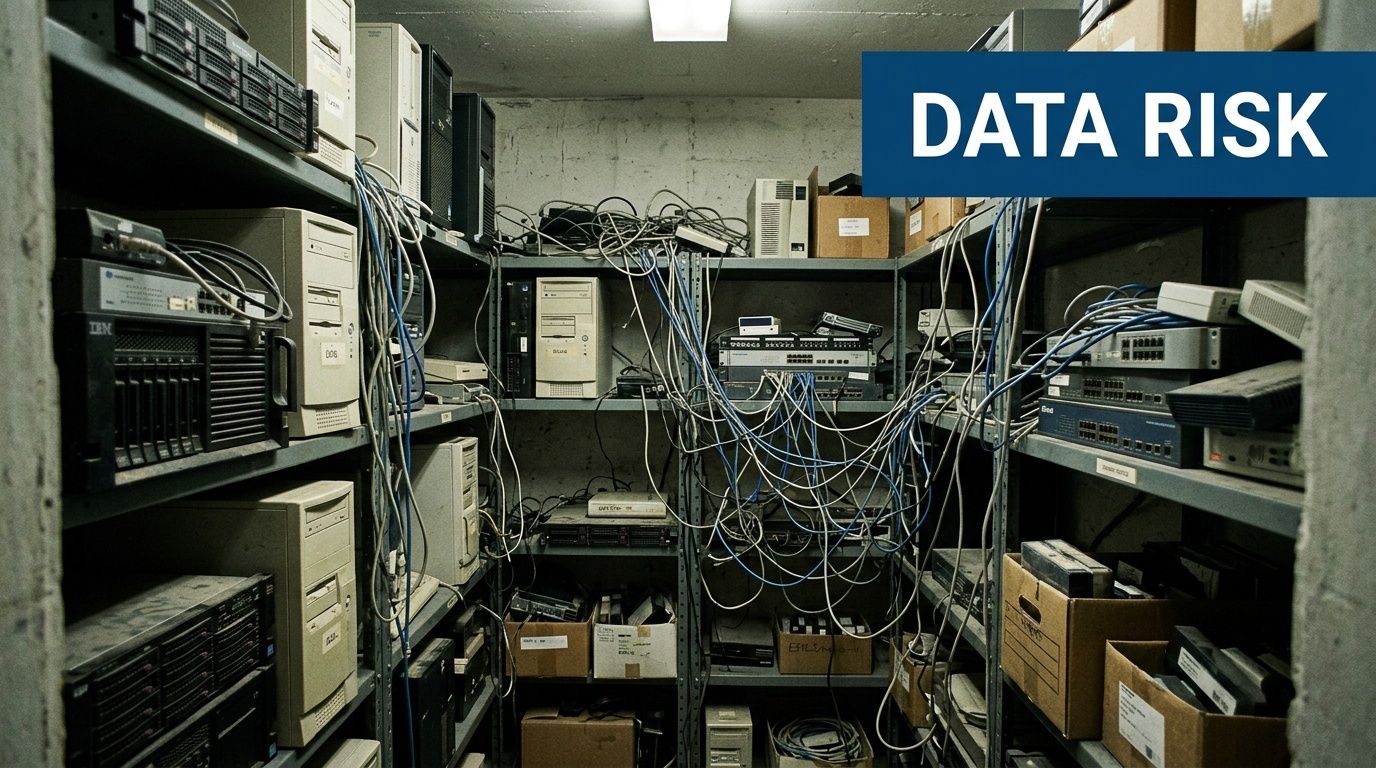
Why a storage room becomes a liability
I tell Alpharetta IT managers to assume any retired device may still contain business data until the asset record, media type, and destruction path are confirmed. That applies to servers, laptops, desktops, backup appliances, loose hard drives, failed SSDs, and network gear with internal storage.
The risk is not the pile itself. The risk is poor control over what is in the pile.
A consumer recycling drop-off solves very little for a business. You still need documented custody, media handling that matches the device, and records that hold up if legal, compliance, or cyber insurance asks questions later. A failed SSD and a working hard drive do not get handled the same way. Loose drives in an unlabeled box create a different exposure than a tagged lot of decommissioned laptops.
That is why businesses with mature IT Asset Management practices usually have fewer surprises at disposition time. They already know what they own, who used it, and which assets are likely to carry regulated or confidential data.
What goes wrong in real offices
The first failure is ownership. IT, facilities, security, and department managers each assume someone else approved the handoff.
The second is mixing asset types. Monitors, printers, switches, laptops, access points, and data-bearing drives end up on the same cart or in the same cage. That slows inventory work and increases the odds that a device with storage leaves without the right handling.
The third is choosing a vendor based only on who will haul equipment away. For business projects, collection is the easy part. The hard part is proving what was picked up, how it was secured, what happened to the data, and what documentation came back. If you are comparing providers for Alpharetta electronics recycling services, judge them on chain of custody, data destruction options, and audit-ready reporting, not just convenience.
The risk standard to use
Use a simple rule. If your team cannot identify the asset owner, confirm whether the device stores data, and state the approved destruction method, it is not ready to leave the site.
That standard changes the conversation fast. Teams stop treating the project like a cleanup task and start treating it like controlled disposition. In Alpharetta, where high-tech offices cycle through endpoints, lab systems, and infrastructure regularly, that shift matters. It protects data, reduces internal confusion, and gives the business records it can use when someone asks for proof months later.
Preparing Your IT Assets for Secure Disposition
A pickup can fail before the truck ever reaches your Alpharetta office. I see it when a team books removal for Friday, then spends Thursday afternoon opening storage closets, checking serial numbers, and asking department heads whether a stack of retired laptops was approved for release. That is how controlled disposition turns into a scramble.
Preparation starts with scope control. Define exactly what is leaving, what is staying, and what needs a separate approval path. Alpharetta businesses often have a mix of office endpoints, lab devices, conference room systems, network hardware, and equipment from recent refresh cycles. Those assets do not move through the same workflow, especially if some contain regulated data, some are under lease, and some still need deinstallation from racks or wall mounts.
Start with one accountable owner
Assign one internal project lead with authority to coordinate IT, compliance, facilities, and department contacts. Shared ownership slows decisions and creates gaps in the record. One person should approve the asset list, confirm the handling instructions, and clear exceptions before pickup is scheduled.
Use your existing IT Asset Management records as the starting point if they are current. If they are not, build a clean disposition list from scratch and treat it as the project record, not a rough draft.
Include these fields in the inventory:
- Asset type
- Manufacturer and model
- Serial number or service tag
- Exact on-site location
- Whether the asset stores data
- Media type, such as HDD, SSD, flash, tape, or unknown
- Asset condition
- Approved disposition path
- Special handling notes, such as legal hold, leased status, or missing drive
For Alpharetta offices with multiple suites, secure rooms, or separate lab and production areas, location accuracy matters more than teams expect. "Third floor closet" is not enough if pickup crews need escorted access or freight elevator scheduling.
Classify devices before anyone touches a pallet
Do the sorting on your timeline, not at the loading dock. Separate assets into staging groups that match their handling requirements.
A practical setup looks like this:
- Place data-bearing systems such as laptops, desktops, servers, workstations, and loose drives in a locked staging area.
- Place non-data equipment such as monitors, keyboards, docks, cables, and basic peripherals in a separate area.
- Isolate high-risk media such as failed drives, SSDs, USB devices, and backup media in labeled containers.
- Flag exception assets that need manager approval, deinstallation, or review by legal or compliance.
First-time projects often get cleaner rapidly. Teams stop arguing about whether a device is "just old equipment" and start documenting what it is, what it holds, and how it must be handled.
Be careful with devices that look harmless. Firewalls, copiers, VoIP systems, wireless controllers, and some switches may contain internal storage. If the team cannot verify the storage status, mark the asset as data-bearing until someone confirms otherwise.
Build the handoff file before scheduling pickup
The handoff file should be ready before the vendor arrives. It keeps the pickup from turning into a site survey.
Include:
- Primary and backup site contacts
- Building access instructions
- Loading dock, freight elevator, or suite access details
- Hours when equipment can move
- Whether deinstallation is required
- Whether any media needs on-site destruction
- Which assets are excluded from pickup
- Photo references for staging areas, if the site is complex
For Alpharetta businesses in multi-tenant buildings, this step prevents avoidable delays. Property management rules, elevator reservations, COI requirements, and after-hours access limits can affect the entire schedule.
If internal stakeholders need a technical baseline before approving a disposition method, this guide on how to wipe a computer hard drive helps clarify the difference between actual sanitization and a simple delete or format.
Commonly Accepted IT Assets for Commercial Recycling
| Asset Category | Examples |
|---|---|
| End-user devices | Laptops, desktops, thin clients, workstations |
| Server infrastructure | Rack servers, tower servers, blade systems |
| Storage equipment | HDDs, SSDs, SAN units, NAS appliances, tape systems |
| Network hardware | Switches, routers, firewalls, wireless access points |
| Office technology | Printers, copiers, scanners, phones, docking stations |
| Display equipment | Monitors, commercial displays |
| Power and rack gear | UPS units, PDUs, racks, rails, cabling |
| Peripheral electronics | Keyboards, mice, adapters, external drives |
What good prep looks like
Good prep is controlled, documented, and boring. That is the goal.
Equipment is consolidated into a secured staging area. The inventory matches what is physically present. Exceptions are resolved before pickup day. Staff are told not to add late items without approval. Loose drives are accounted for separately, not dropped into a box of general e-waste.
Poor prep usually shows up in smaller ways first. An unlabeled server on a cart. A printer with unknown storage. A branch office manager who set aside "a few more devices" after the list was finalized. Each one creates more reconciliation work and more exposure if the chain of custody is questioned later.
A clean inventory is not admin work for its own sake. It is the record that lets your business prove what left the site, how it was classified, and why the selected disposition method was approved.
Choosing the Right Data Destruction Method
A common Alpharetta scenario looks like this. The IT team has a batch of retired laptops from a software group, a few failed server drives from the data room, and several SSDs pulled during an infrastructure refresh. One disposal instruction will not fit that mix.
The right method depends on three things: media type, drive condition, and policy requirements. Get that decision wrong, and the project either destroys resale value you could have recovered or leaves you with a weak audit trail on sensitive data.
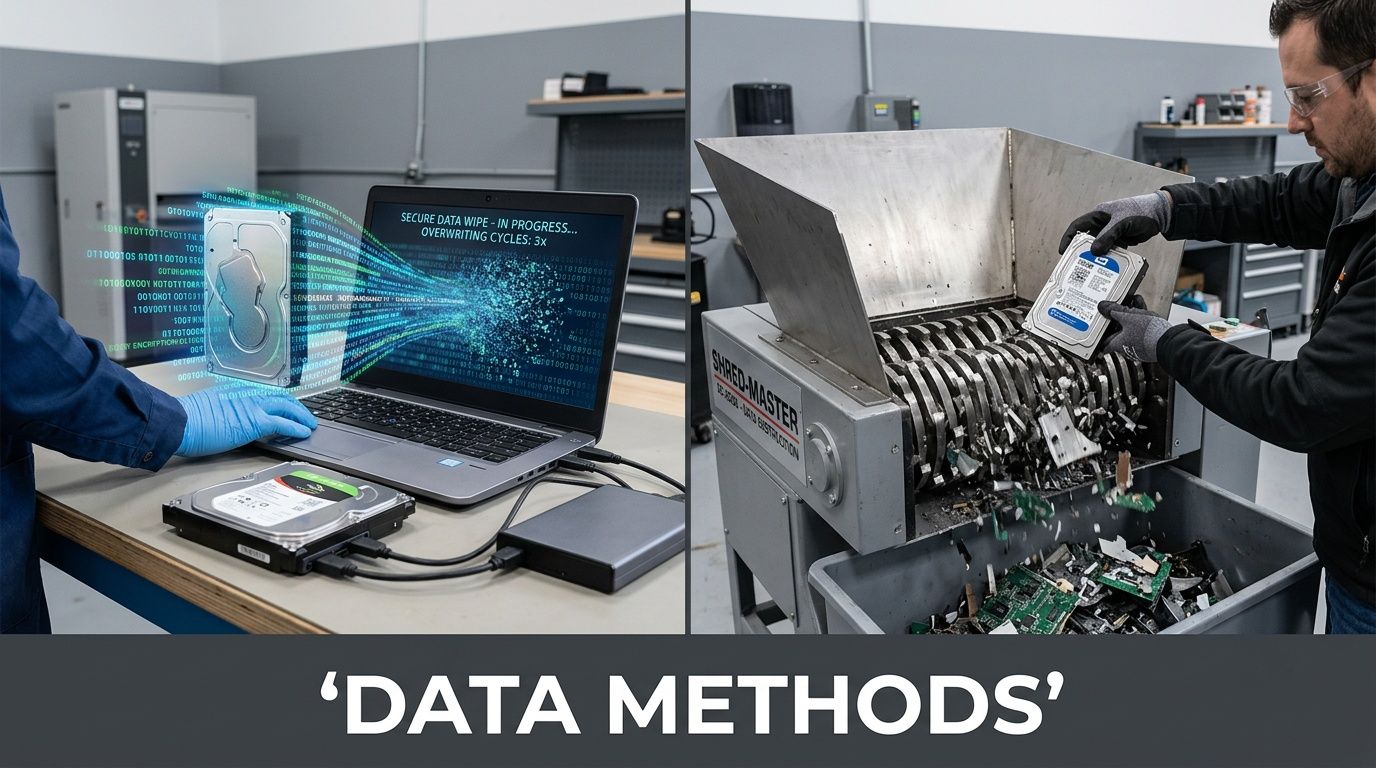
Wiping works for the right drives
Certified data wiping fits functional hard disk drives that are approved for reuse, redeployment, or remarketing. In practice, that usually means standard office PCs, developer workstations, or storage assets your security team has already cleared for sanitization rather than destruction.
This option protects data while preserving asset value. For Alpharetta companies with frequent refresh cycles, that trade-off matters. If a working HDD can be sanitized, verified, and resold through a controlled process, you avoid destroying equipment that still has market value.
Use certified wiping when:
- The HDD is fully functional
- The drive can complete and verify sanitization
- Your internal policy allows reuse or remarketing
- You need records showing the media was sanitized, not destroyed
Skip wiping when the drive is unstable, unreadable, or fails verification. A wipe that cannot be validated does not solve the compliance problem.
Shredding is the cleaner choice for higher-risk media
Physical shredding is usually the right answer for failed hard drives, SSDs, thumb drives, and other flash media. It is also the safer choice when legal, contractual, or internal security rules require destruction regardless of device condition.
That comes up often in Alpharetta's healthcare, fintech, and software environments. Teams may store regulated data, customer credentials, API keys, source code, or exported database files on systems that were never meant to leave a secure environment intact. In those cases, physical destruction removes the debate.
Use shredding when:
- The media is an SSD, NVMe drive, USB device, or memory card
- The HDD has failed or cannot be wiped reliably
- The asset held regulated, confidential, or high-value business data
- Your policy requires destruction instead of sanitization
- You want witnessed destruction on site
If there is any uncertainty about whether a device can complete a verified wipe, shred it.
Degaussing has a narrow role
Degaussing still has a place, but only for magnetic media such as traditional hard disk drives and some tape formats. It does not work on SSDs or other flash-based storage, which is why mixed asset batches need more than one method. This overview of what is a degausser helps internal stakeholders understand where it fits.
For many first-time ITAD projects, degaussing causes confusion because the term sounds broader than it is. It is a specialized option, not a default answer for modern office and data center equipment.
Encryption lowers risk, but it does not close the project
Full-disk encryption is good security practice. A team that already understands the basics of understanding data encryption is starting from the right place.
It still does not replace end-of-life controls.
Keys can be escrowed incorrectly. Devices can be reassigned without updated records. Policies can still require sanitization or destruction before anything leaves the building. For compliance purposes, encryption helps support your data protection posture, but it is not your disposition method.
A practical decision table
| Media or Asset Condition | Best Fit |
|---|---|
| Functional HDD approved for reuse | Certified wiping |
| Failed HDD | Physical shredding |
| SSD or flash media | Physical shredding |
| Regulated data under stricter internal policy | Usually on-site shredding |
| Mixed batch with uncertain media condition | Separate by media type, then apply a hybrid method |
What usually works best
Most well-run projects use a hybrid approach. Working HDDs are wiped, verified, and documented. Failed drives, SSDs, and sensitive removable media are physically destroyed.
That is the balance I recommend most often because it reflects how real Alpharetta environments operate. You may have a finance department that wants maximum destruction, an operations group that wants remarketing recovery, and an audit team that wants clear records for both. A mixed method handles those competing needs without weakening security.
The rule is simple. Match the destruction method to the media, the risk level, and the records your business will need after the assets are gone.
Executing the On-Site Pickup and Chain of Custody
At 4:30 on a Friday, the last thing an Alpharetta IT manager needs is a stack of retired laptops, a half-empty server rack, and three people asking what can leave the building. Pickup day is where good planning either holds or breaks. The job on site should run on a written chain of custody, clear scope, and controlled physical handling from the first device touched to the moment the truck doors close.
The question that matters is straightforward. Who had possession of each asset, when did custody transfer, and can you prove it later if legal, audit, or security asks?
What the day should look like
Start with site check-in, scope confirmation, and a quick walk of the pickup area. The project lead and your internal owner should verify what is in scope, what stays, and which assets need special handling. In Alpharetta offices, that often means separating routine user devices from equipment tied to product development, regulated customer data, or shared lab environments.
Then the work begins. Loose devices are counted and staged. Racked gear is removed in order if de-installation is part of the job. Power, rails, and network connections need to be handled carefully, especially in suites where active and retired equipment sit a few feet apart. One wrong pull can turn an ITAD project into an outage.
This process flow is what you should expect from a professional job:
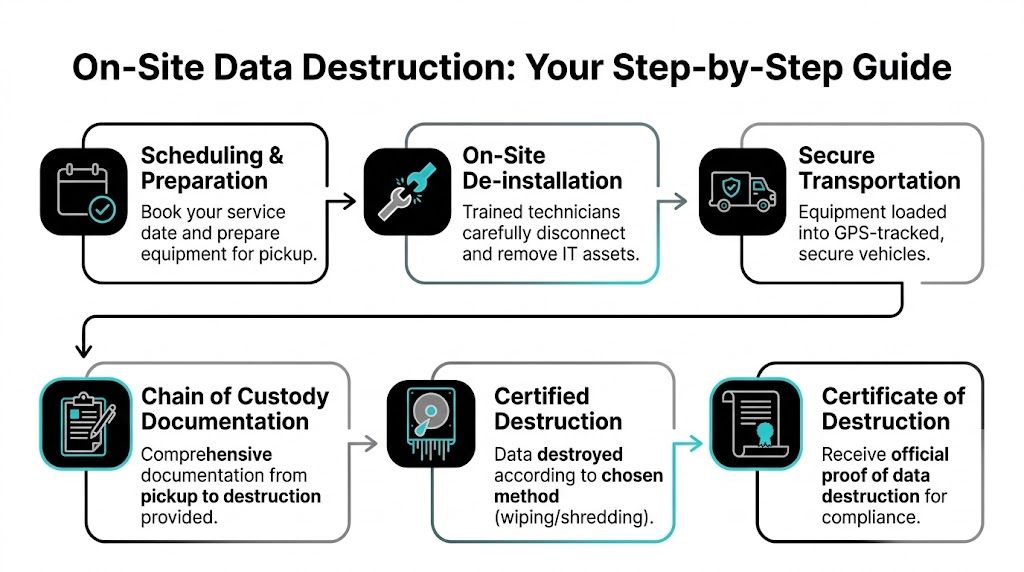
Packaging, labeling, and removal
Once equipment is off the floor or out of the rack, it needs to be packaged in a way that preserves accountability. Heavier infrastructure is usually palletized. Smaller devices and loose media should go into labeled containers with counts that match the transfer record. Staged loads are then secured so the physical shipment matches the paperwork item for item.
That sounds basic. It is also where weak projects start to drift.
A rushed crew creates mixed pallets, unlabeled drive containers, and loose accessories with no clear asset tie-back. Those problems do not stay on the loading dock. They show up later when your inventory does not match the vendor's intake report. If you want a benchmark for a structured pickup process, review this commercial computer pickup process for business equipment removal.
Why chain of custody fails in real offices
Most chain-of-custody failures are not dramatic. A cart gets loaded before counts are verified. An excluded device sits in the same room as pickup assets. A branch manager signs the handoff without checking the batch. In Alpharetta, I see this most often in fast-growing companies that have outgrown their original asset controls. The business scales faster than the retirement process.
On-site handling helps because your team can witness the transfer, resolve scope questions immediately, and stop the job if something does not match the approved list. That is the practical advantage. Less ambiguity, fewer custody gaps, and a cleaner record if an auditor asks you to reconstruct the event months later.
The strongest chain of custody is boring. Every item is identified, every handoff is documented, and nobody improvises.
What should be on the chain-of-custody document
Your transfer record should match the inventory prepared earlier and show exactly what left the site under the vendor's control. Depending on the project, that may be device-level, pallet-level, or a mix of both. The right level of detail depends on asset type, data risk, and how your internal audit team expects to review evidence.
A usable record set includes:
- Pickup date, time, and site location
- Your authorized contact and the receiving technician or driver
- Asset tags, serial numbers, or approved batch identifiers
- Counts by device category and media type
- Notes for assets requiring special handling or witnessed destruction
- Signatures or equivalent transfer acknowledgment
- Shipment or pallet references tied to downstream processing
Review that documentation before the truck leaves the property. That is the control point. If counts are off or an asset description is vague, fix it on site while the equipment is still in front of everyone.
What works on pickup day
Clear lane ownership works. One person handles paperwork. One verifies counts against the approved scope. The technical crew focuses on de-racking, staging, and loading. Your internal lead stays available to approve exceptions in real time.
What causes problems is casual decision-making. I have seen companies tell the crew to "just take everything in that room" because the office is closing or a move deadline is tight. That is how in-scope and out-of-scope devices get mixed, especially in engineering offices where test gear, personal peripherals, and retired production equipment often share the same space.
Physically mark excluded assets before loading starts. If needed, move them to a separate room. A simple visual boundary saves hours of cleanup and prevents the harder problem, explaining why the wrong device left the building.
By the end of pickup, you should have a signed handoff, confirmed counts, and no uncertainty about what transferred into the ITAD vendor's custody. That is what a compliant project looks like in practice.
Receiving Your Certificate of Destruction and Closing the Loop
An Alpharetta IT manager usually feels the pressure after pickup, not before. The hardware is gone, leadership assumes the job is finished, and then legal, security, or internal audit asks for proof that every data-bearing asset reached the right end state.
That proof is the difference between a clean closeout and an avoidable compliance problem.
What happens after pickup
Once the load reaches the processing facility, closeout work starts. Assets are reconciled against the intake records, sorted by disposition path, and reviewed for any exceptions that need to be documented before final processing.
For Alpharetta companies with mixed environments, that step matters more than many first-time clients expect. A single batch can include laptops from a sales floor, failed SSDs from engineering teams, network gear from a satellite office, and storage media that your policy requires to be destroyed instead of wiped. If those items are not tracked to the correct final outcome, the project can look complete operationally while still failing a compliance review.
Why the certificate matters
The Certificate of Destruction closes the documentation chain from inventory to final disposition. It should align with what left your office, what was received, and what destruction method was performed.
A proper certificate helps your team in specific ways:
- Audit support. It gives your compliance or legal team a record tied to the assets and media covered by the project.
- Internal alignment. IT, security, procurement, and leadership can all work from the same final document.
- Policy verification. It confirms whether media was sanitized, shredded, or otherwise processed according to your approved method.
- Risk closure. It removes retired devices from the unresolved category that creates problems during audits and incident reviews.
If your team has not reviewed one before, this sample certificate of destruction form shows the level of detail you should expect.
Your file should stand on its own. Inventory records, transfer documentation, destruction confirmation, and any exception notes should tell one consistent story.
What to check before you file it away
Do not treat the certificate as a generic attachment and move on. Review it against your internal records while the project details are still fresh.
Check the asset counts. Confirm the media types listed match the scope you approved. Make sure any serialized assets or pallet references line up with the handoff documents from pickup day. If your project included witnessed destruction, failed drives, or equipment held for special handling, those exceptions should appear clearly in the final record.
Experienced IT teams, drawing on their expertise, catch issues early. If something is missing, vague, or grouped too broadly, ask for clarification before the project is archived.
Sustainability still needs documentation
Security and environmental responsibility should reach the same conclusion. Reusable equipment should move through approved remarketing or recovery channels only after data handling requirements are met. End-of-life material should go to proper recycling streams, not back into office storage or into an undocumented scrap process.
For Alpharetta businesses managing frequent refresh cycles, that discipline keeps storage rooms from becoming a holding area for unresolved risk.
The business result
Once the certificate matches your inventory and transfer records, the project is closed correctly. You can answer straightforward questions from leadership, auditors, customers, or regulators without rebuilding the history later.
That is the standard. Clear records. Verified destruction. No loose ends.
Frequently Asked Questions for Alpharetta Businesses
Alpharetta has been a business center for a long time. It was officially incorporated on December 11, 1858, as the seat of Milton County, and that long local history matters because companies here still operate across older buildings, newer campuses, satellite offices, and fast-changing tech environments (historic Alpharetta overview). The questions below come up often when teams are trying to standardize disposal across that mix.
FAQ Section
| Question | Answer |
|---|---|
| How much should we prepare before requesting service? | More than most teams expect. At minimum, identify what’s in scope, separate data-bearing from non-data-bearing assets, and assign one internal owner. If you skip that prep, the quote is less accurate and the pickup day gets slower. |
| Do we need on-site destruction for every device? | No. Use the destruction method that matches the media and your policy. Functional hard drives may be eligible for certified wiping. Failed drives, SSDs, and highly sensitive media usually belong in physical destruction. |
| How long does a project take? | It depends on how well the assets are inventoried, whether de-installation is needed, how many locations are involved, and whether your team requires on-site destruction before transport. Clean staging and a single point of contact shorten the project significantly. |
Three practical questions I hear most often
What if we have a small batch today but a larger refresh coming later
Don’t let the future project freeze the current one. If you have a small group of clearly identified sensitive assets now, deal with them now. Old drives and retired laptops don’t become safer because they sit longer.
At the same time, don’t treat every pickup as a one-off. Build a repeatable process with naming conventions, asset tags, internal approval steps, and a standard handoff template. That way the larger refresh uses the same playbook.
Should facilities or IT own the project
IT should own the asset and data decisions. Facilities should support access, staging, elevators, docks, and room coordination.
The problems start when ownership is split informally. If facilities schedules removal without IT signoff, data-bearing equipment can leave before media is classified. If IT plans the destruction work but ignores loading constraints, the job stalls at the dock. One lead should coordinate both sides.
Can we mix office cleanout items with sensitive IT assets
You can, but it’s usually a mistake. Office cleanout timelines and secure IT disposition timelines are not the same.
Keep sensitive IT assets on their own documented track. If you combine everything into one general cleanout event, the secure chain gets blurred. That’s when laptops end up stacked beside miscellaneous scrap and no one can reconstruct the exact custody trail later.
The shortest advice that prevents the biggest headaches
- Label early. The device you don’t label is the device everyone argues about later.
- Sort by media type. HDDs, SSDs, and non-storage hardware should not move as one anonymous pile.
- Review paperwork before departure. Fixing a custody error on site is easy. Fixing it later is not.
- Don’t rely on memory. If the process matters, write it down and make it repeatable.
Good ITAD projects don’t depend on who happens to be available that day. They depend on process.
If your alpharetta team is handling retired servers, laptops, loose drives, or a broader infrastructure refresh, the safest move is to formalize the process before another batch lands in storage.
Atlanta businesses that need secure, compliant IT asset disposition can work with Atlanta Computer Recycling for commercial pickups, data destruction, de-installation, and end-to-end electronics recycling. If you’re planning your first alpharetta ITAD project, start with a clear inventory and reach out for a scope review that matches your security, compliance, and logistics needs.