Your Atlanta Recycling Event Playbook: A HIPAA Guide


The usual trigger is simple. An office refresh finishes, a clinic upgrades workstations, or a school district swaps out aging laptops. Then the retired gear starts piling up in a locked room that nobody really wants to open. A few desktops still power on. A stack of hard drives sits in a banker’s box. Two old switches are balanced on top of a dead UPS, and someone keeps asking whether Facilities can “just get rid of it.”
That storage room isn’t just clutter. For Atlanta businesses, it’s a mix of data risk, compliance exposure, and operational drag. If any of those assets still hold protected health information, student records, financial files, or internal credentials, a casual disposal process creates a problem long before the truck arrives.
Most advice about a recycling event still assumes a household drop-off model. That misses what business IT teams deal with: serialized assets, chain of custody, department coordination, de-installation, loading dock access, and documented data destruction. That gap matters, especially because global e-waste from IT equipment reached 62 million metric tons in 2022, with only 22.3% formally recycled, as noted in this business recycling event gap overview.
Beyond the Basics Why a Corporate Recycling Event Matters
A corporate recycling event should solve three problems at once. It should remove retired equipment from the building, protect the data on every device, and leave your organization with documentation strong enough to survive internal review or an outside audit.

Consumer events rarely do that well for commercial environments. They’re built for convenience, not for HIPAA-bound asset handling, internal inventory controls, or bulk pickups from offices, hospitals, campuses, and data rooms. If your team needs pallets, serial capture, wipe-or-shred decisions, and proof of disposition, the household model breaks down fast.
What a business event fixes
A properly run recycling event gives IT and operations teams a controlled release valve. Instead of letting retired equipment drift into closets, side offices, and unsecured corners of the warehouse, you create one defined process with one date, one intake path, and one accountability standard.
That matters for more than compliance.
- Security discipline: Every device enters a documented flow instead of an informal one.
- Space recovery: IT storage stops functioning as permanent dead-asset parking.
- Lower disruption: Departments know when to stage equipment and when it will leave.
- Better environmental handling: Reuse and certified recycling become part of the same plan, not an afterthought.
Businesses don’t need a “drop-off day.” They need a controlled asset disposition operation that happens to be organized like an event.
The bigger point is strategic. The U.S. has moved from under 7% recycling in 1960 to roughly 32% to 35% in recent years, a long arc that reflects how structured recycling programs changed behavior over time, as described in this overview of what happens to recycled electronics. In a business setting, structure matters even more because the material isn’t just waste. It’s regulated hardware with recoverable components and potentially sensitive data.
The Pre-Event Blueprint Planning Your Event 12 Weeks Out
A strong recycling event starts long before anyone moves a server. The planning window matters because most failures happen upstream. Teams wait too long, guess at scope, forget building approvals, or assume the recycler can sort out bad internal preparation on event day.
Start with one primary objective
Pick the lead objective first. Don’t try to treat every goal as equal.
For one organization, the priority is data security because old laptops and external drives are sitting in multiple departments. For another, it’s site clearance before a move, closure, or renovation. In healthcare and education, the event often has to serve both compliance and operational cleanup at the same time.
The planning conversation gets easier when you decide which of these is driving the event:
| Priority | What it changes |
|---|---|
| Data destruction | Requires tighter intake rules for all data-bearing assets |
| Space recovery | Expands scope to include peripherals, racks, and non-data equipment |
| Asset value recovery | Pushes earlier sorting for reusable devices |
| Sustainability reporting | Requires cleaner categorization and stronger post-event reporting |
The broader context supports taking this seriously. The U.S. recycling rate has grown from under 7% in 1960 to around 32% to 35% today, and the EPA has set a national goal of 50% by 2030, according to America Recycles Day guidance from the EPA. For e-waste, where only a fraction is properly recycled, planning is what keeps your event compliant instead of chaotic.
Build scope before you call the vendor
Internal scoping comes before vendor scheduling. That means identifying where assets sit, who owns them, and what special handling issues exist.
Use a working list that covers:
- Locations: Main office, satellite sites, clinics, labs, classrooms, storage rooms, and MDF/IDF closets.
- Asset types: Laptops, desktops, monitors, servers, switches, phones, printers, hard drives, and loose media.
- Handling needs: Elevator access, dock scheduling, security escort, badge access, and after-hours collection.
- Approval path: IT, compliance, facilities, procurement, legal, and site leadership.
If you need a practical way to pressure-test this, adapt a practical event risk assessment template to your pickup plan. It’s a useful framework for thinking through access, hazards, responsibility, and escalation before the event gets locked in.
Sample 12-Week Atlanta Electronics Recycling Event Timeline
| Week | Key Task | Primary Owner |
|---|---|---|
| 12 | Define event objective, site list, and target asset categories | IT manager |
| 11 | Identify stakeholders across IT, compliance, facilities, and department leads | IT manager |
| 10 | Conduct internal asset walk-throughs and note special handling needs | IT + facilities |
| 9 | Draft inventory approach and staging rules for each department | IT asset team |
| 8 | Confirm approved event date windows with building management | Facilities |
| 7 | Review security requirements for data-bearing assets | Compliance + IT |
| 6 | Finalize communications plan for department coordinators | IT + HR/comms |
| 5 | Confirm loading areas, elevators, and on-site staffing needs | Facilities + security |
| 4 | Validate accepted-item list and internal exclusions | IT manager |
| 3 | Send employee and department instructions | Internal communications |
| 2 | Pre-stage approved equipment and label hold areas | Department leads |
| 1 | Final readiness check, roster confirmation, and escalation contacts | IT manager |
Practical rule: If your internal inventory is messy, your event day will be messy. The vendor can improve execution, but they can’t fix unclear ownership in real time.
For teams still comparing formats, it helps to review examples of a free electronics recycling event near me and then strip away the consumer assumptions. Your event should be scheduled like an operational project, not promoted like a public drop-off.
Choosing Your Secure ITAD Partner in Atlanta
Not every recycler is an ITAD partner. That distinction is where a lot of business risk hides.
A scrap hauler may be able to remove equipment. A qualified IT asset disposition partner should be able to document exactly what was received, how data-bearing devices were sanitized or destroyed, who handled them, where they went next, and what proof you’ll receive after processing.
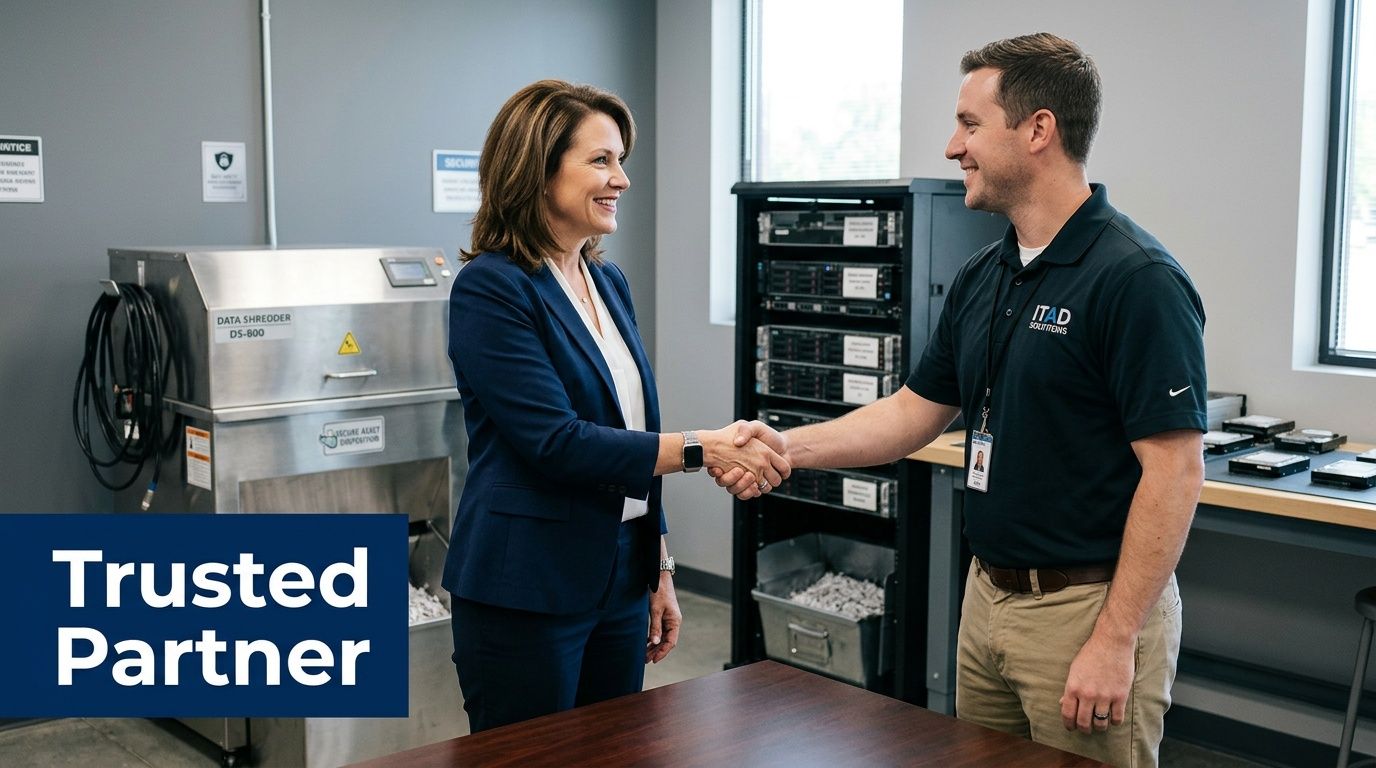
What separates a serious partner from a pickup service
The history of recycling itself points in the same direction. The first documented recycling program dates to 1031 CE in Japan for used paper, a reminder that structured collection and handling have always mattered when resources are valuable and processes need trust, as outlined in this history of early recycling programs. Modern e-waste is far more complex, so informal handling is the wrong model.
When vetting a partner, look for evidence in four areas:
- Certifications and standards: Ask whether they operate under recognized electronics recycling standards such as R2 or e-Stewards.
- Commercial experience: Make sure they regularly handle hospitals, schools, government agencies, or enterprise offices.
- Documented chain of custody: You should be able to see how assets are tracked from pickup through final disposition.
- Clear downstream process: They should explain reuse, dismantling, and certified recycling plainly.
Wiping versus shredding
This is one of the most important decisions in the whole recycling event.
Software wiping is appropriate when drives are functional and your organization wants sanitization with the possibility of reuse. In many B2B environments, teams use standards such as DoD 5220.22-M 3-pass wiping or NIST 800-88 workflows for supported media. That preserves value when the hardware still has a legitimate second life.
Physical shredding fits obsolete, failed, damaged, or highly sensitive media. It also works when policy requires destruction rather than sanitization. Healthcare organizations often prefer shredding for drives pulled from devices that handled patient data because the decision is simpler and easier to defend internally.
A good partner won’t push one answer for every asset. They’ll separate devices by condition, data sensitivity, and reuse potential.
Ask one blunt question: “Show me what paperwork I’ll receive for every data-bearing asset and when I’ll receive it.”
For Atlanta organizations with regulated data, this matters more than marketing language. If you’re evaluating providers for a healthcare or high-sensitivity environment, review what a HIPAA-compliant electronics recycling process in Atlanta should include, then compare each vendor against that bar.
Managing On-Site Logistics and Communications
A recycling event succeeds or fails at the facility level. The vendor may be excellent, but if your staging area is wrong, your employee instructions are vague, or your building team isn’t aligned, the day turns into a series of avoidable delays.
Pick the right collection footprint
The best collection point is secure, easy to access, and close to the actual flow of equipment. In many office buildings, that means a loading dock or ground-floor room with controlled access. In hospitals and campuses, it may mean multiple intake points feeding one secure staging zone.
Don’t choose a location only because it’s empty. Choose it because it supports movement and control.
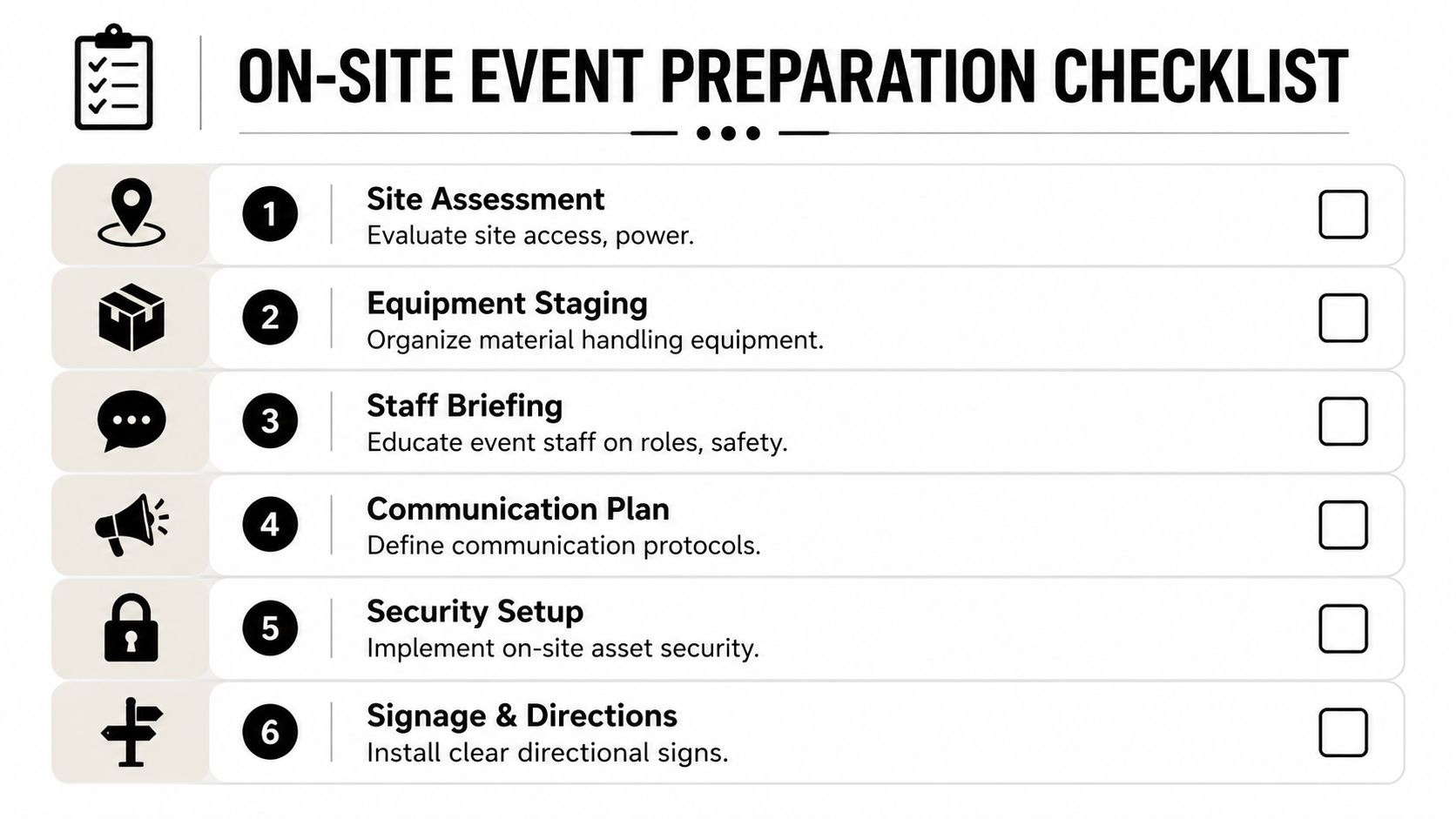
Use this checklist before you lock the site:
- Access path: Can carts, pallet jacks, and rolling bins move from origin points to the collection area without fighting stairs, tight turns, or public traffic?
- Security control: Can you limit who enters, observes, or removes equipment?
- Power availability: If on-site services require powered workstations or wipe stations, is power available where it’s needed?
- Weather protection: If trucks load outside, can assets stay covered and controlled during transfer?
- Building rules: Are there freight elevator schedules, COI requirements, or dock appointment windows?
This visual checklist helps align facilities, IT, and security before event week.
Brief the people who can derail the day
In most organizations, the hidden blockers aren’t technical. They’re administrative.
Your building engineer needs to know when the truck arrives. Security needs names and access times. Department admins need to know whether loose hard drives are accepted separately. HR or internal communications may need to approve broad staff messaging. If any one of those groups gets surprised, your event slows down.
Create one event brief with these fields:
| Operational item | Why it matters |
|---|---|
| Event date and arrival window | Prevents dock and access conflicts |
| Vendor point of contact | Gives staff one escalation path |
| Accepted assets | Reduces surprise material at intake |
| Excluded items | Avoids dangerous or unsupported drop-offs |
| Staging instructions | Keeps departments from sending mixed loads |
| Security protocol | Defines who can release assets |
Send employee communications that remove guesswork
Bad internal messaging creates contamination, confusion, and side deals. Staff start asking whether they can bring home electronics, mix personal devices with company assets, or leave unlabeled hardware in the hallway.
Keep the message short. Be specific.
A workable internal email usually covers:
- What to bring: Company-owned electronics approved for disposition.
- What not to bring: Personal electronics unless leadership explicitly approves a separate process.
- How to prepare assets: Leave asset tags in place, don’t remove drives unless instructed, and route all questions through IT.
- When and where: Exact time window, staging room, and contact person.
- Why procedures matter: Data security and chain of custody.
If you let every department interpret the instructions differently, you’ll spend event day sorting policy problems instead of equipment.
For larger offices and distributed campuses, pairing communications with scheduled pickups inside the building works better than asking every team to improvise. A planned electronics recycling pickup service is usually the cleanest model when departments hold bulky servers, network gear, or high volumes of monitors.
Event Day Execution and Securing the Chain of Custody
Event day should feel boring. That’s the standard. No improvising, no uncertain handoffs, no stack of unlabeled drives appearing at noon from a department that ignored the prep emails.
The team arrives, confirms the staging area, checks access, and sets up intake. From there, every asset follows the same path. It’s received, matched to the event scope or manifest, sorted by category, and directed into the right stream for wipe, shred, resale evaluation, or certified recycling.
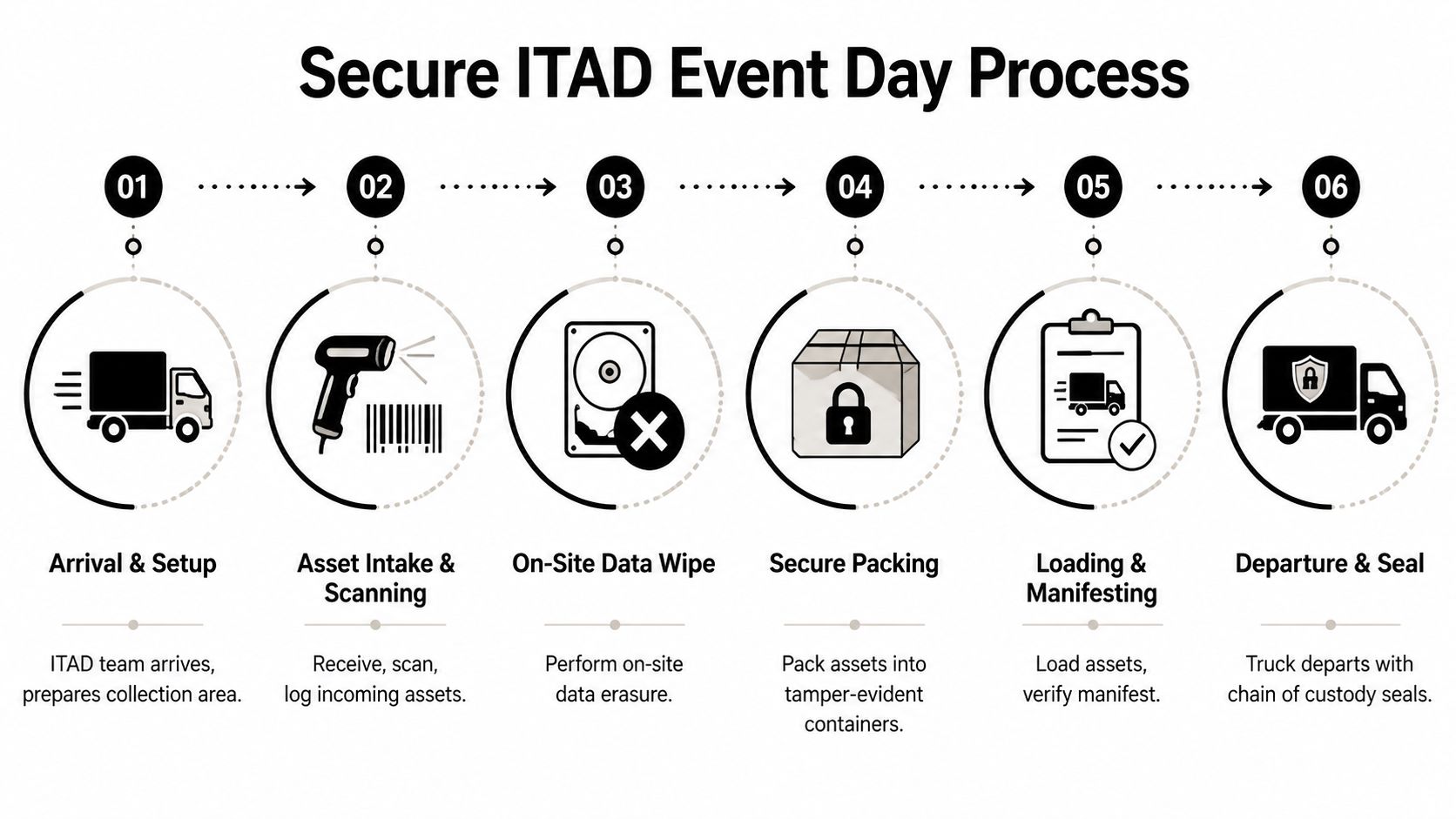
What a clean intake looks like
At intake, staff should verify what’s coming in instead of stacking everything by the door. That includes checking tags, noting asset type, separating data-bearing devices from peripherals, and identifying anything that needs special review.
A disciplined process often includes:
- Check-in against an inventory list when one exists.
- Visual categorization for laptops, desktops, servers, networking gear, monitors, loose drives, and media.
- Serialized tagging or scanning for assets that require individual tracking.
- Segregation of sensitive media so drives and storage devices never get mixed into general hardware piles.
- Secure packing and manifest review before loading.
What chain of custody actually means
Chain of custody isn’t a slogan. It’s the record that shows who possessed the asset, when control changed, how it was secured, and what happened next.
That usually means sealed containers or controlled pallets, documented loading, named handlers, departure records, and a manifest that corresponds to what your organization released. If your event is large or spread across departments, using the planning features found in modern event management software can help your internal team coordinate time slots, responsibilities, and communication before the handoff begins.
The moment that matters most is the handoff. If nobody can prove what left the building, everything after that is weaker.
For HIPAA-bound organizations, discipline reveals itself. A secure event day doesn’t rely on memory. It relies on logs, labels, seals, signatures, and a transport process that can be defended later.
Post-Event Reporting and Proving Compliance
The truck leaving your site is not the finish line. It’s the point where your organization starts relying on documentation instead of physical control.
That documentation needs to do two jobs. First, it must prove secure handling and data destruction. Second, it should help you explain the event’s operational value to leadership in language they care about.

The documents that matter
For data-bearing assets, the core record is the Certificate of Data Destruction. That document should align with your inventory or manifest and identify what was sanitized or destroyed. For non-data equipment and material streams, you should also receive a Certificate of Recycling or equivalent disposition summary.
The reporting standard is straightforward. Success is measured by tracking key metrics similar to EPA guidelines, with the goal of a high diversion rate and a low residual contamination rate, ideally under 10%. For HIPAA-compliant events, the ultimate success metric is a 100% auditable chain of custody, validated by a Certificate of Data Destruction for every single data-bearing asset, as explained in this guide to measuring recycling program success.
How to package the results for leadership
Executives usually don’t want a technical dump. They want a concise report that answers four questions:
- What left the building
- How sensitive assets were handled
- What proof exists
- What operational problem was solved
A clean post-event summary can include:
| Report element | Leadership value |
|---|---|
| Asset categories processed | Shows scope and cleanup impact |
| Data-bearing assets documented | Shows security control |
| Certificates received | Shows audit readiness |
| Diversion and contamination notes | Shows environmental performance |
| Open issues or exceptions | Shows governance discipline |
If your company wants to document the event for internal sustainability reports or employer-brand communications, visual documentation has value too. This short guide to Corporate Event Photography is useful for capturing proof without compromising security. Just make sure photos never expose asset tags, screens, manifests, or confidential material.
A compliance file should stand on its own. If the IT manager is on vacation six months later, the paperwork should still answer the audit questions.
For teams formalizing their records, it helps to compare vendor paperwork against a sample certificate of destruction form so you know what complete documentation should look like before the event is booked.
Atlanta IT Manager FAQ for Electronics Recycling Events
Can employees bring personal electronics to a corporate recycling event
Only if leadership intentionally approves that scope. Mixing personal and company-owned assets creates custody and documentation issues fast. Most business events run better when they stay limited to organization-owned equipment.
Should we inventory everything before the event
Inventory the data-bearing assets and anything high value or policy-sensitive. For low-risk peripherals, a categorized count may be enough. The right level of detail depends on your compliance obligations and how tightly your asset records are managed today.
Is on-site data wiping always better than off-site processing
Not always. On-site work is useful when your organization wants visible control or immediate handling of sensitive devices. Off-site processing can still be secure if the intake, transport, and documentation standards are strong. The key question isn’t location alone. It’s whether the chain of custody is complete and defensible.
What usually causes delays on event day
Three things show up over and over: departments staging unapproved material, building access problems, and weak internal communication. Most event-day friction starts before event day.
What should we do with broken servers or dead hard drives
Treat them as sensitive until proven otherwise. If they can’t be reliably sanitized, route them into physical destruction through a documented process. Don’t assume a non-working drive is a non-risk drive.
Who needs to be involved besides IT
Facilities, security, compliance, and the department leaders releasing equipment. In healthcare or education, legal or privacy leadership may also want visibility depending on the asset mix.
How do we know the event was actually successful
Success isn’t just “the room is empty.” A strong result means the equipment is gone, the data-bearing assets are fully documented, the certificates are complete, and the organization can show a clear chain of custody from pickup through final disposition.
If you’re planning a secure recycling event for an office, hospital, school, government site, or data center in metro Atlanta, Atlanta Computer Recycling can help you handle pickup, de-installation, data destruction, and final documentation with less disruption to your team.