E-Recycle Guide for Atlanta Businesses


You know the situation. A storage closet, server room corner, or spare office starts collecting retired laptops, failed drives, old switches, cracked monitors, and mystery boxes of cables nobody wants to claim. The equipment isn’t in production anymore, but it also isn’t gone. That’s where risk starts.
For a medium or large business in Atlanta, e-recycle work isn’t a housekeeping task. It’s an IT asset disposition project with security, compliance, chain-of-custody, and operational consequences. If your team handles patient records, financial data, student information, internal email archives, or government records, old hardware can create exposure long after users stop touching it.
The biggest mistake first-time project owners make is treating electronics disposal like junk removal. It isn’t. A compliant e-recycle program starts with asset visibility, moves through secure data destruction and logistics planning, and ends with documented downstream processing. If any of those steps break, your audit trail breaks with them.
The Hidden Risks in Your IT Storage Closet
That back room full of retired equipment often contains more than scrap. It holds unverified data-bearing devices, undocumented serial numbers, mixed ownership history, and assets that may still have resale or reuse value.
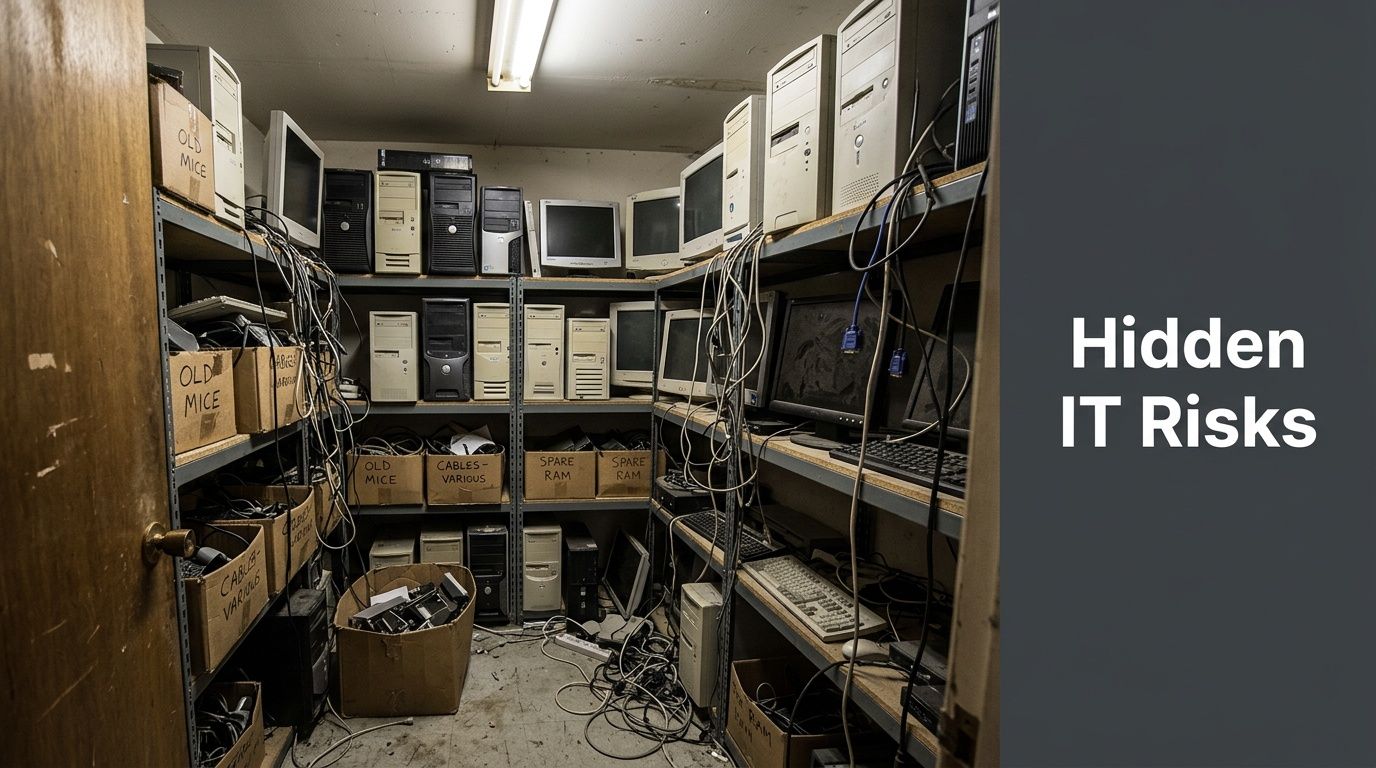
An old desktop with no power cord might still contain an intact drive. A decommissioned firewall could still hold configs. A copier hard drive could still store documents. A box of loose SSDs can become a compliance problem if nobody can prove where they came from or where they went.
Why stored e-waste becomes a business liability
Most organizations let retired equipment sit because disposal feels risky. Ironically, delaying disposal often creates more risk.
Common problems show up fast:
- Unknown data exposure. Deleted files and factory resets don’t automatically equal secure sanitization.
- No inventory trail. If assets weren’t logged at retirement, your team may not know what is still on site.
- Informal handling. Once equipment starts moving between offices, closets, and loading areas, custody gets blurry.
- Lost recovery value. Reusable devices lose value when they sit too long, collect damage, or become incomplete.
- Mixed waste streams. Scrap metal, batteries, computers, and storage media shouldn’t be treated as the same category.
This is also where physical security intersects with IT disposition. If you’re reviewing access controls around server rooms, loading docks, and equipment staging areas, this guide to data center physical security is useful because disposal projects often fail at the handoff point, not at the sanitization step.
Practical rule: If your team can’t answer “what is it, who used it, does it store data, and where is it going?” the asset isn’t ready to leave the building.
The bigger e-waste problem is already here
The urgency isn’t theoretical. In 2022, global e-waste generation reached a record 62 million tonnes, growing at a rate that outpaces recycling efforts fivefold. With only 22.3% formally collected and recycled, businesses face increasing pressure to avoid contributing to $62 billion in squandered resources and environmental risk, according to the WHO e-waste fact sheet).
For an Atlanta business, that macro problem translates into a local operational one. The longer equipment piles up, the harder it is to separate reusable devices from scrap, verify data destruction needs, and prepare a clean disposition event.
Some IT managers assume anything too old to redeploy belongs in the dumpster category. It doesn’t. Even obvious end-of-life equipment may need controlled dismantling, media removal, or commodity recovery. If you’re sorting what qualifies as recoverable material versus regulated disposal, this overview of electronics scrap handling helps frame the difference.
What works and what does not
What works is a scheduled, documented retirement process. Assets come out of service, get tagged, get staged in a restricted area, and move into a defined e-recycle workflow.
What doesn’t work is the casual method most companies fall into:
- Ad hoc pileups in storage rooms
- One-off employee cleanouts with no chain of custody
- Mixing data-bearing devices with general surplus
- Waiting for a move, merger, or renovation to force action
Once your closet becomes a graveyard, the project gets more expensive in time and more dangerous in compliance terms. The fix is a plan, not another shelf.
Developing Your E-Recycle Game Plan
A successful e-recycle project begins before the first pallet is wrapped. The planning phase determines whether pickup day feels controlled or chaotic.
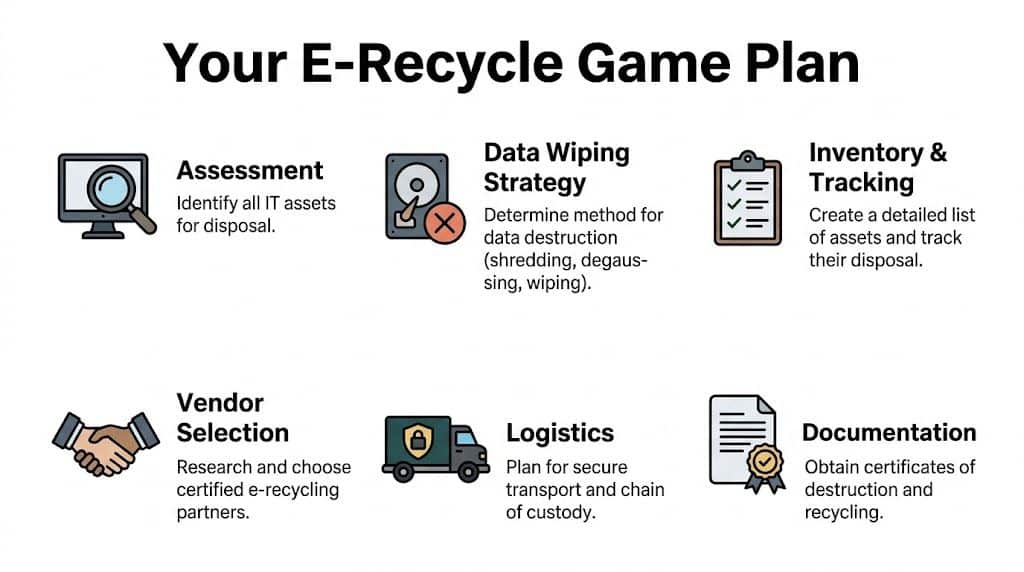
Large office refreshes, clinic hardware replacements, and data center shutdowns all have the same hidden challenge. Operations still need to run while equipment is identified, disconnected, staged, and removed.
Start with an asset map, not a pickup request
Most first projects stall because the request is too vague. “We need to get rid of old IT equipment” isn’t enough for secure execution.
Build an asset map with these fields:
| Field | Why it matters |
|---|---|
| Asset type | Separates laptops, servers, switches, monitors, printers, drives, and peripherals |
| Location | Tells the pickup crew what’s in closets, offices, MDFs, IDFs, labs, or racks |
| Condition | Distinguishes reusable equipment from damaged or non-functional units |
| Data status | Flags whether a device contains storage media |
| Ownership or department | Helps resolve internal signoff issues before removal |
| Removal method | Identifies what can be boxed by staff versus what needs on-site de-installation |
This doesn’t need to start perfect. It does need to start. A rough spreadsheet is better than a verbal estimate.
Separate project scope into three tracks
A practical way to avoid confusion is to divide the work into three tracks.
User devices
Laptops, desktops, docking stations, monitors, keyboards, and office phones usually move fastest. They’re easier to count, easier to stage, and simpler to prepare for pickup.
Infrastructure gear
Servers, storage arrays, switches, rack-mounted appliances, UPS units, and network gear need more coordination. These assets often require shutdown windows, cable documentation, and careful rack removal.
Loose media and high-risk items
Hard drives, SSDs, backup tapes, and failed devices with inaccessible storage should be isolated early. These items should never get buried inside general e-waste pallets without clear handling instructions.
If a device can hold data, classify it before you classify its commodity value.
Build the compliance checklist early
Your disposal method should be driven by the data and regulatory profile of the equipment, not just by whether the hardware still turns on.
Ask these questions internally:
- Healthcare environment. Does the equipment store or process protected health information?
- Public sector environment. Do agency records, law enforcement data, or restricted documentation live on these systems?
- Education environment. Could student records or staff files remain on retired devices?
- Finance or legal environment. Are there retention, confidentiality, or litigation hold concerns?
- Remote workforce devices. Were laptops returned incomplete, unsecured, or without documented wipe status?
The planning gap is especially obvious in larger decommissioning projects. For data center operators and government agencies, the primary challenge in large-scale e-waste decommissioning is minimizing operational disruption, and coordinated logistics for servers and network gear are often ignored in consumer-focused guides, as noted by CalRecycle’s eRecycle business context.
Decide what must happen on-site
Some organizations can stage equipment near a dock and keep the project simple. Others need substantial on-site support.
You may need:
- Rack de-installation for servers, switches, and appliances
- Drive removal before any equipment leaves the room
- Packaging support for monitors, blades, and fragile components
- After-hours scheduling to avoid interfering with staff or patient care
- Department-by-department pickup waves in multi-floor buildings
A good plan also names internal owners. Facilities controls access. IT confirms asset scope. Compliance signs off on data handling. Security manages dock procedures. Finance may want disposition records for fixed-asset reconciliation.
What a workable timeline looks like
You don’t need a massive project plan for every office cleanout, but you do need sequencing.
A straightforward order looks like this:
- Week of assessment. Inventory, location review, and scope confirmation.
- Security decision point. Wipe, shred, or hold for review.
- Logistics planning. Staging areas, elevator access, dock timing, and labor needs.
- Removal event. De-installation, packing, manifesting, and pickup.
- Documentation closeout. Destruction records, recycling records, and asset reporting.
Projects go sideways when teams skip the middle. They identify the pile, schedule a truck, and then discover the equipment is still mounted, still encrypted, still in use by one department, or still tied to a compliance review. Planning prevents those failures.
Securing Your Data Beyond Deletion
The most dangerous sentence in e-recycle work is, “We already deleted everything.”
Deleting files changes what the operating system can see. It does not automatically create a documented, auditable data destruction event. Formatting a drive has the same problem. So does sending retired equipment to a recycler without first deciding how each data-bearing asset will be sanitized.
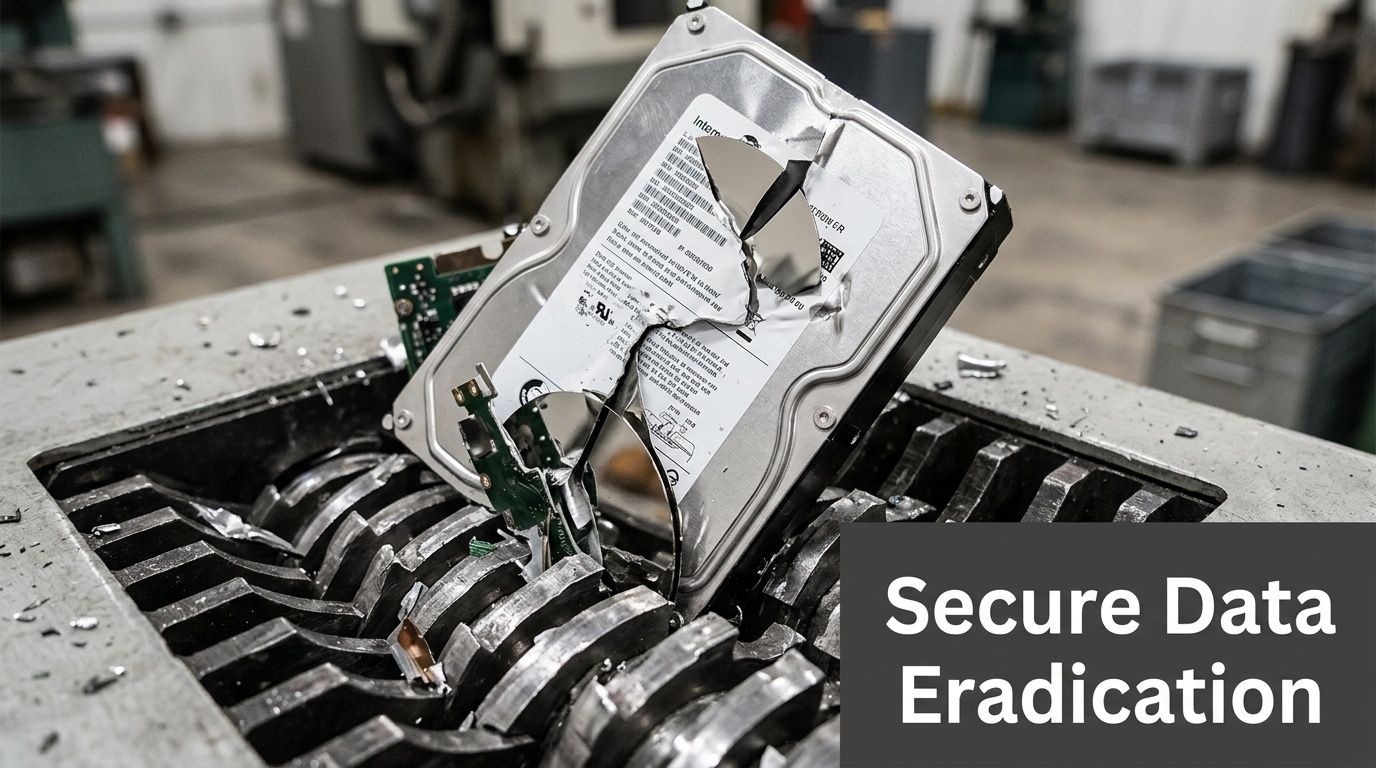
For healthcare organizations, this gap matters even more. There is a significant gap in guidance for businesses seeking HIPAA-compliant data destruction, especially around DoD 5220.22-M 3-pass wiping and physical shredding for retired media, according to CalRecycle’s covered electronics guidance.
Deletion is an IT task. Destruction is a compliance task
That distinction helps teams make better decisions.
When you delete files, you’re performing routine system administration. When you wipe or shred media as part of disposition, you’re creating a control that should stand up to audit, legal review, and internal governance.
That means your process needs:
- A defined sanitization method
- Clear custody from collection to destruction
- Asset-level traceability where appropriate
- Proof that the selected method was completed
If your broader security program already emphasizes internal responsibility rather than blind trust in outside providers, this article on understanding data protection and securing your data beyond vendors fits well with ITAD planning. Vendors matter, but your own process decisions matter first.
When software wiping makes sense
DoD 5220.22-M 3-pass wiping is useful when the media is functional and the organization wants the possibility of reuse or remarketing after sanitization.
That usually fits:
- Working desktops and laptops
- Functional server drives removed during refresh projects
- Redeployable office systems
- Assets where preserving device value still matters
Wiping only works when the media can be read reliably and the process can be documented. If a drive is damaged, inaccessible, encrypted in a problematic way, or mechanically failing, software-based sanitization may not be appropriate.
Use wiping when all three conditions are true
| Condition | Why it matters |
|---|---|
| The media is operational | The wipe process must complete successfully |
| The device may be reused | Sanitization preserves downstream value |
| You can document execution | Auditability matters as much as the method |
When physical shredding is the better answer
Shredding is often the cleaner decision for failed drives, obsolete media, and high-sensitivity environments where reuse of the storage component is not worth the risk debate.
Choose physical destruction when:
- The drive is dead or unstable
- The media came from regulated systems
- You can’t validate wipe completion
- The organization wants finality over recoverable value
- The storage arrived loose with poor historical documentation
Healthcare and government teams often prefer this route for selected asset classes because the decision is easier to defend. If media condition is unknown, shredding removes ambiguity.
A defensible destruction choice is usually better than a theoretically efficient one that nobody can verify later.
A practical comparison for IT managers
Here’s the decision in plain terms:
| Method | Best use case | Main advantage | Main limitation |
|---|---|---|---|
| DoD 5220.22-M 3-pass wiping | Functional media intended for reuse | Preserves device utility | Requires operable media and process verification |
| Physical shredding | Failed, obsolete, or high-risk media | Final destruction of the storage device | Eliminates reuse of that component |
Neither method should be selected casually. The wrong choice usually comes from mixing objectives. If you want reuse, use a verified wipe where appropriate. If you want certainty on failed or sensitive media, shred it.
Chain of custody matters as much as destruction
Teams often obsess over the wipe or shred step and ignore the period before it. That’s a mistake.
A hard drive sitting in an open box in a staging room is still a risk. A stack of laptops waiting by a dock without signoff is still a risk. Data destruction starts with controlled collection, not with the machine that handles the final step.
Use this workflow:
- Identify all data-bearing assets
- Tag or record them before movement
- Stage them in a restricted area
- Assign wipe versus shred status
- Transfer under documented custody
- Collect the destruction record
If your team needs a clear breakdown of physical media destruction methods, this resource on how old hard drives are destroyed is a useful operational reference.
The document you should insist on
The Certificate of Destruction matters because it converts a technical activity into a business record. Without it, you may know what likely happened. With it, you can prove what was done.
For audit and compliance purposes, review whether your documentation includes:
- Date of destruction
- Identification details tied to the media or asset batch
- Method used
- Responsible handling party
- Any associated pickup or manifest reference
The goal isn’t paperwork for its own sake. The goal is being able to answer a hard question months later without depending on memory.
What fails in the field is informal confidence. Someone says the devices were wiped. Someone else thinks the drives were shredded. Nobody has a complete list. That’s exactly how avoidable exposure survives a refresh cycle.
Navigating Logistics From Decommission to Pickup
A well-run e-recycle project should feel organized on your side, even when the scope is large. The best logistics plans reduce the burden on your internal team instead of turning disposal into a week-long interruption.
Take a typical mid-sized Atlanta office. The company has retired user laptops from a recent refresh, several old copiers, a closet of monitors, and a server room with rack gear that’s been offline but never removed. Staff still need access to conference rooms, the dock is shared with deliveries, and building management has elevator rules.
What the day actually looks like
The first move is usually site confirmation, not immediate hauling. That means verifying what is staged, what still needs de-installation, and what can’t leave until a final internal signoff lands.
Then the work splits into two lanes.
Office equipment gets consolidated, counted, and packed for safe handling. Infrastructure gear gets removed more carefully. Servers come out of racks, loose drives are separated if required, cables get cleared, and equipment is staged so nothing blocks active production systems.
Clients often ask whether the job will disrupt operations. It shouldn’t, if the project was scoped appropriately. The biggest disruptions usually come from hidden dependencies, bad staging space, or trying to remove active equipment during business hours.
What you should prepare before the truck arrives
A smooth pickup depends on basic preparation inside your organization.
Use this checklist:
- Access approvals. Confirm who can open suites, IDFs, server rooms, and loading areas.
- Asset release. Make sure departments know which devices are approved to leave.
- Staging zone. Set aside a controlled space near the removal path if possible.
- Building coordination. Notify property management if elevators, dock reservations, or certificates are required.
- Internal point person. Assign one lead who can answer questions in real time.
The fastest pickup is the one that doesn’t stop every fifteen minutes for ownership disputes.
Where projects bog down
Most pickup delays are predictable. The equipment isn’t ready, the room is harder to access than expected, or nobody decided how to handle the data-bearing items before the crew arrived.
The common friction points are straightforward:
| Friction point | What it causes |
|---|---|
| Assets still in use | Last-minute removals from scope |
| No freight path | Delays at elevators, stairs, or dock doors |
| Mixed piles | Extra sorting time and chain-of-custody confusion |
| No internal approver on site | Work pauses while teams chase permission |
| Unboxed loose accessories | Slower loading and higher breakage risk |
A commercial pickup service should account for these realities. For organizations planning office cleanouts, multi-site collections, or scheduled surplus removal, this page on IT equipment pickup in Atlanta gives a practical view of what that service category includes.
What a good logistics partner handles
You should not need your senior systems engineer spending half a day wrapping monitors or carrying dead towers to the dock.
A capable ITAD logistics process typically includes:
- On-site de-installation for infrastructure equipment
- Careful packing and palletizing
- Segregation of media and higher-risk assets
- Scheduled pickup windows
- Manifesting and transfer control
The point isn’t just convenience. It’s consistency. Once a project starts moving, every unscripted handoff increases the chance of loss, confusion, or documentation gaps.
In practice, the least disruptive projects are the ones where the client’s team only does what only the client can do: approve scope, confirm access, and identify what must stay. Everything else should be operationalized.
Choosing Your Atlanta E-Recycle Partner
Vendor selection is where a lot of organizations simplify too far. They compare hauling options, ask whether equipment is accepted, and stop there. That approach misses the difference between a basic recycler and a partner that can support secure IT asset disposition.

For business projects, especially in healthcare, education, and government, you need to evaluate the vendor’s controls, not just its truck.
Start with certification, then keep asking questions
R2v3 matters because it establishes a reuse-first hierarchy and requires a documented chain of custody. For businesses with HIPAA concerns, that framework is valuable because it points to data security controls and downstream tracking. It’s also not enough by itself. As summarized in this review of e-recycler standards and R2v3 expectations, organizations should still perform their own audits because certification alone doesn’t guarantee perfect performance.
That’s the right mindset. Certification is a screening tool. It is not due diligence by itself.
The questions that separate serious vendors from commodity haulers
Ask direct questions and listen for direct answers.
On chain of custody
- How are assets logged from pickup through final processing?
- Can the vendor track by serial number or internal asset identifier when needed?
- How are loose drives or mixed media handled?
On data destruction
- When is wiping used versus physical shredding?
- What happens to failed drives?
- What documentation is issued after destruction?
On downstream accountability
- Does the vendor document where materials go after initial processing?
- How are reuse, resale, and scrap streams separated?
- Are export destinations verified if downstream processors are used?
On operations
- Can the vendor perform on-site de-installation?
- Can pickups be scheduled around patient care, school operations, or business hours?
- What does the client need to stage in advance?
A short evaluation table
| Evaluation area | Strong answer | Weak answer |
|---|---|---|
| Certification | Can explain what the standard requires in practice | Mentions certification without operational detail |
| Inventory control | Provides documented tracking approach | Uses vague language about “handling everything carefully” |
| Data destruction | Defines wipe and shred use cases | Treats all devices the same |
| Logistics | Can discuss site access, de-installation, and staging | Focuses only on pickup day |
| Documentation | Offers clear reporting and destruction records | Says paperwork is available “if needed” |
If a vendor can’t explain chain of custody in plain language, don’t expect strong documentation after the fact.
Don’t confuse recycling with ITAD
A scrap-focused provider may be perfectly fine for low-risk material streams. That doesn’t make the provider a fit for enterprise electronics with compliance exposure.
A true ITAD partner should understand that:
- A retired laptop is not just a metal object
- A failed drive may require a different path than a working one
- A server decommissioning project is a logistics event, not just a recycling event
- Documentation is part of the service, not an afterthought
In Atlanta, one option in this category is Atlanta Computer Recycling’s commercial electronics recycling service, which is focused on B2B equipment disposition, secure media handling, and pickup logistics rather than residential drop-off.
What due diligence looks like in practice
For a first major project, keep your review practical.
Ask for examples of paperwork. Ask how a failed SSD is handled differently from a working laptop. Ask what happens if a server room contains equipment that wasn’t on the original list. Ask who is responsible for de-installation. Ask how custody is maintained once the truck is loaded.
The wrong vendor usually reveals itself through vagueness. You’ll hear broad claims about secure recycling, but not much about manifests, staging, media segregation, or downstream reporting.
The right partner doesn’t need dramatic language. The right partner can explain the workflow clearly, document it cleanly, and execute it without making your team guess what happens next.
From Your Dock to a New Life
Once the truck leaves, the project isn’t over. For most IT managers, this is the least visible part of e-recycle work, and that lack of visibility creates uncertainty. The key is understanding that retired electronics usually follow one of two paths: reuse or material recovery.
Reuse comes first when the equipment is functional, economically sensible to process, and appropriate for remarketing or redeployment. That aligns with the broader reuse-first hierarchy discussed earlier. A usable laptop, server component, or network device shouldn’t be shredded just because it’s old.
Material recovery takes over when the device is obsolete, damaged, incomplete, or unsuitable for further use. That doesn’t mean it becomes worthless. It means its value shifts from device value to commodity value.
What happens in actual recycling
Once equipment is dismantled and prepared for recycling, the mechanical separation stage starts doing the heavy lifting.
Magnetic separation pulls out ferrous metals such as steel and iron. Eddy current separation pushes away non-ferrous metals like aluminum and copper. Water-based separation sorts materials by density, helping separate plastics from heavier glass. According to this e-waste recycling process guide, that separation sequence is a key reason recovered metals from servers and network gear can reach 95%+ purity in the right stream.
Why this matters to an IT manager
That processing detail isn’t academic. It affects three decisions you make earlier in the project:
- Whether to preserve devices for reuse
- Whether to remove certain components before shredding
- How cleanly your asset streams are sorted before pickup
If reusable gear gets mixed into damaged scrap, you lose circular value. If copper-rich networking gear gets contaminated with general trash, downstream recovery gets worse. If drives that should have been destroyed stay mounted in equipment headed for mixed processing, your data risk profile changes for the worse.
The real end state
A responsible e-recycle program doesn’t end with “it was hauled away.” The better end state is this:
- Functional assets were assessed for reuse where appropriate.
- Data-bearing media followed a defined destruction path.
- Non-reusable equipment entered controlled material recovery.
- The organization received documentation that closes the loop.
If you want more visibility into that downstream path, this overview of what happens to recycled electronics is useful for internal stakeholders who want to understand where retired equipment goes.
A good ITAD outcome protects data, supports compliance, and keeps equipment out of the landfill when reuse or proper recovery is still possible. That’s what e-recycle should mean in a business setting. Not disposal for disposal’s sake, but controlled disposition with proof.
If your team is planning an office technology refresh, a healthcare hardware replacement, or a larger server decommissioning project, Atlanta Computer Recycling provides business-focused electronics recycling and IT asset disposition across the Atlanta metro area, including secure pickup, data destruction support, and documented processing for commercial equipment.