Atlanta: Compliant Universal Waste Disposal

A lot of universal waste problems start the same way. An IT manager inherits a locked storage room full of retired laptops, dead UPS batteries, old monitors, loose hard drives, and a few boxes of fluorescent lamps from a lighting retrofit. Nobody wants to throw anything out. Nobody wants to sign off on moving it. Then an office relocation, lease termination, audit request, or hardware refresh turns that forgotten pile into an immediate business problem.
At that point, universal waste disposal stops being a housekeeping task. It becomes a risk management issue. Some items in that room may fall under federal universal waste rules. Some do not. Some may hold regulated data. Some may need destruction, not just recycling. And if your company operates across multiple states, the answer can change depending on where the asset sits and where it is going.
The scale of the problem is not small. In 2022, the world generated a record 62 million tonnes of e-waste, with only 22.3% documented as properly collected and recycled, according to these waste management statistics. The remainder includes hardware that can contain materials such as lead and mercury, creating environmental exposure and business liability when disposal is handled poorly.
For Atlanta organizations, the pressure is usually broader than environmental compliance alone. Hospitals have HIPAA concerns. Schools need clean chain-of-custody. Data centers need decommissioning discipline. Multi-site companies need consistency. That is why disposal decisions increasingly sit next to procurement, security, facilities, and legal, not just facilities maintenance.
If you are already wrestling with retired equipment and downstream vendor risk, this overview of supply chain risk management strategies is also useful context. Disposal is part of the same control environment. Once an asset leaves your floor, your exposure does not disappear unless your process is solid.
The Hidden Risks in Your IT Storage Closet
The storage closet usually looks harmless. Shelves of obsolete desktops. A stack of LCD monitors from a floor consolidation. Server rails nobody remembers ordering. A bin of batteries pulled from backup units. Three banker boxes of hard drives waiting for “later.”
What makes that room dangerous is not the clutter. It is the mix of regulatory, security, and operational risk inside one unmanaged space.
Why old equipment becomes a compliance problem
An old laptop is not just surplus property. It may contain a drive with employee records, customer files, patient information, financial documents, saved credentials, or cached email. A fluorescent lamp is not just maintenance waste. It may need handling under universal waste rules. A damaged battery is not just scrap. It can create storage and transportation problems if staff toss it into general recycling.
The risk grows when teams improvise. Common failure points look like this:
- Informal storage: equipment gets parked in random rooms with no inventory, no owner, and no disposal date.
- Mixed waste streams: lamps, batteries, peripherals, and data-bearing devices all end up together.
- No chain-of-custody: facilities, IT, and office managers each assume someone else handled the handoff.
- Last-minute cleanouts: disposal happens under move-out pressure, which is when mistakes multiply.
Practical takeaway: The biggest disposal failures usually happen before pickup day. They start when retired assets sit too long without classification, labeling, or a data destruction decision.
The financial risk is wider than a recycling invoice
Most businesses first ask, “What will disposal cost?” That is the wrong first question. The more useful question is, “What does poor disposal expose us to?”
If universal waste is stored improperly, staff can trigger avoidable compliance issues. If drives leave your site without a documented destruction process, the environmental side may be clean while the security side fails. If equipment is left in a room for months during a merger, renovation, or closure, your audit trail gets weaker every week.
In practice, the problem is rarely one dramatic error. It is usually a chain of small misses. No labels. No dates. No disposition log. No wipe confirmation. No one assigned to sign the final paperwork.
What works in the field
The teams that stay out of trouble tend to do three things early:
- Separate environmental handling from data handling
- Assign a single internal owner for retired assets
- Move bulk retirement projects into a documented workflow, not an ad hoc cleanup
That sounds simple because it is. The hard part is following it consistently when deadlines tighten and multiple departments touch the same assets.
Decoding Your Waste What Qualifies and Why
Universal waste disposal only gets easier once you classify items correctly. Most business mistakes happen at this stage. Teams either overgeneralize and assume “all electronics are universal waste,” or they miss obvious regulated items because they focus only on computers.

What federal rules clearly include
Under EPA universal waste rules, the core categories include batteries, pesticides, mercury-containing equipment, lamps, and aerosols. For most offices, schools, hospitals, and commercial buildings, the categories that show up most often are batteries, lamps, and some mercury-containing devices.
Examples inside a business environment often include:
- Batteries: UPS batteries, sealed batteries from backup systems, and batteries removed from equipment
- Lamps: fluorescent lamps and HID lamps from offices, classrooms, hallways, and maintenance stock
- Mercury-containing equipment: older switches, thermostats, and related devices in older facilities
That is the federal baseline. It is not the whole story for IT managers.
The question every IT manager asks
Computers, laptops, servers, monitors, network gear, and drives are the center of most ITAD projects. But electronics are not universally treated as universal waste under federal rules.
That distinction matters. Georgia follows federal standards and does not broadly classify routine electronics like computers and servers as universal waste. In other states, electronics or CRTs may be treated differently. The EPA acknowledges that state-specific variations create real confusion, especially for organizations operating across state lines, and notes that electronics are treated as universal waste in some states while Georgia follows the federal framework in this area, as explained on the EPA universal waste page.
That means an Atlanta business cannot assume a retired laptop should be handled the same way as a fluorescent lamp. They travel through different compliance questions. One is primarily a data-bearing IT asset. The other may fit directly into a universal waste stream.
Important distinction: Universal waste disposal is not a synonym for e-waste disposal. Some retired business electronics require a different handling path, especially when data security is involved.
For operations teams, this is why a clear internal sorting standard matters. If your company also handles furniture removals, cleanouts, or relocation projects, it helps to review a broader definitive list of ineligible items for removal. It is a good reminder that disposal categories change quickly once hazardous, regulated, or data-bearing items enter the picture.
Small quantity or large quantity
Volume changes your obligations. The EPA distinguishes between Small Quantity Handlers and Large Quantity Handlers based on the amount of universal waste accumulated.
Small Quantity Handlers accumulate less than 5,000 kg, or about 11,000 lbs, of total universal waste.
Large Quantity Handlers accumulate 5,000 kg or more. Those handlers face stricter requirements, including obtaining an EPA ID number and keeping detailed shipping records, as outlined in Duke University's summary of universal waste requirements.
A medium-size office may stay well below that threshold. A hospital system, university, property portfolio, or data center project can cross it faster than expected, especially when batteries and lamps are included in a large site refresh.
A simple internal audit method
Use a three-bucket approach when you first review a room, closet, cage, or decommissioning site:
| Bucket | Typical contents | Immediate question |
|---|---|---|
| Universal waste | Lamps, batteries, mercury-containing items | Is it labeled, dated, and stored correctly? |
| Data-bearing IT assets | Laptops, servers, hard drives, copiers, network appliances | Will it be wiped, shredded, or held for reuse? |
| Non-universal non-data equipment | Keyboards, cables, metal racks, plastic peripherals | Does it belong in a standard electronics recycling stream? |
For Georgia businesses, this is the cleanest way to avoid category mistakes. If you need a more localized overview of accepted materials and handling pathways, this page on universal waste is a practical reference point.
On-Site Management A Blueprint for Secure Accumulation
Good disposal programs are won or lost on-site. Before any truck arrives, your team needs a controlled accumulation process that protects staff, preserves documentation, and keeps waste from drifting into general storage.
The strongest setups are not complicated. They are disciplined.
The basic operating model
For universal waste lamps, the working process under EPA RCRA 40 CFR Part 273 includes identifying and segregating lamps, using structurally sound closed containers, labeling and dating them, moving them into a secure accumulation area, responding correctly if breakage occurs, and shipping them to a qualified destination while retaining records. Those practical handling steps are summarized in this guide to universal waste lamp disposal.
Use that framework as the model for your broader on-site control plan.
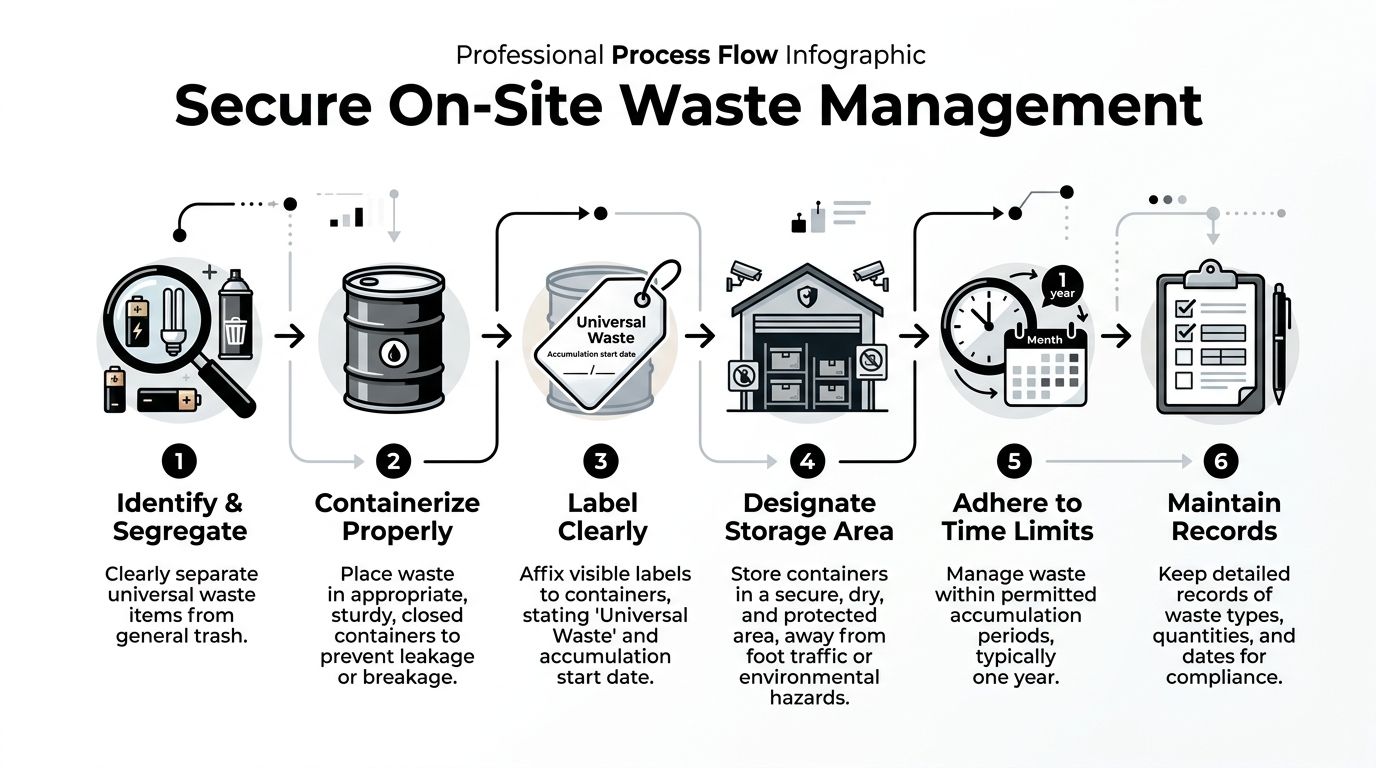
What a compliant accumulation area looks like
The best accumulation areas share a few traits:
- Low traffic: keep containers away from loading chaos, cart traffic, and forklift routes
- Dry and secure: avoid drains, exterior exposure, and unlocked back rooms
- Clearly marked: staff should know immediately that the area is controlled
- Operationally boring: no mixed overflow, no temporary piles, no unlabeled tubs
A bad accumulation area usually has the opposite profile. Open boxes. Broken packaging. Mixed materials. No dates. No one knows who owns it.
The labels that matter
At minimum, labels should tell staff what the material is and when accumulation began. For universal waste, the label should use the words “Universal Waste” plus the waste type, such as “Lamps” or “Batteries,” along with the accumulation start date.
This sounds minor until an auditor asks a simple question: “How long has this been here?”
If your answer depends on memory, your process is already weak.
The one-year limit and the violations that keep showing up
EPA regulations under 40 CFR Part 273 allow universal waste to be accumulated on-site for no longer than one year from the date it becomes waste. The same source notes that common violations stem from inadequate labeling, which accounts for up to 25% of fines in some audits, and exceeding the one-year storage limit, which appears in around 15% of non-compliance issues in some audits, based on the disposal guidance linked earlier.
Those are not abstract issues. They happen because organizations lose track of aging containers in storage rooms, maintenance shops, and warehouse corners.
Tip: Put one person, not a committee, in charge of date control for every accumulation area. Shared responsibility often turns into no responsibility.
A field-tested setup for IT and facilities teams
If you manage both e-waste and universal waste in the same facility, separate the process physically:
- Universal waste zone for lamps, batteries, and similar regulated items
- Data-bearing asset zone for drives, servers, workstations, copiers, and multifunction devices
- Staging zone for packed equipment already approved for pickup
That separation does two things. It lowers handling errors, and it makes pickup days faster because the receiving team can verify what is moving without sorting through mixed material on your floor.
Broken items need their own response
Broken lamps should not go back into containers for intact material. Staff need a clear written response that includes isolating the area, carefully collecting fragments, sealing remnants in a correctly marked container, and treating that waste through the proper channel.
The same principle applies to damaged batteries and cracked devices. Do not let staff “temporarily” drop them into whatever bin is nearby.
For media that cannot leave the building intact, an on-site destruction option often makes the process cleaner. If your disposal plan includes media destruction at your location, this overview of onsite hard drive shredding in Atlanta GA helps frame how to build that into your accumulation workflow.
Data Destruction The Non-Negotiable Security Layer
Environmental compliance does not remove data risk. That is the mistake many organizations make when they hear the word “recycling.”
A server can be recycled properly and still expose confidential data if the drives were not wiped or destroyed correctly. A copier can leave the building through an approved downstream channel and still create legal trouble if its internal storage was ignored. Universal waste disposal handles one side of the problem. Data destruction handles the other.
Wiping versus shredding
Most organizations need both methods available, not just one.
Software wiping fits drives and devices that still function and may be reused or remarketed. In business ITAD, a recognized process such as DoD 5220.22-M 3-pass wiping is often used when the goal is secure sanitization with the possibility of asset recovery.
Physical shredding fits drives and media that are obsolete, failed, damaged, or too risky to release intact. It is also the cleaner option when internal policy requires irreversible destruction.
The wrong move is using a single default for everything. If you shred every usable device, you may erase reuse value. If you try to wipe every drive regardless of condition, you may create security gaps.
When healthcare has no room for shortcuts
Hospitals, clinics, billing companies, medical practices, labs, and healthcare vendors carry a stricter burden because retired devices often touch protected health information. The challenge is not limited to obvious assets like laptops. Networked printers, copiers, imaging workstations, local backup devices, and old departmental servers can all hold regulated information.
That means disposal teams need to answer basic questions before pickup:
- Does this device contain local storage?
- Is the media functional enough to wipe?
- If not, what destruction method will be used?
- Who signs off on completion?
- What documentation proves it?
A surprising number of organizations discover storage only after de-installation starts. That is too late. Data-bearing status should be identified during inventory, not at the loading dock.
Degaussing is not the same as wiping or shredding
Some security programs also ask about degaussing. It has a specific place, but it is not a universal answer for every media type or every workflow. Teams considering magnetic media destruction should understand how a degausser fits into the broader sanitization picture before making it their default control.
What fails in real-world cleanouts
The most common security failures are operational:
- Drives removed but not logged
- Laptops palletized before sanitization status is verified
- Copiers released by facilities without IT review
- Staff assumptions that a recycler “handles the data part” automatically
- No final certificate tied back to the original asset count
Those are process failures, not technology failures.
Security rule: Never treat a retired device as “recycled” until its data disposition is complete, documented, and matched to the asset or media moved off-site.
Choose the control that matches the asset
Think in decision paths, not slogans.
If an asset is reusable and functioning, wiping can support both security and asset recovery. If it is damaged, unsupported, or high-risk, shredding often makes more sense. If the device type has hidden storage or removable media, add a verification step before transport.
Mature IT managers distinguish themselves from reactive ones by their approach here. They do not ask, “Can the vendor take this?” They ask, “What is the right destruction method for this specific asset class, and what proof will I have after it is done?”
Executing the Disposal Selecting Your Partner and Managing Logistics
By the time disposal reaches the pickup stage, most of the important decisions should already be made. Items should be classified. Data-bearing equipment should have a destruction path. Accumulation areas should be controlled. What remains is vendor selection, logistics, and documentation. Here, many companies still get sloppy. They choose based on convenience, not control.
What a qualified partner should prove
A disposal vendor should be able to explain more than where a truck goes. The vendor should show how materials are received, tracked, sanitized, processed, and documented. If your project includes a move, office closure, hardware refresh, or data center decommissioning, the logistics plan matters as much as the environmental claims.
Use this checklist before approving any ITAD or electronics recycling partner.
| Criterion | What to Look For | Why It Matters |
|---|---|---|
| Certifications | Recognized electronics recycling or ITAD certifications, plus documented downstream controls | Reduces the chance of informal or poorly documented processing |
| Data destruction options | Software wiping, physical shredding, and clear decision criteria for each | Different asset types require different destruction methods |
| Chain-of-custody | Asset counts, serialized tracking where appropriate, signed transfer records | Protects you if questions arise after pickup |
| On-site services | De-installation, packing, palletizing, and secure pickup | Lowers internal handling errors during large projects |
| Documentation | Certificates of destruction and recycling reports | Gives compliance, legal, and audit teams closure |
| Insurance and risk controls | Appropriate liability coverage and documented operating procedures | Adds protection during transportation and processing |
| Experience with regulated sectors | Familiarity with healthcare, education, government, or enterprise environments | Complex organizations usually need stricter workflows |
| Local logistics capability | Ability to schedule around business operations and building constraints | Prevents project delays and on-site disruption |
A vendor that cannot answer these questions clearly is not ready for a commercial environment.
Why chain-of-custody matters more than marketing
The phrase “we recycle responsibly” is not enough. You need a chain-of-custody that shows who handled the assets, when they were transferred, what happened to the media, and what documentation closes the loop.
For IT managers, chain-of-custody is the difference between confidence and guesswork. For legal and compliance teams, it is often the difference between a defendable process and a problem.
This is especially important during large projects. Office consolidations and data center shutdowns create confusion fast. Devices may be disconnected in one phase, staged in another, and loaded in a third. If those handoffs are not documented, your risk climbs.
The cost question needs a wider lens
Cost matters. It just should not be viewed in isolation.
The most useful cost comparison in this area is not “cheap vendor versus expensive vendor.” It is basic disposal versus controlled ITAD. According to the SFA presentation referenced in the verified data, universal waste rules can cut compliance costs by 50-70% compared to full hazardous waste management, but professional ITAD services may add $0.20-$0.50 per pound for certified wiping or shredding. That added cost reflects the security layer required to manage data-bearing devices, not just the environmental stream.
In plain terms, a lower invoice can still produce a higher total cost if it leaves gaps in sanitization, chain-of-custody, or project execution.
Key takeaway: Environmental compliance and data security solve different problems. A disposal partner should handle both, or clearly define where one ends and the other begins.
Managing the logistics of a real project
For an office cleanout, the sequence usually looks straightforward until people start touching equipment. Then mistakes show up. Monitors get mixed with personal devices. Drives get removed and set aside without tags. Network gear disappears into facilities carts. Pickup paths conflict with tenant rules. The loading dock books another vendor in the same window.
Large projects need a site plan, not just a service appointment.
A disciplined execution plan includes:
- Pre-pickup inventory review
- Room-by-room or rack-by-rack scope confirmation
- Data-bearing asset segregation
- Packing and staging instructions
- Building access and loading coordination
- Final document package after processing
This is one reason organizations often prefer a provider that can manage the whole workflow, including de-installation and transport. If you are evaluating local providers for a broader program, this page on choosing an electronic waste recycling company gives a practical starting point for comparing service models.
The certificate is not paperwork fluff
A Certificate of Destruction is not decorative admin work. It is often the final document your security, compliance, or procurement team needs to close the file. The same goes for recycling documentation where applicable.
If a vendor downplays that paperwork, take it seriously. Strong operators know documentation is part of the service, not an afterthought.
Frequently Asked Questions on Universal Waste
Are computers and laptops universal waste in Georgia
Not generally under the federal framework Georgia follows. Lamps, batteries, and certain mercury-containing items fit more neatly into universal waste categories. Computers, laptops, servers, and similar electronics usually need to be handled through an IT asset disposition or electronics recycling process, with data security reviewed first.
Can I store universal waste in a back room until we have enough for pickup
Yes, but only if the area is controlled and the waste is managed properly. The room should not function as informal overflow storage. Containers should be appropriate, items should be segregated, and labels should identify the waste type and accumulation start date. Waiting without date control is where many organizations get into trouble.
What should staff do with broken fluorescent lamps
Do not treat broken lamps the same way as intact ones. Isolate the area, clean up carefully using the applicable procedure, and place remnants into a properly marked container for the correct handling path. Staff should know this procedure in advance. Broken material is where accidental exposure and classification mistakes happen.
Does recycling a device automatically mean the data is gone
No. Recycling and data destruction are separate controls. A device can move through an environmentally proper channel while still retaining recoverable data if nobody wiped or destroyed the storage media. Treat every data-bearing device as a security project until sanitization is complete and documented.
Should we wipe drives or shred them
It depends on the device condition, your policy, and the intended outcome. Wiping makes sense for functioning assets that may be reused. Shredding fits failed, obsolete, or high-risk media when irreversible destruction is the right choice. The important part is choosing deliberately, not by habit.
Do copiers and printers count as data-bearing devices
Often, yes. Many business copiers, multifunction printers, and imaging devices contain internal storage. That storage should be identified during the inventory stage. Do not let facilities or office services release those units before IT confirms their data status.
What about employee-owned electronics left behind at the office
Do not mix personally owned devices into a business disposal stream without a clear policy. The chain-of-custody, ownership, and data authorization questions are different. Route them through HR or management first so staff understand what can and cannot enter the company process.
How often should a business schedule universal waste disposal
Schedule based on risk, storage discipline, and project cycles. High-volume sites often need recurring pickups. Lower-volume sites may tie pickups to maintenance cycles, office refreshes, or seasonal cleanouts. The wrong cadence is waiting until the storage area is overloaded or dates become uncertain.
Who should own the process internally
One accountable owner should coordinate the workflow, even if several departments participate. IT, facilities, compliance, security, and procurement may all have roles, but one person should own inventory status, pickup readiness, and final documentation.
Best practice: If nobody inside your company can quickly answer what is in storage, how long it has been there, and whether it holds data, your disposal program needs tighter ownership.
Building Your Sustainable IT Asset Disposition Program
The organizations that handle universal waste disposal well do not treat it as a once-a-year cleanup. They build it into the IT lifecycle.
That means every refresh, relocation, closure, and decommissioning project should trigger the same basic controls. Identify what qualifies as universal waste. Separate it from standard electronics recycling. Flag data-bearing assets early. Decide whether media will be wiped or shredded. Use a documented vendor process. Close every project with records that make sense months later, not just on pickup day.
A good program also values reuse where appropriate. Some companies offset refresh costs by pairing disposition planning with a broader IT asset trade-in program. That approach does not replace secure disposal, but it does reinforce a healthier lifecycle mindset. Assets should move through a decision tree, not a junk pile.
For Atlanta businesses, the practical standard is simple. Your disposal process should protect the environment, protect the data, and stand up to internal review. If one of those fails, the program is incomplete.
The strongest ITAD programs are not flashy. They are repeatable. Staff know what goes where. Pickup days are predictable. Certificates are easy to find. Storage rooms stop turning into compliance traps.
Atlanta businesses that need secure, commercial-grade ITAD support can work with Atlanta Computer Recycling for electronics recycling, data destruction, pickups, de-installation, and data center decommissioning across the metro area. If you are managing retired laptops, servers, drives, network gear, batteries, or bulk office equipment, ACR can help you build a disposal process that is compliant, secure, and easier to run.