How to Wipe a Computer Hard Drive: A Business Leader’s Guide

When it's time to retire company computers, dragging files to the recycling bin is not an option. Securely wiping a hard drive means completely overwriting existing data with random, meaningless information, rendering the original files unrecoverable. For any modern business, this process isn't just an IT task—it's a critical component of risk management.
The process demands specialized software that meets stringent government and industry standards or, for ultimate security, the physical destruction of the drive itself. Anything less exposes your organization to significant financial and reputational risk.
Why Secure Data Destruction is a Business Imperative

Before discussing hardware, let's be clear: wiping a hard drive is far more than a simple IT function. It's a fundamental pillar of your company's risk management, compliance, and brand protection strategy.
Relying on a factory reset or hitting "delete" creates a dangerous illusion of security. These basic commands merely remove the pointers to your data, leaving the actual files intact on the drive. Commercially available software can easily recover this information, turning your retired IT assets into ticking data bombs.
The Real-World Risks of Improper IT Asset Disposition
The consequences of failed data sanitization are severe. Imagine a healthcare provider facing crippling HIPAA fines because patient records were recovered from a discarded server. Or a financial firm's reputation being destroyed after confidential client data was leaked from old laptops sold on the secondary market. These aren't hypothetical scenarios; they are the direct results of inadequate data destruction protocols.
Every device, from an employee laptop to a data center server, is a repository of sensitive information:
- Customer Data: Names, addresses, payment details, and contact lists.
- Employee Records: Social Security numbers, payroll information, and performance reviews.
- Intellectual Property: Trade secrets, product designs, and proprietary financial data.
The bottom line is this: every retired hard drive is a potential data breach. Failing to implement a secure data destruction protocol isn't just an operational oversight—it's a direct threat to your financial stability and the trust you've built with your clients.
Compliance and Brand Reputation Are on the Line
With stringent data privacy laws like GDPR, CCPA, and HIPAA, the stakes have never been higher. A single misstep can lead to massive fines, protracted legal battles, and a loss of customer confidence that can take years to rebuild. Secure data destruction is a non-negotiable component of modern compliance, proving to auditors and clients that you manage their information responsibly throughout its entire lifecycle.
Our guide on secure old hard drive disposal provides deeper insights into managing this critical business function.
The market reflects this growing urgency. The secure data destruction market was recently valued at $3.35 billion and grew to $3.72 billion the following year—an 11.3% compound annual growth rate. Projections show it hitting $5.64 billion by 2029, highlighting just how critical this service has become for businesses worldwide.
Ultimately, knowing how to wipe a computer hard drive is one of the essential data security best practices that protects your business, your customers, and your future. It's not about getting rid of old equipment; it's about protecting your entire enterprise.
Choosing the Right Data Destruction Method
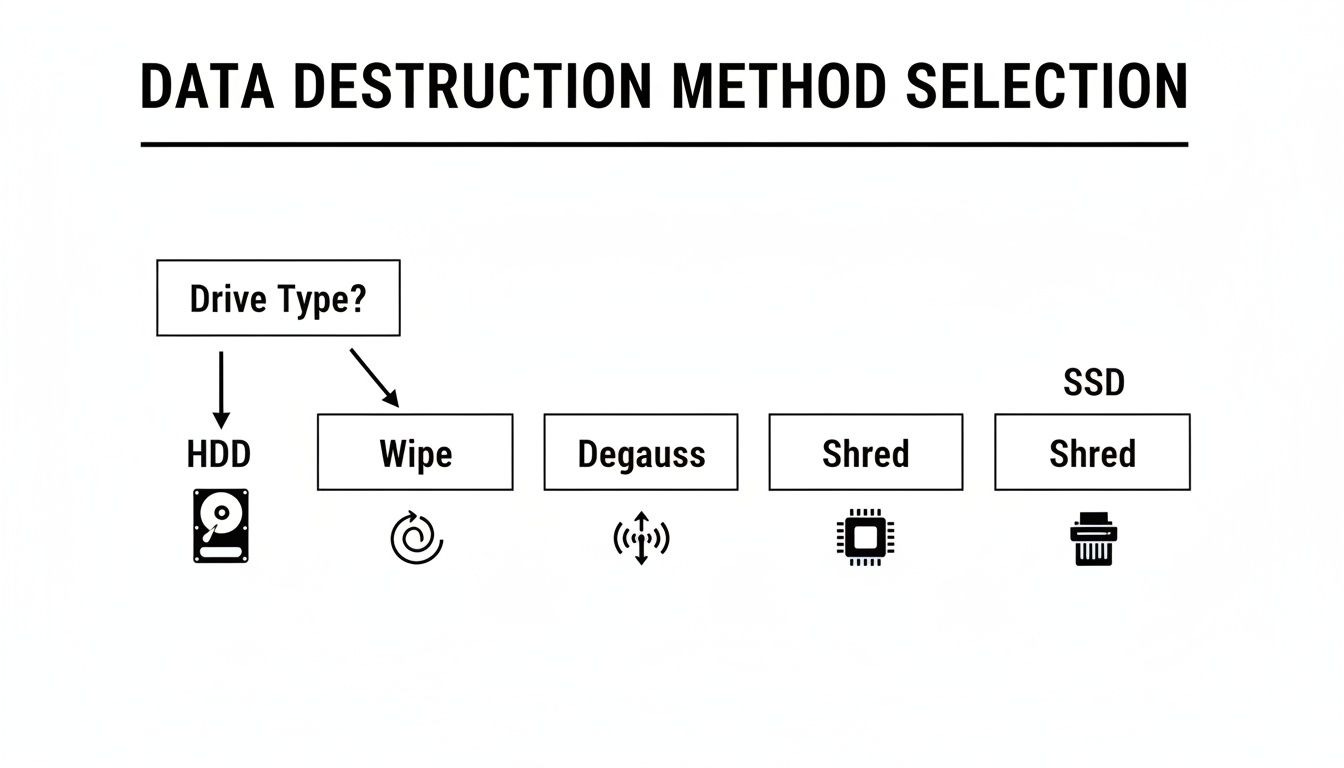
Not all data destruction techniques are created equal. The optimal choice for your business depends on the drive type, data sensitivity, and your specific compliance framework, such as HIPAA or GDPR. Making the wrong decision can leave your organization as exposed as doing nothing at all.
There are three primary methods for data destruction, each with distinct advantages and limitations. Let's analyze them to help you align the right strategy with your business needs.
Software Wiping for Data Sanitization
Software wiping, or data sanitization, uses specialized programs to overwrite every sector of a hard drive with random characters. This process effectively buries the original data under layers of digital noise, making it irrecoverable with standard tools. For years, it was the standard method for traditional hard disk drives (HDDs).
- For HDDs: Standards like DoD 5220.22-M were designed for magnetic platters, running multiple "passes" to ensure complete data erasure. This is an effective method if the drive is intended for reuse or resale.
- For SSDs: Software wiping is fundamentally unreliable on modern solid-state drives. SSDs use wear-leveling technology to distribute data writes, which prolongs the drive's life but can prevent wiping software from accessing every block where data fragments may reside.
Degaussing for Magnetic Media
Degaussing employs a powerful machine that generates an intense magnetic field to instantly scramble the data on an HDD's magnetic platters or on backup tapes. It is an extremely fast and effective method for rendering data unreadable.
Degaussing is a highly effective but specialized tool. It permanently renders the hard drive inoperable, eliminating any possibility of reuse.
Crucially, degaussing is completely ineffective on SSDs. Since solid-state drives store data on non-magnetic flash memory chips, the degausser's magnetic field has no effect on the stored data. Relying on this method for SSDs creates a false and dangerous sense of security.
Physical Destruction for Absolute Certainty
When data must be verifiably and permanently eliminated, physical destruction is the only guaranteed solution. This process uses an industrial-grade shredder to obliterate the drive, reducing it to small, unrecognizable fragments of metal and plastic.
This is the ultimate guarantee against data recovery.
- Universal Effectiveness: Shredding works on all media types, including HDDs, SSDs, flash drives, and backup tapes.
- Compliance Assurance: For organizations governed by HIPAA, SOX, or GDPR, physical destruction provides a clear, auditable, and definitive end to the data lifecycle.
- Zero Recovery Possibility: Once a drive is shredded into confetti-sized fragments, there is a zero percent chance of data reconstruction.
The market is increasingly standardizing on this method for high-security applications. The hard drive destruction service market is projected to grow from $1.65 billion to $5.05 billion over the next decade. Within this market, hard drive shredding is the dominant service line because it offers the highest level of security assurance. You can explore the growth of the hard drive destruction market to understand these trends.
So, how do you choose the right method for your business? This comparison clarifies the decision.
Data Destruction Method Comparison
| Method | Effective On HDD | Effective On SSD | Best For | Allows Reuse | Compliance Level |
|---|---|---|---|---|---|
| Software Wipe | Yes | No (unreliable) | Reusing or reselling non-sensitive HDDs | Yes | Low to Medium |
| Degaussing | Yes | No (useless) | Rapidly destroying bulk magnetic media like HDDs and tapes | No | Medium |
| Shredding | Yes | Yes | High-security needs, regulated data (HIPAA, GDPR), SSDs | No | High |
Ultimately, your chosen method must align with your organization's risk tolerance and compliance obligations. While software wiping may be suitable for low-risk scenarios, the guaranteed and universally effective nature of shredding has made it the gold standard for businesses that prioritize data security. For any business requiring certified data destruction, a professional service is the only way to ensure complete peace of mind and the critical documentation that no DIY approach can provide.
Handling Data Wiping In-House: The Risks and Realities
For a business retiring only a handful of computers, managing data destruction in-house might seem like a cost-effective strategy. However, this approach often conceals significant technical challenges, hidden costs, and severe compliance risks.
A proper in-house data destruction program requires dedicated staff hours, deep technical expertise across different drive technologies, and a tolerance for errors that can lead to catastrophic data breaches. Before tasking your IT team with this responsibility, it is essential to weigh the true costs against the perceived savings.
The Old-School Approach for HDDs
For years, the standard tool for in-house wiping of traditional hard disk drives (HDDs) has been DBAN (Darik's Boot and Nuke). The process involves creating a bootable USB drive, booting the target computer from it, and allowing the software to overwrite every sector.
While this method is effective for HDDs, it is extremely time-consuming.
A single, thorough wipe on a large drive can take hours—often a full day. For a business processing five, ten, or fifty machines, this "free" solution quickly translates into a significant payroll expense as IT staff monitor progress bars instead of focusing on mission-critical projects.
The biggest hidden cost of in-house wiping is the opportunity cost. Every hour an IT professional spends supervising a wipe is an hour not spent improving your network, securing your systems, or supporting your employees.
Why That Logic Fails with Modern SSDs
The DIY strategy completely breaks down with Solid-State Drives (SSDs). Using a tool like DBAN on an SSD is not only ineffective but can also cause unnecessary wear on the drive. As previously discussed, SSDs use wear-leveling algorithms that can deceive overwriting software, leaving fragments of sensitive data behind even after a "successful" wipe.
To correctly wipe an SSD, one must trigger the Secure Erase command built into the drive's firmware. This requires sourcing manufacturer-specific utilities, which vary widely in quality and ease of use.
- One brand’s tool might be a simple Windows application, while another requires a command-line interface.
- Documentation is often sparse and written for engineers.
- There is no universal standard, forcing your team to learn a different, error-prone process for each brand of SSD in your fleet.
This inconsistent patchwork of methods is a recipe for human error, creating unacceptable business risk.
The Dealbreaker: A Total Lack of Certification
The single greatest failure of any in-house data destruction program is the lack of auditable proof. When the process is complete, what do you have to show for it? A screenshot? A text log? An employee's assurance? None of these will withstand scrutiny during a compliance audit.
For any organization subject to HIPAA, SOX, GDPR, or other data privacy regulations, this is an absolute non-starter.
Auditors do not accept internal checklists as proof of compliance. They require a formal Certificate of Destruction that provides an ironclad, legally defensible record of sanitization. This document must include:
- Unique Serial Numbers of every processed drive.
- The Date and Method of destruction (e.g., DoD 5220.22-M wipe, physical shred).
- A verifiable Chain of Custody log.
- The signature of a trusted, third-party vendor who guarantees the work meets industry standards.
Without this certified documentation, your business assumes all liability. A data breach traced to an improperly retired asset could trigger fines and reputational damage that dwarf the cost of professional services. In-house data destruction trades a small, short-term saving for a massive, long-term risk.
Why a Certificate of Destruction Is Your Best Defense
Wiping a drive is only the first step. For any business accountable to compliance regulations, the primary challenge—and your best defense—is the ability to prove you did it correctly. This is where a Certificate of Destruction (CoD) becomes an invaluable corporate asset.
A CoD is a formal, legally defensible document issued by a professional ITAD partner. It serves as the official record confirming that your devices were securely sanitized or destroyed according to specific industry standards. It transforms the act of wiping a hard drive from a simple IT task into a fully documented, auditable event that stands up to scrutiny from regulators, auditors, and legal teams.
What a Legitimate Certificate Must Contain
A simple invoice or an internal software log is insufficient for a formal audit. A true, compliance-grade Certificate of Destruction must provide a detailed, verifiable account of the entire disposition process. Without these key elements, the document is worthless.
Every legitimate CoD should meticulously document the following:
- Unique Serial Numbers: A complete inventory of every hard drive, server, or device processed.
- The Date of Destruction: The exact date the data sanitization or physical destruction was completed.
- The Method Used: A clear statement specifying whether drives were wiped (e.g., DoD 5220.22-M), degaussed, or physically shredded.
- A Documented Chain of Custody: A paper trail tracking the assets from your facility to their final disposition.
- Third-Party Attestation: The signature and credentials of the certified vendor who performed and guarantees the work.
For any organization managing data under frameworks like HIPAA, SOX, or GDPR, this level of detail is non-negotiable.
The Unmistakable Value of Third-Party Validation
The critical difference between a DIY log and a professional CoD is third-party validation. When you manage data destruction in-house, you are effectively grading your own work. You retain all liability, and in the event of a breach, the burden of proof rests entirely on your shoulders.
Partnering with a professional ITAD firm transfers that burden. By issuing a CoD, the vendor puts their own reputation and legal standing on the line, attesting that the work was performed to industry standards. This external validation provides a powerful layer of defense that internal processes can never replicate.
A Certificate of Destruction is more than paperwork; it’s your evidence. It is the proof that you have fulfilled your due diligence and taken every necessary step to protect sensitive information, turning a potential liability into a verified compliance asset.
The growing demand for this verifiable proof is driving market expansion. The data destruction market is projected to skyrocket from $10.17 billion to $26.08 billion over the next eight years. This rapid growth is fueled by cybersecurity, environmental, and regulatory pressures that make certified documentation a business necessity. You can review the full data destruction market analysis for more details.
For businesses that require absolute certainty, understanding the role of a Certificate of Destruction for hard drives is the foundation of a secure IT asset retirement strategy. It's the final, crucial step in ensuring your organization has wiped its hard drives correctly.
When to Call a Professional ITAD Partner

Knowing how to wipe a computer hard drive is useful. Knowing when to engage a professional partner is critical, especially when the scale, risk, or complexity of the task exceeds your in-house capabilities.
A DIY approach may suffice for a single, non-critical device, but this logic quickly fails in a corporate environment. This is where a professional IT Asset Disposition (ITAD) partner becomes a strategic necessity. An ITAD expert transforms data destruction from an internal burden into a secure, fully documented, and managed service, handling everything from logistics and pickup to final certification and recycling.
Triggers That Demand Professional Expertise
Certain business events can easily overwhelm an internal IT team, creating logistical challenges and significant compliance risks. Attempting to manage these scenarios in-house exposes the organization to data breaches, regulatory fines, and operational disruption. The presence of any of the following triggers is a clear indicator that it's time to engage a professional ITAD service.
Call a professional for these key business events:
- Large-Scale Technology Refreshes: When replacing dozens or hundreds of employee workstations, the volume of drives makes manual, in-house wiping impractical and inefficient. A professional partner can process all assets in bulk, ensuring consistent and certified sanitization.
- Data Center Decommissioning: This is a highly complex project involving the teardown of servers, storage arrays, and networking equipment. It requires specialized logistics and the secure destruction of thousands of drives containing highly sensitive data, a task far beyond the scope of an internal team.
- Office Moves or Consolidations: Relocations invariably surface large quantities of obsolete technology. An ITAD partner can securely manage the entire removal and disposal process, preventing sensitive hardware from being lost or stolen during the transition.
- Handling Regulated Data: If your hardware contains Personally Identifiable Information (PII), Protected Health Information (PHI), or financial records, the stakes are too high for a DIY approach. A professional ensures compliance with standards like HIPAA and GDPR, backed by a certified audit trail.
The core value of an ITAD partner is their ability to absorb complexity and risk. They convert a high-stakes, resource-intensive challenge into a predictable, secure, and compliant process, delivering a level of assurance unattainable through internal efforts.
The Business Case for Outsourcing Data Destruction
A thorough cost-benefit analysis makes the business case for outsourcing data destruction clear. The "free" DIY approach carries significant hidden costs, including wasted IT staff hours, the persistent risk of a data breach from human error, and the complete absence of legally defensible certification.
A dedicated ITAD partner delivers a comprehensive, end-to-end solution that protects your business from all angles.
Key benefits include:
- Secure Logistics and Chain of Custody: Professionals provide on-site packing, serialized asset tracking, and secure, GPS-tracked transport, guaranteeing no device is lost between your facility and the destruction site.
- Guaranteed Compliance: A reputable partner is an expert in regulatory compliance. They use certified methods and provide the necessary documentation to satisfy auditors for HIPAA, SOX, and other mandates.
- Certified Destruction for All Media: Whether it's an HDD, an SSD, or backup tapes, they have the right tools—from multi-pass wiping software to industrial shredders—to guarantee permanent data elimination.
- A Complete and Defensible Audit Trail: The process concludes with a Certificate of Destruction, a legal document that proves due diligence and shields your organization from future liability.
Using IT Asset Management (ITAM) software to track hardware from deployment to disposal is an excellent preparatory step. This detailed inventory aligns perfectly with the documentation requirements of a certified ITAD process. For businesses in the Atlanta area, working with an experienced electronic waste recycling company provides a local, secure, and responsible solution for retiring old IT assets, ensuring data is destroyed and hardware is recycled sustainably.
Frequently Asked Questions About Wiping Hard Drives
Even with a well-defined strategy, key questions often arise during implementation. Here are answers to common concerns from IT managers and business leaders.
Is the Windows "Reset This PC" Feature Secure Enough for Business Use?
For a personal home computer, it is a reasonable first step. For a business asset containing sensitive data, it is completely inadequate.
The "Reset This PC" function in Windows, even with the "Remove everything" option, is not designed for enterprise-grade security. Its most significant flaw is the lack of an audit trail. It does not produce a Certificate of Destruction, which is a mandatory requirement for any business needing to demonstrate compliance with regulations like HIPAA, SOX, or GDPR. Without legally defensible proof, your organization remains exposed to risk.
How Long Does It Take to Professionally Wipe a Hard Drive?
The time required depends entirely on the method chosen.
- Software Wiping: A thorough, multi-pass software wipe on a large-capacity hard drive can take several hours, sometimes extending to a full day for multi-terabyte drives.
- Physical Shredding: This method is nearly instantaneous. A professional service can shred hundreds of drives in the time it would take an internal team to software-wipe just a few, delivering massive gains in efficiency.
For any business retiring more than a small number of computers, physical destruction is the superior choice for both efficiency and security.
IT managers who attempt to wipe a room full of PCs themselves often find that a project they estimated would take a day turns into weeks of lost productivity. Professional shredding converts that multi-week project into a certified, completed task in a single afternoon.
Can Data Be Recovered After a Professional Wipe?
No. When a certified professional performs data destruction correctly, the data is permanently unrecoverable. A proper DoD-standard software wipe overwrites every sector so completely that recovery is not feasible with current technology.
Physical shredding offers an absolute guarantee. It reduces the drive to small metal fragments, making data recovery physically impossible. This is why shredding remains the gold standard for high-security and compliance-driven industries.
What Should I Do with the Computer After the Drive Is Wiped?
Once the data has been securely destroyed, the physical hardware remains. It is critical that this e-waste is not sent to a landfill.
Many professional ITAD partners, including our firm, provide responsible recycling of the remaining computer components as part of their service. If you are managing this step yourself, our guide on what to do with old desktop computers offers practical advice for ethical disposal. Partnering with a certified e-waste recycler is the only way to ensure you meet both your data security and corporate environmental responsibility goals.
When your business requires ironclad data destruction and responsible electronics recycling, Atlanta Computer Recycling delivers a secure, certified, and seamless solution. We manage everything from on-site pickup to certified destruction, giving you total confidence that your sensitive data and old hardware are handled the right way. Contact us today to schedule your free pickup.