How to Clear a Computer’s Hard Drive: A Guide for Businesses

Securely clearing a computer's hard drive is about much more than just deleting files or hitting "reset." For a business, it’s a deliberate process of either overwriting the data with specialized software or physically obliterating the drive itself. A simple format just doesn't cut it—it leaves sensitive information easily recoverable, creating a massive security hole for any organization.
Simply put, true data destruction is a non-negotiable final step in the IT asset lifecycle.
The Hidden Dangers of Improperly Cleared Hard Drives
That stack of old employee laptops and retired servers in your storage closet isn't just taking up space. It’s a ticking time bomb of corporate liability. Far too many businesses operate under the dangerous assumption that a factory reset or a quick format is enough protection. This is precisely where catastrophic data breaches begin.
When you fail to properly sanitize a hard drive, you're essentially handing over a digital filing cabinet filled with your company's crown jewels. We're talking about everything from financial records and strategic plans to customer lists and employee PII (Personally Identifiable Information).
The Real-World Consequences of a Single Oversight
This isn't some hypothetical risk; it's a tangible threat with staggering financial fallout. The average cost of a data breach has now climbed to USD 4.88 million globally, and that number jumps to an eye-watering USD 6.08 million for financial companies. The security gap is real—studies have shown that standard formatting can leave up to 75% of data recoverable with off-the-shelf forensic tools.
Beyond the immediate hit to your bottom line, the consequences of a breach cascade quickly:
- Crippling Regulatory Fines: Laws like HIPAA, GDPR, and CCPA don't mess around. They impose massive penalties on companies that fail to protect data, including information left on retired assets.
- Irreversible Reputational Damage: A public data breach can shatter customer trust that took years to build, leading to client churn and a permanently tarnished brand.
- Legal Action: Businesses must be ready for the severe legal implications of data breaches that often follow an incident caused by improperly handled equipment.
- Loss of Competitive Advantage: If your intellectual property or trade secrets land in a competitor's hands, the damage to your market position can be devastating.
A retired hard drive is never truly "gone" until its data is verifiably and permanently destroyed. Treating it as anything less is a direct invitation for a security incident.
From IT Task to Crucial Risk Management
It’s time to stop thinking about hard drive wiping as a simple IT checklist item. It needs to be a core component of your company's risk management strategy. This process isn't just about cleaning up old equipment; it's about closing a major security loophole that cybercriminals are all too eager to exploit.
Imagine a healthcare provider upgrading its systems. If those old hard drives are simply formatted and sent to a recycler without certified data destruction, they become a potential source for a HIPAA violation—carrying fines that can spiral into the millions. A single mishandled device can completely negate millions of dollars invested in cybersecurity. Taking the time to understand the nuances of old hard drive disposal is essential for any organization that takes compliance seriously.
At the end of the day, the true cost of one oversight far outweighs the investment in professional, certified data destruction. For any business serious about protecting its data, its customers, and its future, ensuring every last retired hard drive is properly sanitized isn't just a best practice—it's a fundamental requirement for survival.
Choosing the Right Data Destruction Method for Your Business
Figuring out the best way to clear a computer's hard drive isn't a one-size-fits-all decision for a business. The method you land on has a direct impact on your data security, your compliance standing, and even your bottom line. It’s a choice between systematically overwriting data, scrambling it with encryption, magnetically wiping it clean, or just physically turning it into a pile of metal fragments.
Each approach has its time and place, but picking the wrong one can be just as risky as doing nothing. This is especially true when you're dealing with different types of storage drives. A method that works perfectly on an old spinning hard drive might fail completely on a modern solid-state drive (SSD), leaving your most sensitive information dangerously exposed.
This simple decision tree gets right to the point: ignoring proper data destruction protocols puts your business on a direct path to high risk.
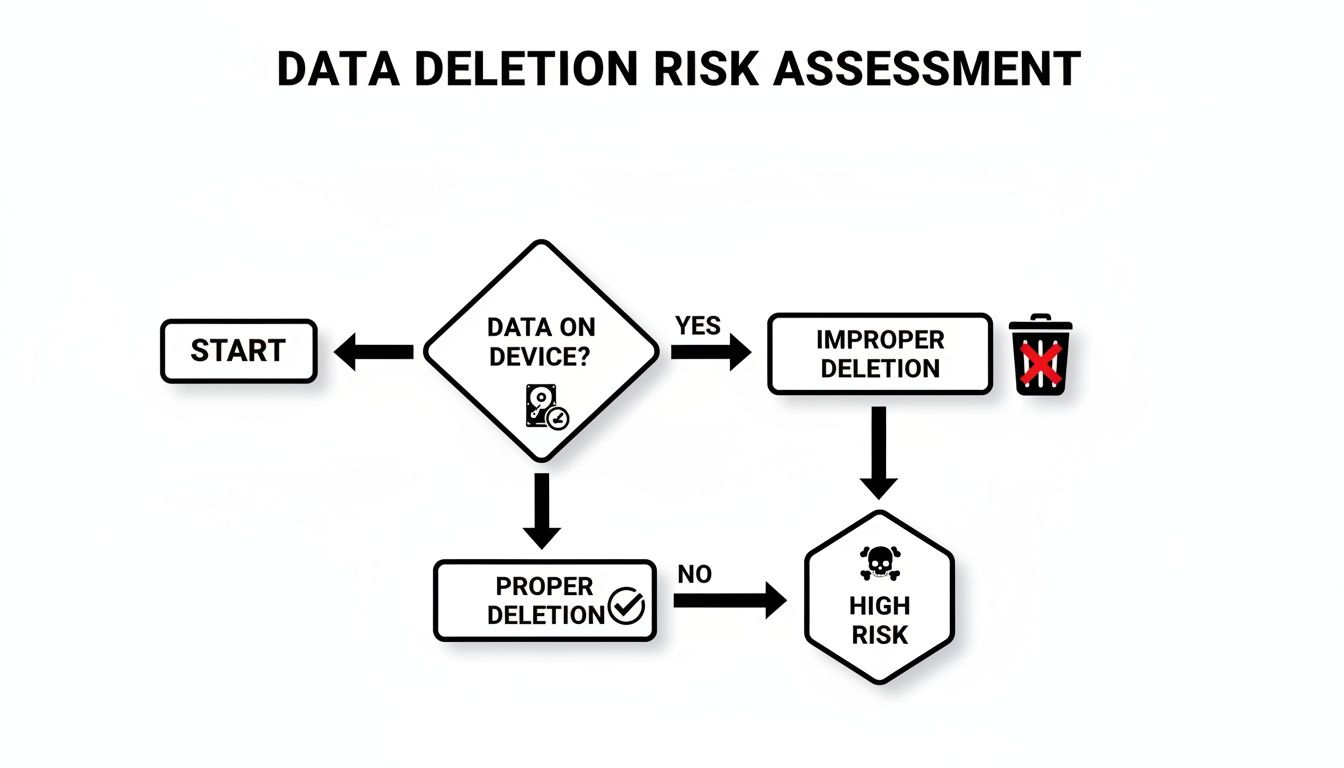
As you can see, once data exists, the only safe route forward is through a deliberate, secure erasure process. Any other path, like simply hitting "delete," ends in a vulnerability you can't afford.
Deciding which path to take depends entirely on the drive type, the sensitivity of the data, and what you plan to do with the asset next. To make it clearer, here's a breakdown of the primary methods.
Comparing Hard Drive Clearing Methods for Business Assets
This table offers a quick comparison of the most common data destruction methods, helping you match the right technique to your specific needs—whether that's for HDDs, SSDs, or a mix of both.
| Method | How It Works | Best For | HDD vs SSD Suitability | Allows Reuse? | Compliance Level (HIPAA, GDPR) |
|---|---|---|---|---|---|
| Software Wiping | Overwrites the entire drive with patterns of 1s and 0s, making original data unrecoverable. | Redeploying, reselling, or donating assets where the drive needs to remain functional. | Excellent for HDDs. Effective for SSDs but can reduce lifespan. | Yes | High, when using certified software and verification. |
| Crypto-Erase | Instantly destroys the onboard encryption key, rendering all data on the drive unreadable. | Rapidly sanitizing self-encrypting drives (SEDs), especially SSDs in data centers. | Ideal for SSDs that are self-encrypting. Not applicable to non-encrypting HDDs. | Yes | High, but only if encryption was properly managed from the start. |
| Degaussing | Uses a powerful magnetic field to permanently erase all data from magnetic media. | Disposing of old HDDs and magnetic tapes quickly and securely. | Effective only for HDDs and magnetic tapes. Completely useless for SSDs. | No | High for magnetic media, but doesn't address SSDs. |
| Physical Shredding | An industrial shredder grinds the drive into small, irrecoverable metal fragments. | End-of-life drives, damaged media, or assets containing highly sensitive data. | The ultimate failsafe for both HDDs and SSDs. | No | Highest level. The gold standard for HIPAA, GDPR, and government standards. |
As you can tell, there's no single "best" method—the right choice is all about context.
Software Wiping: Overwriting the Old Data
One of the most common techniques is data wiping, often called data erasure. This approach uses specialized software to write patterns of ones and zeros over every single sector of the drive, sometimes multiple times. Think of it like painting over a canvas so thoroughly that the original image is gone forever.
The biggest plus here is that the drive itself remains perfectly usable. This makes wiping the go-to choice for assets you plan to redeploy to another employee, resell on the secondary market, or donate.
Cryptographic Erasure: Locking the Data and Throwing Away the Key
Many modern drives, especially SSDs, come with a built-in feature called cryptographic erasure (or crypto-erase). Instead of wiping the data, this method instantly destroys the unique encryption key the drive uses to scramble and unscramble information.
Without that key, the data on the drive becomes a meaningless jumble of digital noise—completely inaccessible. It's an incredibly fast process, often taking just a few seconds. The catch? Its effectiveness hinges on the drive's encryption being enabled and correctly managed throughout its entire life.
If you can't be 100% certain that a drive's encryption was properly implemented and always active, you cannot rely on cryptographic erasure alone. When in doubt, you have to choose a more definitive destruction method.
Degaussing: The Magnetic Approach
Degaussing is a powerful method that works only on traditional magnetic media, like Hard Disk Drives (HDDs) and backup tapes. A degausser is a machine that unleashes an incredibly strong magnetic field, which instantly and permanently scrambles the magnetic coating on the drive's platters where your data lives.
While it’s fast and effective for HDDs, degaussing comes with two huge limitations:
- It renders the hard drive totally inoperable forever.
- It has zero effect on Solid-State Drives (SSDs), because they store data on flash memory chips, not magnetic platters.
Mistaking a degausser as a universal solution is a common and dangerous error. If you're retiring a mix of old servers with HDDs and newer laptops with SSDs, degaussing is only a partial fix.
Physical Shredding: The Ultimate Failsafe
When data is too sensitive to leave anything to chance, or when a drive has reached the absolute end of its life, physical destruction is the final word. Industrial shredders designed for electronics grind hard drives, SSDs, and other media into tiny, irregular pieces, making data recovery a physical impossibility.
This is the gold standard for meeting strict compliance rules like HIPAA, FACTA, and GDPR because it leaves no room for error. For a hospital retiring servers full of patient records, shredding is often the only acceptable path. You can learn more about how professional hard drive destruction services guarantee compliance and provide the certified proof you need for your audit trail.
Building a Defensible Data Destruction Process
Securely wiping a drive is only half the battle. In the business world, proving you did it correctly is what stands up during an audit and protects you from liability. This means you need to shift from simply wiping drives to building a formal, documented process that creates an unshakable audit trail for every single asset your company retires.
Think of it this way: if a data breach is ever traced back to one of your old devices, an auditor won't just ask if you wiped it. They'll demand to see the policy you followed, the records you kept, and the proof that the data is gone forever. A defensible process is your answer to those questions before they're even asked.
A great place to start is with a comprehensive cybersecurity risk assessment. It's the best way to pinpoint your biggest vulnerabilities so you can build a policy that directly addresses them.
Establishing a Rock-Solid Chain of Custody
The moment a device is designated for retirement, your process begins. Chain of custody is the documented, chronological paper trail that details the handling of an asset from collection all the way to its final destruction. Frankly, it's the backbone of any compliant program.
This process eliminates dangerous blind spots. Without it, a laptop could sit unsecured in a storage closet for months, or a box of hard drives could go missing in transit to a recycling facility. Each gap in that chain is a potential security incident just waiting to happen.
Your chain of custody documentation should meticulously track:
- Asset Identification: Serial number, asset tag, and device type.
- Custodial Transfer: Who had the asset, where it was stored, and when it was moved.
- Final Disposition: The date, method, and outcome of the data destruction.
Scenario: A Company-Wide Laptop Refresh
Let’s walk through a real-world example. Your company is replacing 200 employee laptops. A defensible process doesn't start when the new laptops arrive; it starts with a plan for the old ones.
First, you collect all 200 laptops, logging each one by serial number into a master asset list. They are then moved to a secure, access-controlled room—not just an empty office. This first step is logged: date, time, location, and the person responsible.
Next, you decide on the destruction method. Since these laptops might be resold, you opt for software wiping that meets NIST 800-88 standards. Each drive is wiped, and the software generates a verification report tied to that specific serial number. This report is your first piece of hard proof.
If a drive fails to wipe, it gets physically pulled, its serial number is recorded, and it's set aside for physical shredding. Nothing is left to chance. Every step, for every single asset, is documented in your log.
The goal is to create a story for each asset that has a clear beginning, middle, and end. If an auditor picks a random serial number from your list, you should be able to instantly produce its entire lifecycle report from retirement to destruction.
The Certificate of Destruction: Your Legal Shield
The final, and arguably most important, piece of your audit trail is the Certificate of Destruction (CoD). This is a formal document issued by you or your ITAD vendor that legally attests that the assets listed have been destroyed in compliance with all relevant data security laws.
A legitimate CoD is more than a simple receipt. It’s a legal document that should contain specific, non-negotiable details. You can explore more about what makes a Certificate of Destruction a crucial legal document in our detailed guide, but at a bare minimum, it must include a serialized list of the destroyed assets.
This intense focus on provable destruction is driven by tough regulations. North America, for instance, dominates the USD 1.65 billion global hard drive destruction market primarily due to laws like HIPAA and CCPA. With insider-related breaches costing an average of $4.99 million, U.S. organizations face immense pressure to adopt services that provide this level of certified proof. This is why a documented process isn't just good practice—it’s a critical business defense.
Knowing When to Call in a Certified ITAD Partner
Trying to handle data destruction in-house might feel like a cost-saving measure, but for most businesses, it introduces unacceptable risks and inefficiencies. Knowing when your internal capabilities are outmatched by the scale, complexity, or compliance requirements of the task is key to effective risk management.
That tipping point usually arrives when the sheer scale, complexity, or sensitivity of the job makes going it alone far too risky and inefficient.
For a handful of machines, an in-house approach might seem manageable. But when you’re executing a company-wide hardware refresh or decommissioning an entire data center, the operational and compliance risks change dramatically.

Key Scenarios That Demand a Professional Partner
Certain situations are inherently high-stakes, making a professional IT Asset Disposition (ITAD) vendor not just a good idea, but a business necessity. If your organization is facing any of these scenarios, it’s time to engage with certified experts.
- Large-Scale Hardware Refreshes: Decommissioning dozens, or even hundreds, of employee laptops and desktops all at once is a logistical beast. A certified partner can manage the entire flow, from secure pickup and serialized tracking to final destruction and reporting. Nothing gets missed.
- Data Center Decommissioning: This isn’t a weekend project. It’s a high-stakes operation involving servers, storage arrays, and networking gear packed with your most sensitive data. ITAD specialists have the right equipment and know-how to handle everything on-site without derailing your operations.
- Handling Regulated Data: If your business is governed by HIPAA, SOX, GLBA, or other strict regulations, the burden of proof for proper disposal is on you. Certified vendors provide the auditable paperwork you need—like Certificates of Destruction—to prove you did everything by the book.
- Geographically Dispersed Offices: Trying to standardize a disposal process across multiple office locations is a recipe for failure. A good ITAD partner with a wide service area ensures every site follows the exact same high-security protocols.
Bringing on an ITAD vendor isn't just about handing off a task. It's about transferring risk to a certified, insured, and audited specialist who understands the legal and financial weight of getting data destruction right.
The market backs this up. The global secure data destruction industry is projected to grow from USD 3.72 billion to USD 5.64 billion in just four years. Why? Because common DIY methods fall short. While 18% of businesses admit to simply drilling holes in drives, forensic labs can still recover up to 90% of the data from improperly wiped media.
Demystifying ITAD Certifications
Not all ITAD providers are created equal. The certifications they hold are your best guarantee that they meet strict security, environmental, and ethical standards. And when it comes to secure data destruction, one credential stands out as the gold standard.
NAID AAA Certification is the one you absolutely need to look for.
This certification from the National Association for Information Destruction (NAID) means a vendor's entire data destruction process—from hiring practices and facility security to their chain of custody protocol—is subject to rigorous, unannounced audits by a third party. Working with a NAID AAA certified partner gives you confidence that you're entrusting your data to a company that's been externally verified to meet the highest industry standards.
The Strategic Value of a Certified Partner
Bringing in a professional ITAD service is more than just an expense line. It's a strategic move that delivers real value far beyond just getting rid of old gear.
Asset Tracking and Reporting
Certified vendors provide meticulous, serialized reporting for every single asset they touch. This creates an unbreakable audit trail, which is absolutely essential for compliance and internal governance.
Asset Value Recovery
Not every piece of retired IT equipment is junk. A seasoned ITAD partner has established channels to test, refurbish, and resell viable assets, often sharing a portion of the revenue back with you. This can seriously offset the cost of the entire disposal program.
Environmentally Sound Recycling
ITAD vendors are also experts in responsible e-waste recycling. They make sure non-reusable assets are broken down in an environmentally compliant way, keeping hazardous materials out of landfills. A certified partner can connect you with a qualified electronic waste recycling company to handle end-of-life assets the right way.
Ultimately, a certified ITAD partner transforms the complex and risky job of clearing hard drives into a secure, compliant, and streamlined business process.
Common Misconceptions That Lead to Data Breaches
In the world of data security, what you don't know can absolutely come back to haunt you. When it comes to clearing a hard drive, too many well-meaning teams fall back on old advice or flawed assumptions. These shortcuts are the very security gaps that cybercriminals love to exploit, turning your retired assets into active liabilities.
Let's pull back the curtain on some of the most dangerous myths that still persist in far too many organizations. Understanding why these common practices are a recipe for disaster is the first step toward building a truly secure disposal process.
Myth 1: The Factory Reset Is Good Enough
This is easily one of the most pervasive and dangerous beliefs out there. Hitting "factory reset" on a computer, server, or mobile device feels like you're wiping the slate clean, but it's designed for usability, not security. It typically just removes user accounts and settings to create the appearance of a fresh start.
In reality, a factory reset almost never overwrites the actual data on the storage drive. With freely available forensic tools, a motivated individual can often recover huge amounts of sensitive information from a "reset" device. For any business, that's an unacceptable risk.
Myth 2: Drilling a Hole Through the Drive Secures It
It sounds final, doesn't it? Taking a drill to a hard drive seems like a surefire way to destroy the data. But it's a surprisingly unreliable method that gives a false sense of security. While you’ll certainly damage sections of the drive, you often leave large areas of the magnetic platters completely untouched.
A single hard drive stores billions of bits of data in a microscopic space.
A determined adversary with forensic lab capabilities can potentially recover significant amounts of data from the undamaged portions of a drive's platters. It's a gamble, not a guarantee.
This method is even less effective on modern SSDs, which use multiple flash memory chips scattered across a circuit board. A drill bit might miss several of the chips entirely, leaving entire chunks of sensitive data perfectly intact and readable.
Myth 3: Our Old Equipment Has No Value
This is a critical blind spot for many businesses. You might look at a five-year-old server and see a worthless piece of depreciated hardware, but a data thief sees something entirely different. They couldn't care less about the hardware's resale price; they care about the value of the data stored inside it.
That old server could hold years of financial records, confidential client lists, or employee PII. The hardware might be worth a few dollars in scrap metal, but the data could be worth millions on the dark web or to a competitor. A truly thorough approach to what is IT asset disposition means evaluating assets not just for their physical worth, but for the immense risk associated with the data they hold.
Myth 4: Deleting Files and Formatting the Drive Is Secure
This is the digital equivalent of tossing sensitive documents into the office trash can without shredding them first. When you delete a file or perform a "quick format," the operating system simply removes the pointers that tell it where to find the data. It then marks that space as "available" for new information.
The actual ones and zeros that make up your files are still sitting there, just waiting to be overwritten. Until new data is written to that exact spot—which may not happen for a long time—the old information is easily recoverable. For any business governed by compliance standards like HIPAA or SOX, this method offers zero defensible proof of data destruction and is considered completely inadequate.
Common Questions We Get About Hard Drive Disposal
Even with a solid plan, a few key questions always pop up when it's time to retire old hardware. Getting the right answers is the difference between being compliant and being at risk. Here are some of the most common things we're asked about clearing hard drives the right way.
Wiping, Degaussing, and Shredding: What’s the Real Difference?
These three terms get thrown around a lot, but they aren’t interchangeable. Each one serves a very different purpose.
Data wiping is a software-driven process that overwrites your drive's data with random characters, making the original files unrecoverable. This is your go-to method if you plan to reuse, resell, or donate the drive, because the hardware is left perfectly functional.
Degaussing, on the other hand, uses a monster of a magnet to completely scramble the data on traditional spinning hard drives (HDDs) and magnetic tapes. It's fast and effective, but it also renders the drive useless. It's also completely ineffective on Solid-State Drives (SSDs), a critical detail many people miss.
Physical shredding is exactly what it sounds like—the ultimate end-of-the-line. The drive is fed into an industrial shredder and ground into tiny metal fragments. There is zero chance of data recovery. This is the gold standard for any drive containing highly sensitive data or for hardware that's reached the end of its life.
Is a Certificate of Destruction Actually Necessary?
Absolutely. If your business operates under any compliance framework—think HIPAA, SOX, or GDPR—a Certificate of Destruction (CoD) isn't just a nice-to-have, it's your legal proof of due diligence. This document is a cornerstone of your audit trail.
Think of a Certificate of Destruction as your legal shield. If an auditor ever comes knocking, or in the worst-case scenario of a data breach investigation, that certificate is the first thing you'll show to prove you followed secure, compliant procedures. Without it, you're left with no defense.
A legitimate CoD isn't just a generic receipt. It must include a serialized list of the destroyed assets, the date it happened, the specific method used, and the vendor's official information.
Can I Just Wipe an SSD Like an Old Hard Drive?
No, and this is a mistake we see all too often. SSDs are built completely differently than HDDs. They use a technology called "wear-leveling" to spread data across memory chips, and standard wiping software often misses hidden pockets of data. It’s a huge security gap.
For SSDs, you really only have two reliable options:
- Cryptographic Erasure: This method instantly destroys the drive's internal encryption key, which immediately makes all the data on it unreadable. It's incredibly fast, but it only works if the SSD is a self-encrypting drive.
- Physical Shredding: This is the only 100% guaranteed way to destroy data on any SSD, period. It doesn't matter what features the drive has; shredding ensures nothing is left.
On-Site vs. Off-Site Destruction: Which is Better?
Bringing a mobile shredding truck to your facility for on-site destruction offers the highest level of security. You eliminate all chain-of-custody risks because you can physically witness the drives being destroyed before they ever leave your property. This is why it's the preferred method for highly regulated industries like healthcare and finance.
Off-site destruction can be a more practical and cost-effective option, especially for large-scale projects. However, it's critical that you partner with a NAID AAA certified vendor. This certification ensures they maintain a strict, documented, and auditable chain of custody from the second the assets leave your control until they are confirmed destroyed.
Navigating the complexities of IT asset disposition requires a partner you can trust. Atlanta Computer Recycling offers certified, compliant, and secure data destruction services tailored for Atlanta businesses, ensuring your sensitive data is handled correctly every time. Learn how we can protect your business.