Fulton County Schools: Secure ITAD & E-Waste Disposal

A district technology team usually notices the same pattern before anyone says it out loud. Storage rooms start filling with retired laptops. A media center has old carts no one wants to touch because the devices still hold student data. A central office closet has dead switches, failed drives, and a few servers waiting for a migration project to fully close. Then someone asks for a pickup, but there is no district-wide process, no clear chain of custody, and no agreement on whether the devices should be wiped, shredded, redeployed, or recycled.
That problem gets harder at fulton county schools because scale changes everything. A one-building disposal process does not hold up across a large district with mixed device conditions, multiple stakeholders, and uneven site-level capacity. What works is not generic e-waste advice. What works is a disciplined IT asset disposition program tied to compliance, logistics, and budget control.
The Scale of IT Asset Disposition at Fulton County Schools
Fulton County Schools is the fourth-largest school system in Georgia, serving a projected enrollment of 86,031 students during the 2025-26 school year across 102 schools and administrative buildings according to the district’s Our District page. That footprint changes the nature of ITAD. Device retirement is not an occasional cleanup project. It is an operating function.
A district that large does not retire equipment in one neat batch. It retires assets in waves. Some devices age out on schedule. Some fail unexpectedly. Some are displaced by infrastructure upgrades. Others sit in limbo because a school does not have time to package them, inventory them, and coordinate removal.
Why scale creates hidden risk
The obvious issue is volume. The less obvious issue is dispersion.
When assets are spread across so many campuses and support buildings, inconsistency becomes the primary threat. One school labels retired devices carefully. Another stacks them in a bookroom. One site removes drives before transfer. Another sends complete units without records. The district still owns the risk in every one of those scenarios.
For a school system of this size, the weak points usually show up in five places:
- Inventory gaps that leave serial numbers unmatched to physical devices
- Delayed pickups that turn secure retirement into long-term storage
- Mixed handling methods where one department wipes and another shelves equipment
- Confusion over ownership between school staff, instructional technology, infrastructure teams, and procurement
- Last-mile logistics failures when equipment moves without proper documentation
A large district should treat retired equipment the same way it treats active equipment. It needs accountability, process, and documentation from site to final disposition.
The operational opportunity
There is another side to this. A disciplined ITAD program gives the district more than compliance protection.
It creates a repeatable way to move equipment out of schools quickly, preserve recoverable asset value where appropriate, and keep nonworking electronics out of the waste stream. It also reduces the friction that teachers and media specialists feel when obsolete equipment lingers in learning spaces.
That is why district leaders should stop thinking in terms of disposal requests and start thinking in terms of lifecycle governance. Retirement should begin before the pickup request, not after it.
A practical district model usually includes:
- Scheduled retirement windows by cluster, feeder pattern, or asset category
- Standard site prep rules so every school handles retired equipment the same way
- Predefined destruction pathways for drives, servers, and nonfunctional media
- Central documentation controls so records do not live in email threads
- A single disposition partner process instead of ad hoc site-by-site arrangements
District teams looking at local process design can review operational considerations around Fulton County electronics recycling. The important point is not the pickup itself. The important point is building a district process that remains defensible when the assets come from many campuses, many budgets, and many hands.
Aligning Your ITAD Policy with District and Compliance Goals
A pickup request is not an ITAD policy. A warehouse cleanout is not an ITAD policy. A spreadsheet of old devices is not an ITAD policy.
A policy tells the district what happens to equipment from the moment it is declared end-of-life to the moment it is wiped, shredded, resold, recycled, or documented as destroyed. Without that written standard, every school improvises.
FCS’s Capital Plan 2027 technology investments include major upgrades to data centers, disaster recovery, and cloud platforms. A corresponding ITAD policy is essential for securely decommissioning the legacy hardware being replaced, ensuring a compliant transition on the district’s technology capital plan page.
Write the policy around district realities
A school district policy should match the actual environment, not a generic corporate template. K-12 has unique records, shared devices, campus-level storage issues, and constant movement of hardware between classrooms, labs, offices, and support functions.
The strongest policies define these items in plain language:
What counts as an IT asset
Include student devices, staff laptops, desktops, servers, network gear, drives, printers with storage, copiers with storage, AV systems with embedded media, and anything else that can retain data.What triggers retirement
End-of-support, repeated failure, replacement during refresh, security risk, cloud migration, closure of a lab, school move, and storm or incident damage all need clear treatment.Who approves disposition
Site staff should not make final destruction decisions on their own. Approval should sit with district IT leadership, information security, or another designated authority.Which standards apply
FERPA and HIPAA concerns should be mapped directly into the disposition process. If the district cannot prove what happened to the data-bearing device, it has a compliance problem.
Put governance before movement
A common mistake is letting logistics outrun governance. Devices leave a school before anyone finalizes the record set. That creates avoidable exposure.
The better sequence is simple:
- Identify the asset
- Confirm ownership and retirement status
- Classify the data risk
- Assign the destruction or reuse path
- Release the asset for pickup under documented controls
That sequence matters because not every retired asset should follow the same route. A teacher laptop that still functions is different from a failed server pulled from a data center room. The policy should force that distinction early.
Build your documentation package
Districts do not need more paperwork for its own sake. They need the right paperwork. Every ITAD policy should require a core documentation package that can survive an audit or internal review.
That package typically includes:
- Asset inventory records with serial numbers or district tags
- Disposition authorization signed by the proper role
- Transport records showing custody transfer
- Sanitization or destruction records
- Final certificate documentation
For teams tightening internal controls, a practical outside reference is this NIST compliance checklist. It is useful because it pushes staff to think in controls and evidence, not just intent.
A certificate matters only if the district can connect it back to the devices that left the school. That is why many teams standardize around a formal certificate of destruction form and tie it to inventory records before any load leaves the site.
If the district cannot match an asset record to a sanitization or destruction record, the process is incomplete, even if the equipment is physically gone.
Define what does not work
Several practices fail repeatedly in large school systems:
- School-by-school improvisation creates uneven compliance
- Bulk pickups without serial tracking make later verification difficult
- Assuming “powered off” means “safe” ignores residual data
- Holding retired devices indefinitely turns every closet into a compliance risk
- Treating all assets as recyclable scrap wastes recoverable value and blurs sanitization decisions
A district policy should remove discretion from the wrong places. Site staff should not decide whether a device with student data gets wiped or shredded based on convenience. The policy should already answer that question.
Choosing Your Data Destruction Method Wiping vs Shredding
Once a device is retired, the district has to answer one question fast. Can this media be sanitized and kept in a controlled reuse or resale stream, or does it need physical destruction?
That choice should not depend on habit. It should depend on asset condition, data sensitivity, and whether the district needs the strongest possible proof that data cannot be recovered.
As FCS upgraded its infrastructure, its data-driven decision-making methodology highlighted the need for DoD-compliant wiping for retired servers during cloud migrations to ensure data security and maintain operational benchmarks in Education Week’s coverage of the district’s data practices at this article.
Wiping makes sense when the media works
Software-based wiping is the right tool when a drive is functional and the district wants to preserve downstream value. In practical terms, that usually applies to working laptops, desktops, and some servers scheduled for resale, redeployment, or responsible refurbishment.
The advantage is straightforward. The district destroys the data while keeping the device or storage media intact for further disposition.
A sound wiping process should answer four questions:
- Is the drive readable and writable
- Was the wipe method appropriate for the media type
- Was the wipe logged
- Can the district match the record back to the asset
If the answer to any of those is no, move away from wiping and toward physical destruction.
Shredding is the safer choice for failed or sensitive media
Shredding removes the ambiguity that software methods cannot address on damaged or inaccessible media. If the drive will not spin up, cannot complete a wipe cycle, or came from a system with elevated sensitivity, physical destruction is usually the cleaner decision.
This comes up often in school districts with:
- Dead laptop drives
- Failed server drives
- Mixed media from old closets with unknown history
- Devices from special programs or health-related functions
- Storage pulled from incident response or emergency replacement projects
When teams ask which method is more compliant, the practical answer is this: compliance depends on choosing the correct method for the condition of the media and documenting it properly.
Data Sanitization Methods Comparison for School Districts
| Method | Best For | Compliance Level (FERPA/HIPAA) | Asset Value Recovery | ACR Service |
|---|---|---|---|---|
| Software wiping | Working laptops, desktops, servers, and other readable media intended for reuse or recovery | Strong when properly documented and matched to the asset record | Higher, because the media remains intact | DoD 5220.22-M 3-pass wiping |
| Physical shredding | Failed drives, inaccessible media, obsolete storage, and highly sensitive data-bearing components | Strongest practical option when media cannot be reliably wiped or must be destroyed outright | Low to none for the media itself | Hard drive shredding |
| Combined approach | Mixed district loads where some assets are reusable and others are not | Appropriate when policy routes each asset by condition and sensitivity | Balanced across the batch | Wiping for functional media, shredding for nonfunctional media |
A district should expect to use both methods. Large K-12 environments rarely fit a single-path model.
A simple decision rule for school environments
Use this field rule:
- Wipe when the media is functional, the chain of custody is intact, and the district wants to preserve value.
- Shred when the media is nonfunctional, the condition is uncertain, or the sensitivity warrants direct destruction.
- Escalate for review when the asset record is incomplete or the device has storage the site team did not identify clearly.
Many disposal mistakes occur at this stage. Staff see a stack of old laptops and assume the same answer applies to all of them. It usually does not.
A school lab refresh may contain:
- working student laptops,
- broken teacher devices,
- docking stations with no data,
- printers with internal storage,
- and loose drives removed from systems over time.
Those categories need different handling.
Security awareness matters outside the drive itself
The district also needs staff to understand that data risk is broader than a hard drive alone. Communication tools, cloud access, and user behavior all shape exposure before and after device retirement. For non-specialists who need a plain-language primer on that topic, this article on understanding digital security risks is a useful reminder that not every common technology interaction is secure by default.
That mindset helps on the ITAD side. Teams become less likely to assume a reset, unplug, or quick reimage equals destruction.
What works in practice
The most reliable district approach is not ideological. It is conditional.
Use wiping when the asset still has life left
If the device is modern enough, the storage is healthy, and the district can document the process, wiping is efficient and operationally sensible. It keeps more options open.
Use shredding when certainty matters more than recovery
If the storage media is dead, old, suspicious, or tied to a higher-risk environment, destroy it physically and close the loop.
Do not let school staff guess
Campus teams should not have to interpret sanitization standards on the fly. Give them a rule set, escalation path, and approved disposition partner. If they have to improvise, they will.
For district teams comparing methods in more detail, this guide on how to destroy old hard drives provides a useful operational reference.
The wrong method is not just ineffective. It creates a recordkeeping problem, because the district cannot later prove that the chosen method was suitable for the media involved.
Managing On-Site Logistics and Ensuring Chain of Custody
The hardest part of district ITAD is usually not policy. It is execution at the school level.
A principal wants the old devices gone. A media specialist needs the room back. A technician has a narrow pickup window. Some assets are in classrooms, others in a locked office, and a few are sitting in a server room where no one wants outside traffic during the school day. Good intentions often fall apart at this stage.
Persistent socioeconomic inequities across FCS schools mean that a standardized, district-wide ITAD process is vital to ensure all students’ data is protected equally, regardless of a school’s individual resources or PTA funding levels, as noted in this FCS inequities research paper. A district process cannot depend on which school happens to have stronger local capacity.
What a clean pickup day looks like
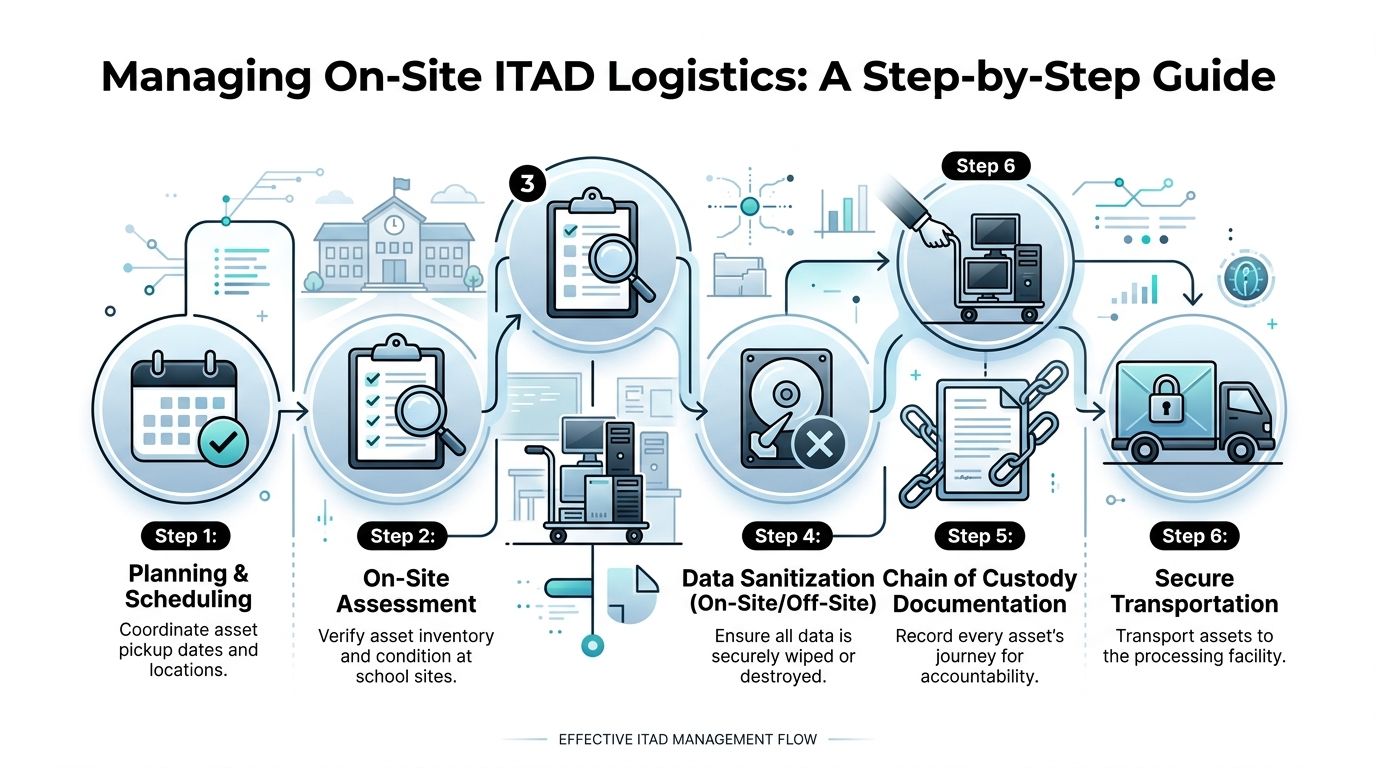
At a well-run site, the day starts before the truck arrives. The school already identified the assets, grouped them by type, and separated data-bearing devices from peripherals. The district or vendor already knows where the equipment is located and who has sign-off authority.
Then the work proceeds in order.
Inventory confirmation
The on-site team checks tags, serials, and counts against the pickup list.Condition review
Functional units are separated from physically damaged or incomplete units.Secure collection
Assets move from classrooms, closets, labs, and offices into a controlled transfer path.Sanitization routing
Wipe-eligible devices and shred-required media are designated before transport confusion starts.Custody transfer documentation
The district records who released the assets, when, and in what quantity.Secure transportation
Equipment leaves in a documented load, not an informal stack headed off campus.
That process sounds simple. It is simple. The challenge is doing it consistently in every building.
Chain of custody is the control that proves the process happened
Many districts talk about chain of custody as if it were just a transport issue. It is broader than that.
Chain of custody starts when a school or department marks an asset for retirement. It continues through handling, staging, removal, transport, sanitization, destruction, and final reporting. If there is a gap at any point, the district loses evidence.
Here is what strong custody documentation usually includes:
- Asset identifier such as serial number or district tag
- Origin site and room or department
- Custody handoff details including date, time, and responsible personnel
- Disposition path such as wipe, shred, recycle, or remarket
- Final processing confirmation
A school scenario that exposes weak process
A middle school clears out an old laptop cart. Staff pull devices from two classrooms, a testing room, and the media center. Some units still power on. Several do not. A few have district tags that no longer match the spreadsheet because they were swapped years ago.
If the team rushes the removal, three bad things happen fast:
- The district loses confidence in what left the site.
- No one can cleanly decide which devices should be wiped versus shredded.
- Final destruction records cannot be tied back to a trustworthy inventory.
That is how routine pickups become audit headaches.
Practical site rules that reduce failure
The best district teams use field rules that keep campuses from overcomplicating the process.
Keep peripherals separate
Monitors, cables, keyboards, and carts should not be mixed into the same serialized workflow as data-bearing devices. That wastes time and muddies records.
Stage in one controlled area
Do not collect half the load in the front office and the rest from three unlocked rooms. One staging point reduces loss, confusion, and missed items.
Designate one site contact
A school needs one responsible person for release, not a relay of assistants and technicians. Confused authority creates broken custody.
Escalate unknown media
Loose drives, unlabeled storage, and equipment with hidden embedded storage should be flagged, not guessed at.
If a district cannot describe who had the equipment, where it moved, and how it was processed, it does not have a defensible chain of custody.
For districts refining removal procedures and campus coordination, this process overview on secure collection and scheduling can help frame on-site IT equipment pickup logistics.
Smart Contracting and Cost Management for E-Waste Disposal
Budget pressure changes vendor decisions. It should not lower the district’s standards.
The wrong way to buy ITAD is to ask only one question: what is the pickup price? The right way is to ask what financial risk the district is carrying if the process fails, drags out, or leaves assets unmanaged across dozens of sites.
With potential budget cuts of $95 million facing Fulton County Schools over the next 4-5 years, partnering with a cost-effective ITAD provider that offers free services like data wiping and bulk pickup is a strategic financial decision, according to reporting on the district’s financial challenges.

The lowest bid can cost more
A district can save money on paper and still lose money operationally.
If a vendor cannot coordinate pickups cleanly, schools spend staff time staging and restaging equipment. If inventory reporting is weak, district staff spend hours reconciling records. If data destruction documentation is vague, legal and security teams inherit the cleanup.
Those costs rarely show up in the original quote.
The strongest contracts look beyond line-item pricing and address the full operating burden:
- Scope clarity so everyone knows what equipment categories are covered
- Data destruction terms that specify wiping, shredding, and documentation expectations
- Liability language that addresses breach-related exposure
- Insurance requirements suitable for public-sector and education work
- Environmental handling terms that prohibit informal dumping or opaque downstream practices
- Service-level expectations for scheduling, pickups, and final reporting
Contract for outcomes, not promises
District teams should ask vendors to describe exactly how they handle mixed loads, failed media, serial tracking, de-installation, and school-site pickups. General assurances are not enough.
A useful contract review lens is to compare ITAD procurement to broader IT procurement best practices. The same principle applies. The district should evaluate operational fit, controls, and accountability, not just the top-line number.
Where schools usually overspend
School systems often pay indirectly for weak process in three ways.
Internal labor drain
If district technicians and site staff have to do too much prep because the vendor cannot handle sorting, packing, or coordinated pickup, labor costs shift back to the district.
Storage creep
Retired equipment sitting in rooms for months consumes usable space and increases the chance of loss, damage, or undocumented movement.
Overdestruction
Some vendors default to scrap treatment for everything. That can be simple, but it is not always financially smart when functional assets could move through a documented recovery path.
Good ITAD contracts reduce both direct spend and administrative drag. The district should feel less operational friction after award, not more.
A practical vendor screen
Before awarding work, districts should ask:
- Can the vendor handle school-by-school pickups without creating campus disruption
- Can the vendor document custody and final disposition clearly
- Can the vendor separate recoverable equipment from destruction-only media
- Can the vendor support bulk projects tied to closures, refresh cycles, or infrastructure upgrades
- Will the contract still work when the project shifts from a few carts to a full room of mixed hardware
A district under budget pressure still needs defensible standards. The answer is not to buy less process. The answer is to buy a process that removes avoidable risk and labor while keeping the district compliant.
Your FCS ITAD Checklist and How to Schedule Service
District teams do not need another abstract framework. They need a practical checklist that works when a school has a room full of retired equipment and wants it handled properly.
Use this as a working list for fulton county schools or any large Atlanta-area organization with multiple sites and mixed asset conditions.
The district ITAD checklist
Confirm retirement authority
Make sure the school or department has approval to release the equipment under district policy.Build the asset list
Record serial numbers, district tags, device category, and location for every data-bearing item.Separate equipment by handling path
Split functional devices, damaged devices, loose drives, and non-data peripherals before pickup day.Flag sensitive systems early
Servers, storage media, and devices from higher-risk functions should be identified before anyone moves them.Select the destruction method
Route working media to documented wiping when appropriate. Route failed or uncertain media to physical destruction.Prepare the site
Choose one staging area, assign one release contact, and keep unauthorized staff out of the transfer process.Document custody transfer
Record who released the assets, who received them, and what was included in the load.Verify final paperwork
Match sanitization and destruction records back to the original inventory before closing the project.
What to have ready before requesting service
The most efficient pickups start with good intake information. District and school teams should prepare:
- Pickup locations across schools, offices, or support buildings
- General asset categories such as laptops, desktops, servers, drives, switches, and monitors
- Approximate condition notes on what is working, damaged, or incomplete
- Access constraints like loading dock limits, school hours, stairs, or secure rooms
- Preferred timing around testing, instruction, or maintenance windows
Do not wait for a perfect list if the room is already holding retired assets. Start with a usable inventory and note what needs on-site verification.
How to schedule without creating chaos
A district project runs more smoothly when scheduling follows the same logic as the custody process.
Centralize the request
One district contact should coordinate the job, even if several schools are involved.Define the project type
Clarify whether this is a routine school pickup, a district-wide refresh, a data center decommissioning task, or a mixed load.Set expectations for on-site handling
Confirm whether the service includes de-installation, packing, and removal from rooms, not just dock pickup.Ask about documentation cadence
Know when inventory confirmations, destruction records, and final certificates will be delivered.Book the service through a formal intake path
Use a structured request process such as this pickup scheduling page so the district can provide asset and site details up front.
What a good first call should cover
A productive intake conversation is short and specific. The district should be ready to answer:
- Which campuses are involved
- What categories of equipment are included
- Whether there are loose drives or failed media
- Whether the assets are already staged
- Whether any equipment must be removed from server rooms, offices, or classrooms
- What documentation the district requires at project close
This is also the point to ask the vendor how they handle mixed-condition assets, site access limitations, and custody records for multi-campus projects.
The easiest way to lose control of an ITAD project is to treat scheduling as a simple truck request. In a large district, scheduling is part of compliance.
A district that standardizes this intake process will move faster every time. Schools stop improvising. Technicians stop chasing missing details. Security and procurement stop cleaning up after ad hoc disposals. That is the significant gain.
Atlanta Computer Recycling helps schools, healthcare organizations, government agencies, and businesses across metro Atlanta manage secure, compliant IT asset disposition without adding operational drag. If your team needs bulk pickup, DoD 5220.22-M wiping, hard drive shredding, de-installation, or support for a multi-site cleanup, start with Atlanta Computer Recycling.