A Guide to Decommissioning a Server Securely and Sustainably


Unplugging an old server and leaving it in a storage closet is one of the most significant—and common—mistakes in corporate IT. This oversight is a serious business risk, creating vulnerabilities for data breaches, substantial non-compliance fines, and operational disruption. A formal process for decommissioning a server is not administrative overhead; it's a critical business function that protects your data, your brand reputation, and your bottom line.
Without a structured decommissioning strategy, you are leaving your company's back door wide open.
Why a Formal Decommissioning Plan is a Business Imperative
When a server reaches its end-of-life, the temptation to simply power it down and move on is understandable. However, that single action can trigger a cascade of hidden dangers. While the hardware may seem obsolete, the data residing on its drives remains a valuable asset—and a significant liability in the wrong hands. A structured, well-documented decommissioning process is your only effective defense.
This is not about a simple checklist. It's a strategic framework for risk management. A haphazard approach can have severe financial and legal consequences, particularly for companies in regulated industries like healthcare or finance. Improperly wiping a hard drive isn't a minor oversight; it can be a direct violation of data protection laws.
The High Stakes of an Improper Process
Failing to properly retire a server creates a minefield of potential business failures. The consequences extend far beyond the data center, impacting everything from your budget to your brand's credibility.
Here are the key risks of an unstructured approach:
- Devastating Data Breaches: A forgotten server still connected to the network is an ideal entry point for attackers. Even when offline, drives that have not been professionally sanitized can leak sensitive customer data or proprietary corporate information if they are lost, stolen, or improperly disposed of.
- Costly Compliance Violations: Regulations like HIPAA and GDPR have stringent requirements for data handling and disposal. A single instance of improperly discarded patient data can trigger fines reaching into the millions. Failing to produce a certificate of data destruction during an audit can result in immediate penalties.
- Operational Meltdowns: A surprising number of critical applications and services are often tied to servers that stakeholders believed were obsolete. Decommissioning a server without a full dependency audit can unexpectedly crash essential business systems, leading to costly downtime and lost productivity.
The most significant risks in server decommissioning are often invisible. The primary threat is not the visible hardware but the residual data and forgotten network connections that remain.
Partnering with an IT Asset Disposition (ITAD) specialist like Atlanta Computer Recycling transforms this liability into a controlled, fully auditable procedure. Our team manages the entire lifecycle—from on-site de-installation and secure data destruction to responsible recycling—and provides the certified documentation your business needs for compliance.
To understand how this protects your organization, you can learn more about what IT asset disposition entails. This professional oversight ensures every step is handled securely, mitigating risk and allowing your IT team to focus on core business objectives, not the liabilities of legacy hardware.
Your Strategic Blueprint for Server Retirement
A successful server decommissioning project does not begin with pulling the power cable. It starts much earlier with meticulous, strategic planning. This initial phase is unequivocally the most critical part of the process, serving as the blueprint that prevents unexpected downtime, data loss, and security vulnerabilities.
Rushing this stage is a recipe for operational failure. A task that appears simple can quickly escalate into a major incident. Consider this planning phase your project's insurance policy—it is the due diligence that distinguishes a smooth, auditable process from a high-risk, reactive scramble.
Start with a Deep-Dive Inventory
Before a server can be taken offline, you must fully understand its role within your IT ecosystem. What business functions does it support? What other systems and users depend on it? Answering these questions requires a thorough inventory and dependency mapping exercise.
It is insufficient to know only the server's name and IP address. You must map its entire network of connections.
Your inventory should document several key areas:
- Applications and Services: List every application, database, or service running on the server. Identify the business owners for each.
- User Dependencies: Determine which departments or specific users rely on this server for functions like shared drives, legacy intranet sites, or backend processes.
- Network Connections: Map all inbound and outbound traffic. Identify which other servers, firewalls, or external systems it communicates with to avoid disrupting a larger workflow.
- Data Inventory: Classify the data stored on the drives. Is it sensitive customer information, financial records, or archival data subject to strict retention policies?
A common mistake is assuming an "old" server is no longer critical. We have seen instances where a forgotten server was still running a legacy but essential function, and decommissioning it caused a key part of a company's production line to fail. Diligent mapping prevents these costly disasters.
Performing a Thorough Risk Assessment
Once you understand the server's function, it is time to assess the real-world impact of taking it offline. A risk assessment is not a box-ticking exercise; it identifies potential failures and helps you build a robust mitigation plan, considering both technical and business implications.
As part of your planning, you also need to understand the nuances of different shutdown actions, like when it’s better to choose an EC2 stop start versus reboot for your cloud-based assets.
For physical hardware, this assessment must cover the security of the data itself. What is the business risk if the data on the drives is not properly sanitized? For a healthcare provider, this could mean a multi-million-dollar HIPAA violation. For a financial firm, it could lead to a brand-damaging data breach.
This is not a minor issue. The global data center decommissioning service market was valued at around $12.12 billion in 2025 and is projected to reach $19.94 billion by 2032. This growth is driven by the constant need to refresh aging hardware and navigate complex data security regulations—especially in North America, where high data center density meets stringent e-waste laws.
The Critical Role of Backup and Verification
No server should be decommissioned until you have a complete, verified backup of its data. This is non-negotiable. The objective is to create a perfect, recoverable copy that can either be archived according to data retention policies or used to migrate services to a new platform.
Simply running a backup job is not sufficient. You must verify its integrity.
This involves performing a test restore to a sandboxed environment to confirm the data is complete, uncorrupted, and accessible. A failed backup is merely a collection of useless files, and discovering this after the original server is gone is a significant business failure.
This crucial planning phase is a core component of our comprehensive data center decommissioning process. A solid, verified backup serves as your ultimate safety net, allowing the rest of the project to proceed with confidence.
Executing Secure Data Destruction and Sanitization
Once a verified backup is securely archived, the project moves to its most critical phase: ensuring the data on the legacy hardware is permanently destroyed. Simply deleting files or reformatting a drive is a critical error. Data recovery from improperly wiped drives is routine for skilled individuals, leaving your organization exposed to significant risk.
Proper data sanitization is not optional; it is a mandatory requirement for risk management and regulatory compliance. This is the step that guarantees sensitive information—whether it is customer PII, internal financial records, or proprietary trade secrets—never falls into the wrong hands. It must be a deliberate, fully documented process that adheres to recognized industry standards.
Before initiating any data destruction, you must be 100% certain that all dependencies have been mapped and addressed. This decision tree illustrates the process flow—if the inventory is incomplete, the project must halt.
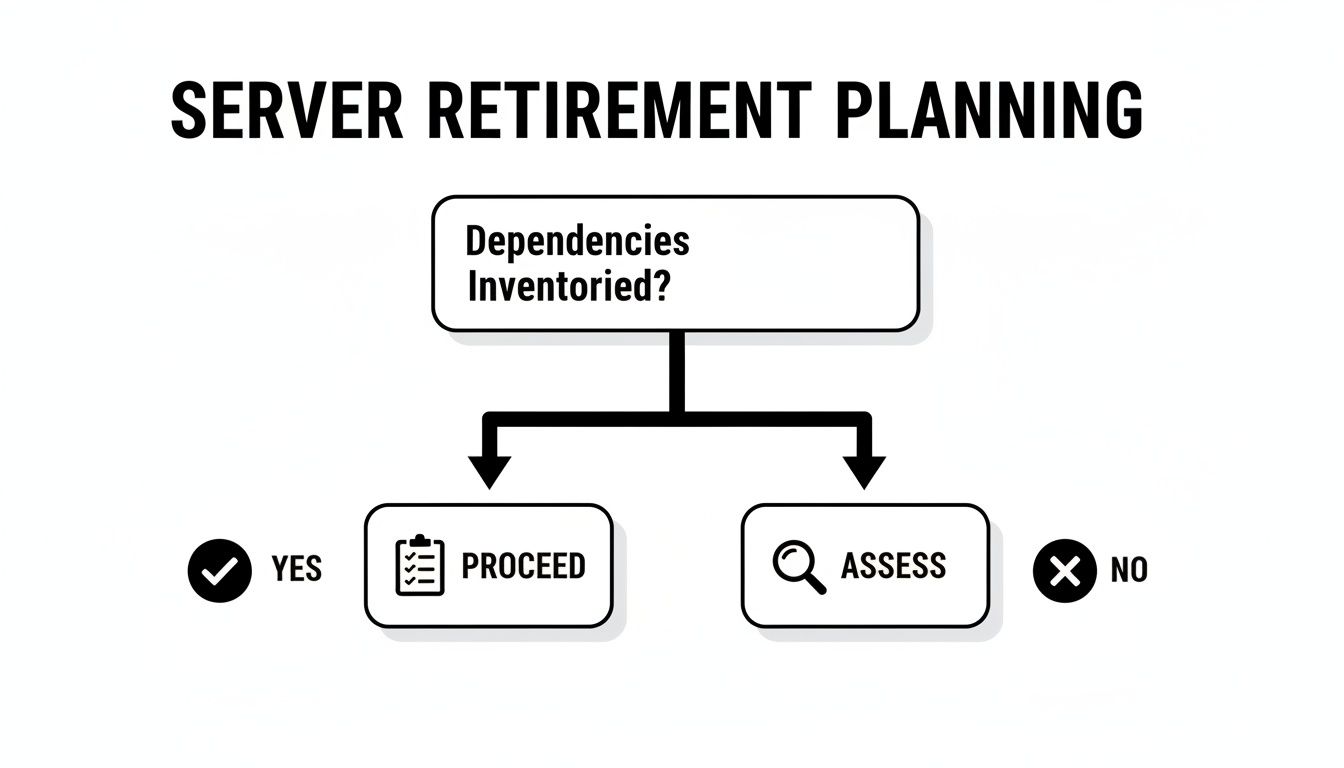
This flowchart reinforces a simple truth: decommissioning without a complete inventory is a gamble your business cannot afford to take.
Choosing Your Data Destruction Method
There are two primary methods for data destruction. The optimal choice depends on the data's sensitivity, industry regulations, and your plans for the physical hardware.
- Software-Based Data Wiping (Sanitization): This method uses specialized software to overwrite the entire hard drive with random data, often in multiple passes, rendering the original data unrecoverable. This is the preferred method if you plan to reuse the drives or resell the server hardware for value recovery.
- Physical Hardware Destruction: For drives that contained highly sensitive information or for hardware that has reached the end of its useful life, physical destruction is the most secure option. This involves shredding, crushing, or degaussing the storage media until data recovery is physically impossible.
Regardless of the method chosen, the objective is the same: the data must be completely and permanently unrecoverable. Whether overwriting every sector with software or reducing a drive to metal fragments, the end result must be total data annihilation.
Understanding the Key Sanitization Standards
To ensure your process withstands an audit, it must follow established standards. The two most prominent standards are DoD 5220.22-M and NIST 800-88. While technical, their purpose is straightforward.
DoD 5220.22-M is a legacy standard from the Department of Defense that is still widely recognized. It specifies a 3-pass overwrite method to ensure the original data is thoroughly obfuscated.
NIST 800-88 is the more modern framework from the National Institute of Standards and Technology. It advocates a risk-based approach and outlines three levels of media sanitization:
- Clear: Uses standard read/write commands to overwrite data. This is suitable for low-risk scenarios where the hardware remains within your organization.
- Purge: This is the enterprise standard. It uses advanced techniques like pattern overwriting or degaussing to make data recovery infeasible, even with advanced forensic tools. This is the required standard for most corporate data sanitization.
- Destroy: This involves physically destroying the media, providing the ultimate form of data security.
For businesses in regulated industries like healthcare (HIPAA) or finance (PCI DSS), following a standard like NIST 800-88 Purge is typically the minimum requirement.
Comparing Data Sanitization Methods
Choosing the right method can be complex. This table provides a quick breakdown to help your business decide what is most appropriate for your situation.
| Method | Description | Best For | Compliance Standard | ACR Service |
|---|---|---|---|---|
| Software Wipe (Purge) | Overwrites drive sectors with random data in multiple passes. | Reusing or reselling hardware; moderately sensitive data. | NIST 800-88 (Purge), DoD 5220.22-M | On-site & Off-site Data Wiping |
| Degaussing | Uses a powerful magnetic field to erase data from magnetic media (HDDs, tapes). | Quickly sanitizing large volumes of magnetic storage; high-security data. | NIST 800-88 (Purge) | Included in secure recycling |
| Shredding/Crushing (Destroy) | Physically grinds or crushes the drive into small, unusable pieces. | End-of-life hardware; highly sensitive or classified data; SSDs. | NIST 800-88 (Destroy) | On-site & Off-site Hard Drive Shredding |
Ultimately, the goal is irrefutable data destruction. Atlanta Computer Recycling offers certified services meeting both DoD and NIST guidelines, complete with the auditable documentation your business requires. For a deeper analysis, check out our guide on how to wipe a hard drive.
Of course, before destruction, you must ensure all necessary data has been securely migrated. Utilizing the best database migration tools is a crucial preliminary step to ensure a seamless transfer before the legacy hardware is permanently sanitized.
From Digital to Physical: Managing Server De-Installation and Removal
Once your data has been securely destroyed, the server decommissioning project transitions from the digital realm to the physical. This phase requires hands-on execution, turning a planned task into a tangible outcome. It is a critical stage that demands careful logistics and precision to avoid disrupting your live operational environment.
This is more than simply unplugging cables and removing old equipment. It is a methodical process of gracefully taking an asset offline, disconnecting it without causing network issues, and physically handling it in a way that protects both your team and surrounding production equipment. While removing a single server from an office closet may be straightforward, decommissioning rows of equipment in a live data center presents significant logistical challenges.
Shutting Down and Unplugging with Precision
The first step is a controlled, graceful shutdown of the operating system. This allows the server to write final logs and terminate applications cleanly, preventing last-minute data corruption or network errors. Never resort to a hard shutdown unless it is an absolute emergency.
After the server is powered down, the physical work begins, and disconnecting it from the network requires full attention to detail.
- Label Everything (Twice): Before unplugging any cable, ensure both ends are clearly labeled. This simple step prevents the accidental disconnection of a production server.
- Update Your Network Docs Immediately: The moment a server is disconnected, update your network diagrams and switch port configurations. This removes the "ghost" asset from your records and frees up valuable ports.
- Scrub it From Your Tools: The final digital step is to remove the server from all monitoring, patching, and management dashboards. This prevents false alerts and maintains an accurate, clean live asset inventory.
Consider this the server's official offboarding. Just like an employee's last day, you must systematically revoke all access and remove its presence from company systems to prevent confusion and potential security blind spots.
The Real-World Logistics of De-Racking and Removal
Physically removing a server from a rack is often more difficult than it appears. These machines are heavy, unwieldy, and typically installed in tight spaces. A single misstep can lead to employee injury or costly damage to adjacent production hardware. A dropped server is not just a lost asset; it is a serious safety hazard.
For large-scale projects, these challenges are amplified. Navigating crowded data center aisles, coordinating multiple teams, and moving hundreds of units without disrupting operations requires professional execution.
This is precisely where an experienced ITAD partner provides immense value. At Atlanta Computer Recycling, our trained technicians manage the entire on-site de-installation for you. We arrive with the proper tools, server lifts, and expertise to de-rack, pack, and remove your retired assets safely and efficiently. We can also schedule the work during off-peak hours or weekends to eliminate any disruption to your business operations.
Secure Packing and Chain of Custody on the Move
Once a server is removed from the rack, its journey is not complete. Stacking hardware on a pallet is not a secure chain of custody. Each asset must be carefully packed and cataloged to maintain security throughout the process.
A professional process includes:
- Final Asset Tag Scan: Before packing, the physical asset tag is scanned and cross-referenced with your project inventory one last time.
- Secure Containment: Servers and components are packed into secure, sealed containers to prevent damage and unauthorized access during transit.
- Managed Logistics: Our dedicated fleet handles the secure transportation from your facility to ours, ensuring every handoff is documented and fully auditable.
By entrusting the physical removal to a specialist, you eliminate the risk of injury, avoid operational disruption, and ensure your secure chain of custody remains unbroken from the server rack to the final disposition report. This transforms a potentially chaotic physical task into a smooth, controlled, and fully documented part of your decommissioning strategy.
Finalizing Documentation and Responsible Disposition
After the last server has been removed from the data center floor, the project is not yet complete. The final phase—documentation and responsible disposition—is what elevates a series of technical tasks into a secure, auditable, and compliant business process.
This is where you produce the evidence that everything was done correctly. Without this crucial step, all prior planning and secure data destruction can be undermined by an incomplete paper trail. This documentation protects your company during an audit and officially closes the asset's lifecycle.
The Unbreakable Chain of Custody
The concept of a chain of custody is a powerful risk management tool. It is a chronological paper trail documenting every touchpoint an asset has from the moment it is taken offline to its final destruction or resale. Every individual who handles the asset, every location it moves to, and every action taken must be meticulously recorded.
This documentation is not just for internal records; it is a critical compliance instrument. If a regulator questions what happened to a server that once held sensitive customer data, a complete chain-of-custody report provides a definitive, defensible answer.
A robust report should track key details:
- Asset Identification: Serial numbers, asset tags, and model numbers.
- Timestamps: The exact date and time of every action, from de-racking and transport to final processing.
- Personnel: Names and signatures of every technician who handled the equipment.
- Location Tracking: Documentation of movement from your data center to a secure transport vehicle and arrival at the ITAD facility.
A gap in your chain of custody is a gap in your compliance armor. An auditor will view that gap not as a minor oversight, but as a potential point of data exposure—a conversation no business leader wants to have.
End-of-Life Options: Hardware Disposition
Once an asset is securely in the possession of a certified ITAD partner like Atlanta Computer Recycling, you have several options for its final destination. The optimal path depends on the equipment's age, condition, and your organization's financial and environmental policies.
- Remarketing and Resale: Newer servers or valuable components like CPUs, high-capacity RAM, and enterprise-grade SSDs often retain significant market value. A qualified ITAD partner can test, refurbish, and resell this equipment, allowing you to recover a portion of your original capital investment.
- Component Harvesting: Even if a server is too old to be resold as a whole unit, individual parts may still be valuable. Components can be harvested for resale or used as spare parts, maximizing the asset's residual value.
- Certified Recycling: For hardware with no remaining market value, responsible recycling is the only acceptable option. This process ensures that hazardous materials like lead and mercury are managed safely and that valuable raw materials are recovered and returned to the manufacturing supply chain.
Certificates of Destruction: The Final Proof
The most important documents you will receive at the conclusion of this process are the Certificates of Data Destruction and Recycling. These are not receipts; they are legally defensible documents that serve as your official proof of compliance.
The Certificate of Data Destruction formally attests that all data-bearing media was sanitized or destroyed in accordance with specific standards, such as NIST 800-88 or DoD 5220.22-M. It lists the serial numbers of the drives, the method used, and the date of destruction. You can learn more about what a proper certificate of destruction template includes and why it is critical for your business records.
Similarly, a Certificate of Recycling confirms that all non-functional assets were processed in an environmentally responsible manner, adhering to R2 or e-Stewards certification standards. These certificates officially close your chain of custody, providing the final, auditable evidence that your server decommissioning project was executed securely, sustainably, and in full compliance with all relevant regulations.
To help your team stay on track, we have compiled a high-level checklist covering the entire decommissioning lifecycle.
Server Decommissioning Project Checklist
This checklist provides an overview of the major phases and tasks in a typical server decommissioning project. Use it to track progress and ensure no critical steps are overlooked, from initial planning through final documentation.
| Phase | Key Task | Status (To Do / In Progress / Complete) | Notes |
|---|---|---|---|
| 1. Planning & Inventory | Identify servers for decommissioning. | Include serial numbers, asset tags, and location. | |
| 1. Planning & Inventory | Perform risk assessment. | What services/data are on these servers? | |
| 2. Execution | Perform and verify full data backups. | Confirm backup integrity before proceeding. | |
| 2. Execution | Sanitize data-bearing media (wipe/shred). | Document method used (NIST 800-88, etc.). | |
| 2. Execution | Shut down services and remove from network. | Update monitoring, DNS, and firewalls. | |
| 2. Execution | Physically de-rack and remove hardware. | Tag assets clearly for transport. | |
| 3. Disposition & Documentation | Package hardware for secure transport. | Start chain-of-custody log. | |
| 3. Disposition & Documentation | Hand off to certified ITAD partner. | Ensure partner is R2 or e-Stewards certified. | |
| 3. Disposition & Documentation | Receive Certificates of Destruction/Recycling. | Verify serial numbers match inventory list. | |
| 3. Disposition & Documentation | Update asset management system (CMDB). | Mark assets as 'Retired' or 'Disposed'. | |
| 3. Disposition & Documentation | Archive all project documentation. | Store CoC, certificates, and reports securely. |
This checklist serves as a valuable starting point. As your team completes each phase, remember that meticulous documentation is your best defense in any future compliance audit.
Common Questions We Hear About Decommissioning Servers
Even the most well-prepared IT departments have questions when a server decommissioning project begins. Here are answers to some of the most common inquiries we receive from our business clients.
How Long Does Server Decommissioning Actually Take?
The timeline for a server decommissioning project can vary significantly. A standalone, non-critical server could potentially be processed in a single day. However, a complex, multi-server environment with interconnected application dependencies could require weeks of careful planning and phased execution.
Key factors that influence the schedule include:
- Data Volume: The amount of data that needs to be backed up and, more importantly, verified. This step cannot be rushed.
- Service Migration: The time required to safely migrate applications and user access to a new system is often the longest part of the process.
- Operational Constraints: Most businesses cannot afford downtime. This often means physical removal must occur after hours or on weekends, requiring careful scheduling.
A detailed project plan is essential for setting realistic expectations with stakeholders and keeping the entire process on track.
Can We Get Any Money Back From Our Old Servers?
Absolutely. Recovering value from retired hardware is a core component of a modern ITAD strategy.
Newer server models or those equipped with high-value components like powerful CPUs, large amounts of RAM, or enterprise-grade SSDs are often excellent candidates for the secondary market. Through IT asset remarketing, this equipment can be refurbished and resold, returning a portion of your initial investment to your IT budget.
For older equipment with no resale value, the focus shifts to responsible recycling. A certified partner will ensure every component is disassembled and processed according to strict environmental regulations. You can learn more about what separates professional services by reading about what makes a great electronic waste recycling company.
A modern ITAD program is not just about secure disposal. It's about transforming a cost center into a potential revenue stream while minimizing your company's environmental footprint.
What's the Real Difference Between DoD and NIST Wiping Standards?
Both are leading data security standards, but they approach the problem from different perspectives. Understanding the difference helps you make an informed decision for your business.
The DoD 5220.22-M standard is a legacy, prescriptive method from the Department of Defense. It mandates a specific 3-pass overwrite procedure to render data unrecoverable and has been a trusted standard for years.
The NIST 800-88 standard is the more modern, flexible framework. It provides a risk-based model with three distinct levels of sanitization:
- Clear: A simple overwrite suitable for low-risk devices remaining within the company.
- Purge: An advanced wipe making data recovery forensically infeasible. This is the recommended standard for most business-critical data.
- Destroy: The ultimate solution. This involves physically destroying the media by shredding or pulverizing it.
For most businesses today, especially those managing regulated or sensitive information, the NIST 800-88 Purge or Destroy methods are the industry best practice. They provide the highest level of security and are considered the gold standard for proving compliance.
Executing a server decommissioning project requires a level of precision and expertise that can be challenging to manage in-house. Atlanta Computer Recycling delivers comprehensive, on-site services for de-installation, data destruction, and certified recycling to ensure your project is secure, compliant, and efficient. Contact us today to plan your next ITAD project.