Your Guide to Business Computer Recycling in Atlanta


For IT managers and business leaders in Atlanta, retiring old computer equipment is more than just a logistical headache—it's a critical task that balances data security against environmental compliance. A structured IT Asset Disposition (ITAD) program is the only way to turn this challenge into a secure, efficient process. In this city, professional computer recycling isn't just an option; it's a corporate necessity.
This guide is your roadmap to building a seamless and compliant ITAD strategy from start to finish.
Building Your Corporate IT Asset Disposition Strategy in Atlanta
An ad-hoc approach to retiring outdated servers, laptops, and networking gear is a massive corporate gamble. Without a formal plan, your organization is wide open to data breaches, steep non-compliance penalties, and a negative environmental footprint.
A well-defined ITAD strategy, on the other hand, gives you a clear, repeatable framework for managing these assets securely and responsibly. This isn't just about disposal. It's about smart inventory management, certified data destruction, and compliant recycling, all coordinated through a trusted B2B partner.
Think about it: a hospital system must guarantee patient data is irretrievably destroyed to satisfy HIPAA. A financial firm needs an airtight, auditable chain of custody for every single device it retires to meet regulatory demands.
The Core Components of a Successful Corporate ITAD Program
A rock-solid ITAD program is built on a few key pillars that protect your organization at every turn. These elements ensure nothing falls through the cracks, from the moment a device is marked for retirement to its final, certified end-of-life.
Here's what your business needs:
- Detailed Inventory Management: You can't secure what you don't track. Knowing exactly what assets you have—serial numbers, specs, and all—is the foundation.
- Verified Data Destruction: This means implementing certified methods like DoD 5220.22-M wiping or physical shredding to leave no doubt that your corporate data is gone for good.
- Compliant Recycling and Disposal: You must partner with a certified recycler who operates in full compliance with all local, state, and federal environmental laws.
- Complete Chain-of-Custody Documentation: Getting certificates of recycling and data destruction isn't just paperwork; it's your proof of compliance for any audit or regulatory inquiry.
A planned ITAD strategy isn't just about clearing out old tech. It’s a critical function of corporate governance that minimizes risk, protects your brand, and proves your commitment to sustainability.
Before launching an equipment refresh, it's crucial to map out these factors. The table below breaks down the essential considerations for any Atlanta-based organization.
Key Considerations for Your Atlanta IT Asset Disposition Plan
| Factor | Why It Matters for Your Business | ACR's Solution |
|---|---|---|
| Data Security & Compliance | A single data breach from a retired asset can lead to massive fines (HIPAA, PCI) and irreparable brand damage. | We provide certified data destruction, including on-site shredding and DoD-compliant wiping, with full documentation. |
| Environmental Regulations | Improper disposal of e-waste violates EPA rules and local ordinances, resulting in penalties and negative publicity. | Our process is R2 and e-Stewards compliant, ensuring every component is recycled responsibly and legally. |
| Logistical Coordination | Managing on-site de-installation, packing, and transportation can drain internal resources and disrupt operations. | We offer full-service, white-glove pickup, handling all the heavy lifting and logistics so your team can stay focused. |
| Chain of Custody | You need an unbroken, documented trail for every asset to prove compliance and mitigate liability. | From pickup to final disposition, we provide serialized asset tracking and certificates of destruction and recycling. |
Putting these pieces together ensures your ITAD process is not only compliant but also a seamless part of your overall business operations.
Why a Professional B2B Partner is Essential
The sheer volume of corporate e-waste is staggering. By 2025, the global electronics recycling market is expected to hit $43.2 billion, and that number is projected to skyrocket to $147.9 billion by 2035. This explosive growth underscores the rising complexity and the absolute need for specialized experts. PCs and laptops alone make up a massive 45.0% of that market.
To build a truly secure plan, you need to integrate it with broader IT asset management best practices. A professional partner like Atlanta Computer Recycling manages all the intricate details—from secure on-site pickup to certified data destruction—freeing your team to focus on their core mission.
Our guide to the complete IT asset disposal process breaks down exactly how we handle these critical tasks for businesses like yours.
Preparing Your IT Assets for a Secure Commercial Pickup
A successful IT recycling project hinges on the prep work done long before our truck ever pulls up to your Atlanta facility. Getting organized doesn't just guarantee a smooth, efficient pickup—it's the first critical step in securing your chain of custody. This initial phase is all about turning a chaotic collection of old electronics into a cataloged, secure inventory ready for responsible retirement.
Without this groundwork, you're setting yourself up for logistical headaches, inaccurate reports, and even potential security gaps. A well-prepared project means minimal disruption to your daily operations, whether you're a hospital system retiring patient-facing tablets or a corporation executing a floor-wide hardware refresh.
Your First Step: Asset Inventory and Documentation
The single most important action your business can take is to conduct a thorough inventory. You can't secure what you haven't identified. This isn't just a simple device count; it's about creating a detailed manifest of every single item slated for recycling.
For most organizations, this is easily the most time-consuming part of the job, but it's completely non-negotiable for a secure chain of custody. Think of it as the foundation—every other security and compliance measure is built on top of it. A vague list of "50 computers" won't cut it. A detailed log is your proof of diligence.
A solid inventory spreadsheet should include:
- Asset Type: Clearly label each item (e.g., Dell Latitude Laptop, HP ProLiant Server, Cisco Catalyst Switch).
- Serial Number: This is your critical tracking element. Document the unique serial number for every single device for tracking and final reporting.
- Asset Tag (if applicable): Record your company's internal asset tag number so you can cross-reference it with your own systems.
- Condition Notes: A quick note on whether a device is functional, dead, or missing key parts like a hard drive.
This spreadsheet becomes your master document. Our logistics team will use it for verification during pickup, and we'll reference it again in your final Certificates of Recycling and Data Destruction. Bottom line: this documentation is your first line of defense in an audit.
Consolidating Equipment for an Efficient Pickup
Once your inventory is nailed down, the next job is to get all that equipment into a single, secure, and easily accessible location. Leaving assets scattered across multiple offices, closets, or even different floors creates a logistical nightmare and dramatically increases the risk of items going missing.
Think about a large corporation managing a campus-wide hardware refresh. Instead of having our team go room by room across multiple buildings, the company's IT staff stages all the old desktops and laptops in a locked storage room near a loading dock. This one simple action can cut our on-site time by more than half, meaning less disruption to business operations.
Pro Tip: Find a specific, low-traffic area to stage your retired IT assets. A locked storage closet, a cordoned-off section of a warehouse, or an unused office are all great choices. Just make sure it’s secure from general foot traffic but still accessible for our team with dollies and pallet jacks.
This consolidation is all about operational efficiency. For our team providing computer recycling Atlanta services, a well-staged project means we can work faster and more safely, getting out of your hair so your business can get back to work. It also makes the verification process a breeze, as we can check your inventory list against the palletized equipment in no time.
For businesses ready to schedule a pickup for their organized assets, you can explore options for a free electronic recycling pickup to get the ball rolling. Taking these prep steps ensures you're set for a seamless and secure handover, turning a complex disposal project into a straightforward, manageable task.
Choosing Your Corporate Data Destruction Method
Once you've inventoried and consolidated your IT assets, you're at the most critical junction of the entire process: deciding how to permanently destroy the sensitive data living on them. For any business in Atlanta, this isn't just a technical task—it’s a major security and compliance decision. The path you choose here will directly define your risk level, the potential for asset reuse, and your project's bottom line.
The two industry-proven methods are software-based data wiping and physical hardware shredding. They serve very different purposes, and knowing when to use each one is key to building a smart disposition plan that matches your company's security needs and financial goals.
The Gold Standard for Reusable Drives: DoD Wiping
For functional hard drives you might want to refurbish, resell, or redeploy, DoD 5220.22-M 3-pass wiping is the go-to method. This isn't just about hitting "delete," which leaves data easily recoverable. It's a deep digital scrub where specialized software overwrites the entire drive with patterns of ones, zeros, and random characters in three distinct passes.
This systematic process completely obliterates the original data, making it virtually impossible to recover. It's the same method trusted by government and military agencies to sanitize media before it leaves their control.
Imagine an Atlanta corporation retiring a department full of still-valuable laptops. DoD wiping is the perfect fit. It guarantees all proprietary data is gone for good while keeping the hardware intact, allowing the company to capture remarketing value and recoup part of its initial investment.
Choosing the right data destruction method is the most critical decision in the ITAD process. It’s the firewall between your retired assets and a potential data breach, ensuring your company’s confidential information, client data, and intellectual property are permanently neutralized.
This flowchart lays out a simple decision tree to help guide your asset preparation and security choices.
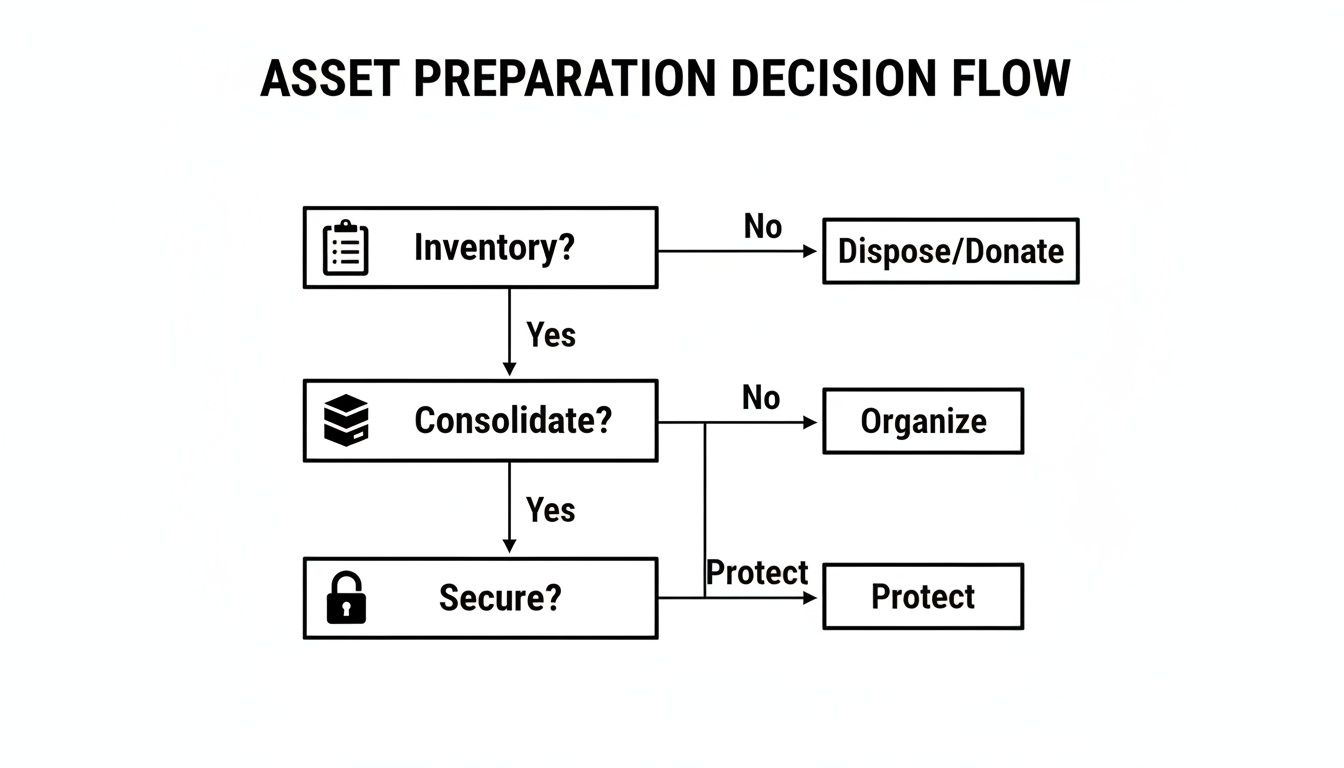
As you can see, securing your assets is the final, crucial step in getting them ready for pickup, which leads directly to this choice between wiping and shredding.
When Complete Destruction Is the Only Answer
Sometimes, a drive is too old, physically damaged, or holds such sensitive information that leaving it intact is simply not an option. For these situations, physical shredding offers the ultimate, irreversible peace of mind. It’s exactly what it sounds like: a massive industrial shredder grinds the hard drive into tiny, mangled pieces of metal.
There is no data recovery from a shredded drive. Period. This makes it the only acceptable choice for healthcare providers who need to meet HIPAA standards or financial institutions protecting customer data. If a server drive from a data center has failed or a laptop contains top-level trade secrets, shredding provides absolute certainty.
Data Wiping vs. Physical Shredding
Making the right call often means balancing your security needs against asset value and compliance rules. And it’s not just about the method itself; data destruction needs to be part of your company's broader strategy for digital security and resilience.
To make the decision clearer, here's a side-by-side look at the two approaches.
| Feature | DoD 5220.22-M Wiping | Physical Shredding |
|---|---|---|
| Best Use Case | Functional hard drives intended for reuse, resale, or donation. | Non-functional, damaged, or end-of-life drives with highly sensitive data. |
| Asset Value | Preserves the hardware's value, allowing for remarketing and cost recovery. | Destroys the hardware entirely, eliminating any potential for reuse. |
| Compliance Alignment | Meets NIST 800-88 and DoD standards for data sanitization. Ideal for most scenarios. | The ultimate solution for HIPAA, FACTA, and other high-security compliance needs. |
| Environmental Impact | More sustainable, as it promotes the circular economy through hardware reuse. | Less sustainable, as it turns a functional asset into scrap metal for recycling. |
| Verification | A software-generated report confirms a successful wipe for each serial number. | A Certificate of Destruction confirms the physical destruction of the media. |
In reality, most organizations end up using a hybrid strategy. They'll choose wiping for their newer, working equipment to recover value and opt for shredding on any older, failed, or highly sensitive drives. Our team can walk you through our secure data destruction services to help you build the perfect, compliant plan for your specific inventory.
Coordinating On-Site Services and Logistics for Your Business
Once you’ve cataloged your equipment and decided on a data destruction plan, the next challenge is getting everything out of your building. This is where a professional computer recycling Atlanta service really proves its worth, taking on the heavy lifting and logistical headaches that can quickly overwhelm your own IT staff. Our goal is a seamless, secure removal that barely makes a ripple in your day-to-day business operations.
A well-planned pickup is about more than just brute force; it’s about precision and planning. Whether your office is in a downtown Atlanta skyscraper with tight loading dock hours or a sprawling suburban corporate campus, a professional crew arrives ready for the unique challenges of your location.
This frees up your team from the grueling work of pulling servers from racks, packing up hundreds of laptops, and dealing with building access rules. They get to stay focused on their mission-critical tasks.
What to Expect on Pickup Day
A professional on-site service is a tightly run operation, designed from the ground up for security and efficiency. When our uniformed and insured logistics team shows up, they have everything needed for the job—from pallet jacks and shrink wrap to the specific tools for de-installing server racks.
The process is systematic and predictable. Here’s how it typically unfolds:
- Check-In and Verification: Our team lead connects with your designated contact person. They’ll run through the asset list you provided, confirming the scope of work before a single piece of equipment is touched.
- Professional De-installation: In data centers or server closets, our technicians will expertly de-rack servers, switches, and other mounted hardware. This isn't just about unscrewing bolts; it's a skilled process that prevents damage to your facility and ensures everything is handled safely.
- Secure Packing and Staging: All assets are then carefully packed onto pallets, secured with shrink wrap, and staged for removal. We make sure to protect your floors, walls, and doorways throughout the entire process.
- Loading and Transport: Finally, the pallets are loaded onto our secure, GPS-tracked trucks. From the moment your assets leave your sight, they are never left unattended until they reach our secure facility.
This methodical approach guarantees a quick, clean, and secure removal every single time.
Navigating Different Commercial Environments
Logistical needs change dramatically from one business to the next. A hospital, for instance, needs a quiet, discreet removal that won't disturb patients, which often means scheduling after hours. A school district might require a massive, multi-campus pickup coordinated during summer break to avoid disrupting classes.
A true ITAD partner doesn’t just show up with a truck. They function as a logistics consultant, working with you to build a pickup plan that respects your operational hours, security rules, and physical layout.
We’ve managed projects in just about every commercial setting you can imagine here in Atlanta. That experience means we can anticipate the little things that can derail a project—like a freight elevator that needs to be reserved or a secure data center that requires a staff escort—and we plan for them. It’s this proactive thinking that makes a project go smoothly.
Tips for Scheduling a Disruption-Free Pickup
Scheduling is a team effort. A little bit of coordination goes a long way in making sure the pickup day is fast, efficient, and interruption-free for your business.
Here are a few simple tips to keep in mind:
- Share Clear Access Details: Let your recycling partner know about any specific instructions for your building. Think loading dock hours, security check-in policies, or elevator restrictions.
- Designate a Point Person: Assigning one person from your team to oversee the pickup makes communication simple and keeps things moving.
- Clear the Path: Before the crew arrives, make sure the walkway from your equipment to the exit is free of obstacles. This speeds everything up and makes the process safer for everyone.
By working together, we can get the job done quickly and professionally. For organizations with security policies that mandate data destruction before assets leave the building, you can add another layer of verified security by exploring our options for on-site hard drive shredding near you. This service integrates perfectly with our pickup logistics, giving you a complete, end-to-end secure solution.
Ensuring Compliance Through Certified Reporting
After your IT assets are picked up and the data is destroyed, the most critical phase for your organization's protection begins. This is where you get the official documentation that proves you’ve done everything by the book.
When it comes to enterprise-level computer recycling Atlanta services, this isn't just a receipt. It's an auditable paper trail that shields your organization from legal, financial, and reputational blows. Without certified reporting, your entire effort is just an unverified claim.
These documents are your ultimate defense, giving auditors, regulators, and your leadership team concrete proof of compliance.
Understanding the Chain of Custody
The concept of a chain of custody is the absolute backbone of secure IT asset disposition. It’s a chronological paper trail that tracks every single asset from the moment it leaves your facility to its final destruction and recycling. This unbroken record ensures there are no gaps where a device could get lost or data could be exposed.
Think about a law firm retiring dozens of laptops loaded with sensitive client case files. A documented chain of custody provides a serialized log, showing each laptop was securely transported, its hard drive was verifiably shredded, and its components were responsibly recycled. That level of detail isn't just nice to have—it's non-negotiable for mitigating corporate risk.
A robust chain of custody is your assurance that every device is accounted for. It’s the documented proof that closes the loop on your compliance obligations and mitigates liability by leaving nothing to chance.
This meticulous tracking is what makes the final delivery of your certificates meaningful.
The Two Documents Your Business Must Always Receive
Once the job is done, your recycling partner must provide two specific pieces of documentation. These certificates are not optional; they are essential records you need to keep as part of your permanent compliance files.
They are your official proof of a job well done, especially when regulators come knocking.
- Certificate of Data Destruction: This document certifies that all data on your hard drives and other media was permanently destroyed. It should list the serial numbers of the drives and specify the method used—be it DoD 5220.22-M wiping or physical shredding. You can learn more about what this involves in our detailed breakdown of the Certificate of Destruction process.
- Certificate of Recycling: This certificate confirms that your old equipment was processed and recycled in full compliance with all local, state, and federal environmental regulations, including EPA standards. It’s your proof of environmental stewardship.
How Documentation Supports Regulatory Compliance
For organizations in regulated industries, these certificates are much more than just paperwork. They are direct, tangible evidence of compliance.
A healthcare provider in Atlanta, for instance, has to prove adherence to HIPAA’s strict data security rules. A Certificate of Data Destruction serves as undeniable proof that protected health information (ePHI) was handled and destroyed correctly.
Likewise, a financial institution governed by regulations like GLBA can use these documents to show that customer financial records on old computers were properly eliminated. This documentation provides peace of mind and a rock-solid defense in the event of an audit, solidifying a secure and responsible ITAD strategy.
Your Top Questions About Business Computer Recycling, Answered
Even with a solid plan, IT managers and business leaders in Atlanta often have a few practical questions before they hand over their old equipment. We get it. You want to be sure you're making the right move for your company's security and compliance.
We’ve heard just about every question in the book. Here are straightforward answers to the ones that come up most often, designed to give you the confidence to finalize your IT asset disposition strategy.
What Kind of Business Equipment Do You Take?
Our focus is squarely on business-to-business IT asset disposition. That means we’re set up to handle the commercial-grade infrastructure that keeps your organization running, not the electronics you’d find in a typical home.
We routinely recycle a whole range of corporate assets, including:
- Computers and Laptops: Any brand of desktop, workstation, or notebook.
- Servers and Data Center Hardware: This includes rack-mounted servers, blade servers, storage area networks (SANs), and other heavy-duty data center gear.
- Networking Equipment: We take switches, routers, firewalls, and access points from Cisco, Juniper, and other major manufacturers.
- Standard Peripherals: As part of a larger business pickup, we're happy to take your keyboards, mice, and LCD monitors off your hands.
Just to be clear, our service isn't built for consumer electronics like TVs, stereos, or kitchen appliances. If you have some highly specialized or unique machinery in your inventory, it's always a good idea to give us a call first to confirm we can handle it properly.
How Much Does Your Computer Recycling Service Cost in Atlanta?
This is easily one of the most common questions we get, and the answer usually comes as a pleasant surprise. For the vast majority of standard business IT assets—we’re talking servers, laptops, and desktop computers—our pickup and recycling services are completely free, especially when dealing with bulk quantities. That even includes our standard DoD-compliant data wiping.
Of course, there are a couple of exceptions where a fee might apply.
- Special Handling: Some older electronics, particularly those bulky CRT monitors, contain hazardous materials. The specialized process required to handle them safely comes with a modest cost.
- Premium On-Site Services: For ultimate security and convenience, we can bring our industrial shredders to you. This on-site hard drive shredding service is a premium option that many of our clients find invaluable.
We believe in total transparency from the start. You'll get a clear, itemized quote based on your exact inventory and service needs before we do a thing. No surprises, no hidden fees. Ever.
Our mission is to make responsible computer recycling Atlanta both accessible and affordable for every local business.
How Do We Schedule a Pickup for Our Office or Data Center?
Getting a pickup on the calendar is simple. We’ve designed our logistics to work around your schedule, not the other way around. We know your team is busy, and the last thing you need is a disruption to business operations.
Just fill out the contact form on our website or give our Atlanta office a quick call to get started. Our team will ask for a few key details to get the ball rolling—things like the type and approximate amount of equipment you have, your address, and any specific access instructions like loading dock hours or security check-in protocols.
From there, our logistics coordinator will work directly with you to lock in a pickup time that’s perfect for your schedule. Need us there during business hours? No problem. Prefer an after-hours pickup to avoid impacting your team? We’re flexible. Our crew always arrives fully equipped and ready to work fast, ensuring a smooth and hassle-free removal of your retired tech.
How Do You Ensure We Stay HIPAA Compliant?
For our healthcare clients, HIPAA compliance isn't just a best practice—it's the law. We've built our entire process from the ground up to meet and exceed the stringent data security rules outlined in the Health Insurance Portability and Accountability Act.
We protect you with a multi-layered approach that centers on an unbreakable chain of custody and certified data destruction. This process is your guarantee that any device containing protected health information (ePHI) is handled with absolute security from our hands to its final disposition.
Here’s exactly how we tackle HIPAA requirements:
- Secure Chain of Custody: From the moment an asset leaves your facility, it's tracked by serial number. This creates a fully auditable trail from start to finish.
- Compliant Data Destruction: We offer both DoD 5220.22-M wiping and physical shredding. Both methods are fully compliant for destroying ePHI under the HIPAA security rule.
- Certificate of Data Destruction: Once the job is done, we provide you with a formal Certificate of Data Destruction. This is your official legal proof that all sensitive patient data was destroyed beyond recovery, satisfying your obligations in any potential HIPAA audit.
When you partner with us, you're not just hiring a recycler; you're gaining an expert dedicated to protecting your organization and ensuring your ITAD process is 100% compliant.
Ready to implement a secure, compliant, and efficient IT asset disposition plan for your Atlanta business? Contact Atlanta Computer Recycling today. Our team is here to manage every detail, from on-site logistics to certified data destruction, so you can focus on your core operations with complete peace of mind. Visit us at https://atlantacomputerrecycling.com to get started.